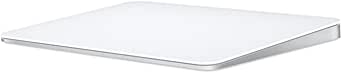
| Product Dimensions | 6.89 x 5.1 x 0.98 inches |
|---|---|
| Item Weight | 11.7 ounces |
| Manufacturer | Apple |
| ASIN | B0DL6ZN6GK |
| Item model number | MXK93AM/A |
| Batteries | 1 Lithium Ion batteries required. (included) |
| Date First Available | October 28, 2024 |
![]() |
VOOZH | about |
We offer easy, convenient returns with at least one free return option: no shipping charges. All returns must comply with our returns policy.
Learn more about free returns.We offer easy, convenient returns with at least one free return option: no shipping charges. All returns must comply with our returns policy.
Learn more about free returns.| Brand | Apple |
| Color | White |
| Connectivity Technology | Bluetooth |
| Special Feature | Lightweight, Portable, Rechargeable, Touch Scroll, Wireless |
| Number of Buttons | 1 |
|
DEVICE
|
||
|---|---|---|
|
PRICE
|
-13%
$69.00
List Price:
$79.00
|
-7%
$119.99
List Price:
$129.00
|
|
RATINGS
|
|
|
|
BLUETOOTH
|
||
|
WIRELESS
|
||
|
PORT TYPE
|
USB-C
|
USB-C
|
| Product Dimensions | 6.89 x 5.1 x 0.98 inches |
|---|---|
| Item Weight | 11.7 ounces |
| Manufacturer | Apple |
| ASIN | B0DL6ZN6GK |
| Item model number | MXK93AM/A |
| Batteries | 1 Lithium Ion batteries required. (included) |
| Date First Available | October 28, 2024 |
Customer Reviews, including Product Star Ratings help customers to learn more about the product and decide whether it is the right product for them.
To calculate the overall star rating and percentage breakdown by star, we don’t use a simple average. Instead, our system considers things like how recent a review is and if the reviewer bought the item on Amazon. It also analyzed reviews to verify trustworthiness.
Learn more how customers reviews work on AmazonIf you own a Mac, the Apple Magic Trackpad truly feels like a natural extension of your system. The multi-touch surface is incredibly responsive, and the gestures are smooth and intuitive — making navigation, switching between apps, and managing multitasking an absolute breeze.
I primarily use mine while working from home, and it’s been a game-changer for productivity. The wireless connection is flawless, the battery life is excellent, and it charges quickly with the included USB-C to Lightning cable. I also love the larger surface area compared to a MacBook’s built-in trackpad — it gives me plenty of space without feeling bulky.
The black finish looks modern and professional, and pairs nicely with other Apple accessories. It’s also much more ergonomic for long work sessions than using a traditional mouse, especially if you’re already used to Mac gestures.
It’s not cheap, but worth every dollar for the quality, design, and integration with macOS. If you’re a Mac user — especially someone working remotely or doing creative work — this is an upgrade that genuinely improves the experience.
Fantastic Wireless Trackpad for my MacBook Pro M4. Battery lasts a month+. Setup was easy. It's better than a mouse. Travels easily with my matchbook. Perfect size for daily work. Extremely touch sensitive/responsive. My only complaint is the price. Overpriced, but I love it.
We’ve been using our Logitech MX Ergo (see image) for years on our Desk/Laptop PCs and MacBooks, appreciating its 0°-20° angle option. However, it doesn’t play well with our Mac Mini. To overhaul our DAW functionality, we ordered this Apple Magic TrackPad 3 (stand purchased separately) to solve our connectivity (and ergonomic) issue. Surprisingly, several days of using the TrackPad was a smoother transition from the trackball than expected as it reminds us of a more capable Apple Magic Keyboard pad. The connectivity & lag issues were immediately resolved! The size is just large enough to be fully functional & the smooth tactile feel is what Apple is known for. This item has been such a game-changer, it's a shame we didn't get one sooner! We opted for "Like New" to try it out and have discovered it's a solid value for the money.
What can I say, I love this thing.
With a Mac, the gestures for multitasking make this thing a MUST have. I use a mouse as well but find that having a secondary method helps with fatigue but its the aforementioned gestures that make it part of my setup.
Comfortable to use, connects easy and CAN be charging while using, which is my only complaint against the Magic Mouse. Low profile with a slight angle makes it a great design along with its large glass surface that keeps for smooth tracking even with slightly sweaty fingers. It is crazy responsive with no lag.
Do you NEED it? No.
Does it make a vast difference? Absolutely.
May you have to get accustomed to using it before you love it? Likely, unless you are already familiar with the Macbook trackpads.
Are there imitations? I bet, but rarely are imitations anywhere near as good as the real thing. Just as the person with the blow-up partner....
Make the effort, take the time and you will find it just as amazing as I do.
Have FUN!
This Magic Trackpad is great - like any other Apple product, it just works seamlessly. The Multi-Touch gestures and Force Touch technology are incredibly responsive and intuitive, making navigation feel natural and effortless. The large glass surface provides plenty of room for gestures, and scrolling and swiping feel smooth and precise. It pairs automatically with my Mac without any setup hassle, and the battery life easily lasts a month or more between charges.
The build quality is premium with noticeable weight to it, giving it a solid, high-end feel on the desk. The black finish looks sleek and modern. While it's expensive compared to other trackpads on the market, you're paying for that Apple ecosystem integration, reliability, and refined user experience. It connect easy to any mac or apple product you have and there is no lag between the device and your machine. If you're already invested in Apple products and prefer trackpad navigation over a mouse, this delivers the polished experience you'd expect from Apple.
Works great with iPad and MacBook, wish it was able to switch between the two like AirPods
I love love love this thing!
I had shoulder surgery on my right shoulder recently, and instead of trying to learn to use a mouse left-handed, I bought this.
I have a MacMini and a Macbook. Using my fingers to move the cursor for the MacMini makes it feel like I am using my laptop. Also - rechargable with USB-C.
The thing just connects easily and is very comfortable to use.
Yeah, we all know Apple makes great products and the fans understand the difference of a mouse compared to a trackpad. I have been using mice for decades and when I had a MacBook, I used a trackpad or mouse, but when I ditched the MB and went iPad Pro I wanted convenience and a clean look—the trackpad does that! The surface is smooth and precise, the haptic response is perfect and the size allows me to do what I need. The best thing about converting was how it connects to its power source—no more awkward connection at the bottom. Yeah, the trackpad is a bit pricey but it’s worth the extra money. This completed the desk I wanted.
The Apple Magic Trackpad is hands down the best trackpad I’ve ever used! If you love fluid navigation, multi-touch gestures, and seamless macOS integration, this is an absolute must-have.
✅ Why I Love It:
✔️ Ultra-Smooth & Responsive – The glass surface feels incredibly premium, and every swipe, scroll, and zoom feels effortless. The haptic feedback is so precise that I forget it’s not a physical click!
✔️ Seamless macOS Integration – Multi-touch gestures like Mission Control, Exposé, and app switching are super intuitive and fast. Perfect for anyone who wants an efficient workflow.
✔️ Large Surface Area – The edge-to-edge glass makes gestures way more comfortable than using a MacBook’s built-in trackpad.
✔️ Instant Connectivity – Pairs instantly via Bluetooth, and I never experience lag or disconnections.
✔️ Long Battery Life – A single charge lasts over a month, which is incredibly convenient.
✔️ Minimalist & Elegant Design – The low-profile, sleek white design looks great on any desk setup.
⚠️ Any Downsides?
Honestly, I have zero complaints. The price is premium, but so is the experience. If you’re someone who values a high-end trackpad experience, this is worth every penny.
🎯 Final Verdict:
If you’re an Apple user who loves gestures, precision, and fluid navigation, the Magic Trackpad is simply the best in its class. The combination of high-end design, excellent responsiveness, and long battery life makes it a perfect tool for both productivity and creative work.
💡 Would I Buy It Again? Absolutely! A game-changer for macOS users. 🚀🍏

The Apple Magic Trackpad is hands down the best trackpad I’ve ever used! If you love fluid navigation, multi-touch gestures, and seamless macOS integration, this is an absolute must-have.
✅ Why I Love It:
✔️ Ultra-Smooth & Responsive – The glass surface feels incredibly premium, and every swipe, scroll, and zoom feels effortless. The haptic feedback is so precise that I forget it’s not a physical click!
✔️ Seamless macOS Integration – Multi-touch gestures like Mission Control, Exposé, and app switching are super intuitive and fast. Perfect for anyone who wants an efficient workflow.
✔️ Large Surface Area – The edge-to-edge glass makes gestures way more comfortable than using a MacBook’s built-in trackpad.
✔️ Instant Connectivity – Pairs instantly via Bluetooth, and I never experience lag or disconnections.
✔️ Long Battery Life – A single charge lasts over a month, which is incredibly convenient.
✔️ Minimalist & Elegant Design – The low-profile, sleek white design looks great on any desk setup.
⚠️ Any Downsides?
Honestly, I have zero complaints. The price is premium, but so is the experience. If you’re someone who values a high-end trackpad experience, this is worth every penny.
🎯 Final Verdict:
If you’re an Apple user who loves gestures, precision, and fluid navigation, the Magic Trackpad is simply the best in its class. The combination of high-end design, excellent responsiveness, and long battery life makes it a perfect tool for both productivity and creative work.
💡 Would I Buy It Again? Absolutely! A game-changer for macOS users. 🚀🍏
This is a great product, works well with my Mac Mini M4. I am still getting use too using it. Some cases I find Magic Mouse Works better for me.
There are options the Magic Mouse cannot do.
Works wonderfully. Apple's no. 1.
My only complaint is that it always ends up connecting on bluetooth. So it is useless on a KVM. Frustratingly that requires me to have 2 tracking devices on my desk. Please Apple, when it is plugged in it should just use the USB and not bluetooth. To work with KVM you have to disable bluetooth on your Mac completely… which prevents other devices from working.
Un tres bon produit apple. Pas de grosse difference avec la version precedente. Alors peut etre techniquement ils sont differents mais pour etre honnete la seule difference notoire en tant qu'utilisateur c'est que c'est un peu plus arrondi sur les coins