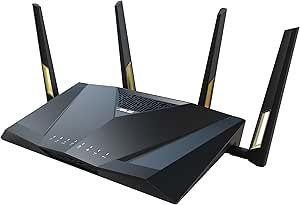
|
VOOZH | about |
|
VOOZH | about |
| Brand | ASUS |
| Model Name | RT-AX88U PRO |
| Special Feature | Access Point Mode, Alexa Compatible, Internet Security, Parental Control, QoS |
| Frequency Band Class | Dual-Band |
| Wireless Communication Standard | 802.11ax |
| Compatible Devices | Gaming Console, Personal Computer, Smart Television, Smartphone, Tablet |
| Recommended Uses For Product | Business, Gaming, Home |
| Included Components | Power Adapter, Quick Start Guide, RJ-45 cable, RT-AX88U PRO Networking router, Warranty Card |
| Connectivity Technology | Ethernet, USB, Wi-Fi |
| Color | BLACK |
ASUS RT-AX88U Pro delivers blazing-fast dual-band 6000 Mbps for connected living. It has two dual-function 2.5 Gbps WAN/LAN ports with link aggregation and load balancing for massive bandwidth. The ASUSWRT 4.0 ensures a network experience from end-to-end and 24/7.
Enjoy the fastest, smoothest WiFi gaming connections ever with the ASUS RT-AX88U Pro dual-band router. It delivers ultrafast WiFi speeds up to 6000 Mbps, and is packed with advanced technology, including Mobile Game Mode for a lag-free, low-latency mobile gaming experience.
The RT-AX88U Pro is powered by a 2.0 GHz quad-core CPU, giving it the performance to handle even the most demanding gaming network. It delivers maximum network throughput by 18%* for lightning-fast, accelerating data transfer and optimizing gaming experience.(*Compared with former WiFi 6 platform.)
ASUS AiMesh technology lets you combine multiple ASUS extendable routers to create a seamless network across your smart home, improving coverage and eliminating dead zones!
ASUS AiMesh goes beyond just extending coverage or seamless roaming. It works with all compatible ASUS routers, offering easy management and advanced security features across your entire network.
ASUS RT-AX88U Pro offers WPA3 security and AiProtection Pro by Trend Micro with automatic updates to shield devices from threats.
ASUS Instant Guard offers one-tap sharable VPN for encrypted connections when you’re away from home. (*Router requires a public WAN IP address.)
Connect to multiple encrypted VPN tunnels simultaneously while maintaining performance for other devices on your network.
Get instant alerts for new device connections to block unknown devices and group them into user profiles for better control.
Stay connected anytime with the convenient USB 4G LTE and 5G mobile tethering, even during internet outages or while on the go.
Gain insight into your kids' online activity and customize settings for different age groups with RT-AX88U Pro's robust parental controls. You can also flexibly schedule internet access with one click, or you can grant extra online time for your kids to reward their good behavior.
RT-AX88U Pro is a 4x4 dual-band WiFi router that provides 160MHz bandwidth and 1024-QAM for dramatically faster wireless connections. With a total networking speed of about 6000Mbps — 1148Mbps on the 2.4GHz band and 4804Mbps on the 5GHz band — RT-AX88U Pro is 2.3X faster than 802.11ac 4x4 dual-band routers. Disclaimer: Actual data throughput and WiFi coverage will vary from network conditions and environmental factors, including the volume of network traffic, building material and construction, and network overhead, result in lower actual data throughput and wireless coverage.
| Other Special Features of the Product | Access Point Mode, Alexa Compatible, Internet Security, Parental Control, QoS |
|---|---|
| Frequency Band Class | Dual-Band |
| Wireless Compability | 802.11ax |
| Compatible Devices | Gaming Console, Personal Computer, Smart Television, Smartphone, Tablet |
| Antenna Location | Business, Gaming, Home |
| Connectivity Technology | Ethernet, USB, Wi-Fi |
| Antenna Type | Fixed |
| Operating System | App, Linus, Mac OS, Windows |
| Security Protocol | WPA2-Enterprise, WPA3-Personal, WPS |
| Number of Ports | 6 |
| Control Method | App, Touch |
| Data Transfer Rate | 6000 Megabits Per Second |
| LAN Port Bandwidth | 2.5 Gigabit |
| Voltage | 110 Volts |
| Maximum Upstream Data Transfer Rate | 6000 Megabits Per Second |
| RAM Memory Installed | 1 GB |
| Number of Antennas | 4 |
| Router Firewall Security Level | High |
| Wi-Fi Generation | WiFi 6 |
| Has Internet Connectivity | Yes |
| Router Network Type | dual-band wireless router |
| Is Modem Compatible | No |
| Connectivity Protocol | Wi-Fi, Ethernet, USB |
| Coverage | Extended |
| Controller Type | App Control, Push Button, Web GUI |
| Frequency | 5 GHz |
ASUS RT-AX88U PRO AX6000 Dual Band WiFi 6 Router, WPA3, Parental Control, Adaptive QoS, Port Forwarding, WAN Aggregation, Lifetime Internet Security and AiMesh Support, Dual 2.5G Port
Share:
Found a lower price? Let us know. Although we can't match every price reported, we'll use your feedback to ensure that our prices remain competitive.
Fields with an asterisk * are required
| Brand | ASUS |
|---|---|
| Model Name | RT-AX88U PRO |
| Built-In Media | Power Adapter, Quick Start Guide, RJ-45 cable, RT-AX88U PRO Networking router, Warranty Card |
| Model Number | RT-AX88U PRO |
| UPC | 195553911054 |
| Manufacturer | ASUS |
| Mfr Part Number | RT-AX88U PRO |
| Item Type Name | Network router |
| Unit Count | 1.0 Count |
| Warranty Description | 3 years warranty |
| Best Sellers Rank |
|
| ASIN | B0BTTY7QFH |
| Customer Reviews |
4.4 out of 5 stars |
| Item Weight | 2.2 Pounds |
|---|---|
| Item Dimensions L x W x H | 11.81"L x 7.4"W x 2.38"H |
| Color | BLACK |
|---|
| Has Security Updates | Yes |
|---|
Customer Reviews, including Product Star Ratings help customers to learn more about the product and decide whether it is the right product for them.
To calculate the overall star rating and percentage breakdown by star, we don’t use a simple average. Instead, our system considers things like how recent a review is and if the reviewer bought the item on Amazon. It also analyzed reviews to verify trustworthiness.
Learn more how customers reviews work on AmazonThe ASUS router has been an excellent upgrade for my home network. It’s fast, reliable, and packed with features that are perfect for more advanced setups. One of the standout features for me is VPN Fusion — it lets me route only specific devices or apps through a VPN while keeping others on the regular connection. That level of control is a huge win.
However, while it does have built-in load balancing, I ran into issues when using it with multiple WAN connections. If one connection failed and the router switched over, it would temporarily expose my VPN traffic, which wasn’t ideal. That’s why I added a TP-Link ER605 in front of it to handle the WAN balancing. Now the ASUS sees just one stable line, and the VPN Fusion works perfectly 24/7 with no leaks or interruptions.
Overall, this is a high-performance router that’s perfect for power users. The interface is clean, firmware updates are consistent, and it plays nicely with complex setups. Highly recommend!
- Easy to setup
- Great wifi range
- Up to this date, Asus still the best router.
- Asus VPN Fusion Option - Works great with OpenVPN and Wireguard
- Dual WAN - Great!
The ASUS router has been an excellent upgrade for my home network. It’s fast, reliable, and packed with features that are perfect for more advanced setups. One of the standout features for me is VPN Fusion — it lets me route only specific devices or apps through a VPN while keeping others on the regular connection. That level of control is a huge win.
However, while it does have built-in load balancing, I ran into issues when using it with multiple WAN connections. If one connection failed and the router switched over, it would temporarily expose my VPN traffic, which wasn’t ideal. That’s why I added a TP-Link ER605 in front of it to handle the WAN balancing. Now the ASUS sees just one stable line, and the VPN Fusion works perfectly 24/7 with no leaks or interruptions.
Overall, this is a high-performance router that’s perfect for power users. The interface is clean, firmware updates are consistent, and it plays nicely with complex setups. Highly recommend!
- Easy to setup
- Great wifi range
- Up to this date, Asus still the best router.
- Asus VPN Fusion Option - Works great with OpenVPN and Wireguard
- Dual WAN - Great!
I upgraded to this newer model Asus RT-AX88U Pro router from my older Asus RT-AC66U-B1 router model I have used for several years. I got the speed and feature improvements I was looking for - I got best results by installing the latest version of the Merlin firmware instead of the Asus firmware, I had use Merlin firmware successfully for years with the older router.
My wifi signal level and speed thruout my house increased significantly, signal was about 12db stronger even at the farthest spots in my house with the RT-AX88U vs the older model and the speed was increased as well. I also use the router's USB 3.0 port with a fast flash drive (capable of 400MB/s R/W) for file serving of video files over my local network and I got the increased speed on that as well - especially since the RT-AX88U supports a 2.5Gbps ethernet connection to my newer PC that also has a 2.5Gbps ethernet port. So with that combo I was able to get file access to the USB flash drive plugged into the router via the local network with read speed about 180MB/s and write speed about 140MB/s. With the older router I got less than 40MB/s read and write speeds in comparison!
This router has been amazing! The setup was smooth, and the speed boost was immediately noticeable. We have multiple devices streaming, gaming, and doing schoolwork all at once, and it handles everything without lag. I really like the parental controls and security features they’re easy to use and give great peace of mind. The signal range is strong throughout the house, and the dual 2.5G ports make it even better for future-proofing. Definitely worth it if you want fast, reliable WiFi.
Have had this router for almost a year. It is not the newest or flashiest but does have an interesting combination of being the maturation point of WIFI 6 routers that are hardware compatible with the newer Wifi 7 product line which means that firmware upgrades will continue to be provided ... but you really want to upgrade to MERLINwrt from stock ASUSwrt.
Merlin shares the same basic UI and enhances it out of the box. ASUSwrt rarely updates after stable release but MERLINwrt is an open source project based upon ASUSwrt being put in the public domain by ASUS. So Merlinwrt has more recent continuous updates and some more features. But the companion AMTM script installer blows the doors off when used with MERLINwrt.
It adds the options for incredible features managed and displayed through the Webgui and ssh to get started. Mind blowing for a home router - more professional like features such as a local DNS resolving server (Unbound) to replace external ones such as Google or your ISP. This is a huge deal for safety, privacy, and speed up. It has the optional adblocker Diversity and major optional firewall enhancement Skynet. While these typically are found on larger Linux systems, they run well and fast in the router which after all is a rather complete embedded Linux computer. There are addition management and reporting tools available. The integration into the Webgui for reporting and control is simply awesome. You can really see what is going on such as on my router how Bulgaria keeps attacking the router which Skynet which keeps resisting. ASUSwrt is already the best router UI on the market, but MerlinWRT with addons knocks it out the park. That isn't a just a router - its an entire home network management system. You do have to be ssh literate to install the options through a well craft old school character interface but even vanilla MERLINwrt is worth the price of admission. I would never buy a non-ASUS router simply because of ASUSwrt --> MERLINwrt --> MERLINwrt + AMTM addons. For further details just Google for "merlinwrt' and "merlinwrt amtm" - don't leave home for the Internet without it!
Bought a ASUS RT-AX88U Pro to be used as my main router and a ASUS RT-AX86U Pro to extend coverage as a AIMesh unit that connects to the main router using 2.5 GHz as backhaul. So far I am very happy with the performance and they have both been extremely stable now for seven months. I have only had to reset the main router once which may or may not have been needed because it might have just been the cable modem? Both are WiFi 6 capable, dual band (2.5 GHz and 5 GHz), able to create mesh network using one of the bands (2.5 GHz or 5 GHz) as a back haul, supports up to 6 SSIDs, and has very good operating system/app support in that you can see traffic statistics on all connected devices combined and or drill down to a specific device. The configuration that I am using is,
• Two SSIDs, one for 2.5 GHz and one for 5 GHz, doing it this way makes it easier to hookup internet of things devices that only use 2.5 GHz
• Main router located downstairs, provides very good coverage to 1st floor of house and front of property
• AIMesh router located upstairs, provides very good coverage to 2nd floor and backyard and side of property
• Shared drive using USB memory stick connected to main router
Based on performance so far I would highly recommend this product.
First I want to say that I'm not the type of person to typically buy consumer grade networking hardware. Where possible, I will go out of my way to purchase MikroTik, Cisco, etc.. This provides me more flexibility within my home lab and ensures I won't have all services die when that typical low-grade consumer product runs itself in to the ground to where it won't boot anymore.
That being said, even with MikroTik's latest WiFi 6 equipment I have been burned out in the past by their WiFi offerings in general, and I'm not the only person voicing those issues (see: MiktoTik forums). Hardware for routing is phenomenal though. Ubiquiti has their offerings, but I'm not wanting to dig in to yet another ecosystem of software - I've run TP-link gear prior with Omada controller, just don't want to put the time in to all that stuff again. Grasping at straws, I decided on the ASUS AX6000 Pro.
First boot of the AX6000, set it up in to AP Mode, plugged it in to the MikroTik RB5009 2.5 port and away it went. As I do, instead of assigning a static IP I grabbed the MAC and gave it a DHCP reservation. Confirmed on the MikroTik that it auto negotiated at 2.5 Gbps.
Immediately upgraded the stock firmware on the AX6000 Pro. Started poking around in settings. I was actually fairly surprised at the offerings provided by stock firmware. Typically you are very limited in tools, services etc. on consumer hardware but a lot of good stuff was there as it was.
Some things were still lacking though. Likely because ASUS would not want to be liable, you cannot for example upload your own certificate for SSL/TLS use, it is either their self-published certificate or if DDNS is set up on WAN a Let's Encrypt cert. Nothing wrong with Let's Encrypt but 1) I've already got a cert I want to utilize from another public CA and 2) I'm not utilizing the WAN port anyway since we're in AP Mode. Thankfully, the Merlin firmware came to the rescue and allows a custom certificate to be uploaded plus lots of other improvements to stock firmware.
All around I am thoroughly impressed with what I've been working here. My WiFi 6 NICs / devices around the house are finally being utilized to their full potential and I've had speeds that were capped on WiFi 5 (200 Mbps up and down respectively) blast way beyond that point (average 500 to 600 Mbps Internet, sometimes 700 to 800 Mbps, LAN file transfers regularly hitting 1 Gbps which is beautiful especially for the NAS). If you are in the market and unsure of quality, I'm sure this would be fantastic for an all-in-one device (utilizing WAN, providing Internet). If you are looking for more, Merlin firmware is great for this.
This is my 5th router from Asus. I have created a mesh net to cover every corner of my house, including the garden. It works perfectly, and the devices look great.
This is my 5th router from Asus. I have created a mesh net to cover every corner of my house, including the garden. It works perfectly, and the devices look great.
Upon purchasing the ASUS RT-AX88 "Pro" router, I was surprised to discover that in order to utilize the advanced features that attracted me to this device, I had to grant Trend Micro permission to monitor all network traffic on my home network. If I chose not to do so, the optimization features would be disabled, leaving me with an underperforming router.
Had this privacy requirement been disclosed in the product packaging or mentioned in the reviews I consulted, I would have reconsidered my purchase decision. The ASUS RT-AX88 "Pro" has essentially become an Internet traffic monitoring device that also happens to function as a router.
The relationship between Trend Micro and ASUS seems to imply that user privacy is compromised in order to ensure optimal performance, particularly for gaming. This raises concerns about the balance between security and privacy, and whether customers should be required to relinquish their privacy rights in exchange for enhanced functionality.
In summary, while the ASUS RT-AX88 "Pro" offers advanced features, the mandatory integration with Trend Micro's monitoring system raises significant privacy concerns. Potential buyers should carefully consider these implications before investing in this router.
Desde que se compró ha tenido diferencia de rendimiento con la versión que no es pro, que tuvimos que devolver por qué dejó de funcionar súbitamente, pero este su rango de alcance no es equiparable. Además que ha tenido problemas de rendimiento en cuanto la conexión de múltiples equipos. Dando velocidades inferiores a distancias medias.
From ASUS
4.4 out of 5 stars, 534 ratings
Customer reviews$339.99 , 4.3 out of 5 stars, 371 ratings
In Stock
7" / 18 cm
Did you find this product summary feature useful?