|
VOOZH | about |
|
VOOZH | about |
In today’s world, businesses and organizations rely heavily on data to make informed decisions. However, analyzing large amounts of data can be a time-consuming and daunting task. That’s where automation comes into play. With the help of frameworks like Langchain and Gen AI, you can automate your data analysis and save valuable time.
In this article, we’ll delve into how you can use Langchain to build your own agent and automate your data analysis. We’ll also show you a step-by-step guide to creating a Langchain agent by using a built-in pandas agent.
Langchain is a framework used to build applications with Large Language models like chatGPT. It provides a better way to manage memory, prompts, and create chains – a series of actions. Furthermore, Langchain provides developers with a facility to create agents. An agent is an entity that can execute a series of actions based on conditions.
There are two types of agents in Langchain:
However, there is no clear distinction between both categories as this concept is still developing.
In order to do data analysis with langchain, we must first install langchain and openai libraries. You can do this by downloading the required libraries and then importing them into your project.
Here’s how you can do it:
# Installing langchain and openai libraries
!pip install langchain openai
# Importing libraries
import os
import pandas as pd
import matplotlib.pyplot as plt
import seaborn as sns
from langchain.agents import create_pandas_dataframe_agent
from langchain.llms import OpenAI

#setup the api key
os.environ['OPENAI_API_KEY']="YOUR API KEY"
You can get your OpenAI API key from the OpenAI platform.
To create a Langchain agent, we’ll use the built-in pandas agent. We’ll be using a heart disease risk dataset for this demo. This data is available online and can be read in the pandas dataframe directly. Here’s how you can do it:
# Importing the data
df = pd.read_csv('http://www-stat.stanford.edu/~tibs/ElemStatLearn/datasets/SAheart.data')
# Initializing the agent
agent = create_pandas_dataframe_agent(OpenAI(temperature=0),
 df, verbose=True)
openai = OpenAI(temperature=0.0)
Openai.model_name # This will print the model being used,
 # by default it uses ‘text-davinci-003’
The temperature parameter is used to adjust the creativity of the model. When it is set to 0, the model is least prone to hallucination. We have kept verbose= True. It will print all the intermediate steps during the execution.
Once you’ve set up your agent, you can start querying it. There are several types of queries you can ask your agent to perform. Let’s Perform a few steps of data analysis:
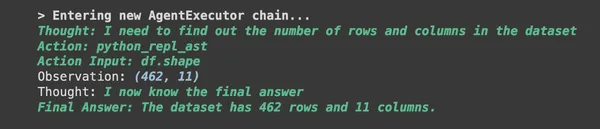
# Let's check the shape of data.'
agent("What is the shape of the dataset?")Here, you can see the model is printing all intermediate steps because we had set verbose= True
#identifying missing values
agent("How many missing values are there in each column?")We can see that none of the columns has missing values.
# Let us see how the data looks like
agent("Display 5 records in form of a table.")In this section we will try to see the distribution of various variables.
agent("Show the distribution of people suffering with chd using bar graph.")agent("""Show the distribution of age where the person is
suffering with chd using histogram with
0 to 10, 10 to 20, 20 to 30 years and so on.""")agent("""Draw boxplot to find out if there are any outliers
in terms of age of who are suffering from chd.""")Let us try to test some hypothesis.
# Does Tobacco Cause CHD?
agent("""validate the following hypothesis with t-test.
Null Hypothesis: Consumption of Tobacco does not cause chd.
Alternate Hypothesis: Consumption of Tobacco causes chd.""")# How is the distribution of CHD across various age groups
agent("""Plot the distribution of age for both the values
of chd using kde plot. Also provide a lenged and
label the x and y axises.""")Let’s do a couple of queries to see how various variables are related.
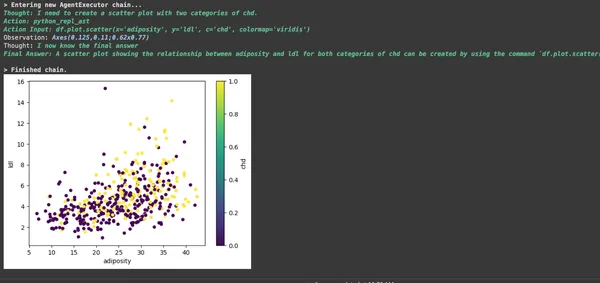
agent("""Draw a scatter plot showing relationship
between adiposity and ldl for both categories of chd.""")agent("""What is the correlation of different variables with chd""")Langchain is an excellent framework for automating your data analysis. By creating agents, you can perform various types of analyses using Gen AI’s language models. In this article, we’ve shown you how to use inbuilt pandas Langchain agent and perform some basic EDA, univariate and bivariate analysis, and hypothesis testing. Furthermore, We hope this guide has been helpful to you in learning how to automate your data analysis and improve your decision-making process.
A. The aim of LangChain is to simplify the development process of applications that utilize extensive language models (LLMs) like OpenAI or Hugging Face. It achieves this by providing a user-friendly open-source framework that streamlines the building process and makes development more straightforward.
A. In a broad sense, LangChain brings excitement by enabling the augmentation of already potent LLMs with memory and context. Also, this empowers us to artificially introduce “reasoning” and tackle more intricate tasks with heightened precision.
A. The majority of accessible LangChain tutorials primarily focus on utilizing OpenAI. While the OpenAI API is affordable for experimentation, it is not offered for free.
Lorem Ipsum is simply dummy text of the printing and typesetting industry. Lorem Ipsum has been the industry's standard dummy text ever since the 1500s, when an unknown printer took a galley of type and scrambled it to make a type specimen book. It has survived not only five centuries, but also the leap into electronic typesetting, remaining essentially unchanged. It was popularised in the 1960s with the release of Letraset sheets containing Lorem Ipsum passages, and more recently with desktop publishing software like Aldus PageMaker including versions of Lorem Ipsum.
GPT-4 vs. Llama 3.1 – Which Model is Better?
Llama-3.1-Storm-8B: The 8B LLM Powerhouse Surpa...
A Comprehensive Guide to Building Agentic RAG S...
Top 10 Machine Learning Algorithms in 2026
45 Questions to Test a Data Scientist on Basics...
90+ Python Interview Questions and Answers (202...
8 Easy Ways to Access ChatGPT for Free
Prompt Engineering: Definition, Examples, Tips ...
What is LangChain?
What is Retrieval-Augmented Generation (RAG)?
Edit
Resend OTP
Resend OTP in 45s