|
VOOZH | about |
|
VOOZH | about |
With the introduction of ChatGPT and the GPT 3 models by OpenAI, the world has shifted towards using AI-integrated applications. In all the day-to-day applications we use, from e-commerce to banking applications, AI embeds some parts of the application, particularly the Large Language Models. One among them is the OpenAI Assistant API, i.e., chatbots. OpenAI recently released Assistants API under Beta, a tool designed to elevate user experience.
This article was published as a part of the Data Science Blogathon.
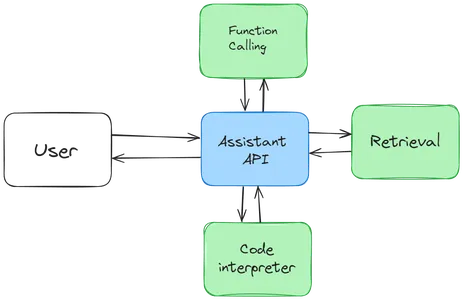
OpenAI assistants API recently launched the Assistants API, which is currently in the Beta phase. This API allows us to build and integrate AI assistants into our applications using the OpenAI Large Language Models and tools. Companies tailor these assistants for a specific purpose and provide them with the relevant data for that particular use. Examples of this assistance include an AI Weather assistant that gives weather-related information or an AI Travel assistant that answers Travel-related queries.
These assistants are built with statefulness in mind. That is, they retain the previous conversations to a large extent, thus making the developers not worry about the state management and leaving it to the OpenAI. The typical flow is below:
All these Assistant, Thread, Message, and Run are called Objects in the Assistant API. Along with these objects, there is another object called Run Step, which provides us with the detailed steps that the Assistant has taken in Run, thus providing insights into its inner workings.
We have constantly mentioned the word tool, so what does it have to do with the OpenAI Assistant API? Tools are like weapons, which allow the Assistant API to do additional tasks. These include the OpenAI-hosted tools like the Knowledge Retrieval and the Code Interpreter. We can also define our custom tools using Function calling, which we will not discuss in this article.
So, let’s go through the remaining tools in detail.
In this section, we will go through creating an Assistant, adding messages to a Thread, and Running the Assistant on that Thread. We will begin by downloading the OpenAI library.
# installs the openai library that contains the Assistants API
!pip install openai
Ensure you are using the latest version (v.1.2.3 is the latest when this article was written). Let’s start by creating our client.
# importing os library to read environment variables
import os
# importing openai library to interact with Assistants API
from openai import OpenAI

# storing OPENAI API KEY in a environment variable
os.environ["OPENAI_API_KEY"] = "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"

# creating our OpenAI client by providing the API KEY
client = OpenAI(api_key = os.environ['OPENAI_API_KEY'])
So we import the OpenAI class from the openai library. Then, we store our OpenAI API Token in the environment variable. And then, instantiate an OpenAI class with the api_key as the variable. The client variable is the instance of the OpenAI class. Now it’s time to create our assistant.
# creating an assistant

assistant = client.beta.assistants.create(
 name="PostgreSQL Expret",
 instructions="You are a PostgreSQL expert and can answer any question in a \
 simple way with an example",
 model="gpt-4-1106-preview",
 tools=[{"type":"retrieval"}]
)
Thus, we created and assigned an assistant to the variable assistant. The next step will be loading the documents.
# upload the file
file = client.files.create(
 file=open(
 "/content/LearnPostgres.pdf",
 "rb",
 ),
 purpose="assistants",
)

# update Assistant
assistant = client.beta.assistants.update(
 assistant.id,
 file_ids=[file.id],
)As we have included the retrieval tool in our Assistant configuration, it takes care of chunking our LearnPostres.pdf, converting it into embeddings, and retrieving the relevant information from it.
In this section, we will create a Thread and add Messages to it. We will start by creating a new Thread.
# creating a thread
thread = client.beta.threads.create()
The create() method of the threads class is used to create a Thread. A Thread represents a conversation session. Similar to assistants, the Thread object will also have a unique ID associated with it. Also, note that we have not passed any Assitant ID to it, implying that the Thread is isolated and not coupled with the assistant. Now, let’s add a message to our newly created Thread.
# adding our first message to the thread
message = client.beta.threads.messages.create(
 thread_id=thread.id,
 role="user",
 content="How to create a table in PostgreSQL"
)Now, we run the Assistant by creating a Run on the Thread that we want our Assistant to run on.
# Creating an Run

run = client.beta.threads.runs.create(
 thread_id=thread.id,
 assistant_id=assistant.id
)The Object provides a variable called status, which contains whether a particular Run is queued / in-progress / completed. For this, we create the following function.
import time

# creating a function to check whether the Run is completed or not
def poll_run(run, thread):
 while run.status != "completed":
 run = client.beta.threads.runs.retrieve(
 thread_id=thread.id,
 run_id=run.id,
 )
 time.sleep(0.5)
 return run

# waiting for the run to be completed
run = poll_run(run, thread)In this Run step, the Assistant we have created will utilize the Retrieval tool to retrieve the relevant information related to the user query from the available data call in the model we specified with the applicable data and generate a response. This generated response gets stored in the Thread. Now, our thread has two messages: one is the user query, and the other is the Assistant response.
Let’s get the messages stored in our Thread.
# extracting the message
messages = client.beta.threads.messages.list(thread_id=thread.id)

for m in messages:
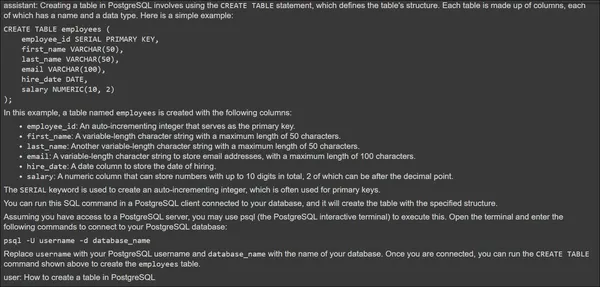
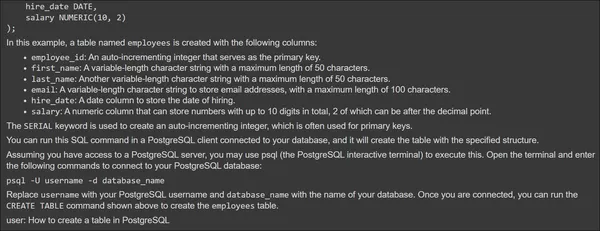
print(f"{m.role}: {m.content[0].text.value}")The above image shows the Assistant Response at the top and User Query at the bottom. Now, let’s give a second message and test if the Assistant can access the previous conversation.
# creating second message
message2 = client.beta.threads.messages.create(
 thread_id=thread.id,
 role="user",
 content="Add some value to the table you have created"
)

# creating an Run
run = client.beta.threads.runs.create(
 thread_id=thread.id,
 assistant_id=assistant.id
)

# waiting for the Run method to complete
run = poll_run(run, thread)

# extracting the message
messages = client.beta.threads.messages.list(thread_id=thread.id)

for m in messages:
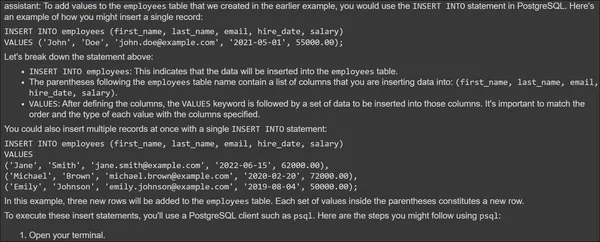
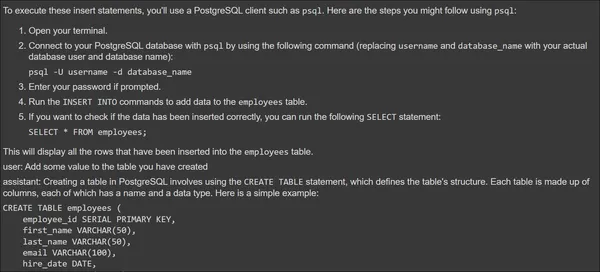
print(f"{m.role}: {m.content[0].text.value}")Finally, we are retrieving and printing all the messages from the Thread.
The Assistant could indeed access the information from the previous conversation and also use the Retrieval tool to generate a response for the query provided. Thus, through the OpenAI Assistant API, we can create custom Assistants and then integrate them in any form in our applications. OpenAI is also planning to release many tools that the Assistant API can use.
The Assistant API is billed based on the model selected and the tools used. The tools like the Retrieval and the Code Interpreter each have a separate cost of their own. Starting with the model, each model in the OpenAI has their separate cost based on the number of tokens used for the input and the number of output tokens generated. So, for the Model pricing, click here to check all the OpenAI Large Language Model prices.
Regarding the Code Interpreter, it is priced at $0.03 per session, with sessions active for one hour by default. One session is associated with one Thread, so if you have N Threads running, the cost will be N * $0.03.
On the other hand, Retrieval comes with a pricing of $0.20 per GB per assistant per day. If N Assistants access this Tool, it will be priced N * $0.2 / Day. The number of Threads does not affect the retrieval pricing.
Regarding the Ethical Concerns and the use of User Data, OpenAI puts Data Privacy on top of everything. The user will be the sole owner of the data sent to the OpenAI API and data received from it. Also, OpenAI does not train on the user data, and the data’s longevity is in the user’s control. Even the custom models trained in OpenAI only belong to the user who has created them.
OpenAI follows strict compliance. It enables data encryption at rest (via AES-256) and during transit (TLS 1.2+). OpenAI has been audited for SOC 2 compliance, meaning that OpenAI puts rigorous efforts into data privacy and security. OpenAI enables strict access control of who can access the data within the organization.
The OpenAI Assistants API offers a new approach for creating and integrating AI assistants into applications. These are the assistants developed to tackle a specific purpose/task. As we’ve explored the functionalities and tools of this API, including the code interpreter, retrieval, and the creation of custom tools, it becomes evident that developers now have a powerful arsenal. The stateful nature of assistants, managed seamlessly through Threads, reduces the burden on developers, allowing them to focus on creating tailored AI experiences.
A. OpenAI Assistants API is a tool for developers to create and integrate Assistants for specific application tasks.
A. The key objects include Assistant, Threads, Messages, Run, and Run Steps. These are the objects necessary for creating a specific Assistant from start to finish.
A. Runs can have statuses such as queued, in-progress, completed, requires_action, expired, canceling, canceled, and failed. We have to poll the Run object to check if it’s finished or not.
A. The data ingestion is taken care of by the OpenAI Retrieval Tool. This tool takes files of different formats, chunks them, and transforms them into embeddings. While querying, it will retrieve the relevant information related to the user’s query.
A. The Assistants API currently supports Retrieval and Code Interpreter Tools. It also includes Function Calling, which allows the developers to create their own tools for the assistant.
The media shown in this article is not owned by Analytics Vidhya and is used at the Author’s discretion.
I work as a Developer in the field of Data Science. I constantly spend time learning new things be it related to AI, DataSceine, and CyberSecurity. Deep learning and machine learning are two topics that I find particularly fascinating, and Python is my preferred language for programming. Cyber Security is another field that I'm touching upon recently. I have experience with large-scale data analysis, and I have a solid grasp of a variety of deep learning and machine learning approaches, including neural networks, regression models, and natural language processing. I'm eager to take on new challenges and make a meaningful contribution to the industry, so I'm constantly seeking for ways to enlarge and deepen my knowledge and skills in the subject.
GPT-4 vs. Llama 3.1 – Which Model is Better?
Llama-3.1-Storm-8B: The 8B LLM Powerhouse Surpa...
A Comprehensive Guide to Building Agentic RAG S...
Top 10 Machine Learning Algorithms in 2026
45 Questions to Test a Data Scientist on Basics...
90+ Python Interview Questions and Answers (202...
8 Easy Ways to Access ChatGPT for Free
Prompt Engineering: Definition, Examples, Tips ...
What is LangChain?
What is Retrieval-Augmented Generation (RAG)?
Edit
Resend OTP
Resend OTP in 45s