URL: https://www.apideck.com/blog/how-to-connect-with-the-hubspot-api.md
---
title: "How to Connect with the HubSpot API"
description: "Learn how to connect to HubSpot API with OAuth 2.0, handle rate limits, manage lifecycle stages, and avoid common integration pitfalls. Complete implementation guide with TypeScript examples, webhook setup, and solutions to undocumented API quirks."
author: "Saurabh Rai"
published: "2025-09-15T09:00+05:30"
updated: "2025-09-15T12:03:54.516Z"
url: "https://www.apideck.com/blog/how-to-connect-with-the-hubspot-api"
category: "Unified API"
tags: ["Unified API", "CRM", "Guides & Tutorials"]
---
# How to Connect with the HubSpot API
HubSpot's API looks modern on the surface. REST endpoints, JSON payloads, OAuth 2.0, webhooks. Then you actually build something with it and discover the truth: it's a maze of rate limits, undocumented quirks, and lifecycle stage logic that defies human comprehension.
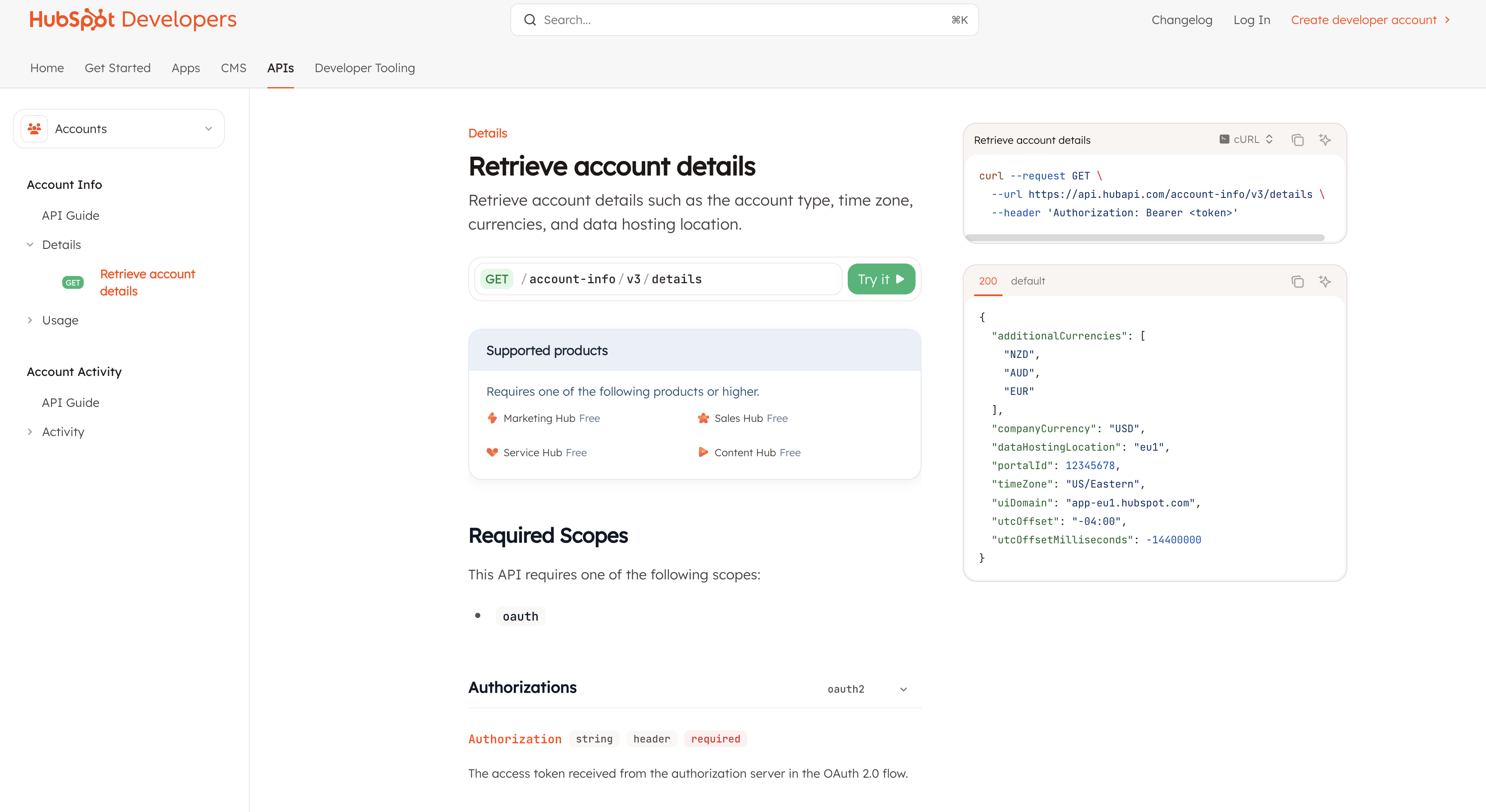
I've spent the last three years integrating HubSpot for various clients. Here's what the documentation won't tell you and what will save you from the same pain I went through.
## The OAuth Dance Nobody Warns You About
HubSpot uses OAuth 2.0, which sounds standard until you realize their implementation has its own special flavor. You need three things before you even start: a developer account (separate from your regular HubSpot account), an app registration, and the patience of a saint.
First, create your app at [developers.hubspot.com](https://developers.hubspot.com). You'll get a Client ID and Client Secret. Guard that secret like your life depends on it, because regenerating it will break every existing integration.
Here's the authorization URL you need to build:
```javascript
const authUrl = `https://app.hubspot.com/oauth/authorize?` +
`client_id=${CLIENT_ID}&` +
`redirect_uri=${encodeURIComponent(REDIRECT_URI)}&` +
`scope=crm.objects.contacts.read%20crm.objects.contacts.write`;
```
But wait, there's a catch nobody mentions: the redirect URI must match EXACTLY what you registered. Not just the domain, not just the path, but every single character, including trailing slashes. Get it wrong and you'll see a generic error that tells you nothing.
When the user approves, HubSpot redirects back with a code. You have exactly 30 seconds to exchange it for tokens, or it expires:
```javascript
const tokenResponse = await fetch('https://api.hubapi.com/oauth/v1/token', {
method: 'POST',
headers: { 'Content-Type': 'application/x-www-form-urlencoded' },
body: new URLSearchParams({
grant_type: 'authorization_code',
client_id: CLIENT_ID,
client_secret: CLIENT_SECRET,
redirect_uri: REDIRECT_URI,
code: authCode
})
});
const { access_token, refresh_token } = await tokenResponse.json();
```
Most access tokens are short-lived. You can check the expires_in parameter when generating an access token to determine its lifetime (in seconds). Practically you have a few minutes before they expire.
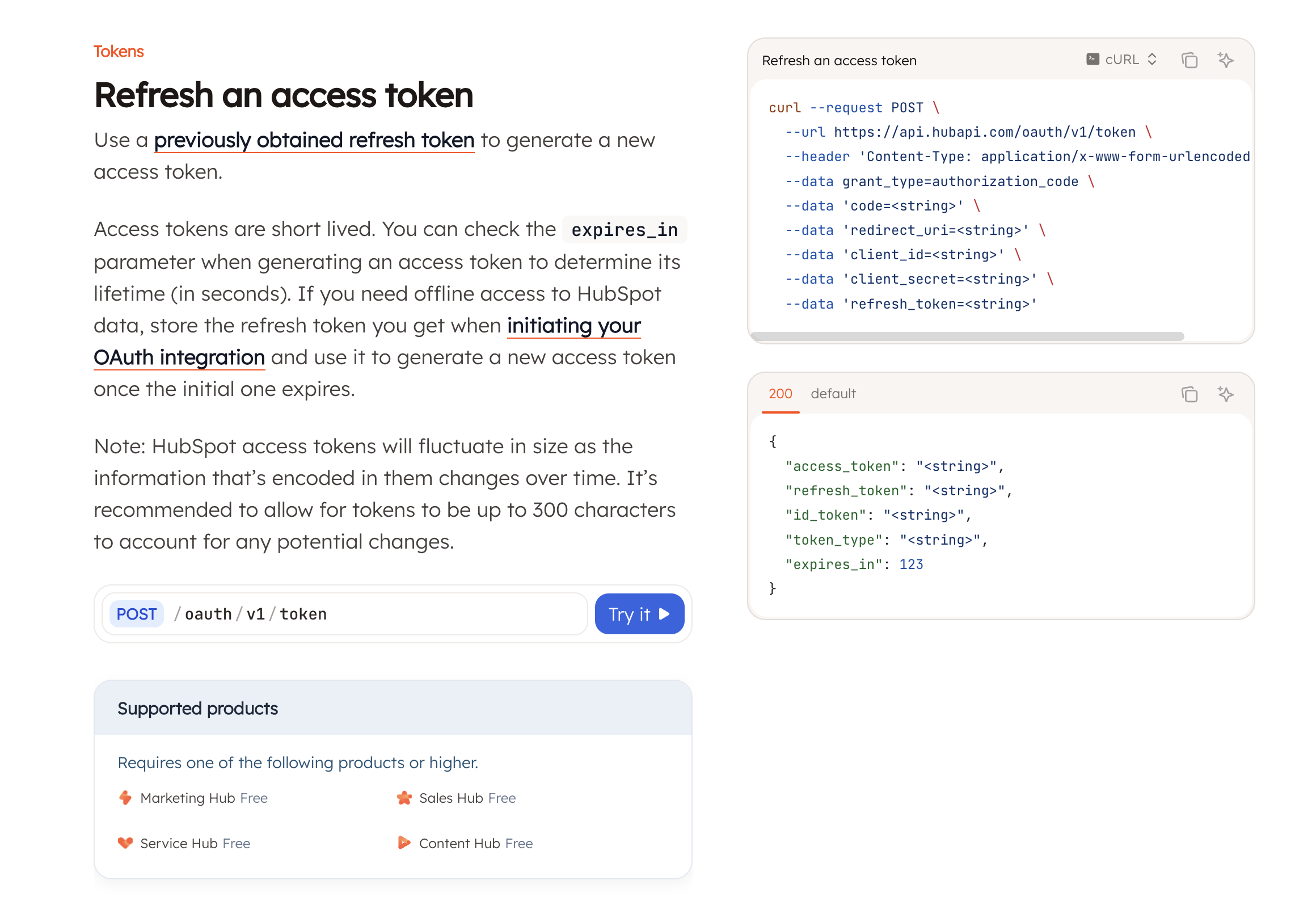
Here's the refresh logic you'll need running constantly:
```javascript
async function refreshAccessToken(refreshToken) {
const response = await fetch('https://api.hubapi.com/oauth/v1/token', {
method: 'POST',
headers: { 'Content-Type': 'application/x-www-form-urlencoded' },
body: new URLSearchParams({
grant_type: 'refresh_token',
client_id: CLIENT_ID,
client_secret: CLIENT_SECRET,
refresh_token: refreshToken
})
});
if (!response.ok) {
// Refresh token is dead, user needs to reauthorize
throw new Error('Token refresh failed - user must reauthorize');
}
return await response.json();
}
```
You can read more about the refresh access token logic from the [HubSpot documentation here](https://developers.hubspot.com/docs/api-reference/auth-oauth-v1/tokens/post-oauth-v1-token).
## Rate Limiting: The 429 Error Festival
HubSpot's rate limits are documented, but what they don't tell you is how aggressive they are. You get 100 requests per 10 seconds for public apps. That sounds like a lot until you realize that's shared across ALL your users if you're using a single app registration.
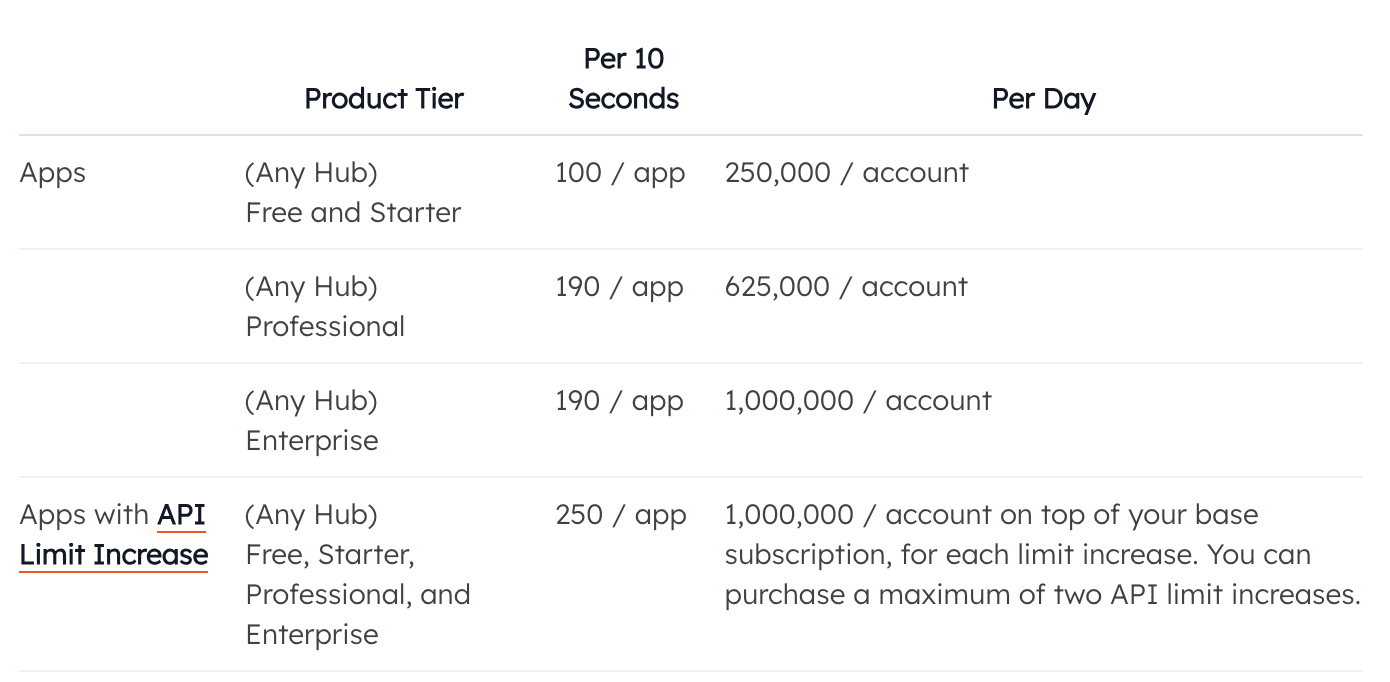
However, you can upgrade the number of calls your app can make, which is based on your account subscription in the account it's installed in. Here's the plan details from the [HubSpot Documentation](https://developers.hubspot.com/docs/developer-tooling/platform/usage-guidelines#app-limits):
[IMAGE: Rate limit table by subscription tier]
Here's what a 429 error looks like when you hit the limit:
```json
{
"status": "error",
"message": "You have reached your secondly limit",
"errorType": "RATE_LIMIT",
"correlationId": "c033cdaa-2c40-4a64-ae48-b4cec88dad24",
"policyName": "TEN_SECONDLY_ROLLING"
}
```
The worst part? HubSpot counts requests that fail against your rate limit. So when you hit the limit and retry immediately, you're making it worse. You need exponential backoff or you'll be stuck in 429 hell forever:
```javascript
async function makeHubSpotRequest(url, options, retryCount = 0) {
const response = await fetch(url, options);
if (response.status === 429) {
if (retryCount >= 5) {
throw new Error('Max retries exceeded');
}
// Exponential backoff: 1s, 2s, 4s, 8s, 16s
const delay = Math.pow(2, retryCount) * 1000;
console.log(`Rate limited. Waiting ${delay}ms before retry...`);
await new Promise(resolve => setTimeout(resolve, delay));
return makeHubSpotRequest(url, options, retryCount + 1);
}
if (!response.ok) {
throw new Error(`HubSpot API error: ${response.status}`);
}
return response.json();
}
```
But here's the real kicker: if you're using Make.com, Zapier, or any integration platform, you're sharing rate limits with every other customer using their HubSpot connector. I've seen perfectly reasonable workflows fail at 2 AM because someone else's integration went haywire. The only solution is to create your own OAuth app and use their "advanced" connection option.
## The Lifecycle Stage Nightmare
HubSpot's lifecycle stages are supposed to track where contacts are in your sales process. In reality, they're a one-way street designed by someone who's never had to fix bad data.
Lifecycle stages can only move forward by default. Lead to Customer? Fine. Customer back to Lead because they canceled? Nope. You have to clear the field first, then set the new value in a separate API call:
```javascript
// This won't work - lifecycle stage can't go backwards
await updateContact(contactId, { lifecyclestage: 'lead' }); // Fails silently
// This is what you actually need
await updateContact(contactId, { lifecyclestage: '' }); // Clear it first
await updateContact(contactId, { lifecyclestage: 'lead' }); // Now set it
async function updateContact(contactId, properties) {
return makeHubSpotRequest(
`https://api.hubapi.com/crm/v3/objects/contacts/${contactId}`,
{
method: 'PATCH',
headers: {
'Authorization': `Bearer ${accessToken}`,
'Content-Type': 'application/json'
},
body: JSON.stringify({ properties })
}
);
}
```
That's two API calls for one field update, doubling your rate limit usage. And it gets worse: the batch API doesn't guarantee order, so you can't clear and set in the same batch request. Every backwards lifecycle stage movement costs you two separate API calls.
Oh, and those "Became a [stage] date" properties? They're being deprecated. HubSpot announced this in 2024, but half of its documentation still references them. You now need to use their "calculated properties," which have their own special quirks and can't be set via API at all.
## Custom Properties: The False Promise
HubSpot lets you create custom properties for anything. Sounds great until you realize that enumeration properties (dropdowns, checkboxes) have their own internal IDs that aren't the same as the labels you see in the UI.
You think you're setting a property to "Enterprise Customer," but HubSpot wants "enterprise_customer_7821" or something equally ridiculous. To find the internal values, you need to query the properties endpoint first:
```javascript
const propertyResponse = await makeHubSpotRequest(
'https://api.hubapi.com/crm/v3/properties/contacts/industry',
{
headers: { 'Authorization': `Bearer ${accessToken}` }
}
);
// Returns something like:
// {
// "options": [
// { "label": "Enterprise Customer", "value": "enterprise_customer_7821" },
// { "label": "SMB Customer", "value": "smb_customer_9183" }
// ]
// }
```
And don't even think about changing these values later. Every integration, workflow, and report using that property will break. I learned this when a client wanted to rename "Hot Lead" to "Qualified Lead" and it took three days to fix all the broken automations.
## Webhooks: Death by a Thousand Subscriptions
HubSpot webhooks seem straightforward: subscribe to events, receive notifications. What they don't tell you is that webhooks are tied to your app, not individual accounts. Every customer using your app shares the same webhook URL.
Setting up webhooks requires a verified domain and HTTPS endpoint that can handle HubSpot's validation:
```javascript
app.post('/webhook', (req, res) => {
// HubSpot sends validation on setup
if (req.headers['x-hubspot-signature']) {
const signature = req.headers['x-hubspot-signature'];
const sourceString = req.method + req.url + req.rawBody;
const hash = crypto.createHash('sha256')
.update(CLIENT_SECRET + sourceString)
.digest('hex');
if (hash !== signature) {
return res.status(401).send('Invalid signature');
}
}
// Process webhook events
req.body.forEach(event => {
console.log(`Event: ${event.eventType} for object ${event.objectId}`);
// But which customer is this for? Good luck figuring that out
});
res.status(200).send();
});
```
The webhook payload doesn't include which account it's from. You get an object ID and have to make another API call (counting against your rate limit) to figure out whose data changed. With 100 customers, that's 100 extra API calls per webhook event.
## The Undocumented Reality
Here's what HubSpot won't tell you but you need to know:
**The API versions are complex.** There's v1, v2, and v3 running simultaneously. Some endpoints only exist in v1 (looking at you, Engagements API), some features are v3 only, and they're deprecating v1 "soon" (they've been saying this for three years).
**Private apps are not the same as OAuth apps.** Private apps use API keys and are simpler but can't be distributed. OAuth apps can be shared but require the whole token dance. Choose wrong and you'll be rebuilding your integration from scratch.
**The search API is basically useless.** It has a different rate limit (4 requests per second), can't search all properties, and sometimes returns stale data. One client had contacts appearing in search results three hours after deletion. The only reliable way to find data is to pull everything and filter locally.
**Error messages lie.** You'll get "Contact already exists" when the real problem is a malformed email. You'll get "Invalid property value" when the property doesn't exist. Always log the full request and response because the error message alone won't help you debug.
**Associations are their own special hell.** Want to link a contact to a company? That's a separate API call. Want to see all contacts for a company? Another call. Want to update the association? You can't, you have to delete and recreate it. Each operation counts against your rate limit.
## Making This Bearable with TypeScript
If you're building anything serious, use TypeScript. HubSpot's API responses are inconsistent and TypeScript will save you from runtime explosions:
```typescript
interface HubSpotContact {
id: string;
properties: {
email?: string;
firstname?: string;
lastname?: string;
lifecyclestage?: string;
[key: string]: string | undefined;
};
createdAt: string;
updatedAt: string;
}
interface HubSpotError {
status: 'error';
message: string;
correlationId: string;
errorType?: 'RATE_LIMIT' | 'VALIDATION_ERROR' | 'NOT_FOUND';
}
class HubSpotClient {
constructor(private accessToken: string) {}
async getContact(id: string): Promise
