URL: https://www.apideck.com/blog/integrating-with-the-netsuite-rest-api.md
---
title: "A Guide to Integrating with the NetSuite REST API"
description: "Learn how to integrate with the NetSuite REST API, from OAuth 1.0a authentication setup to real-world implementation examples. Discover how Apideck's Unified Accounting API eliminates integration complexity and lets you connect to NetSuite & 20+ ERP applications."
author: "Saurabh Rai"
published: "2025-08-28T00:00+05:30"
updated: "2026-04-26T05:14:09.478Z"
url: "https://www.apideck.com/blog/integrating-with-the-netsuite-rest-api"
category: "Unified API"
tags: ["Unified API", "Accounting", "Guides & Tutorials"]
---
# A Guide to Integrating with the NetSuite REST API
# A Guide to Integrating with the NetSuite REST API
Accounting systems like [NetSuite](https://www.netsuite.com/portal/home.shtml) are the backbone for managing and optimizing business operations through automated processes and integrated workflows. NetSuite is a cloud-based enterprise resource planning (ERP) system that provides a business software suite for financial management, customer relationship management, e-commerce, and more.
The NetSuite REST API allows developers to build modern integrations that connect NetSuite to other systems, automate complex workflows, and synchronize data across different platforms. Using this API, developers can automate tasks such as customer creation, order processing, and real-time inventory updates. This is key to building automated solutions that reduce manual effort and increase accuracy.
## Why the NetSuite REST API Matters
The NetSuite REST API provides a modern, JSON-based interface to NetSuite's core functionality, allowing you to interact with the platform programmatically using standard HTTP methods. You can use it to perform operations such as creating and updating records, managing customer data, processing transactions, and retrieving financial reports. The REST API enables you to integrate NetSuite into your existing systems and automate business-critical processes while ensuring data consistency across all applications.
For example, you can automate workflows like customer onboarding or sync order data between NetSuite and external platforms, reducing manual errors and increasing operational efficiency.
## NetSuite SOAP API Alternative
If you're evaluating NetSuite integration options, you might also consider the NetSuite SOAP API. While SOAP is more established and offers broader functionality coverage, it's significantly more complex to implement due to XML handling and verbose request structures. For a detailed comparison and implementation guide, see our [comprehensive NetSuite SOAP API integration guide](https://www.apideck.com/blog/guide-to-integrating-with-the-netsuite-soap-api).
Here are some examples of how you can use the REST API:
**Automating customer management**: The NetSuite REST API can automatically create customer records when new users sign up on your website, sync contact information, and update customer data across systems. This eliminates duplicate data entry and ensures customer information stays current across all touchpoints.
**Real-time inventory synchronization**: The REST API can integrate with e-commerce platforms like Shopify or WooCommerce to provide real-time inventory updates. When a product is sold online, the API immediately updates stock levels in NetSuite and can trigger reorder notifications when inventory falls below threshold levels.
**Automated financial reporting**: The REST API can integrate with business intelligence tools to generate real-time financial dashboards. This automation provides up-to-date profit and loss statements, cash flow reports, and sales analytics, helping businesses make data-driven decisions quickly.
## How to Integrate with the NetSuite REST API
NetSuite's REST API supports [Token-Based Authentication (TBA)](https://docs.oracle.com/en/cloud/saas/netsuite/ns-online-help/section_N3445710.html#bridgehead_4489663579) and [OAuth 2.0](https://docs.oracle.com/en/cloud/saas/netsuite/ns-online-help/section_1544634936.html) for secure API access.
This guide focuses on Token-Based Authentication, which involves creating a signature using your NetSuite account credentials and including it with other authentication parameters in the request headers.
To interact with the REST API, you need to:
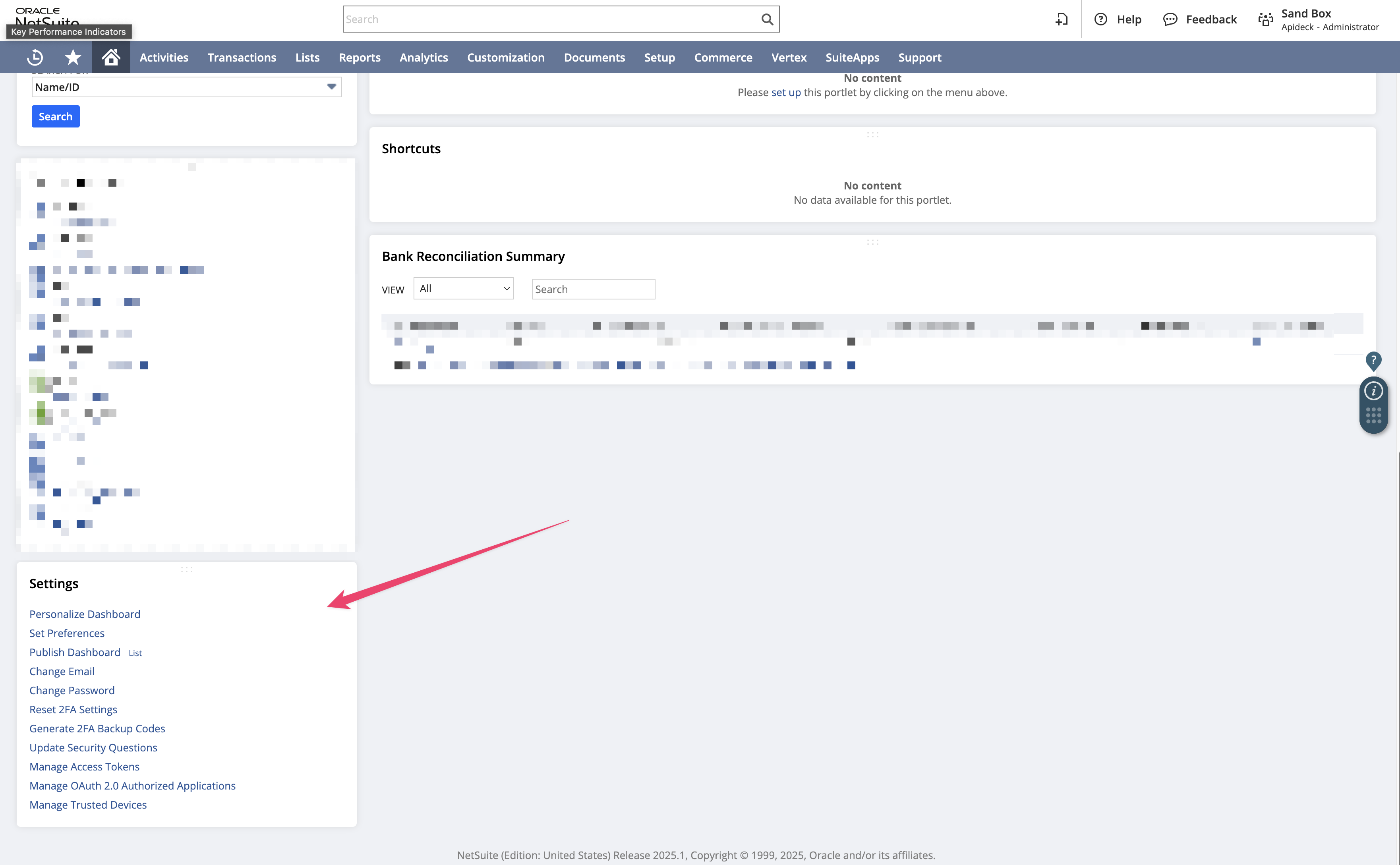
1. [Create a user role](https://docs.oracle.com/en/cloud/saas/netsuite/ns-online-help/bridgehead_4248124361.html#bridgehead_4249074259) with appropriate permissions, including REST Web Services access
2. [Create a new integration record](https://docs.oracle.com/en/cloud/saas/netsuite/ns-online-help/bridgehead_4249032125.html#procedure_4253065190) for token-based authentication and obtain the consumer key and secret
3. [Create a new access token](https://docs.oracle.com/en/cloud/saas/netsuite/ns-online-help/bridgehead_4254081947.html#procedure_4253065595) and obtain the token ID and secret
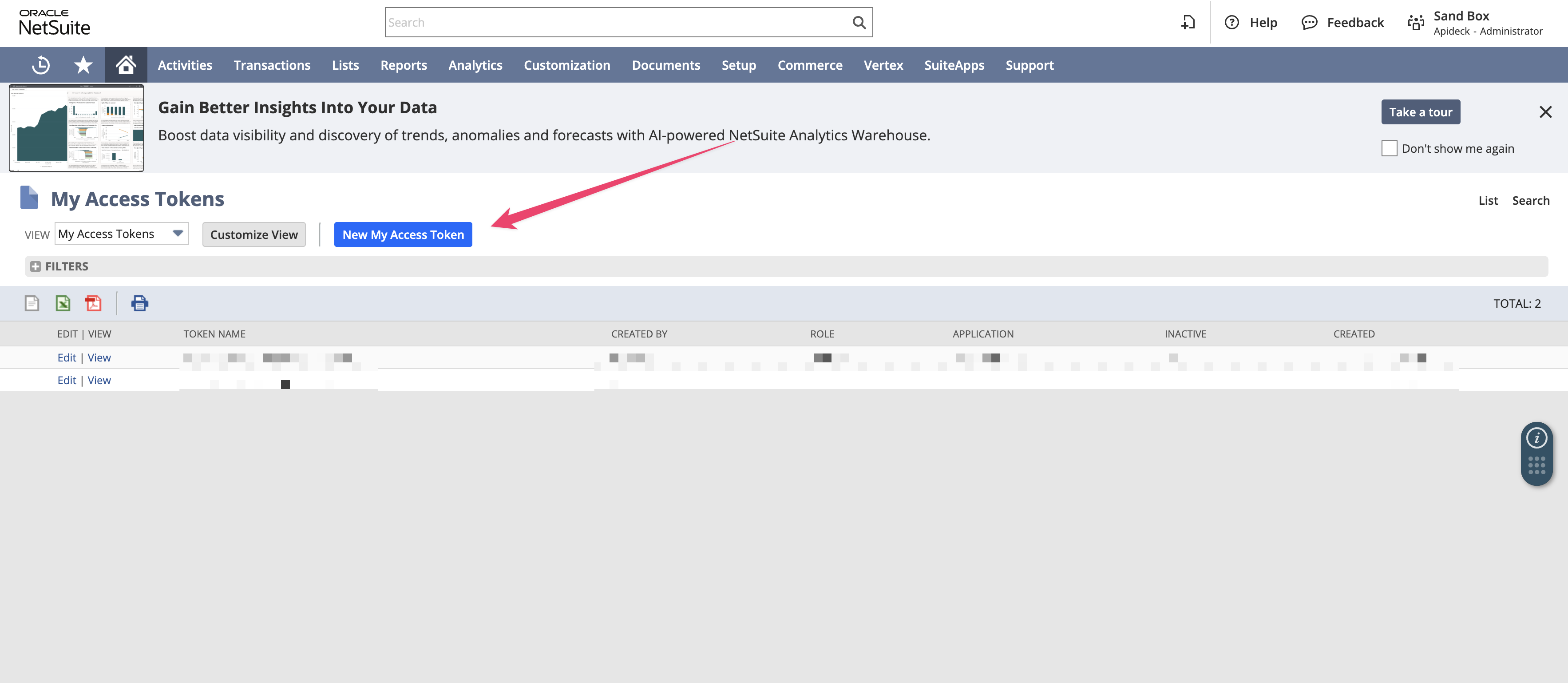
More detailed information is available in the [official documentation](https://docs.oracle.com/en/cloud/saas/netsuite/ns-online-help/section_1540391670.html).
## Simplify Authentication with Apideck Vault
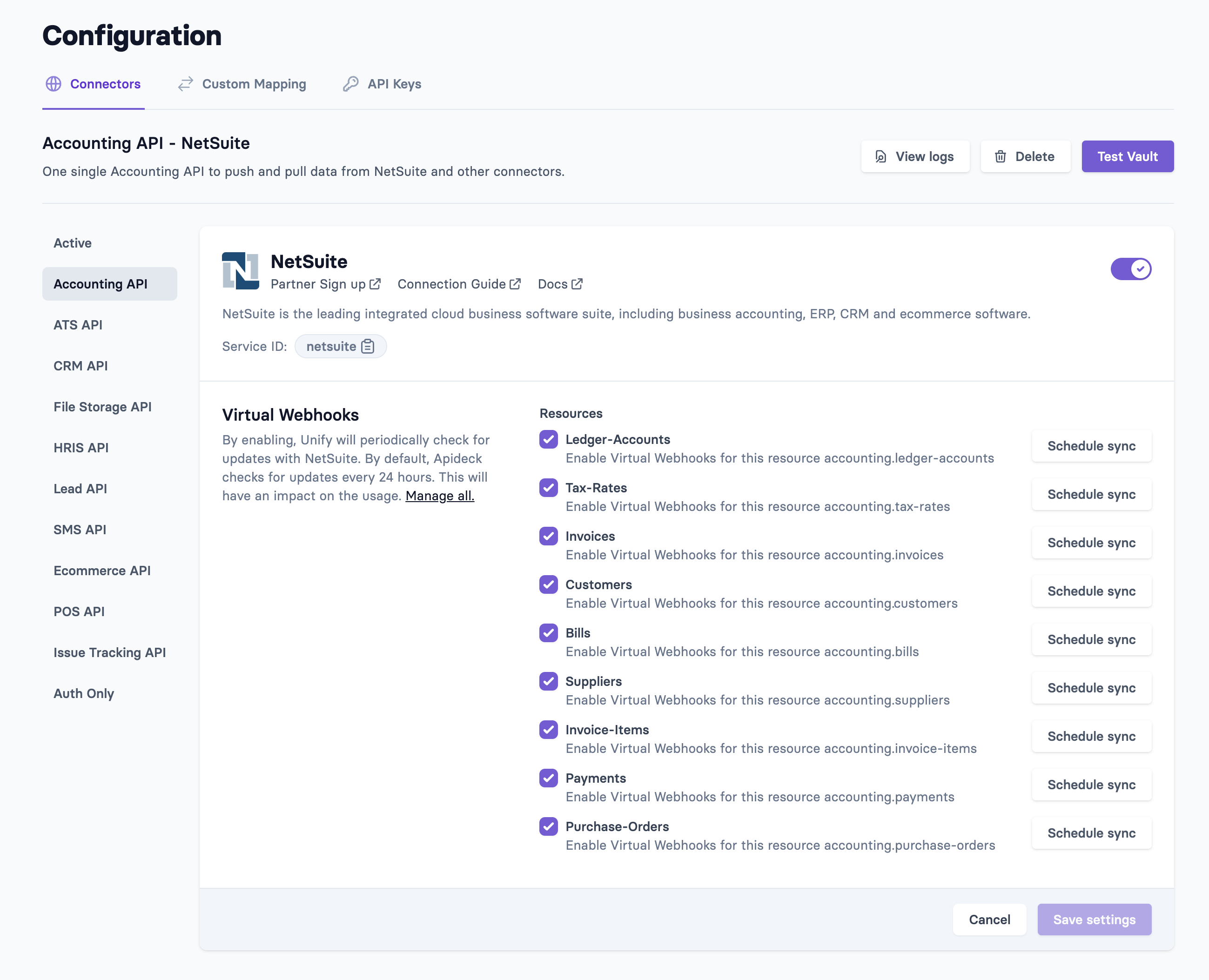
The authentication setup process above can be complex and time-consuming for your end users. [Apideck Vault](https://www.apideck.com/products/vault) provides a white-label, hosted authentication interface that eliminates this complexity entirely.
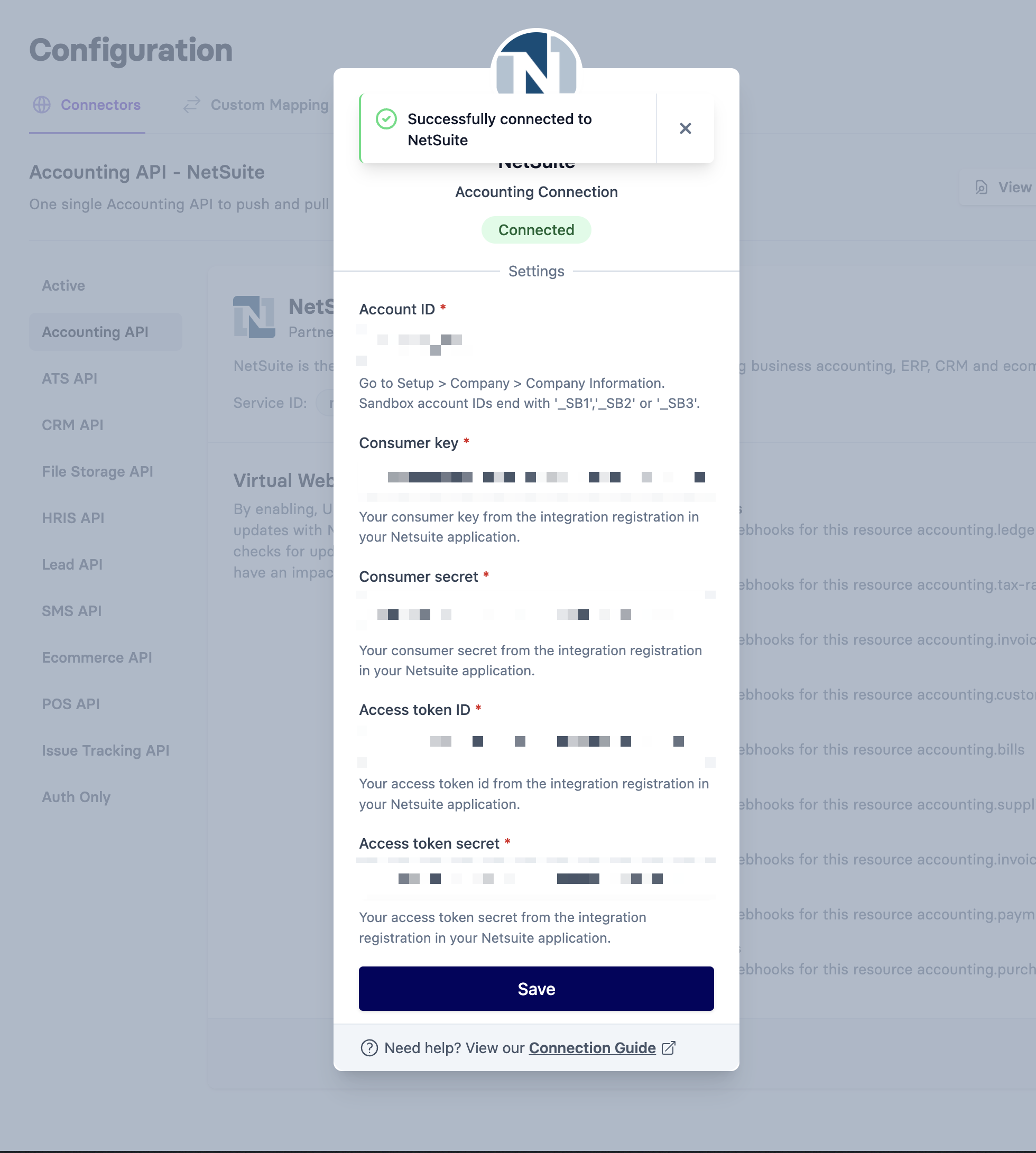
With Vault, your users can:
- **Connect NetSuite in seconds** - No technical setup required on their end
- **Secure credential storage** - OAuth tokens and API keys are stored safely with enterprise-grade security
- **Unified experience** - Same interface works for NetSuite, QuickBooks, Xero, and 200+ other integrations
- **Self-service management** - Users can connect, disconnect, and manage integrations independently
Instead of asking users to create integration records and access tokens, they simply authenticate through Vault's hosted interface. You get the integration data you need without the setup friction that kills conversion rates.
## Making a Request to the NetSuite REST API
The base URL for NetSuite REST API requests follows this format:
`https://{account_id}.suitetalk.api.netsuite.com/services/rest/record/v1/{record_type}`
NetSuite uses OAuth 1.0a for authentication, which requires generating a signature for each request. Here's a Python example:
```python
import requests
from requests_oauthlib import OAuth1
# NetSuite credentials
account_id = "your_account_id"
consumer_key = "your_consumer_key"
consumer_secret = "your_consumer_secret"
token_key = "your_token_key"
token_secret = "your_token_secret"
# Create OAuth1 auth object
auth = OAuth1(
consumer_key,
client_secret=consumer_secret,
resource_owner_key=token_key,
resource_owner_secret=token_secret,
signature_method='HMAC-SHA256',
signature_type='AUTH_HEADER'
)
# Example: Get a customer record
def get_customer(customer_id):
url = f"https://{account_id}.suitetalk.api.netsuite.com/services/rest/record/v1/customer/{customer_id}"
headers = {
'Content-Type': 'application/json'
}
response = requests.get(url, auth=auth, headers=headers)
return response.json()
# Example: Create a customer record
def create_customer(customer_data):
url = f"https://{account_id}.suitetalk.api.netsuite.com/services/rest/record/v1/customer"
headers = {
'Content-Type': 'application/json'
}
response = requests.post(url, auth=auth, headers=headers, json=customer_data)
return response.json()
# Usage examples
try:
# Get customer with ID 123
customer = get_customer("123")
print("Customer data:", customer)
# Create a new customer
new_customer = {
"companyName": "Acme Corporation",
"email": "contact@acme.com",
"phone": "+1-555-0123"
}
result = create_customer(new_customer)
print("Created customer:", result)
except Exception as error:
print("Error making API request:", error)
```
## The Integration Challenge
As you can see from the examples above, integrating directly with the NetSuite REST API involves several challenges:
1. **Authentication complexity**: Implementing OAuth 1.0a signature generation requires precise handling of encoding, sorting, and hashing
2. **Rate limiting management**: NetSuite has [strict concurrency limits](https://docs.oracle.com/en/cloud/saas/netsuite/ns-online-help/section_1557159142.html) that require careful request throttling to avoid timeouts
3. **Custom field handling**: NetSuite's custom fields require specific formatting and field ID mapping that varies by account
4. **Error handling complexity**: NetSuite's error responses require specific parsing and retry logic for different error types
5. **Data transformation**: NetSuite's data structures often don't match your application's data models
6. **Pagination complexity**: Handling large datasets requires implementing cursor-based pagination logic
7. **Webhook limitations**: NetSuite's webhook support is limited, requiring polling for real-time data needs
Each of these challenges adds development time and increases the potential for bugs in your integration.
## The Apideck Unified Accounting API
Integrating with multiple accounting systems, including NetSuite, can be overwhelming and time-consuming. Managing OAuth signatures, handling rate limits, and dealing with different data formats across various platforms requires months of development effort and ongoing maintenance.
The [Apideck Unified Accounting API](https://www.apideck.com/accounting-api) provides a single integration point for 20+ accounting platforms, including NetSuite. This approach abstracts away the complexities of individual APIs, simplifying the integration process.
Key benefits of using the Apideck Unified Accounting API include:
- **Real-time data processing**: All API calls are processed in real-time, not batched, ensuring your data is always fresh
- **Managed authentication with Vault**: [Apideck Vault](https://www.apideck.com/products/vault) handles all OAuth flows and credential management, eliminating complex authentication setup for your users
- **Unified data model**: Consistent data structures across all 18+ accounting platforms
- **Built-in rate limit management**: Automatic throttling and retry logic with exponential backoff
- **Webhook emulation**: Get push notifications from platforms that support webhooks, with Apideck emulating webhooks for platforms that don't
- **White-label user interface**: Easily embedded interface that gives users a simple and secure connection experience
- **Data normalization**: Messy, inconsistent APIs are normalized into a single structure while still exposing raw downstream information
- **Reduced maintenance burden**: Updates to underlying accounting systems don't require changes to your integration
## Making Requests with Apideck
Before making API requests through Apideck, you need to [configure your NetSuite connection](https://developers.apideck.com/connectors/netsuite/docs/consumer+connection) in the Apideck platform.
Here's how simple the same operations become with Apideck's unified API. You can try these requests in our Api Explorer, which makes this even simpler.
```typescript
import axios from "axios";
const headers = {
"x-apideck-app-id": "
