1. Overview
Apache HttpClient is a popular Java library providing efficient and feature-rich packages implementing the client-side of the most recent HTTP standards. The library is designed for extension while providing robust support for the base HTTP methods.
In this tutorial, we’ll look at the Apache HttpClient API design. We’ll explain the difference between HttpClient and CloseableHttpClient. In addition, we’ll check how to create CloseableHttpClient instances using HttpClients or HttpClientBuilder.
Finally, we’ll recommend which of the mentioned APIs we should be using in our custom code. Also, we’ll look at which API classes implement the Closeable interface, thus requiring us to close their instances in order to free up resources.
2. API Design
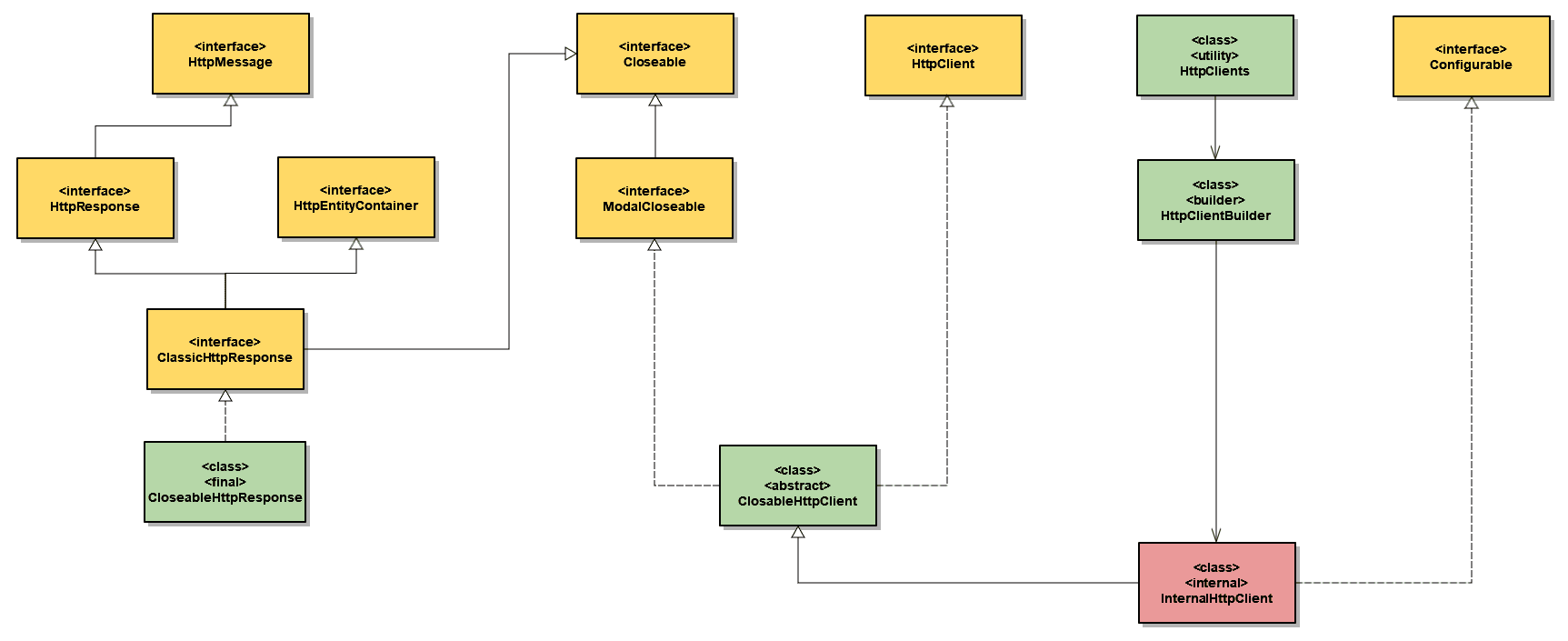
Let’s start by looking at how the API is designed, focusing on its high-level classes and interfaces. In the class diagram below, we’ll show a part of the API required for the classic execution of HTTP requests and processing HTTP responses:
👁 Apache Classic HTTP Client
In addition, Apache HttpClient API also supports asynchronous HTTP request/response exchange, as well as reactive message exchange using RxJava.
3. HttpClient vs. CloseableHttpClient
HttpClient is a high-level interface that represents the basic contract for HTTP request execution. It imposes no restrictions on the request execution process. Also, it leaves specifics like state management and authentication and redirects to individual client implementations.
We can cast any client implementation to the HttpClient interface. Thus, we may use it to execute basic HTTP requests via the default client implementation:
HttpClient httpClient = HttpClients.createDefault();
HttpGet httpGet = new HttpGet(serviceOneUrl);
httpClient.execute(httpGet, response -> {
 assertThat(response.getCode()).isEqualTo(HttpStatus.SC_OK);
 return response;
});
Notice here the second parameter of the execute method is an HttpClientResponseHandler functional interface.
However, the code above will result in a blocker issue on SonarQube. The reason is that the default client implementation returns an instance of CloseableHttpClient, which requires closing.
CloseableHttpClient is an abstract class that represents a base implementation of the HttpClient interface. However, it also implements the Closeable interface. Thus, we should close all its instances after use. We can close them by using either try-with-resources or by calling the close method in a finally clause:
try (CloseableHttpClient httpClient = HttpClients.createDefault()) {
 HttpGet httpGet = new HttpGet(serviceOneUrl);
 httpClient.execute(httpGet, response -> {
 assertThat(response.getCode()).isEqualTo(HttpStatus.SC_OK);
 return response;
 });
}
Therefore, in our custom code, we should use the CloseableHttpClient class, not the HttpClient interface.
4. HttpClients vs. HttpClientBuilder
In the above examples, we used a static method from the HttpClients class to obtain a default client implementation. HttpClients is a utility class containing factory methods for creating CloseableHttpClient instances:
CloseableHttpClient httpClient = HttpClients.createDefault();
We can achieve the same using the HttpClientBuilder class. HttpClientBuilder is an implementation of the Builder design pattern for creating CloseableHttpClient instances:
CloseableHttpClient httpClient = HttpClientBuilder.create().build();
Internally, HttpClients uses HttpClientBuilder to create client implementation instances. Therefore, we should prefer to use HttpClients in our custom code. Given that it is a higher-level class, its internals might change with new releases.
5. Resource Management
The reason why we need to close CloseableHttpClient instances once they go out of scope is to shut down the associated connection manager.
5.1. Automatic resource deallocation (HttpClient 4.x)
In the current Apache HttpClient 5 version, client resources are deallocated automatically after the http communication, by using the HttpClientResponseHandler we saw earlier.
Before the current version, CloseableHttpResponse is provided for backward compatibility with HttpClient 4.x.
CloseableHttpResponse is a class implementing the ClassicHttpResponse interface. However, ClassicHttpResponse also extends HttpResponse, HttpEntityContainer, and Closeable interfaces.
The underlying HTTP connection is held by the response object to allow the response content to be streamed directly from the network socket. Therefore, we should use the CloseableHttpResponse class instead of the HttpResponse interface in our custom code. We also need to make sure to call the close method once we consume the response:
try (CloseableHttpClient httpClient = HttpClientBuilder.create().build()) {
 HttpGet httpGet = new HttpGet(serviceUrl);
 try (CloseableHttpResponse response = httpClient.execute(httpGet)) {
 HttpEntity entity = response.getEntity();
 EntityUtils.consume(entity);
 }
}
We should note that the underlying connection cannot be safely re-used when response content is not fully consumed. In such situations, the connection will be shut down and discarded by the connection manager.
5.2. Reusing Clients
Closing a CloseableHttpClient instance and creating a new one for every request could be an expensive operation. Instead, we can reuse a single instance of a CloseableHttpClient for sending multiple requests:
try (CloseableHttpClient httpClient = HttpClientBuilder.create().build()) {
 HttpGet httpGetOne = new HttpGet(serviceOneUrl);
 httpClient.execute(httpGetOne, responseOne -> {
 HttpEntity entityOne = responseOne.getEntity();
 EntityUtils.consume(entityOne);
 assertThat(responseOne.getCode()).isEqualTo(HttpStatus.SC_OK);
 return responseOne;
 });

 HttpGet httpGetTwo = new HttpGet(serviceTwoUrl);
 httpClient.execute(httpGetTwo, responseTwo -> {
 HttpEntity entityTwo = httpGetTwo.getEntity();
 EntityUtils.consume(entityTwo);
 assertThat(responseTwo.getCode()).isEqualTo(HttpStatus.SC_OK);
 return responseTwo;
 });
}
As a result, we avoid shutting down the internally associated connection manager and creating a new one.
6. Conclusion
In this article, we explored the classic HTTP API of Apache HttpClient, a popular client-side HTTP library for Java.
We learned the difference between HttpClient and CloseableHttpClient. Also, we recommended using CloseableHttpClient in our custom code. Next, we saw how to create CloseableHttpClient instances using HttpClients or HttpClientBuilder.
Finally, we looked at CloseableHttpClient and CloseableHttpResponse classes, both implementing the Closeable interface. We saw that their instances should be closed in order to free up resources.
The code backing this article is available on GitHub. Once you're
logged in as a Baeldung Pro Member, start learning and coding on the project.