

1. Overview
In the context of ORM, database auditing means tracking and logging events related to persistent entities, or simply entity versioning. Inspired by SQL triggers, the events are insert, update, and delete operations on entities. The benefits of database auditing are analogous to those provided by source version control.
In this tutorial, we’ll demonstrate three approaches to introducing auditing into an application. First, we’ll implement it using standard Jakarta Persistence (JPA 3.x). Next, we’ll look at two JPA extensions that provide their own auditing functionality, one provided by Hibernate Envers (Hibernate 6.x), and another by Spring Data JPA (Spring 6.x).
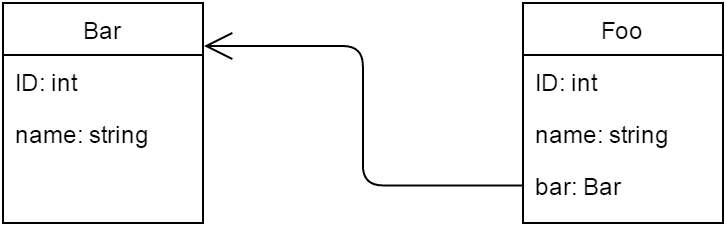
Here are the sample related entities, Bar and Foo, that we’ll use in this example:
👁 Screenshot_4
2. Auditing With JPA
JPA doesn’t explicitly contain an auditing API, but we can achieve this functionality by using entity lifecycle events.
2.1. @PrePersist, @PreUpdate, and @PreRemove
In the JPA Entity class, we can specify a method as a callback, which we can invoke during a particular entity lifecycle event. To execute callbacks before the corresponding DML operations, we use the @PrePersist, @PreUpdate, and @PreRemove callback annotations. Note that these annotations have moved from the javax.persistence package to jakarta.persistence in JPA 3.x:
@Entity
public class Bar {

 @PrePersist
 public void onPrePersist() { ... }

 @PreUpdate
 public void onPreUpdate() { ... }

 @PreRemove
 public void onPreRemove() { ... }
}
Internal callback methods should always return void and take no arguments. They can have any name and any access level, but shouldn’t be static.
Be aware that the @Version annotation in JPA isn’t strictly related to our topic; it has to do with optimistic locking more than with audit data.
2.2. Implementing the Callback Methods
There’s a significant restriction with this approach, though. As stated in JPA 2 specification:
In general, the lifecycle method of a portable application should not invoke EntityManager or Query operations, access other entity instances, or modify relationships within the same persistence context. A lifecycle callback method may modify the non-relationship state of the entity on which it is invoked.
In the absence of an auditing framework, we must maintain the database schema and domain model manually. For our simple use case, let’s add two new properties to the entity, as we can manage only the “non-relationship state of the entity.” An operation property will store the name of an operation performed, and a timestamp property is for the timestamp of the operation:
@Entity
public class Bar {

 //...

 @Column(name = "operation")
 private String operation;

 @Column(name = "timestamp")
 private long timestamp;

 // standard setters and getters for the new properties

 @PrePersist
 public void onPrePersist() {
 audit("INSERT");
 }

 @PreUpdate
 public void onPreUpdate() {
 audit("UPDATE");
 }

 @PreRemove
 public void onPreRemove() {
 audit("DELETE");
 }

 private void audit(String operation) {
 setOperation(operation);
 setTimestamp((new Date()).getTime());
 }
}
If we need to add such auditing to multiple classes, we can use @EntityListeners to centralize the code:
@EntityListeners(AuditListener.class)
@Entity
public class Bar { ... }
public class AuditListener {
@PrePersist
@PreUpdate
@PreRemove
private void beforeAnyOperation(Object object) { ... }
}3. Hibernate Envers
With Hibernate, we can make use of Interceptors and EventListeners, as well as database triggers, to accomplish auditing. But the ORM framework offers Envers, a module implementing auditing and versioning of persistent classes.
3.1. Getting Started with Envers
To set up Envers for Hibernate 6.x, we need to add the hibernate-envers JAR to our classpath. Note the updated artifact name (from org.hibernate:envers to org.hibernate.orm:envers):
<dependency>
 <groupId>org.hibernate.orm</groupId>
 <artifactId>hibernate-envers</artifactId>
 <version>6.6.38.Final</version>
</dependency>
Then we add the @Audited annotation, either on an @Entity (to audit the whole entity) or on specific @Columns (if we need to audit specific properties only):
@Entity
@Audited
public class Bar { ... }
Note that Bar has a one-to-many relationship with Foo. In this case, we need to audit Foo as well by adding @Audited on Foo:
@Entity
@Audited
public class Foo { ... }
3.2. Creating Audit Log Tables
There are several ways to create audit tables:
- Set hibernate.hbm2ddl.auto to create, create-drop, or update, so Envers can create them automatically.
- Use org.hibernate.tool.EnversSchemaGenerator to export the complete database schema programmatically.
- Set up a build task (Ant, Maven, or Gradle) to generate appropriate DDL statements.
We’ll go the first route, as it’s the most straightforward, but be aware that using automated schema generation (hibernate.hbm2ddl.auto) isn’t safe in production.
In our case, the bar_AUD and foo_AUD (if we’ve set Foo as @Audited as well) tables should be generated automatically. The audit tables copy all audited fields from the entity’s table with two fields, REVTYPE (values are: “0” for adding, “1” for updating, and “2” for removing an entity) and REV.
Besides these, an extra table named REVINFO will be generated by default. It includes two important fields, REV and REVTSTMP, and records the timestamp of every revision. As we can guess, bar_AUD.REV and foo_AUD.REV are actually foreign keys to REVINFO.REV.
3.3. Configuring Envers
We can configure Envers properties just like any other Hibernate property.
For example, let’s change the audit table suffix (which defaults to “_AUD“) to “_AUDIT_LOG.” Here’s how we set the value of the corresponding property org.hibernate.envers.audit_table_suffix:
Properties hibernateProperties = new Properties();
hibernateProperties.setProperty(
 "org.hibernate.envers.audit_table_suffix", "_AUDIT_LOG");
sessionFactory.setHibernateProperties(hibernateProperties);
A full listing of available properties can be found in the Envers documentation.
3.4. Accessing Entity History
We can query for historic data in a way similar to querying data via the Hibernate Criteria API. We can access the audit history of an entity using the AuditReader interface, which we can obtain with an open EntityManager or Session via the AuditReaderFactory:
AuditReader reader = AuditReaderFactory.get(session);Envers provides AuditQueryCreator (returned by AuditReader.createQuery()) to create audit-specific queries. The following line will return all Bar instances modified at revision #2 (where bar_AUDIT_LOG.REV = 2):
AuditQuery query = reader.createQuery()
 .forEntitiesAtRevision(Bar.class, 2)
Here’s how we can query for Bar‘s revisions. It’ll result in getting a list of all audited Bar instances in all their states:
AuditQuery query = reader.createQuery()
 .forRevisionsOfEntity(Bar.class, true, true);
If the second parameter is false, it joins the result with the REVINFO table. Otherwise, it returns only entity instances. The last parameter specifies whether to return deleted Bar instances.
Then we can specify constraints using the AuditEntity factory class:
query.addOrder(AuditEntity.revisionNumber().desc());4. Spring Data JPA
Spring Data JPA is a framework that extends JPA by adding an extra layer of abstraction on top of the JPA provider. This layer supports creating JPA repositories by extending Spring JPA repository interfaces.
For our purposes, we can extend CrudRepository<T, ID extends Serializable>, the interface for generic CRUD operations. As soon as we’ve created and injected our repository into another component, Spring Data will provide the implementation automatically, and we’re ready to add auditing functionality.
4.1. Enabling JPA Auditing
To start, we want to enable auditing via annotation configuration. To do that, we add @EnableJpaAuditing on our @Configuration class:
@Configuration
@EnableTransactionManagement
@EnableJpaRepositories
@EnableJpaAuditing
public class PersistenceConfig { ... }
4.2. Adding Spring’s Entity Callback Listener
As we already know, JPA provides the @EntityListeners annotation to specify callback listener classes. Spring Data provides its own JPA entity listener class, AuditingEntityListener. So let’s specify the listener for the Bar entity:
@Entity
@EntityListeners(AuditingEntityListener.class)
public class Bar { ... }
Now we can capture auditing information by the listener upon persisting and updating the Bar entity.
4.3. Tracking Created and Last Modified Dates
Next, we’ll add two new properties for storing the created and last modified dates to our Bar entity. The properties are annotated by the @CreatedDate and @LastModifiedDate annotations accordingly, and their values are set automatically:
@Entity
@EntityListeners(AuditingEntityListener.class)
public class Bar {

 //...

 @Column(name = "created_date", nullable = false, updatable = false)
 @CreatedDate
 private long createdDate;

 @Column(name = "modified_date")
 @LastModifiedDate
 private long modifiedDate;

 //...
}
Generally, we move the properties to a base class (annotated by @MappedSuperClass), which all of our audited entities would extend. In our example, we add them directly to the Bar for the sake of simplicity.
4.4. Auditing the Author of Changes With Spring Security
If our app uses Spring Security, we can track when changes are made and who made them:
@Entity
@EntityListeners(AuditingEntityListener.class)
public class Bar {

 //...

 @Column(name = "created_by")
 @CreatedBy
 private String createdBy;

 @Column(name = "modified_by")
 @LastModifiedBy
 private String modifiedBy;

 //...
}
The columns annotated with @CreatedBy and @LastModifiedBy are populated with the name of the principal that created or last modified the entity. The information comes from SecurityContext‘s Authentication instance. If we want to customize values that are set to the annotated fields, we can implement the AuditorAware<T> interface:
public class AuditorAwareImpl implements AuditorAware<String> {

 @Override
 public Optional<String> getCurrentAuditor() {
 // your custom logic
 }
}
To configure the app to use AuditorAwareImpl to look up the current principal, we declare a bean of AuditorAware type, initialized with an instance of AuditorAwareImpl, and specify the bean’s name as the auditorAwareRef parameter’s value in @EnableJpaAuditing:
@EnableJpaAuditing(auditorAwareRef="auditorProvider")
public class PersistenceConfig {

 //...

 @Bean("auditorProvider")
 public AuditorAware<String> auditorProvider() {
 return new AuditorAwareImpl();
 }

 //...
}
5. Conclusion
In this article, we considered three approaches to implementing auditing functionality:
- The pure JPA (Jakarta Persistence) approach is the most basic and consists of using lifecycle callbacks. However, we’re only allowed to modify the non-relationship state of an entity. This makes the @PreRemove callback useless for our purposes, as any settings we made in the method will be deleted along with the entity.
- Hibernate Envers is a mature auditing module provided by Hibernate. It’s highly configurable and lacks the flaws of the pure JPA implementation. Thus, it allows us to audit the delete operation, as it logs into tables other than the entity’s table.
- The Spring Data JPA approach abstracts working with JPA callbacks and provides handy annotations for auditing properties. It’s also ready for integration with Spring Security. The disadvantage is that it inherits the same flaws of the JPA approach, so the delete operation can’t be audited.












