👁 announcement - icon
Master the most popular testing framework for Java, through the Learn JUnit course:
 |
VOOZH | about |
Mocking is an essential part of unit testing, and the Mockito library makes it easy to write clean and intuitive unit tests for your Java code.
Get started with mocking and improve your application tests using our Mockito guide:
Handling concurrency in an application can be a tricky process with many potential pitfalls. A solid grasp of the fundamentals will go a long way to help minimize these issues.
Get started with understanding multi-threaded applications with our Java Concurrency guide:
Spring 5 added support for reactive programming with the Spring WebFlux module, which has been improved upon ever since. Get started with the Reactor project basics and reactive programming in Spring Boot:
Since its introduction in Java 8, the Stream API has become a staple of Java development. The basic operations like iterating, filtering, mapping sequences of elements are deceptively simple to use.
But these can also be overused and fall into some common pitfalls.
To get a better understanding on how Streams work and how to combine them with other language features, check out our guide to Java Streams:
Get started with Spring and Spring Boot, through the Learn Spring course:
>> LEARN SPRINGExplore Spring Boot 3 and Spring 6 in-depth through building a full REST API with the framework:
Yes, Spring Security can be complex, from the more advanced functionality within the Core to the deep OAuth support in the framework.
I built the security material as two full courses - Core and OAuth, to get practical with these more complex scenarios. We explore when and how to use each feature and code through it on the backing project.
You can explore the course here:
Spring Data JPA is a great way to handle the complexity of JPA with the powerful simplicity of Spring Boot.
Get started with Spring Data JPA through the guided reference course:
Refactor Java code safely — and automatically — with OpenRewrite.
Refactoring big codebases by hand is slow, risky, and easy to put off. That’s where OpenRewrite comes in. The open-source framework for large-scale, automated code transformations helps teams modernize safely and consistently.
Each month, the creators and maintainers of OpenRewrite at Moderne run live, hands-on training sessions — one for newcomers and one for experienced users. You’ll see how recipes work, how to apply them across projects, and how to modernize code with confidence.
Join the next session, bring your questions, and learn how to automate the kind of work that usually eats your sprint time.
In this article, we’ll show how to check the architecture of a system using ArchUnit.
The link between architecture traits and maintainability is a well-studied topic in the software industry. Defining a sound architecture for our systems is not enough, though. We need to verify that the code implemented adheres to it.
Simply put, ArchUnit is a test library that allows us to verify that an application adheres to a given set of architectural rules. But, what is an architectural rule? Even more, what do we mean by architecture in this context?
Let’s start with the latter. Here, we use the term architecture to refer to the way we organize the different classes in our application into packages.
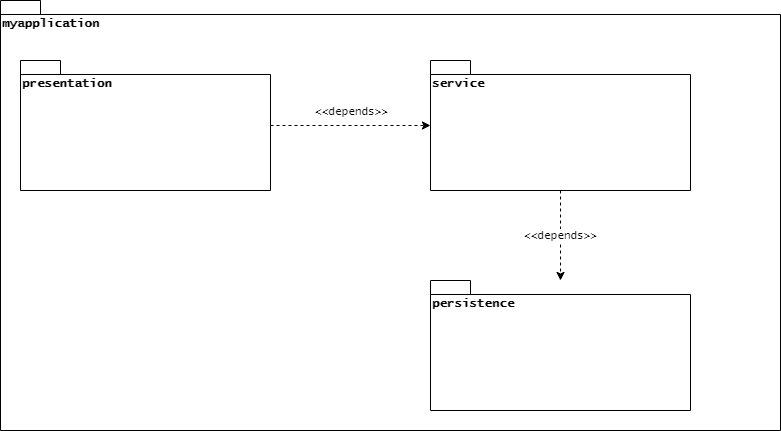
The architecture of a system also defines how packages or groups of packages – also known as layers – interact. In more practical terms, it defines whether code in a given package can call a method in a class belonging to another one. For instance, let’s suppose that our application’s architecture contains three layers: presentation, service, and persistence.
One way to visualize how those layers interact is by using a UML package diagram with a package representing each layer:
👁 figure1-1Just by looking at this diagram, we can figure out some rules:
Looking at those rules, we can now go back and answer our original question. In this context, an architectural rule is an assertion about the way our application classes interact with each other.
So now, how do we check that our implementation observes those rules? Here is where ArchUnit comes in. It allows us to express our architectural constraints using a fluent API and validate them alongside other tests during a regular build.
ArchUnit integrates nicely with the JUnit test framework, and so, they are typically used together. All we have to do is add the archunit-junit4 dependency to match our JUnit version:
<dependency>
 <groupId>com.tngtech.archunit</groupId>
 <artifactId>archunit-junit4</artifactId>
 <version>0.14.1</version>
 <scope>test</scope>
</dependency>
As its artifactId implies, this dependency is specific for the JUnit 4 framework.
There’s also an archunit-junit5 dependency if we are using JUnit 5:
<dependency>
 <groupId>com.tngtech.archunit</groupId>
 <artifactId>archunit-junit5</artifactId>
 <version>0.14.1</version>
 <scope>test</scope>
</dependency>Once we’ve added the appropriate dependency to our project, let’s start writing our architecture tests. Our test application will be a simple SpringBoot REST application that queries Smurfs. For simplicity, this test application only contains the Controller, Service, and Repository classes.
We want to verify that this application complies with the rules we’ve mentioned before. So, let’s start with a simple test for the “presentation classes should only depend on service classes” rule.
The first step is to create a set of Java classes that will be checked for rules violations. We do this by instantiating the ClassFileImporter class and then using one of its importXXX() methods:
JavaClasses jc = new ClassFileImporter()
 .importPackages("com.baeldung.archunit.smurfs");
In this case, the JavaClasses instance contains all classes from our main application package and its sub-packages. We can think of this object as being analogous to a typical test subject used in regular unit tests, as it will be the target for rule evaluations.
Architectural rules use one of the static methods from the ArchRuleDefinition class as the starting point for its fluent API calls. Let’s try to implement the first rule defined above using this API. We’ll use the classes() method as our anchor and add additional constraints from there:
ArchRule r1 = classes()
 .that().resideInAPackage("..presentation..")
 .should().onlyDependOnClassesThat()
 .resideInAPackage("..service..");
r1.check(jc);
Notice that we need to call the check() method of the rule we’ve created to run the check. This method takes a JavaClasses object and will throw an exception if there’s a violation.
This all looks good, but we’ll get a list of errors if we try to run it against our code:
java.lang.AssertionError: Architecture Violation [Priority: MEDIUM] -
 Rule 'classes that reside in a package '..presentation..' should only
 depend on classes that reside in a package '..service..'' was violated (6 times):
... error list omitted
Why? The main problem with this rule is the onlyDependsOnClassesThat(). Despite what we’ve put in the package diagram, our actual implementation has dependencies on JVM and Spring framework classes, hence the error.
One way to solve this error is to add a clause that takes into account those additional dependencies:
ArchRule r1 = classes()
 .that().resideInAPackage("..presentation..")
 .should().onlyDependOnClassesThat()
 .resideInAPackage("..service..", "java..", "javax..", "org.springframework..");
With this change, our check will stop failing. This approach, however, suffers from maintainability issues and feels a bit hacky. We can avoid those issues rewriting our rule using the noClasses() static method as our starting point:
ArchRule r1 = noClasses()
 .that().resideInAPackage("..presentation..")
 .should().dependOnClassesThat()
 .resideInAPackage("..persistence..");
Of course, we can also point that this approach is deny-based instead of the allow-based one we had before. The critical point is that whatever approach we choose, ArchUnit will usually be flexible enough to express our rules.
ArchUnit makes the creation of complex architectural rules an easy task thanks to its built-in rules. Those, in turn, can also be combined, allowing us to create rules using a higher level of abstraction. Out of the box, ArchUnit offers the Library API, a collection of prepackaged rules that address common architecture concerns:
Covering all those rules is out of scope for this introduction, but let’s take a look at the Architecture rule package. In particular, let’s rewrite the rules in the previous section using the layered architecture rules. Using these rules requires two steps: first, we define the layers of our application. Then, we define which layer accesses are allowed:
LayeredArchitecture arch = layeredArchitecture()
 // Define layers
 .layer("Presentation").definedBy("..presentation..")
 .layer("Service").definedBy("..service..")
 .layer("Persistence").definedBy("..persistence..")
 // Add constraints
 .whereLayer("Presentation").mayNotBeAccessedByAnyLayer()
 .whereLayer("Service").mayOnlyBeAccessedByLayers("Presentation")
 .whereLayer("Persistence").mayOnlyBeAccessedByLayers("Service");
arch.check(jc);
Here, layeredArchitecture() is a static method from the Architectures class. When invoked, it returns a new LayeredArchitecture object, which we then use to define names layers and assertions regarding their dependencies. This object implements the ArchRule interface so that we can use it just like any other rule.
The cool thing about this particular API is that it allows us to create in just a few lines of code rules that would otherwise require us to combine multiple individual rules.
In this article, we’ve explored the basics of using ArchUnit in our projects. Adopting this tool is a relatively simple task that can have a positive impact on overall quality and reduce maintenance costs in the long run.
Baeldung Pro comes with both absolutely No-Ads as well as finally with Dark Mode, for a clean learning experience:
Once the early-adopter seats are all used, the price will go up and stay at $33/year.
The Apache HTTP Client is a very robust library, suitable for both simple and advanced use cases when testing HTTP endpoints. Check out our guide covering basic request and response handling, as well as security, cookies, timeouts, and more:
Handling concurrency in an application can be a tricky process with many potential pitfalls. A solid grasp of the fundamentals will go a long way to help minimize these issues.
Get started with understanding multi-threaded applications with our Java Concurrency guide:
Since its introduction in Java 8, the Stream API has become a staple of Java development. The basic operations like iterating, filtering, mapping sequences of elements are deceptively simple to use.
But these can also be overused and fall into some common pitfalls.
To get a better understanding on how Streams work and how to combine them with other language features, check out our guide to Java Streams:
Get started with Spring Boot and with core Spring, through the Learn Spring course:
Modern Java teams move fast — but codebases don’t always keep up. Frameworks change, dependencies drift, and tech debt builds until it starts to drag on delivery. OpenRewrite was built to fix that: an open-source refactoring engine that automates repetitive code changes while keeping developer intent intact.
The monthly training series, led by the creators and maintainers of OpenRewrite at Moderne, walks through real-world migrations and modernization patterns. Whether you’re new to recipes or ready to write your own, you’ll learn practical ways to refactor safely and at scale.
If you’ve ever wished refactoring felt as natural — and as fast — as writing code, this is a good place to start.