1. Introduction
In this article, we’ll discuss in detail a core concept in Java – the lifecycle of a thread.
We’ll use a quick illustrated diagram and, of course, practical code snippets to better understand these states during the thread execution.
To get started understanding Threads in Java, this article on creating a thread is a good place to start.
2. Multithreading in Java
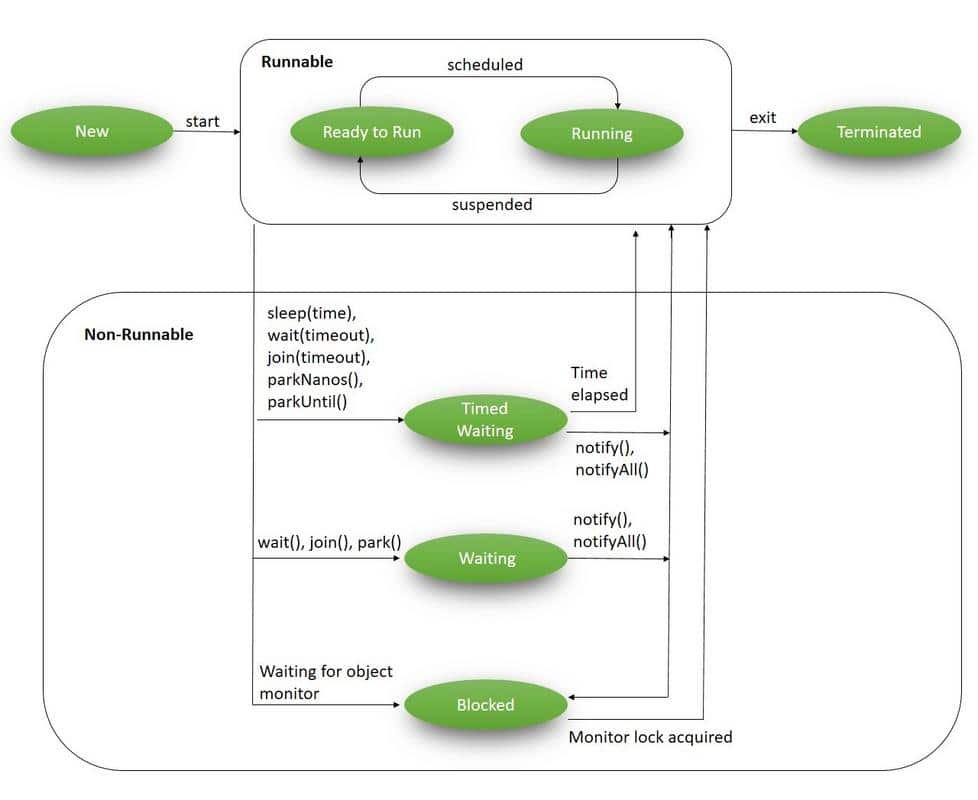
In the Java language, multithreading is driven by the core concept of a Thread. During their lifecycle, threads go through various states:
👁 Life Cycle of a Thread
3. Life Cycle of a Thread in Java
The java.lang.Thread class contains a static State enum – which defines its potential states. During any given point of time, the thread can only be in one of these states:
- NEW – a newly created thread that has not yet started the execution
- RUNNABLE – either running or ready for execution but it’s waiting for resource allocation
- BLOCKED – waiting to acquire a monitor lock to enter or re-enter a synchronized block/method
- WAITING – waiting for some other thread to perform a particular action without any time limit
- TIMED_WAITING – waiting for some other thread to perform a specific action for a specified period
- TERMINATED – has completed its execution
All these states are covered in the diagram above; let’s now discuss each of these in detail.
3.1. New
A NEW Thread (or a Born Thread) is a thread that’s been created but not yet started. It remains in this state until we start it using the start() method.
The following code snippet shows a newly created thread that’s in the NEW state:
Runnable runnable = new NewState();
Thread t = new Thread(runnable);
System.out.println(t.getState());
Since we’ve not started the mentioned thread, the method t.getState() prints:
NEW
3.2. Runnable
When we’ve created a new thread and called the start() method on that, it’s moved from NEW to RUNNABLE state. Threads in this state are either running or ready to run, but they’re waiting for resource allocation from the system.
In a multi-threaded environment, the Thread-Scheduler (which is part of JVM) allocates a fixed amount of time to each thread. So it runs for a particular amount of time, then relinquishes the control to other RUNNABLE threads.
For example, let’s add t.start() method to our previous code and try to access its current state:
Runnable runnable = new NewState();
Thread t = new Thread(runnable);
t.start();
System.out.println(t.getState());
This code is most likely to return the output as:
RUNNABLE
Note that in this example, it’s not always guaranteed that by the time our control reaches t.getState(), it will be still in the RUNNABLE state.
It may happen that it was immediately scheduled by the Thread-Scheduler and may finish execution. In such cases, we may get a different output.
3.3. Blocked
A thread is in the BLOCKED state when it’s currently not eligible to run. It enters this state when it is waiting for a monitor lock and is trying to access a section of code that is locked by some other thread.
Let’s try to reproduce this state:
public class BlockedState {
 public static void main(String[] args) throws InterruptedException {
 Thread t1 = new Thread(new DemoBlockedRunnable());
 Thread t2 = new Thread(new DemoBlockedRunnable());

 t1.start();
 t2.start();

 Thread.sleep(1000);

 System.out.println(t2.getState());
 System.exit(0);
 }
}

class DemoBlockedRunnable implements Runnable {
 @Override
 public void run() {
 commonResource();
 }

 public static synchronized void commonResource() {
 while(true) {
 // Infinite loop to mimic heavy processing
 // 't1' won't leave this method
 // when 't2' try to enter this
 }
 }
}
In this code:
- We’ve created two different threads – t1 and t2
- t1 starts and enters the synchronized commonResource() method; this means that only one thread can access it; all other subsequent threads that try to access this method will be blocked from the further execution until the current one will finish the processing
- When t1 enters this method, it is kept in an infinite while loop; this is just to imitate heavy processing so that all other threads cannot enter this method
- Now when we start t2, it tries to enter the commonResource() method, which is already being accessed by t1, thus, t2 will be kept in the BLOCKED state
Being in this state, we call t2.getState() and get the output as:
BLOCKED
3.4. Waiting
A thread is in WAITING state when it’s waiting for some other thread to perform a particular action. According to JavaDocs, any thread can enter this state by calling any one of the following three methods:
- object.wait()
- thread.join() or
- LockSupport.park()
Note that in wait() and join() – we do not define any timeout period as that scenario is covered in the next section.
We have a separate tutorial that discusses in detail the use of wait(), notify() and notifyAll().
For now, let’s try to reproduce this state:
public class WaitingState implements Runnable {
 public static Thread t1;

 public static void main(String[] args) {
 t1 = new Thread(new WaitingState());
 t1.start();
 }

 public void run() {
 Thread t2 = new Thread(new DemoWaitingStateRunnable());
 t2.start();

 try {
 t2.join();
 } catch (InterruptedException e) {
 Thread.currentThread().interrupt();
 e.printStackTrace();
 }
 }
}

class DemoWaitingStateRunnable implements Runnable {
 public void run() {
 try {
 Thread.sleep(1000);
 } catch (InterruptedException e) {
 Thread.currentThread().interrupt();
 e.printStackTrace();
 }

 System.out.println(WaitingState.t1.getState());
 }
}
Let’s discuss what we’re doing here:
- We’ve created and started the t1
- t1 creates a t2 and starts it
- While the processing of t2 continues, we call t2.join(), this puts t1 in WAITING state until t2 has finished execution
- Since t1 is waiting for t2 to complete, we’re calling t1.getState() from t2
The output here is, as you’d expect:
WAITING
3.5. Timed Waiting
A thread is in TIMED_WAITING state when it’s waiting for another thread to perform a particular action within a stipulated amount of time.
According to JavaDocs, there are five ways to put a thread on TIMED_WAITING state:
- thread.sleep(long millis)
- wait(int timeout) or wait(int timeout, int nanos)
- thread.join(long millis)
- LockSupport.parkNanos
- LockSupport.parkUntil
To read more about the differences between wait() and sleep() in Java, have a look at this dedicated article here.
For now, let’s try to quickly reproduce this state:
public class TimedWaitingState {
 public static void main(String[] args) throws InterruptedException {
 DemoTimeWaitingRunnable runnable= new DemoTimeWaitingRunnable();
 Thread t1 = new Thread(runnable);
 t1.start();

 // The following sleep will give enough time for ThreadScheduler
 // to start processing of thread t1
 Thread.sleep(1000);
 System.out.println(t1.getState());
 }
}

class DemoTimeWaitingRunnable implements Runnable {
 @Override
 public void run() {
 try {
 Thread.sleep(5000);
 } catch (InterruptedException e) {
 Thread.currentThread().interrupt();
 e.printStackTrace();
 }
 }
}
Here, we’ve created and started a thread t1 which is entered into the sleep state with a timeout period of 5 seconds; the output will be:
TIMED_WAITING
3.6. Terminated
This is the state of a dead thread. It’s in the TERMINATED state when it has either finished execution or was terminated abnormally.
We have a dedicated article that discusses different ways of stopping the thread.
Let’s try to achieve this state in the following example:
public class TerminatedState implements Runnable {
 public static void main(String[] args) throws InterruptedException {
 Thread t1 = new Thread(new TerminatedState());
 t1.start();
 // The following sleep method will give enough time for
 // thread t1 to complete
 Thread.sleep(1000);
 System.out.println(t1.getState());
 }

 @Override
 public void run() {
 // No processing in this block
 }
}
Here, while we’ve started thread t1, the very next statement Thread.sleep(1000) gives enough time for t1 to complete and so this program gives us the output as:
TERMINATED
In addition to the thread state, we can check the isAlive() method to determine if the thread is alive or not. For instance, if we call the isAlive() method on this thread:
Assert.assertFalse(t1.isAlive());
It returns false. Put simply, a thread is alive if and only if it has been started and has not yet died.
4. Conclusion
In this tutorial, we learned about the life-cycle of a thread in Java. We looked at all six states defined by Thread.State enum and reproduced them with quick examples.
Although the code snippets will give the same output in almost every machine, in some exceptional cases, we may get some different outputs as the exact behavior of Thread Scheduler cannot be determined.
The code backing this article is available on GitHub. Once you're
logged in as a Baeldung Pro Member, start learning and coding on the project.