
eBook – Guide Spring Cloud – NPI EA (cat=Spring Cloud)

eBook – Mockito – NPI EA (tag = Mockito)
👁 announcement - icon
Mocking is an essential part of unit testing, and the Mockito library makes it easy to write clean and intuitive unit tests for your Java code.
Get started with mocking and improve your application tests using our Mockito guide:
eBook – Java Concurrency – NPI EA (cat=Java Concurrency)
👁 announcement - icon
Handling concurrency in an application can be a tricky process with many potential pitfalls. A solid grasp of the fundamentals will go a long way to help minimize these issues.
Get started with understanding multi-threaded applications with our Java Concurrency guide:
eBook – Reactive – NPI EA (cat=Reactive)
👁 announcement - icon
Spring 5 added support for reactive programming with the Spring WebFlux module, which has been improved upon ever since. Get started with the Reactor project basics and reactive programming in Spring Boot:
eBook – Java Streams – NPI EA (cat=Java Streams)
👁 announcement - icon
Since its introduction in Java 8, the Stream API has become a staple of Java development. The basic operations like iterating, filtering, mapping sequences of elements are deceptively simple to use.
But these can also be overused and fall into some common pitfalls.
To get a better understanding on how Streams work and how to combine them with other language features, check out our guide to Java Streams:
eBook – Jackson – NPI EA (cat=Jackson)
eBook – HTTP Client – NPI EA (cat=Http Client-Side)
eBook – Maven – NPI EA (cat = Maven)
eBook – Persistence – NPI EA (cat=Persistence)
eBook – RwS – NPI EA (cat=Spring MVC)
Course – LS – NPI EA (cat=Jackson)
👁 announcement - icon
Get started with Spring and Spring Boot, through the Learn Spring course:
>> LEARN SPRINGCourse – RWSB – NPI EA (cat=REST)
👁 announcement - icon
Explore Spring Boot 3 and Spring 6 in-depth through building a full REST API with the framework:
Course – LSS – NPI EA (cat=Spring Security)
👁 announcement - icon
Yes, Spring Security can be complex, from the more advanced functionality within the Core to the deep OAuth support in the framework.
I built the security material as two full courses - Core and OAuth, to get practical with these more complex scenarios. We explore when and how to use each feature and code through it on the backing project.
You can explore the course here:
Course – LSD – NPI EA (tag=Spring Data JPA)
👁 announcement - icon
Spring Data JPA is a great way to handle the complexity of JPA with the powerful simplicity of Spring Boot.
Get started with Spring Data JPA through the guided reference course:
Partner – Moderne – NPI EA (cat=Spring Boot)
👁 announcement - icon
Refactor Java code safely — and automatically — with OpenRewrite.
Refactoring big codebases by hand is slow, risky, and easy to put off. That’s where OpenRewrite comes in. The open-source framework for large-scale, automated code transformations helps teams modernize safely and consistently.
Each month, the creators and maintainers of OpenRewrite at Moderne run live, hands-on training sessions — one for newcomers and one for experienced users. You’ll see how recipes work, how to apply them across projects, and how to modernize code with confidence.
Join the next session, bring your questions, and learn how to automate the kind of work that usually eats your sprint time.
Course – LJB – NPI EA (cat = Core Java)
1. Introduction
Nowadays, it’s very common to write an application and deploy to the cloud and not worry about the infrastructure. Serverless and FaaS have become very popular.
In this type of environment, where instances are created and destroyed frequently, the time to boot and time to first request are extremely important, as they can create a completely different user experience.
Languages as JavaScript and Python are always in the spotlight in this type of scenario. In other words, Java with its fat JARs and long booting time was never a top contender.
In this tutorial, we’ll present Quarkus and discuss if it’s an alternative for bringing Java more effectively to the cloud.
2. Quarkus
QuarkusIO, the Supersonic Subatomic Java, promises to deliver small artifacts, extremely fast boot time, and lower time-to-first-request. When combined with GraalVM, Quarkus will compile ahead-of-time (AOT).
And, since Quarkus is built on top of standards, we don’t need to learn anything new. Consequently, we can use CDI and JAX-RS, among others. Also, Quarkus has a lot of extensions, including ones that support Hibernate, Kafka, OpenShift, Kubernetes, and Vert.x.
3. Our First Application
The easiest way to create a new Quarkus project is to open a terminal and type:
mvn io.quarkus:quarkus-maven-plugin:0.13.1:create \
 -DprojectGroupId=com.baeldung.quarkus \
 -DprojectArtifactId=quarkus-project \
 -DclassName="com.baeldung.quarkus.HelloResource" \
 -Dpath="/hello"
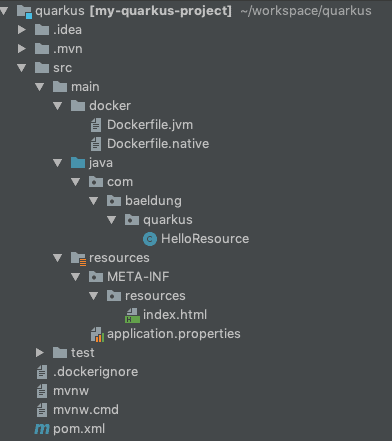
This will generate the project skeleton, a HelloResource with a /hello endpoint exposed, configuration, Maven project, and Dockerfiles.
Once imported into our IDE, we’ll have a structure similar to that shown in the image below:
Let’s examine the content of the HelloResource class:
@Path("/hello")
public class HelloResource {

 @GET
 @Produces(MediaType.TEXT_PLAIN)
 public String hello() {
 return "hello";
 }
}
Everything looks good so far. At this point, we have a simple application with a single RESTEasy JAX-RS endpoint. Let’s go ahead and test it by opening a terminal and running the command:
./mvnw compile quarkus:dev: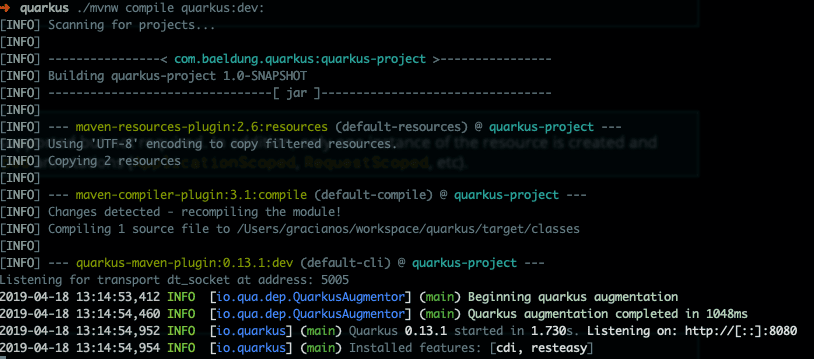
Our REST endpoint should be exposed at localhost:8080/hello. Let’s test it with the curl command:
$ curl localhost:8080/hello
hello
4. Hot Reload
When running in development mode (./mvn compile quarkus:dev), Quarkus provides a hot-reload capability. In other words, changes made to Java files or to configuration files will automatically be compiled once the browser is refreshed. The most impressive feature here is that we don’t need to save our files. This could be good or bad, depending on our preference.
We’ll now modify our example to demonstrate the hot-reload capability. If the application is stopped, we can simply restart it in dev mode. We’ll use the same example as before as our starting point.
First, we’ll create a HelloService class:
@ApplicationScoped
public class HelloService {
 public String politeHello(String name){
 return "Hello Mr/Mrs " + name;
 }
}
Now, we’ll modify the HelloResource class, injecting the HelloService and adding a new method:
@Inject
HelloService helloService;

@GET
@Produces(MediaType.APPLICATION_JSON)
@Path("/polite/{name}")
public String greeting(@PathParam("name") String name) {
 return helloService.politeHello(name);
}
Next, let’s test our new endpoint:
$ curl localhost:8080/hello/polite/Baeldung
Hello Mr/Mrs Baeldung
We’ll make one more change to demonstrate that the same can be applied to property files. Let’s edit the application.properties file and add one more key:
greeting=Good morningAfter that, we’ll modify the HelloService to use our new property:
@ConfigProperty(name = "greeting")
private String greeting;

public String politeHello(String name){
 return greeting + " " + name;
}
If we execute the same curl command, we should now see:
Good morning BaeldungWe can easily package the application by running:
./mvnw package
This will generate 2 jar files inside the target directory:
- quarkus-project-1.0-SNAPSHOT-runner.jar — an executable jar with the dependencies copied to target/lib
- quarkus-project-1.0-SNAPSHOT.jar — contains classes and resource files
We can now run the packaged application:
java -jar target/quarkus-project-1.0-SNAPSHOT-runner.jar5. Native Image
Next, we’ll produce a native image of our application. A native image will improve start-up time and time to first response. In other words, it contains everything it needs to run, including the minimal JVM necessary to run the application.
To start with, we need to have GraalVM installed and the GRAALVM_HOME environment variable configured.
We’ll now stop the application (Ctrl + C), if not stopped already, and run the command:
./mvnw package -PnativeThis can take a few seconds to complete. Because native images try to create all code AOT to boot faster, as a result, we’ll have longer build times.
We can run ./mvnw verify -Pnative to verify that our native artifact was properly constructed:
👁 native verify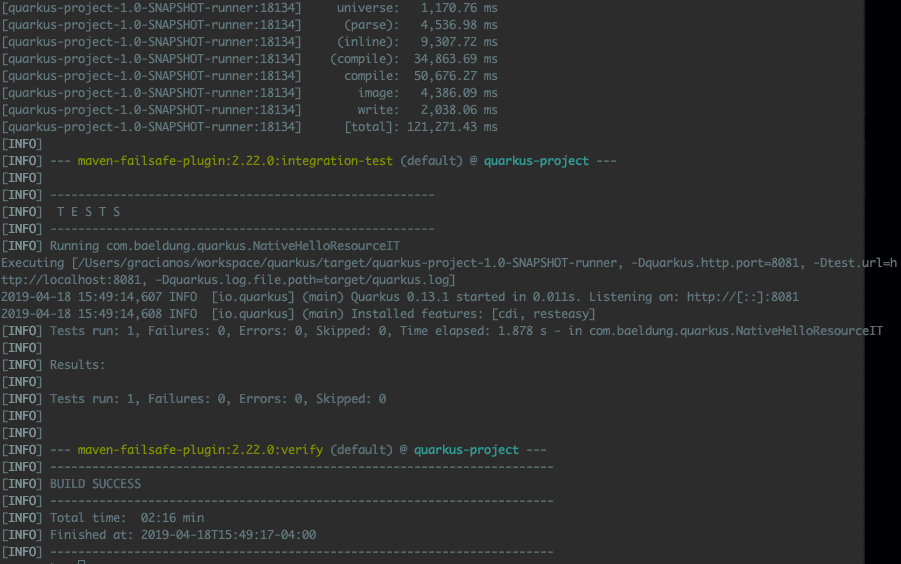
Secondly, we’ll create a container image using our native executable. For that, we must have a container runtime (i.e. Docker) running in our machine. Let’s open up a terminal window and execute:
./mvnw package -Pnative -Dnative-image.docker-build=true
This will create a Linux 64-bit executable, therefore if we’re using a different OS, it might not be runnable anymore. That’s okay for now.
The project generation created a Dockerfile.native for us:
FROM registry.fedoraproject.org/fedora-minimal
WORKDIR /work/
COPY target/*-runner /work/application
RUN chmod 775 /work
EXPOSE 8080
CMD ["./application", "-Dquarkus.http.host=0.0.0.0"]
If we examine the file, we have a hint at what comes next. First, we’ll create a docker image:
docker build -f src/main/docker/Dockerfile.native -t quarkus/quarkus-project .Now, we can run the container using:
docker run -i --rm -p 8080:8080 quarkus/quarkus-project👁 docker native
The container started in an incredibly low time of 0.009s. That’s one of the strengths of Quarkus.

Finally, we should test our modified REST to validate our application:
$ curl localhost:8080/hello/polite/Baeldung
Good morning Baeldung
6. Deploying to OpenShift
Once we’re done testing locally using Docker, we’ll deploy our container to OpenShift. Assuming we have the Docker image on our registry, we can deploy the application following the steps below:
oc new-build --binary --name=quarkus-project -l app=quarkus-project
oc patch bc/quarkus-project -p '{"spec":{"strategy":{"dockerStrategy":{"dockerfilePath":"src/main/docker/Dockerfile.native"}}}}'
oc start-build quarkus-project --from-dir=. --follow
oc new-app --image-stream=quarkus-project:latest
oc expose service quarkus-project
Now, we can get the application URL by running:
oc get routeLastly, we’ll access the same endpoint (note that the URL might be different, depending on our IP address):
$ curl http://quarkus-project-myproject.192.168.64.2.nip.io/hello/polite/Baeldung
Good morning Baeldung
7. Conclusion
In this article, we demonstrated that Quarkus is a great addition that can bring Java more effectively to the cloud. For example, it’s possible now to imagine Java on AWS Lambda. Also, Quarkus is based on standards such as JPA and JAX/RS. Therefore, we don’t need to learn anything new.
Quarkus has caught a lot of attention lately, and lots of new features are being added every day. There are several quickstart projects for us to try Quarkus at Quarkus GitHub repository.
The code backing this article is available on GitHub. Once you're logged in as a Baeldung Pro Member, start learning and coding on the project.












