1. Introduction
In this short tutorial, we’ll see how to leverage the great power of virtual threads in a Spring Boot Application.
Introduced by Project Loom and delivered as a preview feature in Java 19, virtual threads are now part of the official JDK release 21. Moreover, the Spring 6 release integrates this awesome feature and allows developers to experiment with it.
First, we’ll see the main difference between a “platform thread” and a “virtual thread.” Next, we’ll build a Spring Boot application from scratch using virtual threads. Finally, we’ll create a small testing suite to see if there is an improvement in the throughput of a simple web app.
2. Virtual Threads vs. Platform Threads
The main difference is that a virtual thread doesn’t rely on the OS thread during its cycle of operation. Virtual threads are decoupled from the hardware, hence the word “virtual.” Moreover, the abstraction layer the JVM provides grants this decoupling.
In this tutorial, we want to validate that virtual threads are far cheaper to operate than platform threads. We want to confirm that it’s possible to create millions of virtual threads without having out-of-memory errors – an issue platform threads tend to fall into.
3. Using Virtual Threads in Spring 6
First, we need to configure our application based on our environment.
3.1. Virtual Threads With Spring Boot 3.2 and Java 21
Starting from Spring Boot 3.2, enabling virtual threads is very easy if we’re using Java 21. We set the spring.threads.virtual.enabled property to true, and we’re good to go:
spring.threads.virtual.enabled=true
Theoretically, we don’t have to do anything else. However, switching from normal threads to virtual threads can have unforeseen consequences for legacy applications. Therefore, we must test our application thoroughly.
3.2. Virtual Threads With Spring Framework 6 and Java 19
However, if we cannot use the latest Java version but are using Spring Framework 6, the virtual thread feature is still available. We require some additional configuration to enable the preview feature of Java 19. This means we need to tell the JVM we want to enable them in our application. Since we’re using Maven to build our application, let’s make sure to include the following code in the pom.xml:
<build>
 <plugins>
 <plugin>
 <groupId>org.apache.maven.plugins</groupId>
 <artifactId>maven-compiler-plugin</artifactId>
 <configuration>
 <source>19</source>
 <target>19</target>
 <compilerArgs>
 --enable-preview
 </compilerArgs>
 </configuration>
 </plugin>
 </plugins>
</build>
From the Java point of view, to work with Apache Tomcat and virtual threads, we need a simple configuration class with a couple of beans:
@EnableAsync
@Configuration
@ConditionalOnProperty(
 value = "spring.thread-executor",
 havingValue = "virtual"
)
public class ThreadConfig {
 @Bean
 public AsyncTaskExecutor applicationTaskExecutor() {
 return new TaskExecutorAdapter(Executors.newVirtualThreadPerTaskExecutor());
 }

 @Bean
 public TomcatProtocolHandlerCustomizer<?> protocolHandlerVirtualThreadExecutorCustomizer() {
 return protocolHandler -> {
 protocolHandler.setExecutor(Executors.newVirtualThreadPerTaskExecutor());
 };
 }
}
The first Spring Bean, ApplicationTaskExecutor, replaces the standard ApplicationTaskExecutor. In short, we want to override the default Executor so it starts a new virtual thread for each task. The second bean, named ProtocolHandlerVirtualThreadExecutorCustomizer, customizes the standard TomcatProtocolHandler in the same way.
Additionally, we add the annotation @ConditionalOnProperty so we can enable or disable virtual threads using properties in the application.yaml file:
spring:
 thread-executor: virtual
 //...
Now, we can verify that we are running virtual threads.
3.3. Verify Virtual Threads Are Running
Let’s test whether the Spring Boot Application uses virtual threads to handle web request calls. To do this, we need to build a simple controller that returns the required information:
@RestController
@RequestMapping("/thread")
public class ThreadController {
 @GetMapping("/name")
 public String getThreadName() {
 return Thread.currentThread().toString();
 }
}
The toString() method of the Thread object returns all the information we need: the thread id, thread name, thread group, and priority. Let’s hit this endpoint with a curl request:
$ curl -s http://localhost:8080/thread/name
$ VirtualThread[#171]/runnable@ForkJoinPool-1-worker-4
As we can see, the response explicitly says that we’re using a virtual thread to handle this web request. In other words, the Thread.currentThread() call returns an instance of the VirtualThread class. Let’s now see the effectiveness of a virtual thread with a simple but effective load test.
4. Performance Comparison
To compare the performance, we’ll use JMeter to run a load test. Notably, this won’t be a complete performance comparison, but a starting point from which we can build more tests with different parameters.
In this particular scenario, we’ll call an endpoint in a RestController that simply puts the execution to sleep for one second, simulating a complex asynchronous task:
@RestController
@RequestMapping("/load")
public class LoadTestController {

 private static final Logger LOG = LoggerFactory.getLogger(LoadTestController.class);

 @GetMapping
 public void doSomething() throws InterruptedException {
 LOG.info("hey, I'm doing something");
 Thread.sleep(1000);
 }
}
Using the @ConditionalOnProperty annotation, we can switch between virtual threads and standard threads.
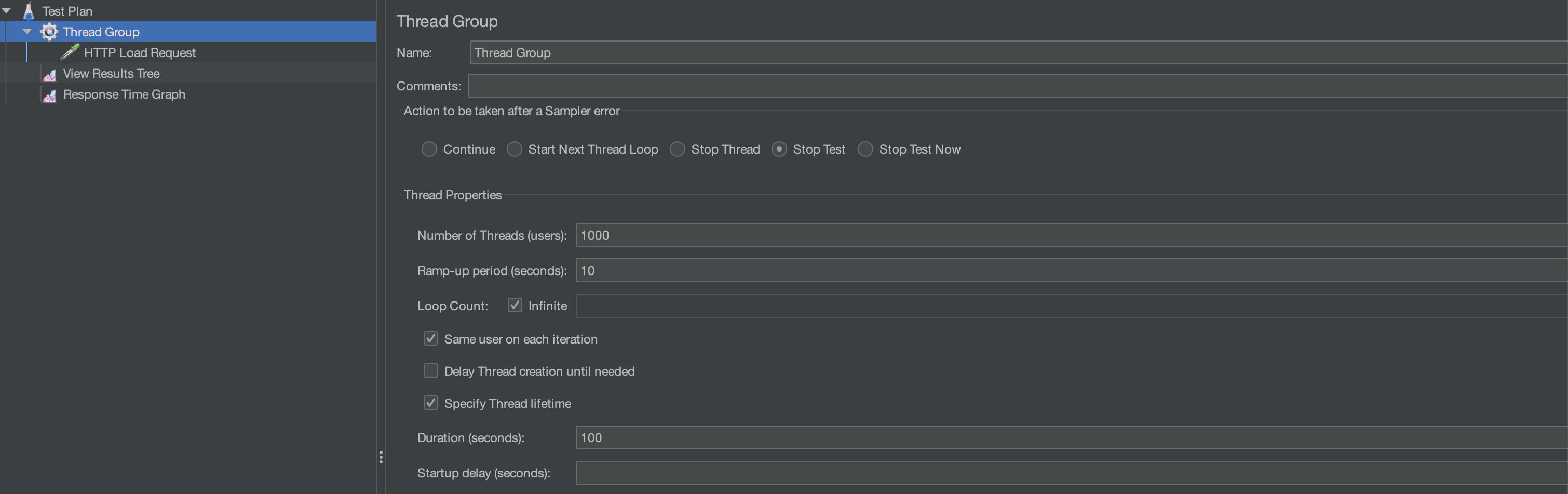
The JMeter test contains only one thread group, simulating 1000 concurrent users hitting the /load endpoint for 100 seconds:
👁 JMeter Thread Group
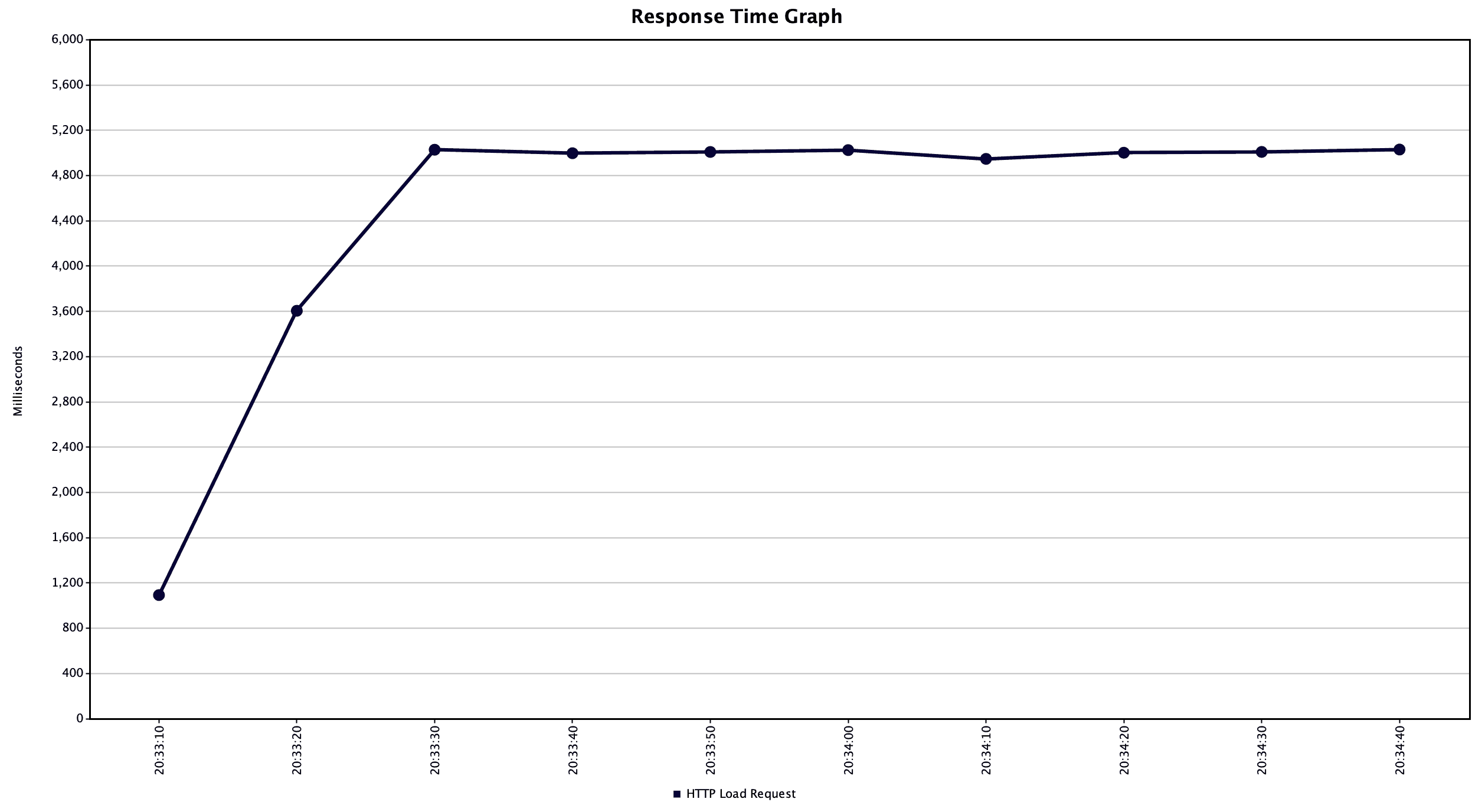
The performance gains from adopting this new feature are evident in this case. Let’s compare the “Response Time Graph” of the different implementations. This is the response graph of standard threads. As we can see, the time needed to finish a call quite immediately reaches 5000 milliseconds:
👁 Standard Threads Performace
This is happening because platform threads are a limited resource. When all the scheduled and pooled threads are busy, the Spring App can only hold the request until one thread is free.
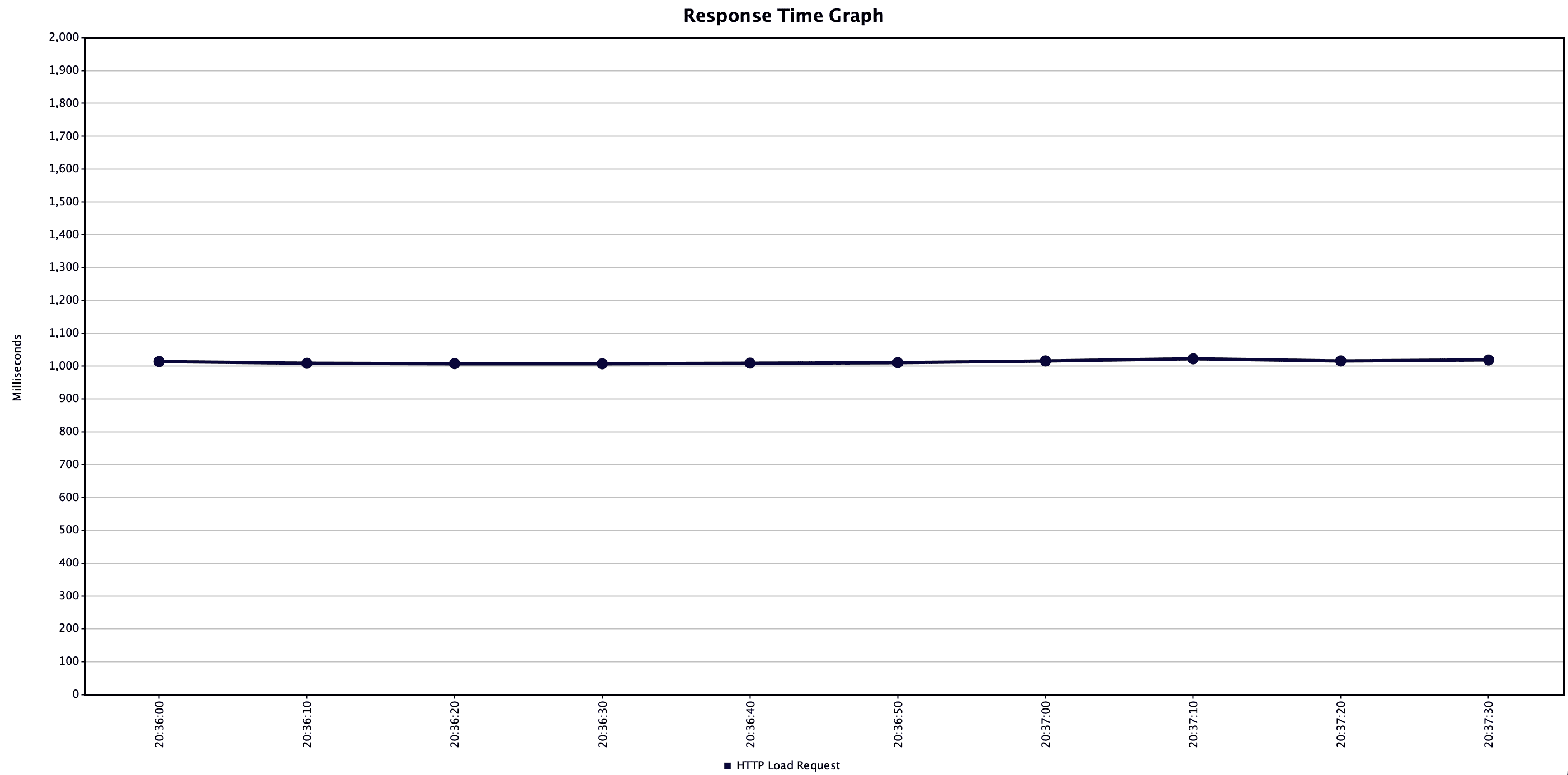
Let’s see instead what happens with virtual threads:
👁 Virtual Threads Graph
The resulting graph shows that the response settles down at 1000 milliseconds. So, virtual threads are created and used immediately after the request because they’re super cheap from the resource point of view. In this case, we’re comparing the usage of the Spring default fixed standard thread pool (which is by default of size 200) and the Spring default unbounded pool of virtual threads.
This kind of performance gain is only possible in simple scenarios like our toy application. In fact, for CPU-intensive operations, virtual threads aren’t a good fit, as minimal blocking is required for such tasks.
5. Conclusion
In this article, we learned how virtual threads can be used in a Spring 6-based application. First, we saw how to enable virtual threads based on the JDK used by our application. Second, we created a REST controller to return the thread name. Finally, we used JMeter to confirm that virtual threads use fewer resources as opposed to the standard threads. And we also saw how this can simplify the handling of more requests.
The code backing this article is available on GitHub. Once you're
logged in as a Baeldung Pro Member, start learning and coding on the project.