

1. Overview
In this tutorial, we’ll explore the fluent API of ChatClient, a feature of the Spring AI module version 1.0.0 M1.
The ChatClient interface from the Spring AI module enables communication with AI models, allowing users to send prompts and receive structured responses. It follows the builder pattern, offering an API similar to WebClient, RestClient, and JdbcClient.
2. Executing Prompts via ChatClient
We can use the client in Spring Boot as an auto-configured bean, or create an instance programmatically.
First, let’s add the spring-ai-openai-spring-boot-starter dependency to our pom.xml:
<dependency>
 <groupId>org.springframework.ai</groupId>
 <artifactId>spring-ai-openai-spring-boot-starter</artifactId>
</dependency>
With this, we can inject the ChatClient.Builder instance into our Spring-managed components:
@RestController
@RequestMapping("api/articles")
class BlogsController {

 private final ChatClient chatClient;

 public BlogsController(ChatClient.Builder chatClientBuilder) {
 this.chatClient = chatClientBuilder.build();
 }

 // ...
}
Now, let’s create a simple endpoint that accepts a question as a query parameter and forwards the prompt to the AI:
@GetMapping("v1")
String askQuestion(@RequestParam(name = "question") String question) {
 return chatClient.prompt()
 .user(question)
 .call()
 .chatResponse()
 .getResult()
 .getOutput()
 .getContent();
}
As we can see, the fluent ChatClient allows us to easily create a prompt request from the user’s input String, call the API, and retrieve the response content as text.
Moreover, if we’re only interested in the response body as a String and don’t need metadata like status codes or headers, we can simplify our code by using the content() method to group the last four steps. Let’s refactor the code and add this improvement:
@GetMapping("v1")
String askQuestion(@RequestParam(name = "question") String question) {
 return chatClient.prompt()
 .user(question)
 .call()
 .content();
}
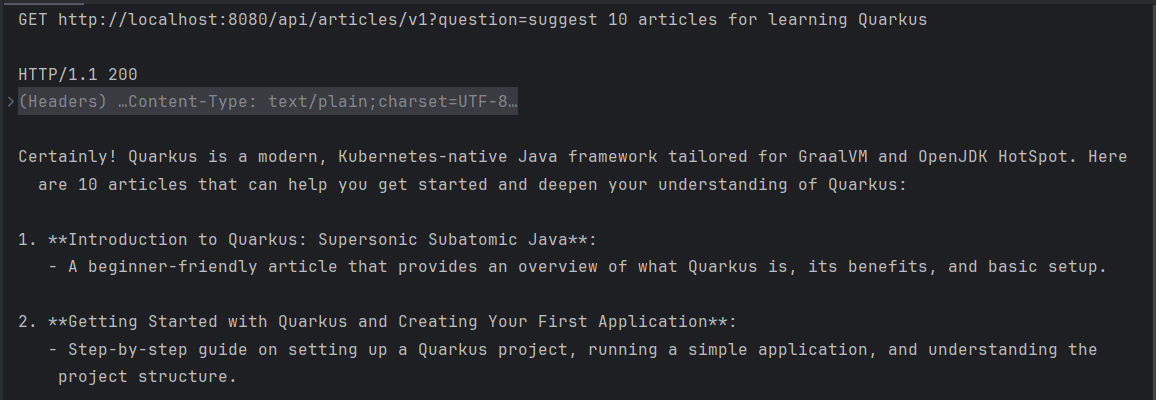
If we send a GET request now, we’ll receive a response without a defined structure, similar to the default output from ChatGPT when accessed through a browser:
👁 request article recommedation
3. Mapping Response to a Specific Format
As we can see, the ChatClient interface simplifies the process of forwarding user queries to a chat model and sending the response back. However, in most cases, we’ll want the model’s output in a structured format, which can then be serialized to JSON.
The API exposes an entity() method, which allows us to define a specific data structure for the model’s output. Let’s revise our code to ensure it returns a list of Article objects, each containing a title and a set of tags:
record Article(String title, Set<String> tags) {
}

@GetMapping("v2")
List<Article> askQuestionAndRetrieveArticles(@RequestParam(name = "question") String question) {
 return chatClient.prompt()
 .user(question)
 .call()
 .entity(new ParameterizedTypeReference<List<Article>>() {});
}
If we execute the request now, we’ll expect the endpoint to return the Article recommendation in a valid JSON list:
👁 request aritcles as json

4. Provide Additional Context
We’ve learned how to use the Spring AI module to create prompts, send them to an AI model, and receive structured responses. However, the article recommendations returned by our REST API are fictional and may not exist in reality, on our website.
To address this, the ChatClient leverages the Retrieval Augmented Generation (RAG) pattern, combining data retrieval from a source with a generative model to provide more accurate responses. We’ll use a vector store to take advantage of RAG and load it with documents relevant to our use case.
First, we’ll create a VectorStore and load it with the augmented data from a local file, during the class initialization:
@RestController
@RequestMapping("api/articles")
public class BlogsController {

 private final ChatClient chatClient;
 private final VectorStore vectorStore;

 public BlogsController(ChatClient.Builder chatClientBuilder, EmbeddingModel embeddingModel) throws IOException {
 this.chatClient = chatClientBuilder.build();
 this.vectorStore = new SimpleVectorStore(embeddingModel);
 initContext();
 }

 void initContext() throws IOException {
 List<Document> documents = Files.readAllLines(Path.of("src/main/resources/articles.txt"))
 .stream()
 .map(Document::new)
 .toList();

 vectorStore.add(documents);
 }

 // ...
}
As we can see, we read all the entries from articles.txt and created a new Document for each line of this file. Needless to say, we don’t have to rely on a file – we can use any data source if needed.
After that, we’ll provide the augmented data to the model by wrapping the VectorStore in a QuestionAnswerAdvisor:
@GetMapping("v3")
List<Article> askQuestionWithContext(@RequestParam(name = "question") String question) {
 return chatClient.prompt()
 .advisors(new QuestionAnswerAdvisor(vectorStore, SearchRequest.defaults()))
 .user(question)
 .call()
 .entity(new ParameterizedTypeReference<List<Article>>() {});
}
As a result, our application now returns data exclusively from the augmented context:
👁 request articles using rag

5. Conclusion
In this article, we explored Spring AI’s ChatClient. We began by sending simple user queries to the model and reading its responses as plain text. Then, we enhanced our solution by retrieving the model’s response in a specific, structured format.
Finally, we learned how to load the model’s context with a collection of documents to provide accurate responses based on our own data. We achieved this using a VectorStore and a QuestionAnswerAdvisor.












