

1. Overview
In this tutorial, we’ll discuss the enhanced Testcontainers support introduced in Spring Boot 3.1.
This update provides a more streamlined approach to configuring the containers, and it allows us to start them for local development purposes. As a result, developing and running tests using Testcontainers becomes a seamless and efficient process.
2. Testcontainers Prior to SpringBoot 3.1
We can use Testcontainers to create a production-like environment during the testing phase. By doing so, we’ll eliminate the need for mocks and write high-quality automated tests that aren’t coupled to the implementation details.
For the code examples in this article, we’ll use a simple web application with a MongoDB database as a persistence layer and a small REST interface:
@RestController
@RequestMapping("characters")
public class MiddleEarthCharactersController {
 private final MiddleEarthCharactersRepository repository;

 // constructor not shown

 @GetMapping
 public List<MiddleEarthCharacter> findByRace(@RequestParam String race) {
 return repository.findAllByRace(race);
 }

 @PostMapping
 public MiddleEarthCharacter save(@RequestBody MiddleEarthCharacter character) {
 return repository.save(character);
 }
}
During the integration tests, we’ll spin up a Docker container containing the database server. Since the database port exposed by the container will be dynamically allocated, we cannot define the database URL in the properties file. As a result, for a Spring Boot application with a version prior to 3.1, we’d need to use @DynamicPropertySource annotation in order to add these properties to a DynamicPropertyRegistry:
@Testcontainers
@SpringBootTest(webEnvironment = DEFINED_PORT)
class DynamicPropertiesIntegrationTest {

 @Container
 static MongoDBContainer mongoDBContainer = new MongoDBContainer(DockerImageName.parse("mongo:4.0.10"));

 @DynamicPropertySource
 static void setProperties(DynamicPropertyRegistry registry) {
 registry.add("spring.data.mongodb.uri", mongoDBContainer::getReplicaSetUrl);
 }

 // ...
}
For the integration test, we’ll use the @SpringBootTest annotation to start the application on the port defined in the configuration files. Additionally, we’ll use Testcontainers for setting up the environment.
Finally, let’s use REST-assured for executing the HTTP requests and asserting the validity of the responses:
@Test
void whenRequestingHobbits_thenReturnFrodoAndSam() {
 repository.saveAll(List.of(
 new MiddleEarthCharacter("Frodo", "hobbit"),
 new MiddleEarthCharacter("Samwise", "hobbit"),
 new MiddleEarthCharacter("Aragon", "human"),
 new MiddleEarthCharacter("Gandalf", "wizzard")
 ));

 when().get("/characters?race=hobbit")
 .then().statusCode(200)
 .and().body("name", hasItems("Frodo", "Samwise"));
}
3. Using @ServiceConnection for Dynamic Properties
Starting with SpringBoot 3.1, we can utilize the @ServiceConnection annotation to eliminate the boilerplate code of defining the dynamic properties.
Firstly, we’ll need to include the spring-boot-testcontainers dependency in our pom.xml:
<dependency>
 <groupId>org.springframework.boot</groupId>
 <artifactId>spring-boot-testcontainers</artifactId>
 <scope>test</scope>
</dependency>
After that, we can remove the static method that registers all the dynamic properties. Instead, we’ll simply annotate the container with @ServiceConnection:
@Testcontainers
@SpringBootTest(webEnvironment = DEFINED_PORT)
class ServiceConnectionIntegrationTest {

 @Container
 @ServiceConnection
 static MongoDBContainer mongoDBContainer = new MongoDBContainer(DockerImageName.parse("mongo:4.0.10"));

 // ...

}
The @ServiceConncetion allows SpringBoot’s autoconfiguration to dynamically register all the needed properties. Behind the scenes, @ServiceConncetion determines which properties are needed based on the container class, or on the Docker image name.
A list of all the containers and images that support this annotation can be found in Spring Boot’s official documentation.
4. Testcontainers Support for Local Development
Another exciting feature is the seamless integration of Testcontainers into local development with minimal configuration. This functionality enables us to replicate the production environment not only during testing but also for local development.
In order to enable it, we first need to create a @TestConfiguration and declare all the Testcontainers as Spring Beans. Let’s also add the @ServiceConnection annotation that will seamlessly bind the application to the database:
@TestConfiguration(proxyBeanMethods = false)
class LocalDevTestcontainersConfig {
 @Bean
 @ServiceConnection
 public MongoDBContainer mongoDBContainer() {
 return new MongoDBContainer(DockerImageName.parse("mongo:4.0.10"));
 }
}
Because all the Testcontainers dependencies are being imported with a test scope, we’ll need to start the application from the test package. Consequently, let’s create in this package a main() method that calls the actual main() method from the java package:
public class LocalDevApplication {
 public static void main(String[] args) {
 SpringApplication.from(Application::main)
 .with(LocalDevTestcontainersConfig.class)
 .run(args);
 }
}
This is it. Now we can start the application locally from this main() method and it will use the MongoDB database.
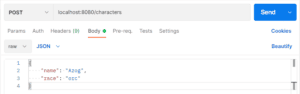
Let’s send a POST request from Postman and then directly connect to the database and check if the data was correctly persisted:
👁 postman post data
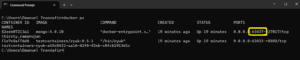
In order to connect to the database, we’ll need to find the port exposed by the container. We can fetch it from the application logs or simply by running the docker ps command:
👁 visual diff on changed files
Finally, we can use a MongoDB client to connect to the database using the URL mongodb://localhost:63437/test, and query the characters collection:
👁 mongodb find all
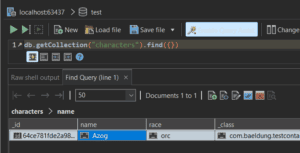
That’s it, we’re able to connect and query to the database started by the Testcontainer for local development.
5. Integration With DevTools and @RestartScope
If we restart the application often during the local development, a potential downside would be that all the containers will be restarted each time. As a result, the start-up will potentially be slower and the test data will be lost.
However, we can keep containers alive when the application is being reloaded by leveraging the Testcontainers integration with spring-boot-devtools. This is an experimental Testcontainers feature that enables a smoother and more efficient development experience, as it saves valuable time and test data.
Let’s start by adding the spring-boot-devtools dependency:
<dependency>
 <groupId>org.springframework.boot</groupId>
 <artifactId>spring-boot-devtools</artifactId>
 <scope>runtime</scope>
 <optional>true</optional>
</dependency>
Now, we can go back to the test configuration for local development and annotate the Testcontainers beans with the @RestartScope annotation:
@Bean
@RestartScope
@ServiceConnection
public MongoDBContainer mongoDBContainer() {
 return new MongoDBContainer(DockerImageName.parse("mongo:4.0.10"));
}
As a result, we can now start the application from the main() method from the test package and take advantage of the spring-boot-devtools live-reload functionality. For instance, we can save an entry from Postman, then recompile and reload the application:
👁 postman save again
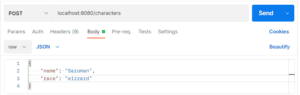
Let’s introduce a minor change like switching the request mapping from “characters” to “api/characters” and re-compile:
👁 devtools ive reload
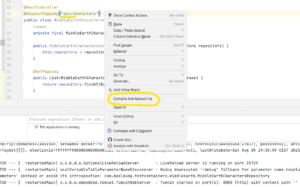
We can already see from the application logs or from Docker itself that the database container wasn’t restarted. Nevertheless, let’s go one step further and check that the application reconnected to the same database after the restart. For example, we can do this by sending a GET request at the new path and expecting the previously inserted data to be there:
👁 app reconnected
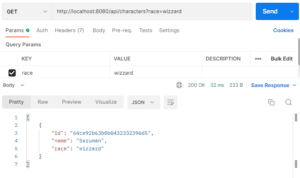
Similarly, we can use the withReuse(true) method of the Testcontainer’s API:
@Bean
@ServiceConnection
public MongoDBContainer mongoDBContainer() {
 return new MongoDBContainer(DockerImageName.parse("mongo:4.0.10"))
 .withReuse(true);
}
This is a more powerful alternative that enables the container to outlive the application. In other words, by enabling reuse, we can reload or even completely restart the application, while ensuring the containers remain actively preserved.
6. Conclusion
In this article, we’ve discussed SpringBoot 3.1’s new Testcontainers features. We learned how to use the new @ServiceConnection annotation that provides a streamlined alternative to using @DynamicPropertySource and the boilerplate configuration.
Following that, we delved into utilizing Testcontainers for local development by creating an additional main() method in the test package and declaring them as Spring beans. In addition to this, the integration with spring-boot-devtools and @RestartScope enabled us to create a fast, consistent, and reliable environment for local development.












