
eBook – Guide Spring Cloud – NPI EA (cat=Spring Cloud)

eBook – Mockito – NPI EA (tag = Mockito)
👁 announcement - icon
Mocking is an essential part of unit testing, and the Mockito library makes it easy to write clean and intuitive unit tests for your Java code.
Get started with mocking and improve your application tests using our Mockito guide:
eBook – Java Concurrency – NPI EA (cat=Java Concurrency)
👁 announcement - icon
Handling concurrency in an application can be a tricky process with many potential pitfalls. A solid grasp of the fundamentals will go a long way to help minimize these issues.
Get started with understanding multi-threaded applications with our Java Concurrency guide:
eBook – Reactive – NPI EA (cat=Reactive)
👁 announcement - icon
Spring 5 added support for reactive programming with the Spring WebFlux module, which has been improved upon ever since. Get started with the Reactor project basics and reactive programming in Spring Boot:
eBook – Java Streams – NPI EA (cat=Java Streams)
👁 announcement - icon
Since its introduction in Java 8, the Stream API has become a staple of Java development. The basic operations like iterating, filtering, mapping sequences of elements are deceptively simple to use.
But these can also be overused and fall into some common pitfalls.
To get a better understanding on how Streams work and how to combine them with other language features, check out our guide to Java Streams:
eBook – Jackson – NPI EA (cat=Jackson)
eBook – HTTP Client – NPI EA (cat=Http Client-Side)
eBook – Maven – NPI EA (cat = Maven)
eBook – Persistence – NPI EA (cat=Persistence)
eBook – RwS – NPI EA (cat=Spring MVC)
Course – LS – NPI EA (cat=Jackson)
👁 announcement - icon
Get started with Spring and Spring Boot, through the Learn Spring course:
>> LEARN SPRINGCourse – RWSB – NPI EA (cat=REST)
👁 announcement - icon
Explore Spring Boot 3 and Spring 6 in-depth through building a full REST API with the framework:
Course – LSS – NPI EA (cat=Spring Security)
👁 announcement - icon
Yes, Spring Security can be complex, from the more advanced functionality within the Core to the deep OAuth support in the framework.
I built the security material as two full courses - Core and OAuth, to get practical with these more complex scenarios. We explore when and how to use each feature and code through it on the backing project.
You can explore the course here:
Course – LSD – NPI EA (tag=Spring Data JPA)
👁 announcement - icon
Spring Data JPA is a great way to handle the complexity of JPA with the powerful simplicity of Spring Boot.
Get started with Spring Data JPA through the guided reference course:
Partner – Moderne – NPI EA (cat=Spring Boot)
👁 announcement - icon
Refactor Java code safely — and automatically — with OpenRewrite.
Refactoring big codebases by hand is slow, risky, and easy to put off. That’s where OpenRewrite comes in. The open-source framework for large-scale, automated code transformations helps teams modernize safely and consistently.
Each month, the creators and maintainers of OpenRewrite at Moderne run live, hands-on training sessions — one for newcomers and one for experienced users. You’ll see how recipes work, how to apply them across projects, and how to modernize code with confidence.
Join the next session, bring your questions, and learn how to automate the kind of work that usually eats your sprint time.
Course – LJB – NPI EA (cat = Core Java)
1. Overview
Spring Cloud Gateway is an intelligent proxy service often used in microservices. It transparently centralizes requests in a single entry point and routes them to the proper service. One of its most interesting features is the concept of filters (WebFilter or GatewayFilter).
WebFilter, together with Predicate factories, incorporate the complete routing mechanism. Spring Cloud Gateway provides many built-in WebFilter factories that allow interacting with the HTTP requests before reaching the proxied service and the HTTP responses before delivering the result to the client. It is also possible to implement custom filters.
In this tutorial, we’ll focus on the built-in WebFilter factories included in the project and how to use them in advanced use cases.
2. WebFilter Factories
WebFilter (or GatewayFilter) factories allow modifying the inbound HTTP requests and outbound HTTP responses. In this sense, it offers a set of interesting functionalities to apply before and after interacting with the downstream services.
👁 Spring Cloud Gateway WebFilter Factories Architecture
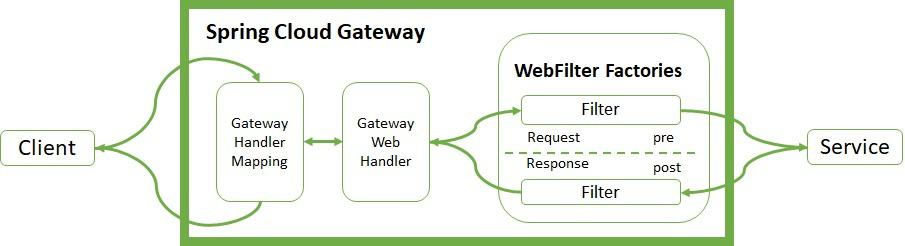
The Handler Mapping manages the client’s request. It checks whether it matches some configured route. Then, it sends the request to the Web Handler to execute the specific filter chain for this route.
The dotted line splits the logic between pre- and post-filter logic. The incoming filters run before the proxy request. The output filters enter into action when they receive the proxy response. Filters provide mechanisms to modify the process in between.
3. Implementing WebFilter Factories
Let’s review the most important WebFilter factories incorporated in the Spring Cloud Gateway project. There are two ways to implement them, using YAML or Java DSL.
Let’s look at examples of both.
3.1. HTTP Request
The built-in WebFilter factories allow interacting with the headers and parameters of the HTTP request. We can add (AddRequestHeader), patch(AddRequestHeadersIfNotPresent from version 4.0), map (MapRequestHeader), set or replace (SetRequestHeader), and remove (RemoveRequestHeader) header values and send them to the proxied service.
The original host header can also be kept (PreserveHostHeader).
In the same way, we can add (AddRequestParameter) and remove (RemoveRequestParameter) parameters to be processed by the downstream service:
- id: add_request_header_route
 uri: https://httpbin.org
 predicates:
 - Path=/get/**
 filters:
 - AddRequestHeader=My-Header-Good,Good
 - AddRequestHeader=My-Header-Remove,Remove
 - AddRequestHeadersIfNotPresent=My-Header-Absent:Absent
 - AddRequestParameter=var, good
 - AddRequestParameter=var2, remove
 - MapRequestHeader=My-Header-Good, My-Header-Bad
 - MapRequestHeader=My-Header-Set, My-Header-Bad
 - SetRequestHeader=My-Header-Set, Set
 - RemoveRequestHeader=My-Header-Remove
 - RemoveRequestParameter=var2
Let’s check if everything works as expected. For that, we’ll use curl and the publicly available httpbin.org:
$ curl http://localhost:8080/get
{
 "args": {
 "var": "good"
 },
 "headers": {
 "Host": "localhost",
 "My-Header-Bad": "Good",
 "My-Header-Good": "Good",
 "My-Header-Set": "Set",
 },
 "origin": "127.0.0.1, 90.171.125.86",
 "url": "https://localhost:8080/get?var=good"
}
We can see the curl response as a consequence of the request filters configured. They add My-Header-Good with value Good and map its content to My-Header-Bad. They remove My-Header-Remove and set a new value to My-Header-Set. In the args and url sections, we can see a new parameter var added. Furthermore, the last filter removes the var2 parameter.
In addition, we can modify the request body before reaching the proxied service. This filter can only be configured using the Java DSL notation. The snippet below just uppercases the content of the response body:
@Bean
public RouteLocator routes(RouteLocatorBuilder builder) {
 return builder.routes()
 .route("modify_request_body", r -> r.path("/post/**")
 .filters(f -> f.modifyRequestBody(
 String.class, Hello.class, MediaType.APPLICATION_JSON_VALUE,
 (exchange, s) -> Mono.just(new Hello(s.toUpperCase()))))
 .uri("https://httpbin.org"))
 .build();
}
To test the snippet, let’s execute curl with the -d option to include the body “Content”:
$ curl -X POST "http://localhost:8080/post" -i -d "Content"
"data": "{\"message\":\"CONTENT\"}",
"json": {
 "message": "CONTENT"
}
We can see that the content of the body is now converted to uppercase – CONTENT – as a result of the filter.
3.2. HTTP Response
Likewise, we can modify response headers by using add (AddResponseHeader), set or replace (SetResponseHeader), remove (RemoveResponseHeader) and rewrite (RewriteResponseHeader).
Another functionality over the response is to dedupe (DedupeResponseHeader) to overwrite strategies and avoid duplication on them. We can get rid of backend-specific details regarding version, location, and host by using another built-in factory (RemoveLocationResponseHeader).
After version 4.0, we can remove (RemoveJsonAttributesResponseBody) multiple attributes from the JSON body content. By default, it just removes the attributes at the root level. Adding a true attribute at the end will remove attributes at any level of the JSON structure.
Let’s see a complete example:
- id: response_header_route
 uri: https://httpbin.org
 predicates:
 - Path=/header/post/**
 filters:
 - DedupeResponseHeader=Access-Control-Allow-Credentials Access-Control-Allow-Origin
 - SetResponseHeader=My-Header-Set, Set
 - RemoveResponseHeader=My-Header-Remove
 - RewriteResponseHeader=My-Header-Rewrite, password=[^&]+, password=***
 - RewriteLocationResponseHeader=AS_IN_REQUEST, Location, ,
 - RemoveJsonAttributesResponseBody=form,Accept,true
 - AddResponseHeader=My-Header-Good,Good
 - AddResponseHeader=My-Header-Set,Good
 - AddResponseHeader=My-Header-Remove,Remove
 - AddResponseHeader=My-Header-Rewrite,password=12345678
 - StripPrefix=1
Let’s use curl to display the response headers:
$ curl -X POST "http://localhost:8080/header/post" -s -o /dev/null -D -
HTTP/1.1 200 OK
My-Header-Good: Good
Access-Control-Allow-Origin: *
Access-Control-Allow-Credentials: true
My-Header-Rewrite: password=***
My-Header-Set: Set
Similarly to the HTTP request, we can modify the response body. For this example, we overwrite the body of the PUT response:
@Bean
public RouteLocator responseRoutes(RouteLocatorBuilder builder) {
 return builder.routes()
 .route("modify_response_body", r -> r.path("/put/**")
 .filters(f -> f.modifyResponseBody(
 String.class, Hello.class, MediaType.APPLICATION_JSON_VALUE,
 (exchange, s) -> Mono.just(new Hello("New Body"))))
 .uri("https://httpbin.org"))
 .build();
}
Let’s use the PUT endpoint to test the functionality:
$ curl -X PUT "http://localhost:8080/put" -i -d "CONTENT"
{"message":"New Body"}
3.3. Path
One of the features provided with the built-in WebFilter factories is the interaction with the paths configured by the client. It is possible to set a different path (SetPath), rewrite (RewritePath), add a prefix (PrefixPath), and strip (StripPrefix) to extract only parts of it.
We should note that the filters are executed in order based on their positions in the YAML file:
- id: path_route
 uri: https://httpbin.org
 predicates:
 - Path=/new/post/**
 filters:
 - RewritePath=/new(?<segment>/?.*), $\{segment}
 - SetPath=/post
Both filters remove the subpath /new before reaching the proxied service.
Let’s test this with curl:
$ curl -X POST "http://localhost:8080/new/post" -i
"X-Forwarded-Prefix": "/new"
"url": "https://localhost:8080/post"
We could also use the StripPrefix factory. With StripPrefix=1, we can get rid of the first subpath when contacting the downstream service.
3.4. Related to HTTP Status
RedirectTo takes two parameters: status and URL. The status must be a series of 300 redirection HTTP code and the URL a valid one. SetStatus takes one parameter status that can be an HTTP code or its string representation:
- id: redirect_route
 uri: https://httpbin.org
 predicates:
 - Path=/fake/post/**
 filters:
 - RedirectTo=302, https://httpbin.org
- id: status_route
 uri: https://httpbin.org
 predicates:
 - Path=/delete/**
 filters:
 - SetStatus=401
The first filter acts over the /fake/post path, and the client is redirected to https://httpbin.org with an HTTP status 302:
$ curl -X POST "http://localhost:8080/fake/post" -i
HTTP/1.1 302 Found
Location: https://httpbin.org
The second filter detects the /delete path, and an HTTP status 401 is set:
$ curl -X DELETE "http://localhost:8080/delete" -i
HTTP/1.1 401 Unauthorized
3.5. Request Size Limit
Finally, we can restrict the size limit of the request (RequestSize).
If the request size is beyond the limit, the gateway rejects access to the service:
- id: size_route
 uri: https://httpbin.org
 predicates:
 - Path=/anything
 filters:
 - name: RequestSize
 args:
 maxSize: 5000000
4. Advanced Use Cases
Spring Cloud Gateway offers other advanced WebFilter factories to support baseline functionalities for the microservices pattern.
4.1. Circuit Breaker
Spring Cloud Gateway has a built-in WebFilter factory for Circuit Breaker capability. The factory permits different fallback strategies and Java DSL route configuration:
- id: circuitbreaker_route
 uri: https://httpbin.org
 predicates:
 - Path=/status/504
 filters:
 - name: CircuitBreaker
 args:
 name: myCircuitBreaker
 fallbackUri: forward:/anything
 - RewritePath=/status/504, /anything
For the configuration of the Circuit Breaker, we used Resilience4J by adding the spring-cloud-starter-circuitbreaker-reactor-resilience4j dependency:
<dependency>
 <groupId>org.springframework.cloud</groupId>
 <artifactId>spring-cloud-starter-circuitbreaker-reactor-resilience4j</artifactId>
</dependency>
Again, we can test the functionality using curl:
$ curl http://localhost:8080/status/504
"url": "https://localhost:8080/anything"
4.2. Retry
Another advanced feature allows the client to retry access when something happens with proxied services. It takes several parameters, such as the number of retries, the HTTP status codes (statuses) and methods that should be retried, series, exceptions, and backoff intervals to wait after each retry:
- id: retry_test
 uri: https://httpbin.org
 predicates:
 - Path=/status/502
 filters:
 - name: Retry
 args:
 retries: 3
 statuses: BAD_GATEWAY
 methods: GET,POST
 backoff:
 firstBackoff: 10ms
 maxBackoff: 50ms
 factor: 2
 basedOnPreviousValue: false
When the client reaches /status/502 (Bad Gateway), the filter retries three times, waiting for the backoff intervals configured after each execution.
Let’s see how it works:
$ curl http://localhost:8080/status/502At the same time, we need to check the Gateway logs in the server:
Mapping [Exchange: GET http://localhost:8080/status/502] to Route{id='retry_test', ...}
Handler is being applied: {uri=https://httpbin.org/status/502, method=GET}
Received last HTTP packet
Handler is being applied: {uri=https://httpbin.org/status/502, method=GET}
Received last HTTP packet
Handler is being applied: {uri=https://httpbin.org/status/502, method=GET}
Received last HTTP packet
The filter retries three times with this backoff for methods GET and POST when the gateway receives status 502.
4.3. Save Session and Secure Headers
The SecureHeader factory adds HTTP security headers to the response. Similarly, SaveSession is of particular importance when used with Spring Session and Spring Security:
filters:
- SaveSession
This filter stores the session state before making the forwarded call.
4.4. Request Rate Limiter
The RequestRateLimiter factory determines if the request can proceed. If not, it returns an HTTP code status 429 – Too Many Requests. It uses different parameters and resolvers to specify the rate limiter.
The RedisRateLimiter uses the well-known Redis database to check the number of tokens the bucket can keep.
It requires the following dependency:
<dependency>
 <groupId>org.springframework.boot</groupId>
 <artifactId>spring-boot-starter-data-redis-reactive</artifactId>
 </dependency>
Consequently, it also needs the configuration of Spring Redis:
spring:
 redis:
 host: localhost
 port: 6379
The filter has several properties. The first argument, replenishRate, is the number of requests per second allowed. The second argument, burstCapacity, is the maximum number of requests in a single second. The third parameter, requestedTokens, is how many tokens the request costs. Let’s see an example implementation:
- id: request_rate_limiter
 uri: https://httpbin.org
 predicates:
 - Path=/redis/get/**
 filters:
 - StripPrefix=1
 - name: RequestRateLimiter
 args:
 redis-rate-limiter.replenishRate: 10
 redis-rate-limiter.burstCapacity: 5
 redis-rate-limiter.requestedTokens: 1
Let’s use curl to test the filter. Beforehand, we should remember to start a Redis instance, for example using Docker:
$ curl "http://localhost:8080/redis/get" -i
HTTP/1.1 200 OK
X-RateLimit-Remaining: 4
X-RateLimit-Requested-Tokens: 1
X-RateLimit-Burst-Capacity: 5
X-RateLimit-Replenish-Rate: 10
Once the remaining rate limit reaches zero, the gateway raises HTTP code 429. For testing the behavior, we can use the unit tests.
We start an Embedded Redis Server and run RepeatedTests in parallel. Once the bucket reaches the limit, the error begins to display:
00:57:48.263 [main] INFO c.b.s.w.RedisWebFilterFactoriesLiveTest - Received: status->200, reason->OK, remaining->[4]
00:57:48.394 [main] INFO c.b.s.w.RedisWebFilterFactoriesLiveTest - Received: status->200, reason->OK, remaining->[3]
00:57:48.530 [main] INFO c.b.s.w.RedisWebFilterFactoriesLiveTest - Received: status->200, reason->OK, remaining->[2]
00:57:48.667 [main] INFO c.b.s.w.RedisWebFilterFactoriesLiveTest - Received: status->200, reason->OK, remaining->[1]
00:57:48.826 [main] INFO c.b.s.w.RedisWebFilterFactoriesLiveTest - Received: status->200, reason->OK, remaining->[0]
00:57:48.851 [main] INFO c.b.s.w.RedisWebFilterFactoriesLiveTest - Received: status->429, reason->Too Many Requests, remaining->[0]
00:57:48.894 [main] INFO c.b.s.w.RedisWebFilterFactoriesLiveTest - Received: status->429, reason->Too Many Requests, remaining->[0]
00:57:49.135 [main] INFO c.b.s.w.RedisWebFilterFactoriesLiveTest - Received: status->200, reason->OK, remaining->[4]
4.5. Cache Support
From version 4.0, Spring Cloud Gateway provides cache filters for both request (CacheRequestBody) and response (LocalCacheResponseBody).
To configure the CacheRequestBody filter, we just need to set the type of body class to convert it to:
- id: cache_request_body_route
 uri: https://httpbin.org
 predicates:
 - Path=/cache/post/**
 filters:
 - StripPrefix=1
 - name: CacheRequestBody
 args:
 bodyClass: java.lang.String
The cached content will be available in the ServerWebExchange.getAttributes() under a key defined in ServerWebExchangeUtils.CACHED_REQUEST_BODY_ATTR to use it in a later filter.
Before configuring the LocalCacheResponseBody filter, we need to add the spring-boot-starter-cache and caffeine dependencies or other Spring Cache implementations:
<dependency>
 <groupId>org.springframework.boot</groupId>
 <artifactId>spring-boot-starter-cache</artifactId>
</dependency>
<dependency>
 <groupId>com.github.ben-manes.caffeine</groupId>
 <artifactId>caffeine</artifactId>
</dependency>
We can activate this cache filter globally by setting the following property spring.cloud.gateway.filter.local-response-cache.enabled to true. It provides two more properties timeToLive and size. The property timeToLive sets the time to expire a cache entry. The property size sets the maximum size of the cache to evict entries.
spring:
 cloud:
 gateway:
 filter:
 local-response-cache:
 enabled: true
 timeToLive: 20m
 size: 6MB
We can also override the global configuration by configuring the filter per route. The route configuration accepts two parameters. The first parameter will override the time to expire a cache entry. The second parameter will override the maximum size of the cache to evict entries for this route.
- id: cache_response_body_route
 uri: https://httpbin.org
 predicates:
 - Path=/cache/get/**
 filters:
 - StripPrefix=1
 - LocalResponseCache=10s,20MB
After we visit this path, we will find a response header Cache-Control with the value max-age=10.
5. Conclusion
In this tutorial, we covered Spring Cloud Gateway’s WebFilter factories. We saw how to interact with the requests and responses from the client before and after executing the proxied service.
The code backing this article is available on GitHub. Once you're logged in as a Baeldung Pro Member, start learning and coding on the project.












