👁 announcement - icon
If you're working on a Spring Security (and especially an OAuth) implementation, definitely have a look at the Learn Spring Security course:
>> LEARN SPRING SECURITY |
VOOZH | about |
Mocking is an essential part of unit testing, and the Mockito library makes it easy to write clean and intuitive unit tests for your Java code.
Get started with mocking and improve your application tests using our Mockito guide:
Handling concurrency in an application can be a tricky process with many potential pitfalls. A solid grasp of the fundamentals will go a long way to help minimize these issues.
Get started with understanding multi-threaded applications with our Java Concurrency guide:
Spring 5 added support for reactive programming with the Spring WebFlux module, which has been improved upon ever since. Get started with the Reactor project basics and reactive programming in Spring Boot:
Since its introduction in Java 8, the Stream API has become a staple of Java development. The basic operations like iterating, filtering, mapping sequences of elements are deceptively simple to use.
But these can also be overused and fall into some common pitfalls.
To get a better understanding on how Streams work and how to combine them with other language features, check out our guide to Java Streams:
Get started with Spring and Spring Boot, through the Learn Spring course:
>> LEARN SPRINGExplore Spring Boot 3 and Spring 6 in-depth through building a full REST API with the framework:
Yes, Spring Security can be complex, from the more advanced functionality within the Core to the deep OAuth support in the framework.
I built the security material as two full courses - Core and OAuth, to get practical with these more complex scenarios. We explore when and how to use each feature and code through it on the backing project.
You can explore the course here:
Spring Data JPA is a great way to handle the complexity of JPA with the powerful simplicity of Spring Boot.
Get started with Spring Data JPA through the guided reference course:
Refactor Java code safely — and automatically — with OpenRewrite.
Refactoring big codebases by hand is slow, risky, and easy to put off. That’s where OpenRewrite comes in. The open-source framework for large-scale, automated code transformations helps teams modernize safely and consistently.
Each month, the creators and maintainers of OpenRewrite at Moderne run live, hands-on training sessions — one for newcomers and one for experienced users. You’ll see how recipes work, how to apply them across projects, and how to modernize code with confidence.
Join the next session, bring your questions, and learn how to automate the kind of work that usually eats your sprint time.
In this tutorial, we’ll learn how to set up an OAuth 2.0 resource server using Spring Security 5.
We’ll do this using JWTs, as well as opaque tokens, the two kinds of bearer tokens supported by Spring Security.
Before we jump in to the implementation and code samples, we’ll first establish some background.
JWT, or JSON Web Token, is a way to transfer sensitive information securely in the widely-accepted JSON format. The contained information could be about the user, or about the token itself, such as its expiry and issuer.
On the other hand, an opaque token, as the name suggests, is opaque in terms of the information it carries. The token is just an identifier that points to the information stored at the authorization server; it gets validated via introspection at the server’s end.
In the context of OAuth 2.0, a resource server is an application that protects resources via OAuth tokens. These tokens are issued by an authorization server, typically to a client application. The job of the resource server is to validate the token before serving a resource to the client.
A token’s validity is determined by several things:
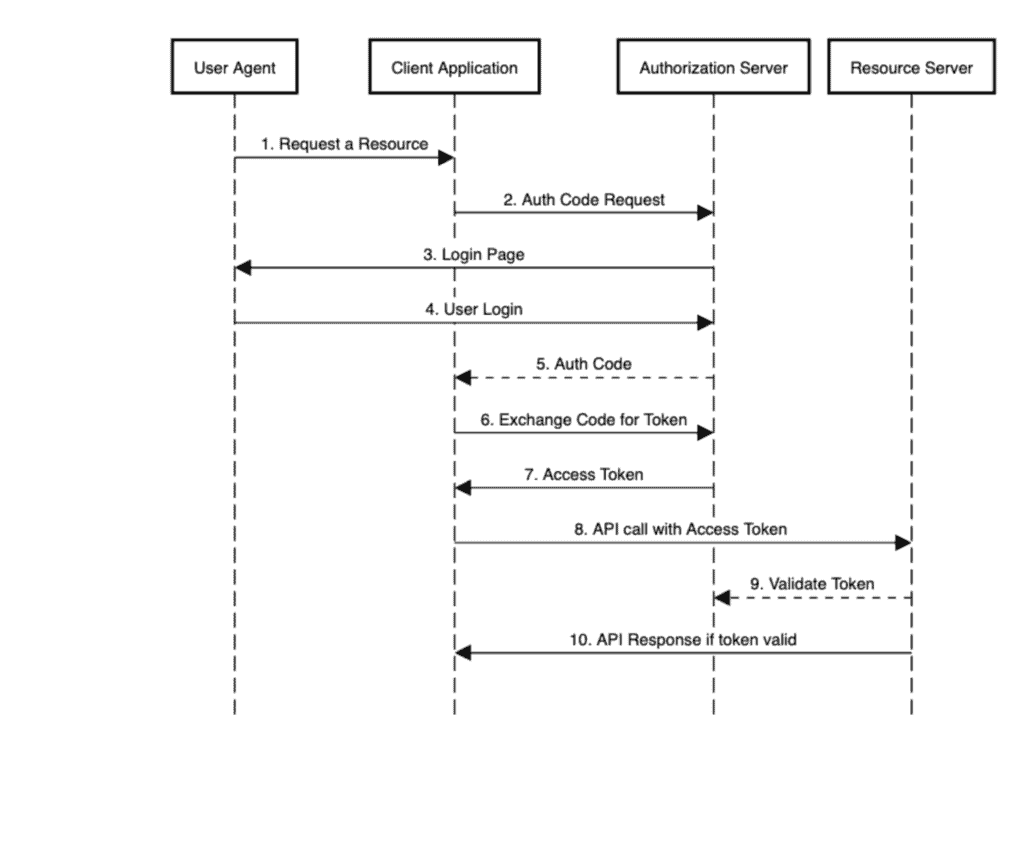
To visualize this, let’s look at a sequence diagram for the authorization code flow, and see all the actors in action:
👁 AuthCodeFlowSequenceDiagram
As we can see in step 8, when the client application calls the resource server’s API to access a protected resource, it first goes to the authorization server to validate the token contained in the request’s Authorization: Bearer header, and then responds to the client.
Step 9 is what we’ll focus on in this tutorial.
So now let’s jump into the code part. We’ll set up an authorization server using Keycloak, a resource server validating JWT tokens, another resource server validating opaque tokens, and a couple of JUnit tests to simulate client apps and verify responses.
First, we’ll set up an authorization server, the thing that issues tokens.
For this, we’ll use Keycloak embedded in a Spring Boot Application. Keycloak is an open-source identity and access management solution. Since we’re focusing on the resource server in this tutorial, we won’t delve any deeper into it.
Our embedded Keycloak Server has two clients defined, fooClient and barClient, corresponding to our two resource server applications.
Our resource server will have four main components:
After we take a quick look at the dependencies, we’ll go through these components one by one for our resource server handling JWT tokens.
Mainly, we’ll need the spring-boot-starter-oauth2-resource-server, Spring Boot’s starter for resource server support. This starter includes Spring Security by default, so we don’t need to add it explicitly:
<dependency>
 <groupId>org.springframework.boot</groupId>
 <artifactId>spring-boot-starter-web</artifactId>
 <version>2.7.5</version>
</dependency>
<dependency>
 <groupId>org.springframework.boot</groupId>
 <artifactId>spring-boot-starter-oauth2-resource-server</artifactId>
 <version>2.7.5</version>
</dependency>
<dependency>
 <groupId>org.apache.commons</groupId>
 <artifactId>commons-lang3</artifactId>
 <version>3.13.0</version>
</dependency>
Apart from that, we’ll also add web support.
For our demonstration purposes, we’ll generate resources randomly, instead of getting them from a database, with some help from Apache’s commons-lang3 library.
Keeping it simple, we’ll use Foo, a POJO, as our protected resource:
public class Foo {
 private long id;
 private String name;

 // constructor, getters and setters
}
Here’s our rest controller to make Foo available for manipulation:
@RestController
@RequestMapping(value = "/foos")
public class FooController {

 @GetMapping(value = "/{id}")
 public Foo findOne(@PathVariable Long id) {
 return new Foo(Long.parseLong(randomNumeric(2)), randomAlphabetic(4));
 }

 @GetMapping
 public List findAll() {
 List fooList = new ArrayList();
 fooList.add(new Foo(Long.parseLong(randomNumeric(2)), randomAlphabetic(4)));
 fooList.add(new Foo(Long.parseLong(randomNumeric(2)), randomAlphabetic(4)));
 fooList.add(new Foo(Long.parseLong(randomNumeric(2)), randomAlphabetic(4)));
 return fooList;
 }

 @ResponseStatus(HttpStatus.CREATED)
 @PostMapping
 public void create(@RequestBody Foo newFoo) {
 logger.info("Foo created");
 }
}
As is evident, we have the provision to GET all Foos, GET a Foo by id, and POST a Foo.
In this configuration class, we’ll define access levels for our resource:
@Configuration
public class JWTSecurityConfig {

 @Bean
 public SecurityFilterChain filterChain(HttpSecurity http) throws Exception {
 http.authorizeRequests(authz -> authz.antMatchers(HttpMethod.GET, "/foos/**")
 .hasAuthority("SCOPE_read")
 .antMatchers(HttpMethod.POST, "/foos")
 .hasAuthority("SCOPE_write")
 .anyRequest()
 .authenticated())
 .oauth2ResourceServer(oauth2 -> oauth2.jwt());
 return http.build();
 }
}
Anyone with an access token having the read scope can get Foos. In order to POST a new Foo, their token should have a write scope.
Additionally, we’ll add a call to jwt() using the oauth2ResourceServer() DSL to indicate the type of tokens supported by our server here.
In the application properties, in addition to the usual port number and context-path, we need to define the path to our authorization server’s issuer URI so that the resource server can discover its provider configuration:
server:
 port: 8081
 servlet:
 context-path: /resource-server-jwt

spring:
 security:
 oauth2:
 resourceserver:
 jwt:
 issuer-uri: http://localhost:8083/auth/realms/baeldung
The resource server uses this information to validate the JWT tokens coming in from the client application, as per Step 9 of our sequence diagram.
For this validation to work using the issuer-uri property, the authorization server must be up and running. Otherwise, the resource server won’t start.
If we need to start it independently, then we can supply the jwk-set-uri property instead to point to the authorization server’s endpoint exposing public keys:
jwk-set-uri: http://localhost:8083/auth/realms/baeldung/protocol/openid-connect/certsAnd that’s all we need to get our server to validate JWT tokens.
For testing, we’ll set up a JUnit. In order to execute this test, we need the authorization server, as well as the resource server, up and running.
Let’s verify that we can get Foos from resource-server-jwt with a read scoped token in our test:
@Test
public void givenUserWithReadScope_whenGetFooResource_thenSuccess() {
 String accessToken = obtainAccessToken("read");

 Response response = RestAssured.given()
 .header(HttpHeaders.AUTHORIZATION, "Bearer " + accessToken)
 .get("http://localhost:8081/resource-server-jwt/foos");
 assertThat(response.as(List.class)).hasSizeGreaterThan(0);
}
In the above code, at Line #3, we obtain an access token with a read scope from the authorization server, covering Steps 1 through 7 of our sequence diagram.
Step 8 is performed by the RestAssured‘s get() call. Step 9 is performed by the resource server with the configurations we saw, and is transparent to us as users.
Next, let’s see the same components for our resource server handling opaque tokens.
To support opaque tokens, we’ll need the additional oauth2-oidc-sdk dependency:
<dependency>
 <groupId>com.nimbusds</groupId>
 <artifactId>oauth2-oidc-sdk</artifactId>
 <version>8.19</version>
 <scope>runtime</scope>
</dependency>For this one, we’ll add a Bar resource:
public class Bar {
 private long id;
 private String name;

 // constructor, getters and setters
}
We’ll also have a BarController, with endpoints similar to our FooController before, to dish out Bars.
In the application.yml here, we’ll need to add an introspection-uri corresponding to our authorization server’s introspection endpoint. As mentioned before, this is how an opaque token gets validated:
server:
 port: 8082
 servlet:
 context-path: /resource-server-opaque

spring:
 security:
 oauth2:
 resourceserver:
 opaque:
 introspection-uri: http://localhost:8083/auth/realms/baeldung/protocol/openid-connect/token/introspect
 introspection-client-id: barClient
introspection-client-secret: barClientSecretKeeping access levels similar to that of Foo for the Bar resource as well, this configuration class also makes a call to opaqueToken() using the oauth2ResourceServer() DSL to indicate the use of the opaque token type:
@Configuration
public class OpaqueSecurityConfig {

 @Value("${spring.security.oauth2.resourceserver.opaque.introspection-uri}")
 String introspectionUri;

 @Value("${spring.security.oauth2.resourceserver.opaque.introspection-client-id}")
 String clientId;

 @Value("${spring.security.oauth2.resourceserver.opaque.introspection-client-secret}")
 String clientSecret;

 @Bean
 public SecurityFilterChain filterChain(HttpSecurity http) throws Exception {
 http.authorizeRequests(authz -> authz.antMatchers(HttpMethod.GET, "/bars/**")
 .hasAuthority("SCOPE_read")
 .antMatchers(HttpMethod.POST, "/bars")
 .hasAuthority("SCOPE_write")
 .anyRequest()
 .authenticated())
 .oauth2ResourceServer(oauth2 -> oauth2.opaqueToken
 (token -> token.introspectionUri(this.introspectionUri)
 .introspectionClientCredentials(this.clientId, this.clientSecret)));
 return http.build();
 }
}
Here we’ll also specify the client credentials corresponding to the authorization server’s client that we’ll be using. We defined these earlier in our application.yml.
We’ll set up a JUnit for our opaque token-based resource server, similar to what we did for the JWT one.
In this case, we’ll check if a write scoped access token can POST a Bar to resource-server-opaque:
@Test
public void givenUserWithWriteScope_whenPostNewBarResource_thenCreated() {
 String accessToken = obtainAccessToken("read write");
 Bar newBar = new Bar(Long.parseLong(randomNumeric(2)), randomAlphabetic(4));

 Response response = RestAssured.given()
 .contentType(ContentType.JSON)
 .header(HttpHeaders.AUTHORIZATION, "Bearer " + accessToken)
 .body(newBar)
 .log()
 .all()
 .post("http://localhost:8082/resource-server-opaque/bars");
 assertThat(response.getStatusCode()).isEqualTo(HttpStatus.CREATED.value());
}
If we get a status of CREATED back, it means the resource server successfully validated the opaque token and created the Bar for us.
In this article, we learned how to configure a Spring Security based resource server application for validating JWTs, as well as opaque tokens.
As we saw, with minimal setup, Spring made it possible to seamlessly validate the tokens with an issuer and send resources to the requesting party (in our case, a JUnit test).
Baeldung Pro comes with both absolutely No-Ads as well as finally with Dark Mode, for a clean learning experience:
Once the early-adopter seats are all used, the price will go up and stay at $33/year.
The Apache HTTP Client is a very robust library, suitable for both simple and advanced use cases when testing HTTP endpoints. Check out our guide covering basic request and response handling, as well as security, cookies, timeouts, and more:
Handling concurrency in an application can be a tricky process with many potential pitfalls. A solid grasp of the fundamentals will go a long way to help minimize these issues.
Get started with understanding multi-threaded applications with our Java Concurrency guide:
Since its introduction in Java 8, the Stream API has become a staple of Java development. The basic operations like iterating, filtering, mapping sequences of elements are deceptively simple to use.
But these can also be overused and fall into some common pitfalls.
To get a better understanding on how Streams work and how to combine them with other language features, check out our guide to Java Streams:
Get started with Spring Boot and with core Spring, through the Learn Spring course:
Modern Java teams move fast — but codebases don’t always keep up. Frameworks change, dependencies drift, and tech debt builds until it starts to drag on delivery. OpenRewrite was built to fix that: an open-source refactoring engine that automates repetitive code changes while keeping developer intent intact.
The monthly training series, led by the creators and maintainers of OpenRewrite at Moderne, walks through real-world migrations and modernization patterns. Whether you’re new to recipes or ready to write your own, you’ll learn practical ways to refactor safely and at scale.
If you’ve ever wished refactoring felt as natural — and as fast — as writing code, this is a good place to start.