


Agentic AI Launchpad
Go from user to builder in 6 weeks.

Grok Imagine Video 1.5 Review 2026: xAI's Image-to-Video Model Hits #1 on the Arena Leaderboard
The AI video leaderboard has a new leader. Grok Imagine Video 1.5, xAI's latest image-to-video generation model, launched on May 30-31, 2026 in preview and claimed the number one position on the Image-to-Video Arena leaderboard within days, posting a +52 Elo point jump over version 1.0 and surpassing Seedance 2.0, Kling 2.6, HappyHorse 1.0, and Google Veo. API access opened on June 3, 2026 via api.x.ai under the model alias grok-imagine-video-1.5-preview. On June 11, xAI formally documented the release in its official release notes.
The headline numbers are attention-grabbing: 720p output, up to 15 seconds of clip duration (a 50% jump from version 1.0's 10-second cap), native synchronized audio generated in the same pass as the video, and generation speeds of 5 to 30 seconds per clip. The model turns a single still image into fluid cinematic video using natural-language motion prompts, while preserving the source image's composition, lighting, and subject identity. For context on where this fits in the broader AI video landscape, the AI Image and Video Generation collection at Build Fast with AI tracks every major video model release with honest benchmarks and comparisons.
This review covers every confirmed detail about Grok Imagine Video 1.5: the technical specs, the leaderboard position and what it actually measures, the pricing breakdown across consumer and API access, a step-by-step guide to using it, prompting best practices, an honest side-by-side comparison with Kling 3.0, Google Veo 3.1, and Seedance 2.0, and a clear verdict on whether to switch your video workflow to xAI today
1. What Is Grok Imagine Video 1.5? Core Specs and Release Timeline
Grok Imagine Video 1.5 is xAI's second generation image-to-video generation model, built on the Aurora-2 engine that xAI introduced earlier in 2026. It is a standalone generation model entirely separate from the Grok language model and chatbot. Its job is to take a still image (or a motion prompt for supported text-to-video workflows) and output a fluid, cinematic video clip with synchronized audio.
The model debuted in preview on May 30-31, 2026, became available via the xAI API on June 3, 2026, and was formally noted in xAI's official release notes on June 11, 2026. The API model alias is grok-imagine-video-1.5-preview with a release date stamp of 2026-05-30 in the model identifier. Consumer access is available through grok.com/imagine and the Grok mobile apps on iOS and Android.
👁 What Is Grok Imagine Video 1.5? Core Specs and Release Timeline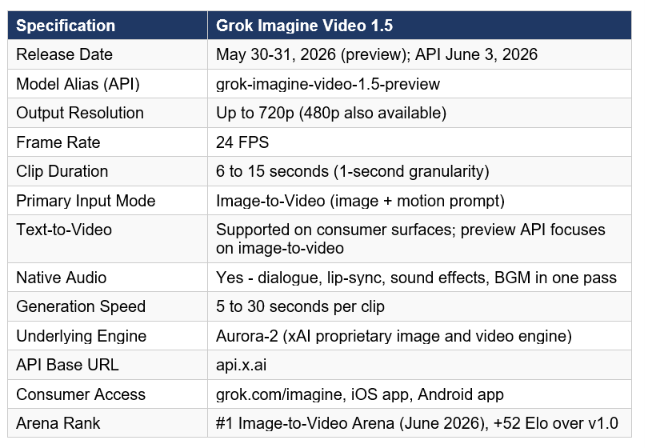
One technical constraint worth flagging upfront: at the API level, grok-imagine-video-1.5-preview focuses on image-and-video input workflows. The official model page notes that the preview model currently does not support text-to-video at the API layer. Consumer surfaces such as grok.com/imagine do support text prompts as an input, but if you are building a developer workflow via the API and expecting to pass only a text prompt with no starting image, verify the current documentation before committing to that architecture.
2. Leaderboard Position: What #1 on Image-to-Video Arena Actually Means
The Image-to-Video Arena is a human preference leaderboard where real users generate clips from the same prompts using different models and vote on which output they prefer, without knowing which model produced it. This blind voting methodology is the same approach used by LMSys Chatbot Arena for language models and is generally considered a more honest signal than vendor-published benchmarks because it captures what actual users find useful and visually compelling, not what a controlled test suite is designed to measure.
Grok Imagine Video 1.5 Preview holds an Elo score of 1473 on the Image-to-Video Arena as of June 2026, representing a +52 Elo point increase over Grok Imagine Video 1.0. This places it ahead of Seedance 2.0, HappyHorse 1.0 from Alibaba, Kling 2.6, and Google Veo on the image-to-video specific leaderboard at 720p.
The honest caveat: Elo scores on preference leaderboards are not fixed benchmarks. They are live, moving numbers that shift as new clips are voted on and as competitors submit their own models for evaluation. The +52 Elo advantage Grok Imagine Video 1.5 holds today over Seedance 2.0 is real, but it is not a permanent lead. ByteDance, Kuaishou, and Google have all shipped model updates that reclaimed top positions on this leaderboard in 2026, and any of them could again. What the leaderboard position tells you today is that users, in blind preference tests, currently prefer Grok Imagine Video 1.5's image-to-video output quality over all evaluated competitors. That is a meaningful signal, but treat the specific ranking as a current snapshot rather than a settled verdict.
3. Key Features: Native Audio, Extended Duration, Aurora Engine
Native One-Pass Audio Generation
The single most operationally significant feature of Grok Imagine Video 1.5 is native audio generated in the same pass as the video. Dialogue, lip-sync, sound effects, and background music are all produced simultaneously rather than added in post-production. This is not a minor quality-of-life improvement. For most AI video workflows in 2025 and early 2026, audio was the bottleneck that required either a separate generation step (using a tool like ElevenLabs, Suno, or Runway's audio pipeline), manual audio editing, or accepting silent output.
Grok Imagine Video 1.5 eliminates that entire step for standard content types. A clip of a character speaking is generated with lip-synced dialogue. A skateboarding scene includes the sound of wheels on asphalt. A car chase includes engine audio. The model responds to explicit audio descriptions in the prompt, so a prompt that specifies "the sound of rain on a tin roof and distant thunder" produces audio that matches that description rather than generic background noise.
The limit of this approach compared to dedicated audio generation: if you need precise dialogue from a specific script, a voice clone of a particular person, or multi-track audio editing, you will still need an external audio pipeline. Grok Imagine Video 1.5's audio is cinematic and context-aware, not a voice studio.
Extended Duration to 15 Seconds
Version 1.0 capped clips at 10 seconds. Version 1.5 extends that to 15 seconds, a 50% increase. Duration is selectable in 1-second increments from 6 to 15 seconds. Shorter clips generate faster and cost fewer credits or less API budget. Longer clips give more narrative room but require more precise prompting to maintain coherence across the full duration.
The extension workflow is one of Grok Imagine Video 1.5's more useful production features. You can take the final frame of a generated clip and use it as the starting image for a new generation, chaining clips into a longer sequence. This is how the early user examples of extended action sequences (like the DogeDesigner examples of a car chase and the skateboarding scenes down San Francisco hills) were constructed. It is not seamless native long-form video, but it is fast enough at 5 to 30 seconds per clip that iteration is practical.
Aurora Engine and Subject Preservation
Grok Imagine Video 1.5 is built on the Aurora-2 engine, xAI's proprietary image generation backbone. Aurora was introduced for still image generation earlier in 2026, where it demonstrated 78% character consistency across variations, outperforming FLUX, Midjourney, and DALL-E on that specific metric. In the video context, Aurora-2's contribution is subject and compositional anchoring: the model is designed to stay faithful to the source image's lighting, subject identity, and compositional framing rather than drifting toward its own interpretation of the scene.
This fidelity is what makes it specifically strong for image-to-video use cases where you have an existing asset you want to animate, such as a product photo, a character illustration, a portrait, or a concept frame. The model animates the motion you describe without reimagining the source material, which is the behavior most professional workflows actually need.
Camera and Physics Control
Natural-language camera direction is one of the model's strongest capabilities in user testing. You can specify camera moves (push in, pull back, pan left, orbit around the subject, Dutch tilt), pacing (slow, fast, cut, hold), atmosphere (fog rolling in, wind moving through the scene), and physics (water splashing, cloth moving in the wind, vehicle dynamics) all in plain text. The model interprets these instructions well enough that early testers described the cinematic quality of outputs as genuinely impressive, with DogeDesigner's skateboarding and car chase examples cited specifically as demonstrations of accurate physics simulation.
4. Access and Pricing: Free Tier, SuperGrok, and API
Consumer Access
Grok Imagine Video 1.5 is available through three consumer paths: the web interface at grok.com/imagine, the Grok iOS app, and the Grok Android app. Free accounts receive 5 credits per day across image and video generation. Video clips consume more credits than still images, and longer duration clips (closer to 15 seconds) consume more credits than shorter ones (6 to 8 seconds). The daily free limit is low enough that heavy iteration will exhaust it within a session.
SuperGrok at 30 dollars per month is the primary paid tier for consumers. It unlocks unlimited video generations, priority queue access, and Spicy Mode for appropriate adult content with reduced moderation. xAI has not published exact daily video generation numbers for SuperGrok, and independent reports indicate the daily limit can drop further during peak server demand. Users who need to run 20 to 40 prompt variations per session have reported hitting limits within hours during high-traffic periods.
API Pricing
👁 API Pricing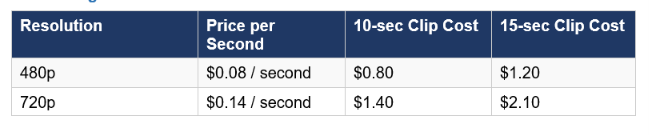
The xAI API uses the OpenAI SDK, so existing OpenAI-compatible code can be adapted with minimal changes. The API accepts both image and video inputs at the preview stage. Context caching, batch processing, and rate limit specifics are available in xAI's official documentation at x.ai.
Pricing Comparison with Competitors
👁 Pricing Comparison with Competitors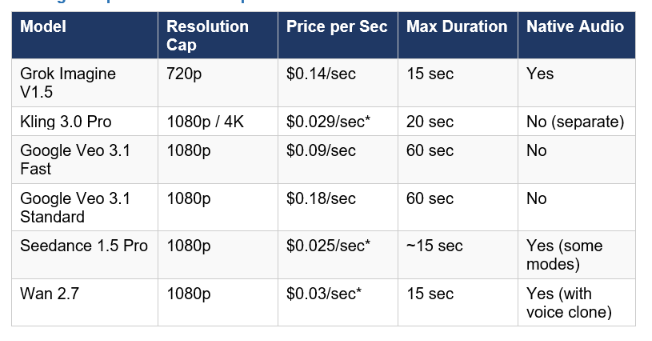
* Third-party provider pricing (e.g. fal.ai, WaveSpeed). Official Kling and Seedance direct API pricing may differ. Grok Imagine Video 1.5 is priced at the mid-range of the competitive set at 720p. The key differentiator is native audio in the same generation pass, which eliminates a separate audio workflow cost that competitors require.
Don't just use ChatGPT. Learn to build custom LLM agents, RAG pipelines, and full-stack Agentic AI apps in our intensive 6-week program.
5. How to Use Grok Imagine Video 1.5: Step-by-Step Guide
Consumer Workflow (grok.com/imagine)
- Go to grok.com/imagine and sign in with your X (formerly Twitter) account, or create a new account. No separate xAI account is required for consumer access.
- In the left navigation, select Imagine. The interface opens on image generation by default.
- Switch to the Video tab to access Grok Imagine Video 1.5.
- For image-to-video: upload your starting image using the upload button. Accepted formats include JPEG, PNG, and WebP. The image becomes the first frame of your video.
- Write your motion prompt in the Prompt field. Describe only the motion, camera, and atmosphere. The model carries all visual content from the source image.
- Set your desired duration (6 to 15 seconds) and resolution (480p or 720p). Shorter clips generate faster.
- Click Generate. Clip production takes 10 to 30 seconds with audio included automatically.
- To extend the clip, select the final frame of the generated video and repeat the process with a new motion prompt that continues the action from that point.
API Workflow (Developer)
from openai import OpenAI import base64  client = OpenAI(     api_key="YOUR_XAI_API_KEY",
 base_url="https://api.x.ai/v1" )
# Load and encode your starting image with open("starting_frame.jpg", "rb") as f:     image_b64 = base64.b64encode(f.read()).decode("utf-8")
 response = client.chat.completions.create(
   model="grok-imagine-video-1.5-preview",
 messages=[    {
         "role": "user",
          "content": [
             {"type": "image_url",
 "image_url": {"url": f"data:image/jpeg;base64,{image_b64}"}},
        {"type": "text", "text": "Camera slowly pushes in as leaves fall gently around the subject. Soft ambient wind audio."}
         ]
    }
   ],
  max_tokens=1024 )
print(response.choices[0].message.content)
The xAI API uses the OpenAI SDK, so this pattern will look familiar to anyone already using Claude Code or GPT-5.5 via API. For hands-on multi-model video generation experiments and production workflow patterns, the gen-ai-experiments cookbook repository has implementation notebooks covering video generation pipelines that map directly to this kind of image-to-video use case.
6. Prompting Guide: How to Get the Best Results
The Aurora-2 engine processes clips sequentially from the first frame forward. Each frame informs the next, which produces motion coherence across the clip. This means your prompt is not a description. It is a sequential instruction set that the model reads in order. Front-load what matters most.
Prompt Structure Formula
The optimal prompt for Grok Imagine Video 1.5 follows this structure: Subject plus primary action (first 15 to 20 words) then camera move plus lighting changes then atmosphere and environment then specific audio direction. Keep the total prompt between 30 and 60 words. Too short, and the model fills gaps with generic behavior. Too long, and late instructions may not fully render because the clip ends before they are expressed.
Motion and Camera Prompts
- Camera push-in: 'Camera slowly dollies forward into the subject, shallow depth of field, soft background blur increasing.'
- Action sequence: 'Subject runs full speed toward camera, feet pounding pavement, motion blur on background buildings. Sound of sneakers on wet concrete and distant crowd.'
- Environmental: 'Leaves fall gently past the window frame as soft rain begins. Ambient sound of rain on glass, distant thunder rolling.'
- Cinematic style: 'Dramatic rack focus from foreground flower to background subject. Golden hour light, camera holds still. Wind through grass, birdsong.'
Audio Direction Best Practices
Native audio in Grok Imagine Video 1.5 responds directly to explicit description. Generic prompts produce generic audio. Specific audio direction produces synchronized, scene-matched sound. Name specific sounds rather than general moods. Use 'sound of wheels on asphalt, light wind, distant traffic' rather than 'outdoor urban sounds.' For dialogue-adjacent content, describe the audio character rather than scripted lines. The model will generate contextually appropriate speech sounds, not scripted dialogue from a teleprompter.
Subject Preservation Language
When you need the source image preserved precisely, reinforce preservation in the prompt: 'Subject remains stationary, maintaining exact pose and expression from the source frame. Only the background environment shifts.' For product photography animation, use: 'Product stays centered and completely still in frame. Soft light moves across surface from left to right over 8 seconds.'
What Not to Do
- Do not stack multiple unrelated actions in one prompt. One clear action per clip beats three competing ones.
- Do not repeat the visual description of the source image in the prompt. The model already sees the image.
- Do not set duration shorter than 8 seconds for action sequences that need time to develop.
- Do not use generic audio descriptors ('good background music'). Name specific sounds and textures.
7. Grok Imagine Video 1.5 vs Kling 3.0, Veo 3.1, and Seedance 2.0
👁 Grok Imagine Video 1.5 vs Kling 3.0, Veo 3.1, and Seedance 2.0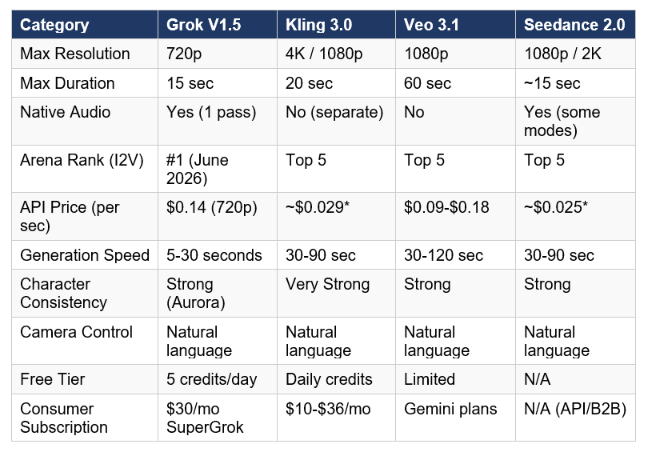
Grok Imagine Video 1.5 vs Kling 3.0
Kling 3.0 is the strongest alternative to Grok Imagine Video 1.5 for professional video production workflows. It generates clips up to 20 seconds (versus Grok's 15) at up to 4K resolution (versus Grok's 720p cap), with more granular camera movement specification through natural language and a multi-shot sequence construction system that Grok Imagine Video 1.5 does not have. Kling's deep dive from Build Fast with AI covers the Kling AI cinematic capabilities in detail. Where Grok wins: native one-pass audio (Kling requires a separate audio step), faster generation times (5 to 30 seconds versus 30 to 90 seconds for Kling), and the current Arena leaderboard position. For teams building content at volume where speed and audio integration matter more than 4K resolution, Grok Imagine Video 1.5 is the practical choice. For teams building branded series where character consistency across 20-second clips at high resolution matters, Kling 3.0 is stronger.
Grok Imagine Video 1.5 vs Google Veo 3.1
Veo 3.1's clearest advantage is duration: 60-second clips versus Grok Imagine Video 1.5's 15-second cap. For narrative storytelling, documentary-style content, or any application that needs a complete scene in a single clip, that 45-second difference is decisive. The Google Veo 3.1 full review covers where Veo wins on physics simulation and human motion realism. Veo 3.1 Standard is priced at 0.18 dollars per second, 29% more expensive than Grok Imagine Video 1.5 at 720p, without native audio. For shorter cinematic clips with integrated audio, Grok Imagine Video 1.5 is more cost-effective. For longer-form content where the audio can be added in post-production, Veo 3.1 wins on duration alone.
Grok Imagine Video 1.5 vs Seedance 2.0
Seedance 2.0 from ByteDance is the closest peer to Grok Imagine Video 1.5 in the current leaderboard. It supports up to 12 reference files (images, video clips, and audio) as inputs, which gives it significantly more creative control for complex multimodal production workflows. The Seedance 2.0 full review covers where ByteDance leads on input flexibility. Grok Imagine Video 1.5's advantages over Seedance 2.0: faster generation times, native audio in the same pass, more accessible consumer pricing through SuperGrok, and the current Arena leaderboard position specifically in image-to-video at 720p. For teams with rich reference material who need multi-clip character consistency, Seedance 2.0 is the stronger tool. For teams starting from a single image who want the fastest path to a finished clip with audio, Grok Imagine Video 1.5 wins.
8. Strengths, Weaknesses, and Our Verdict
Strengths
- #1 on the Image-to-Video Arena leaderboard with +52 Elo over version 1.0, ahead of Seedance 2.0, Kling 2.6, HappyHorse 1.0, and Google Veo in blind user preference tests as of June 2026
- Native one-pass audio generation including dialogue, lip-sync, sound effects, and background music, eliminating a separate post-production audio step
- Generation speed of 5 to 30 seconds per clip, faster than Kling 3.0 (30 to 90 seconds) and Veo 3.1 (30 to 120 seconds)
- Aurora-2 engine provides strong subject and compositional anchoring from source images, making it reliable for animating existing assets without reimagining them
- 50% duration increase over version 1.0 (up to 15 seconds), with 1-second granularity for precise duration control
- OpenAI SDK compatibility for the API, enabling minimal code changes for teams already using OpenAI-compatible endpoints
- Consumer-friendly access via grok.com/imagine with free tier credits and SuperGrok at 30 dollars per month for unlimited generation
Weaknesses
- 720p maximum resolution is significantly below Kling 3.0 (4K), Veo 3.1 (1080p), and Seedance 2.0 (2K) - a meaningful limitation for any professional content that will be displayed at full screen on modern monitors or TVs
- 15-second maximum duration is much shorter than Veo 3.1 (60 seconds) and Kling 3.0 (20 seconds), requiring clip stitching for longer sequences
- API preview currently focuses on image-to-video; text-to-video via pure text prompt is available on consumer surfaces but not confirmed for the preview API
- SuperGrok daily limits are not published and have been reported to reduce during peak demand, making it unreliable for deadline-driven professional workflows
- Audio generation is contextual, not scriptable - if you need specific dialogue lines from a particular voice, you still need an external audio production step
- Arena leaderboard position is a snapshot, not a permanent lead - competitors update their models frequently and rankings shift week to week
Verdict
Grok Imagine Video 1.5 is the best image-to-video model for social media content production, short-form cinematic clips, and any workflow where audio integration is required without a separate post-production step. The combination of Arena leaderboard position, native one-pass audio, and fast generation times makes it genuinely the most practical tool for creators who need high-quality clips at volume. It is not the right choice if your production requires 1080p or higher resolution, clips longer than 15 seconds, or a scriptable audio pipeline. For teams that sit at that boundary, the practical approach in June 2026 is to route short cinematic clips through Grok Imagine Video 1.5 for speed and audio, while using Kling 3.0 or Veo 3.1 for high-resolution or long-form work. The broader picture of where all major AI video models sit relative to each other is covered in the Happy Horse vs Seedance 2.0 comparison and the running AI Image and Video Generation collection at Build Fast with AI.
Frequently Asked Questions
What is Grok Imagine Video 1.5?
Grok Imagine Video 1.5 is xAI's second generation image-to-video AI model, launched on May 30-31, 2026 in preview. It turns a still image into a cinematic video clip (6 to 15 seconds, up to 720p, 24fps) with native synchronized audio generated in the same pass. It currently holds the #1 position on the Image-to-Video Arena leaderboard with an Elo of 1473. API access uses the model alias grok-imagine-video-1.5-preview at api.x.ai.
Does Grok Imagine have video to video?
Yes, in a limited form. At the consumer level (grok.com/imagine and mobile apps), Grok Imagine supports video extension: you take the final frame of a generated clip and use it as the starting image for a new generation, creating a chained sequence. Full video-to-video editing (uploading an existing video and directing modifications throughout the clip) is not a confirmed feature of the current release. The API model page lists Image and Video as input modalities, suggesting video inputs are supported at the API level, but the primary documented workflow is image-to-video.
What is the video limit for Grok Imagine?
Clip duration is limited to 15 seconds per generation in Grok Imagine Video 1.5, up from 10 seconds in version 1.0. For daily generation limits: free accounts receive 5 credits per day shared across image and video generation. SuperGrok subscribers at 30 dollars per month get higher daily limits, but xAI has not published the exact numbers. Independent reports indicate limits can temporarily decrease during peak server demand. For unlimited generation without a daily cap, the xAI API at pay-per-second pricing (0.14 dollars per second at 720p) is the correct path.
How to increase video length in Grok Imagine?
Within a single generation, the maximum is 15 seconds. To produce longer sequences, use the Extend from Frame workflow: generate your initial clip, select the final frame from the output, upload it as the starting image for a new generation, and write a motion prompt that continues the action from that point. Repeating this process chains clips into sequences of arbitrary length. The transition between clips requires careful prompting to maintain visual continuity, and each extension costs additional credits or API usage.
How to prompt Grok Imagine image to video?
For image-to-video in Grok Imagine Video 1.5: describe only the motion, camera moves, and atmosphere. Do not describe the source image content, as the model already sees it. Structure your prompt as: primary action (first 15-20 words), then camera move, then environmental details, then specific audio direction. Keep the total prompt between 30 and 60 words. Front-load what matters most, since the Aurora engine processes frames sequentially and information buried at the end of long prompts may not fully render before the clip ends.
Is Grok Imagine Video 1.5 free?
Free accounts at grok.com/imagine or via X receive 5 credits per day for image and video generation combined. Video clips consume more credits than still images, and longer clips consume more than shorter ones. Five credits per day supports limited experimentation but not production-volume generation. SuperGrok at 30 dollars per month provides higher daily limits and unlimited image generation. For truly unlimited video generation at scale, the xAI API at pay-per-second pricing (0.08 dollars per second at 480p, 0.14 dollars per second at 720p) is the correct tier.
How does Grok Imagine Video 1.5 compare to Kling?
Grok Imagine Video 1.5 leads Kling 2.6 on the current Image-to-Video Arena leaderboard and generates clips faster (5 to 30 seconds versus 30 to 90 seconds). It also provides native one-pass audio that Kling still requires a separate step for. Kling 3.0 (the current Kling version) leads on resolution (4K versus Grok's 720p), clip duration (20 seconds versus 15), and multi-shot sequence construction tools. For short cinematic clips with integrated audio, Grok Imagine Video 1.5 wins. For long-form branded content at high resolution, Kling 3.0 wins.
What is the Grok Imagine Video 1.5 API price?
xAI charges per second of generated video: 0.08 dollars per second for 480p output and 0.14 dollars per second for 720p output. A 10-second clip at 720p costs 1.40 dollars. A 15-second clip at 720p costs 2.10 dollars. There are no subscription costs for API access beyond standard xAI API account setup. The API uses the OpenAI SDK and is accessed at api.x.ai with the model string grok-imagine-video-1.5-preview.
Recommended Blogs
- Seedance 2.0 Review: ByteDance Tops AI Video in 2026
- Google Veo 3.1 Review: Lite vs Fast, Pricing, Prompts and API Guide (2026)
- Happy Horse vs Seedance 2.0: Which AI Video Model Wins? (2026)
- Gemini Omni: Google's AI Video Model Explained (2026)
- Kling AI Review 2026: 3-Minute AI Video With Cinematic Quality
- Best AI Models June 2026: Full Ranked Leaderboard
References
- xAI Official - Grok Imagine 1.5 Preview Launch Announcement (June 3, 2026)
- xAI Release Notes - Grok Imagine Video 1.5 Preview (June 11, 2026)
- Imagine.art - xAI Grok Imagine Video 1.5 Guide: Features, Capabilities and Use Cases
- Imagine.art - Grok Imagine Video 1.5 Prompt Guide
- JXP - Grok Imagine Video 1.5 Preview: xAI's #1 AI Video Generator
- Blockchain News - xAI Grok Imagine 1.5 Preview: Image-to-Video Model
- Felloai - Grok 5 Release Date and All We Know So Far (June 2026)
- Vidguru AI Lab - Best AI Video Generators of Early 2026: Grok, Kling 3.0, and Seedance 2.0 Reviewed
- PixVerse - Can Grok Generate Videos? Grok Imagine Video 1.5, Prompts, Pricing and Limits
- Basenor - Grok Imagine Biggest Updates: Video, Quality Mode and More (June 2026)

