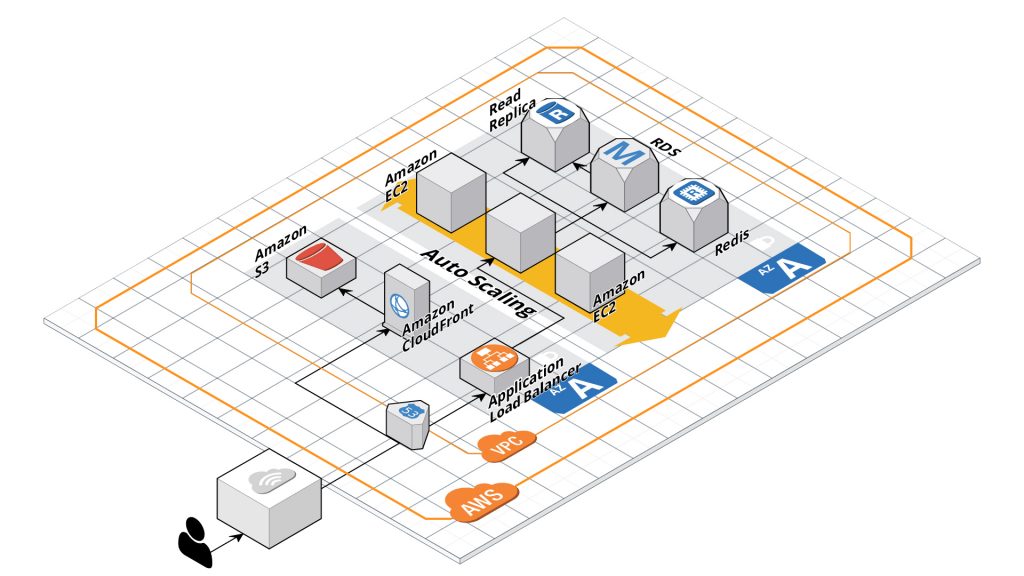
Practice 4. Use an Application Load Balancer (ALB) for Traffic Distribution
Any highly available Laravel deployment should sit behind an Application Load Balancer. ALB is a Layer 7 load balancer that intelligently distributes incoming requests to multiple EC2 instances (or containers) across AZs. It terminates SSL, handles the HTTP(S) traffic, and performs health checks. By routing traffic through ALB, you ensure no single web server becomes a point of failure or overload.
Compared to older generation load balancers, ALB is cost-effective (you pay primarily per request) and supports attaching multiple TLS certificates, which is useful if your SaaS platform serves multiple custom domains. In 2025, ALB can even be paired with AWS WAF (Web Application Firewall) to protect your Laravel app from common exploits and DDoS. Overall, an ALB is essential for a scalable architecture: it improves reliability, allows seamless scaling, and is built to work with container platforms like ECS and EKS out-of-the-box.
Practice 5. Isolate and Secure Infrastructure with Amazon VPC
Every AWS architecture should use a Virtual Private Cloud (VPC) to isolate resources in a private network. Instead of running your Laravel application in the default flat network, create a dedicated VPC with multiple subnets (at least one public and one private subnet in each AZ).
The best practice is to keep your EC2 instances (and other backend resources like databases or caches) in private subnets with no direct internet access, and place only necessary entry points (like the ALB or an Bastion host) in public subnets. This improves security by limiting exposure. For example, your Laravel app servers would reside in private subnets and only the ALB in the public subnet receives public traffic, forwarding it to the instances internally.
Practice 6: Boost Performance with AWS ElastiCache (Redis/Memcached)
ntegrating ElastiCache with Laravel is straightforward using drivers for Redis. Laravel’s cache and session systems natively support Redis. To connect, you provision a Redis cluster in ElastiCache and update your Laravel .env and config/database.php with the cache endpoint and credentials. After that, your application can read/write to the cache.
The performance impact is immediate – in-memory retrieval can be an order of magnitude faster than disk-based DB queries, resulting in snappier user experiences. By offloading frequent reads to ElastiCache, you also free your database to handle more critical transactions. In summary, introducing ElastiCache is a proven way to achieve high throughput and low latency in a Laravel AWS architecture, especially under scale.
Practice 7. Manage DNS and Traffic Routing with Amazon Route 53
Amazon Route 53 is AWS’s managed DNS service, and using it to control your domain and DNS records is considered a best practice. Route 53 is highly available and can scale to handle millions of DNS queries reliably. By migrating your domain’s DNS to Route 53, you unlock advanced routing features that traditional registrars (like GoDaddy) may not offer.
Some Amazon Route53 features:
- Health Checks. Route53 can monitor your applications for outages or downtimes.
- DNS Failover Routing policy. You can obtain a failover solution on the DNS level, separating your SaaS PHP application into two environments: primary and backup.
- DNS Latency routing policy. This policy directs traffic requests to the lowest latency, between the end-user and the application environment. As a result, application speed and UX improvements.
- Geographic routing policy. This routing policy lets your requests be routed to the same physical region where you are located. Similar outcomes from the previous point degrade latency.
In short, Route 53 should manage your Laravel app’s DNS to leverage AWS’s global infrastructure for reliability and to enable smart routing policies that keep your application highly available and responsive worldwide.
Practice 8. Leverage Amazon EFS for Shared Storage (Carefully)
Amazon EFS (Elastic File System) provides a shared POSIX file system that can be mounted across many instances, containers, or Lambda functions. In the past, architects were cautious about using EFS with Laravel due to latency overhead from network storage.
Incorporate EFS if your Laravel architecture requires a shared filesystem, but avoid using it for serving high-traffic web assets or as a substitute for S3. By following this guideline, you maintain application performance while still reaping EFS’s benefits (simplicity and shared access) for specific use cases. Always measure the impact in staging if you introduce EFS, to ensure it meets your app’s performance requirements.
Practice 9. Embrace AWS Lambda for Serverless Processing