

Introduction to Embedded Systems Software and Development Environments
Keep adding new skills with 10,000+ programs for $239 (usually $399). Save now.

Introduction to Embedded Systems Software and Development Environments

Instructor: Alex Fosdick
142,673 already enrolled
Included with
Ask Coursera
654 reviews
654 reviews
What you'll learn
Classify the parts of an embedded systems developer’s Source Configuration Management (SCM)
Implement a build system using GNU’s Make and GCC compiler toolsets
Write C-programs to define data in different memory regions
Skills you'll gain
Details to know

See how employees at top companies are mastering in-demand skills

There are 4 modules in this course
Welcome to the Introduction to Embedded Systems Software and Development Environments. This course is focused on giving you real world coding experience and hands on project work with ARM based Microcontrollers. You will learn how to implement software configuration management and develop embedded software applications. Course assignments include creating a build system using the GNU Toolchain GCC, using Git version control, and developing software in Linux on a Virtual Machine. The course concludes with a project where you will create your own build system and firmware that can manipulate memory.
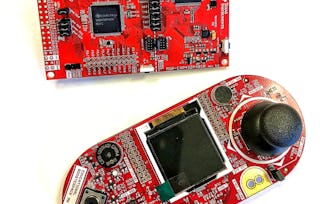
The second course in this 2 course series , Embedded Software and Hardware Architecture, will use hardware tools to program and debug microcontrollers with bare-metal firmware. Using a Texas Instruments MSP432 Development Kit, you will configure a variety of peripherals, write numerous programs, and see your work execute on your own embedded platform!
Module 1 will introduce the learner to the components of your embedded system software development process. This module will be a quick overview for many topics with detailed analysis to follow in later modules and courses. We start with defining the hardware and software building blocks of Embedded Systems which will include a C-programming refresher. Next you will learn about the important tools a developer will need to use to help design, build and manage their designs. This includes development environments, version control and the hardware kits to install on. Learners will install and use a Virtual machine to complete Week 1 Application Assignment.
What's included
10 videos1 reading1 assignment1 peer review
10 videos•Total 77 minutes
- 0. Introduction to the Course•4 minutes
- 1. Introduction to the Module•4 minutes
- 2. Introduction to Embedded Systems•5 minutes
- 3. Embedded Software Engineering•8 minutes
- 4. C-Programming Review•11 minutes
- 5. Introduction to Software Configuration Management•6 minutes
- 6. C Standardization and Team Coding Standards•8 minutes
- 7. Development Environments Overview•9 minutes
- 8. Development Kits and Documentation•10 minutes
- 9. Version Control•12 minutes
1 reading•Total 1 minute
- Course Updates and Accessibility Support•1 minute
1 assignment•Total 28 minutes
- Week 1 Quiz•28 minutes
1 peer review•Total 60 minutes
- Week 1 Application Assignment•60 minutes
Module 2 will introduce the learner to the software development build system. Most software engineers are very knowledgeable about their build system as we need them to translate our high-level software languages to our architecture specific implementations. There are some important platform and architecture concepts that are introduced in the build system to help enforce good software design techniques. Learners will create their own build systems and utilize build tools to analyze their embedded software implementations.
What's included
9 videos1 assignment1 peer review
9 videos•Total 81 minutes
- 1. Introduction to Build Systems using GNU Toolsets•7 minutes
- 2. Compiling and Invoking GCC•11 minutes
- 3. Preprocessor Directives•10 minutes
- 4. Creating Header and Implementation Files•10 minutes
- 5. Linkers•11 minutes
- 6. Make•9 minutes
- 7. Makefiles Part 1•7 minutes
- 8. Makefiles Part 2•10 minutes
- 9. Other Useful GNU Bin Tools•6 minutes
1 assignment•Total 30 minutes
- Week 2 Quiz•30 minutes
1 peer review•Total 60 minutes
- Week 2 Application Assignment•60 minutes
Module 3 will begin to introduce important embedded concepts like the memory systems in their design. Learners will understand how the software to hardware mapping occurs for their designs including differentiating between your program code and your program data. Memory systems have many platform and architecture dependencies, and you will begin to learn about some of the fundamental concepts a software engineer needs to know to utilize all parts of an embedded system’s memory.
What's included
8 videos2 readings2 assignments
8 videos•Total 64 minutes
- 1. Introduction to Memory Organization•7 minutes
- 2. Memory Architectures•8 minutes
- 3. Memory Segments•7 minutes
- 4. Data Memory•8 minutes
- 5. Special Keywords (Const, Extern & Static)•8 minutes
- 6. The Stack•9 minutes
- 7. The Heap•7 minutes
- 8. Code Memory•9 minutes
2 readings•Total 20 minutes
- Programming Assignment Instructions•10 minutes
- Programming Assignment Quiz Solution•10 minutes
2 assignments•Total 60 minutes
- Week 3 Quiz•30 minutes
- Programming Assignment Quiz•30 minutes
During this week you are to going to combine what you have learned in modules 1-3 to write some memory manipulation software, incorporate into your build system and then run some test functions. At the end of the assignment you will perform a detailed code review of other learners’ software. Reviewing other learners code is very important for both your growth of software design but also for the coder to gain valuable feedback. Professional software engineering regularly go through software reviews when developing code.
What's included
1 peer review
1 peer review•Total 60 minutes
- Expanded Build System and Memory•60 minutes
Instructor
Offered by

Explore more from Electrical Engineering
- U
University of Colorado Boulder
Course
- Status: Preview
Course
- Status: Free Trial
Specialization
- Status: Free TrialU
University of Colorado Boulder
Course


Why people choose Coursera for their career


Learner reviews
- 5 stars
69.71%
- 4 stars
19.17%
- 3 stars
4.56%
- 2 stars
2.43%
- 1 star
4.10%
Showing 3 of 654
Reviewed on Jul 16, 2020
This course is very well taught. As a beginner with MCU's, I learned many things. The assessments are interesting and challenging. Great course!
Reviewed on Jul 1, 2018
Great coursework. It makes you explore C , GNU's tool chain and Memory segments which are all essential for Embedded Systems. I'm very much excited and thrilled to share my experience to others.
Reviewed on Nov 11, 2017
Please opt this course for beginning in embedded/ software system domain with aim to capture all the aspects involved in developing sound software.




Frequently asked questions
The specialization supports assignments and grading only on the MSP432 development board. The course material can translate to other development kits and students are welcome to take this course with their own embedded system, but grading will only be supported and graded with only the MSP432.
And just a reminder that the first course of the specialization doesn’t require you to order any hardware. You will need to obtain the following microcontroller development kit to use for project work in later courses of the specialization: Texas Instruments Launchpad - MSP432p401r. This evaluation kit is available for about $13 US dollars. More information about ordering the kit will be provided in the course.
To access the course materials, assignments and to earn a Certificate, you will need to purchase the Certificate experience when you enroll in a course. You can try a Free Trial instead, or apply for Financial Aid. The course may offer 'Full Course, No Certificate' instead. This option lets you see all course materials, submit required assessments, and get a final grade. This also means that you will not be able to purchase a Certificate experience.
When you enroll in the course, you get access to all of the courses in the Specialization, and you earn a certificate when you complete the work. Your electronic Certificate will be added to your Accomplishments page - from there, you can print your Certificate or add it to your LinkedIn profile.
More questions
Financial aid available,