Introducing the Beta Launch of Docker’s AI Agent, Transforming Development Experiences

For years, Docker has been an essential partner for developers, empowering everyone from small startups to the world’s largest enterprises. Today, AI is transforming organizations across industries, creating opportunities for those who embrace it to gain a competitive edge. Yet, for many teams, the question of where to start and how to effectively integrate AI into daily workflows remains a challenge. True to its developer-first philosophy, Docker is here to bridge that gap.
We’re thrilled to introduce the beta launch of Docker AI Agent (also known as Project: Gordon)—an embedded, context-aware assistant seamlessly integrated into the Docker suite. Available within Docker Desktop and CLI, this innovative agent delivers tailored guidance for tasks like building and running containers, authoring Dockerfiles and Docker-specific troubleshooting—eliminating disruptive context-switching. By addressing challenges precisely when and where developers encounter them, Docker AI Agent ensures a smoother, more productive workflow.
As the AI Agent evolves, enterprise teams will unlock even greater capabilities, including customizable features that streamline collaboration, enhance security, and help developers work smarter. With the Docker AI Agent, we’re making Docker even easier and more effective to use than it has ever been — AI accessible, actionable, and indispensable for developers everywhere.
How Docker’s AI Agent Simplifies Development Challenges
Developing in today’s fast-paced tech landscape is increasingly complex, with developers having to learn an ever growing number of tools, libraries and technologies.
By integrating a GenAI Agent into Docker’s ecosystem, we aim to provide developers with a powerful assistant that can help them navigate these complexities.
The Docker AI Agent helps developers accelerate their work, providing real-time assistance, actionable suggestions, and automations that remove many of the manual tasks associated with containerized application development. Delivering the most helpful, expert-level guidance on Docker-related questions and technologies, Gordon serves as a powerful support system for developers, meeting them exactly where they are in their workflow.
If you’re a developer who favors graphical interfaces, Docker Desktop AI UI will help you navigate container running issues, image size management and more generic Dockerfile oriented questions. If you’re a command line interface user, you can call, and share context with the agent directly in your favorite terminal.
So what can Docker’s AI Agent do today?
We’re delivering an expert assistant for every Docker-related concept and technology, whether it’s getting started, optimizing an existing Dockerfile or Compose file, or understanding Docker technologies in general. With Docker AI Agent, you also have the ability to delegate actions while maintaining full control and review over the process.
A first example, if you want to run a container from an image, our agent can suggest the most appropriate docker run command tailored to your needs. This eliminates the guesswork or the need to search Docker Hub, saving you time and effort. The result combines a custom prompt, live data from Docker Hub, Docker container expertise and private usage insights, unique to Docker Inc.
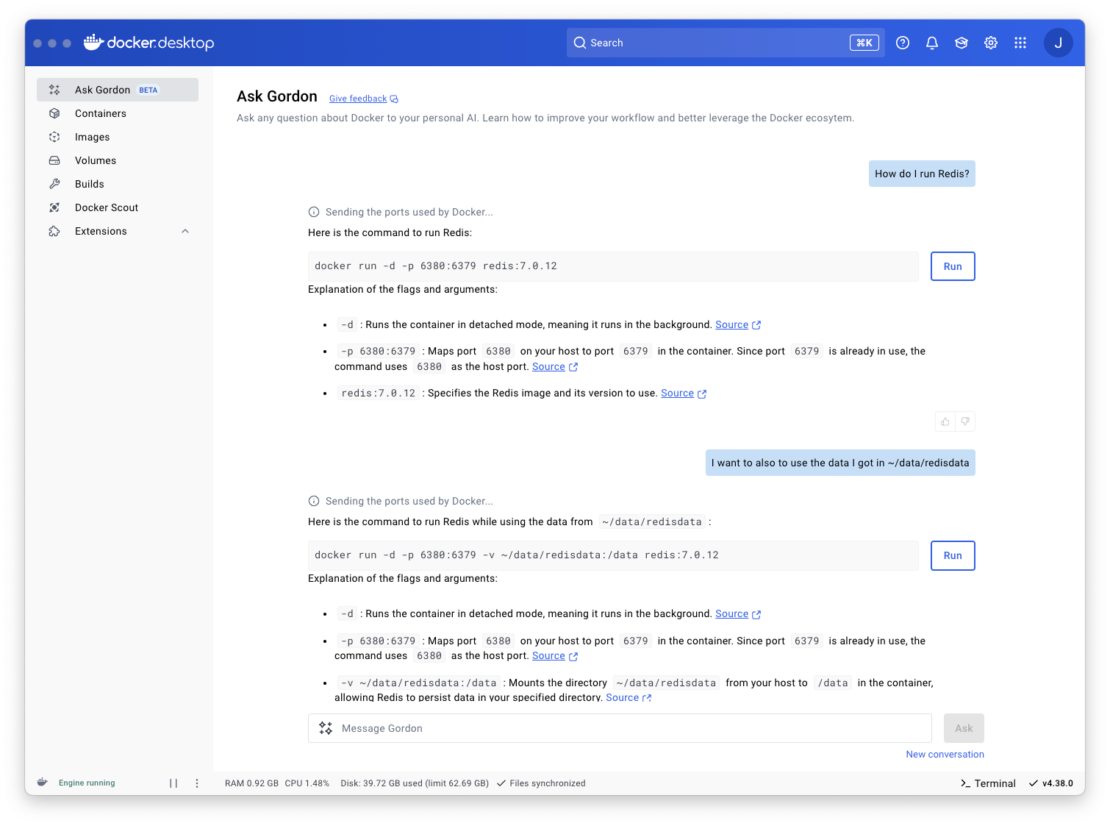
We’ve intentionally designed the output to be concise and actionable, avoiding the overwhelming verbosity often associated with AI-generated commands. We also provide sources for most of the AI agent recommendations, pointing directly to our documentation website. Our goal is to continuously refine this experience, ensuring that Docker’s AI Agent always provides the best possible command based on your specific local context.
Beside helping you run containers, the Docker AI Agent can today:
- Explain, Rate and optimize Dockerfile leveraging the latest version of Docker.
- Help you run containers in an effective, concise way, leveraging the local context (checking port already used or volumes).
- Answers any docker related questions with the latest version of our documentations for our whole tool suite, and as such is able to answer any kind of questions on Docker tools and technologies.
- Containerize a software project helping you run your software in containers.
- Helps on Docker related Github Actions.
- Suggest fix when a container is failing to start in Docker Desktop.
- Provides contextual help for containers, images and volumes.
- Can augment its answer with per directory MCP servers (see doc).
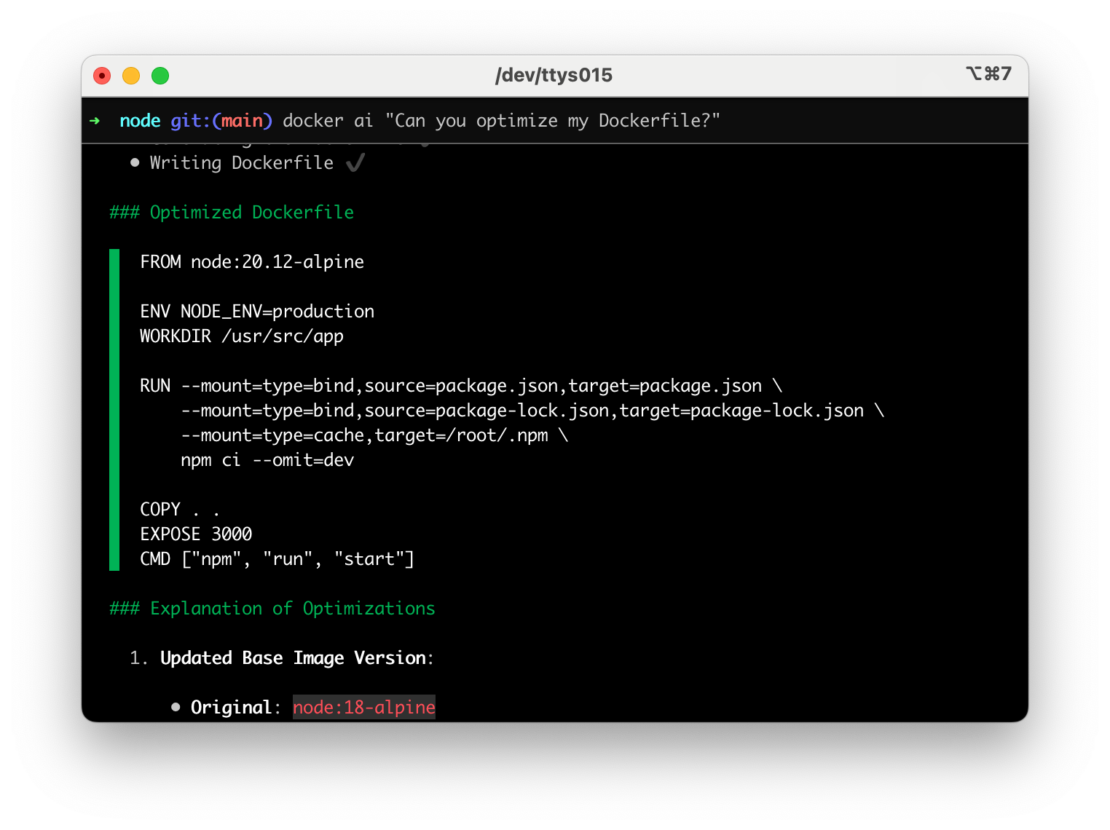
For the node expert, in the above screenshot the AI is recommending node 20.12 which is not the latest version but the one the AI found in the package.json.
With every future version of Docker Desktop and thanks to the feedback that you provide, the agent will be able to do so much more in the future.
How can you try Docker AI Agent?
This first beta release of Docker AI Agent is now progressively available for all signed-in users*. By default, the Docker AI agent is disabled. To enable it you will need to follow the steps below. Here’s how to get started:
- Install or update to the latest release of Docker Desktop 4.38
- Enable Docker AI into Docker Desktop Settings -> Features in Development
- For the best experience, ensure the Docker terminal is enabled by going to Settings → General
- Apply Changes
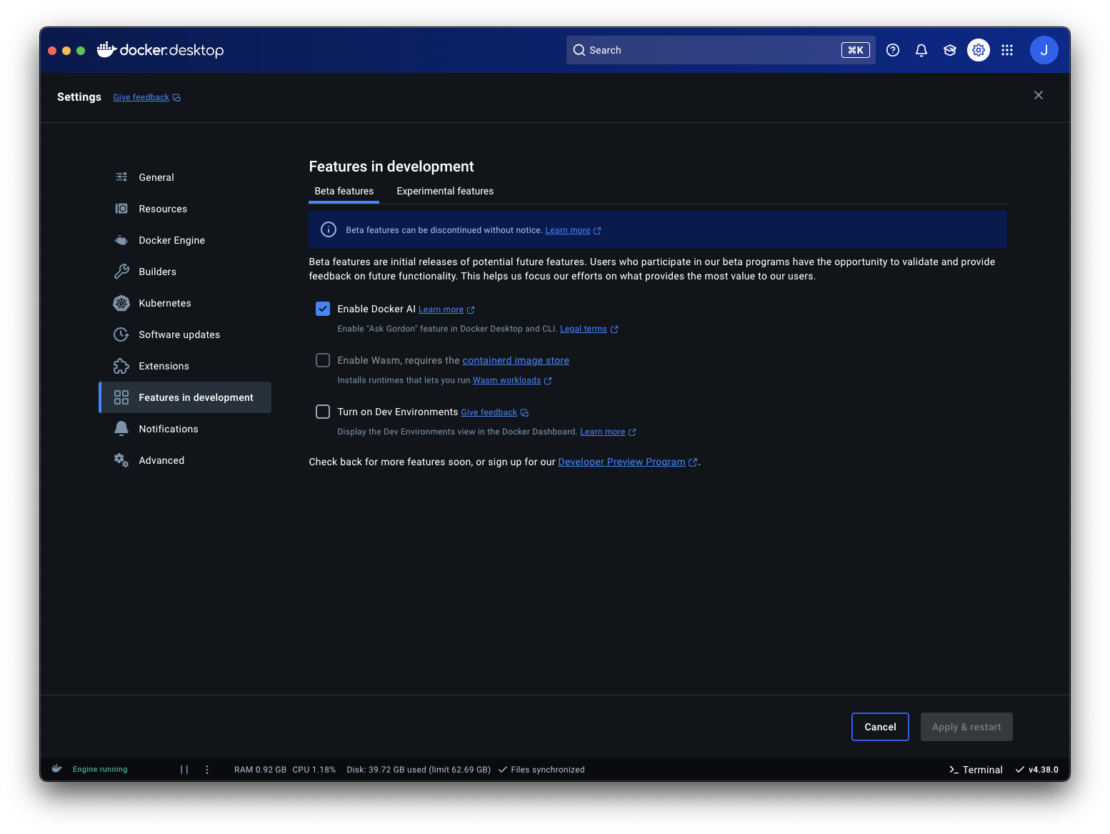
* If you’re a business subscriber, your Administrator needs to enable the Docker AI Agent for the organization first. This can be done through the Settings Management. If this is your case, feel free to contact us through the support for further information.
Docker Agent’s Vision for 2025
By 2025, we aim to expand the agent’s capabilities with features like customizing your experience with more context from your registry, enhanced GitHub Copilot integrations, and deeper presence across the development tools you already use. With regular updates and your feedback, Docker AI Agent is being built to become an indispensable part of your development process.
For now this beta is the start of an exciting evolution in how we approach developer productivity. Stay tuned for more updates as we continue to shape a smarter, more streamlined way to build, secure, and ship applications. We want to hear from you, if you like or want more information you can contact us.
Learn more
- Learn more about Docker’s AI Agent in on our docs
Related Posts
-
May 12, 2026
Docker AI Governance: Unlock Agent Autonomy, Safely
Introducing Docker AI Governance: centralized control over how agents execute, what they can reach on the network, which credentials they can use, and which MCP tools they can call, so every developer in your company can run AI agents safely, wherever they work. Your laptop is the new prod Agents are the biggest productivity unlock…
Srini SekaranRead now
-
Jun 16, 2026
Docker Content Trust: Retirement and Migration Guidance
Docker Content Trust (DCT) and the Notary v1 service at notary.docker.io are being fully retired (first announced in July of 2025). This blog explains what is changing, who is affected, and how to move to modern alternatives.
Julia WilsonandAditya TripathiRead now
-
Jun 15, 2026
Docker joins the Athena coalition: a cross-industry collaboration for supply chain security
AI is lowering the bar for supply chain attacks. Docker is joining the Athena alliance, a cross-industry effort to coordinate the defense of open source, building on our work to give every developer secure-by-default tools and our track record of sharing signals across the ecosystem.
Tushar JainRead now
-
Jun 11, 2026
Docker Hardened Images enhanced vulnerability scanning with Docker and Aikido
Aikido now scans Docker Hardened Images (DHI) with built-in VEX support. Vulnerabilities that Docker has verified as non-exploitable drop out of the queue automatically, so developers spend their time on findings that actually matter. This post walks through what changed, why it matters, and how users can benefit from the new integration. Why teams are…
Dan StelzerandBjorn HovdRead now