Building a Video Analysis and Transcription Chatbot with the GenAI Stack


Videos are full of valuable information, but tools are often needed to help find it. From educational institutions seeking to analyze lectures and tutorials to businesses aiming to understand customer sentiment in video reviews, transcribing and understanding video content is crucial for informed decision-making and innovation. Recently, advancements in AI/ML technologies have made this task more accessible than ever.
Developing GenAI technologies with Docker opens up endless possibilities for unlocking insights from video content. By leveraging transcription, embeddings, and large language models (LLMs), organizations can gain deeper understanding and make informed decisions using diverse and raw data such as videos.
In this article, we’ll dive into a video transcription and chat project that leverages the GenAI Stack, along with seamless integration provided by Docker, to streamline video content processing and understanding.
High-level architecture
The application’s architecture is designed to facilitate efficient processing and analysis of video content, leveraging cutting-edge AI technologies and containerization for scalability and flexibility. Figure 1 shows an overview of the architecture, which uses Pinecone to store and retrieve the embeddings of video transcriptions.

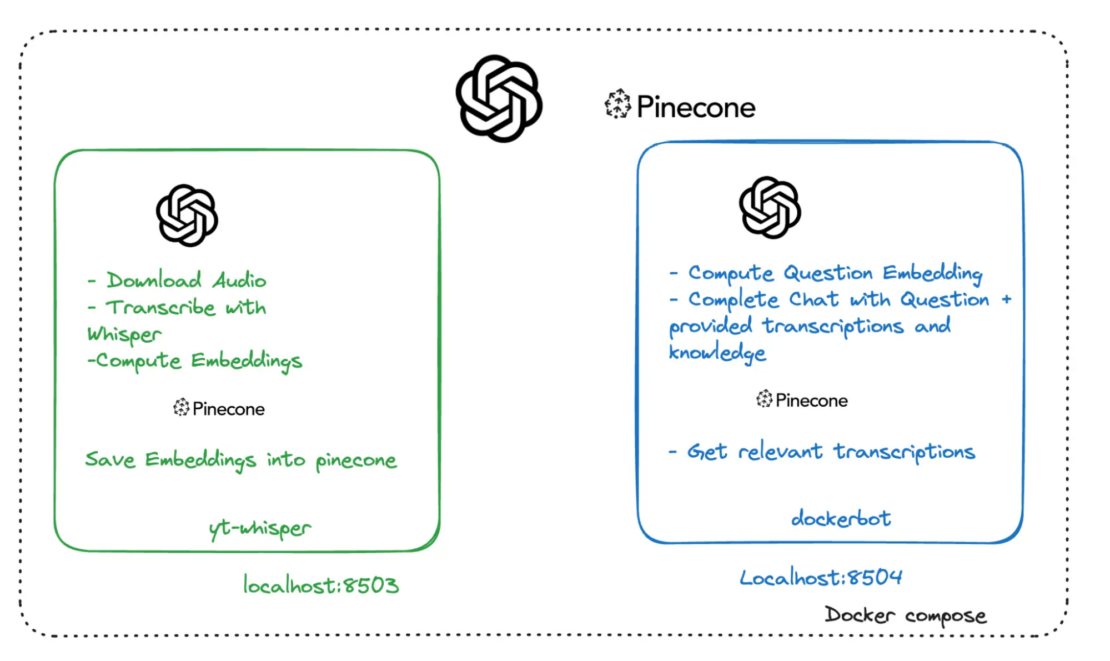
The application’s high-level service architecture includes the following:
- yt-whisper: A local service, run by Docker Compose, that interacts with the remote OpenAI and Pinecone services. Whisper is an automatic speech recognition (ASR) system developed by OpenAI, representing a significant milestone in AI-driven speech processing. Trained on an extensive dataset of 680,000 hours of multilingual and multitask supervised data sourced from the web, Whisper demonstrates remarkable robustness and accuracy in English speech recognition.
- Dockerbot: A local service, run by Docker Compose, that interacts with the remote OpenAI and Pinecone services. The service takes the question of a user, computes a corresponding embedding, and then finds the most relevant transcriptions in the video knowledge database. The transcriptions are then presented to an LLM, which takes the transcriptions and the question and tries to provide an answer based on this information.
- OpenAI: The OpenAI API provides an LLM service, which is known for its cutting-edge AI and machine learning technologies. In this application, OpenAI’s technology is used to generate transcriptions from audio (using the Whisper model) and to create embeddings for text data, as well as to generate responses to user queries (using GPT and chat completions).
- Pinecone: A vector database service optimized for similarity search, used for building and deploying large-scale vector search applications. In this application, Pinecone is employed to store and retrieve the embeddings of video transcriptions, enabling efficient and relevant search functionality within the application based on user queries.
Getting started
To get started, complete the following steps:
- Create an OpenAI API Key.
- Ensure that you have a Pinecone API Key.
- Ensure that you have installed the latest version of Docker Desktop.
The application is a chatbot that can answer questions from a video. Additionally, it provides timestamps from the video that can help you find the sources used to answer your question.
Clone the repository
The next step is to clone the repository:
git clone https://github.com/dockersamples/docker-genai.git
The project contains the following directories and files:
├── docker-genai/
│ ├── docker-bot/
│ ├── yt-whisper/
│ ├── .env.example
│ ├── .gitignore
│ ├── LICENSE
│ ├── README.md
│ └── docker-compose.yaml
Specify your API keys
In the /docker-genai directory, create a text file called .env, and specify your API keys inside. The following snippet shows the contents of the .env.example file that you can refer to as an example.
#-------------------------------------------------------------
# OpenAI
#-------------------------------------------------------------
OPENAI_TOKEN=your-api-key # Replace your-api-key with your personal API key

#-------------------------------------------------------------
# Pinecone
#--------------------------------------------------------------
PINECONE_TOKEN=your-api-key # Replace your-api-key with your personal API key
Build and run the application
In a terminal, change directory to your docker-genai directory and run the following command:
docker compose up --build
Next, Docker Compose builds and runs the application based on the services defined in the docker-compose.yaml file. When the application is running, you’ll see the logs of two services in the terminal.
In the logs, you’ll see the services are exposed on ports 8503 and 8504. The two services are complementary to each other.
The yt-whisper service is running on port 8503. This service feeds the Pinecone database with videos that you want to archive in your knowledge database. The next section explores the yt-whisper service.
Using yt-whisper
The yt-whisper service is a YouTube video processing service that uses the OpenAI Whisper model to generate transcriptions of videos and stores them in a Pinecone database. The following steps outline how to use the service.
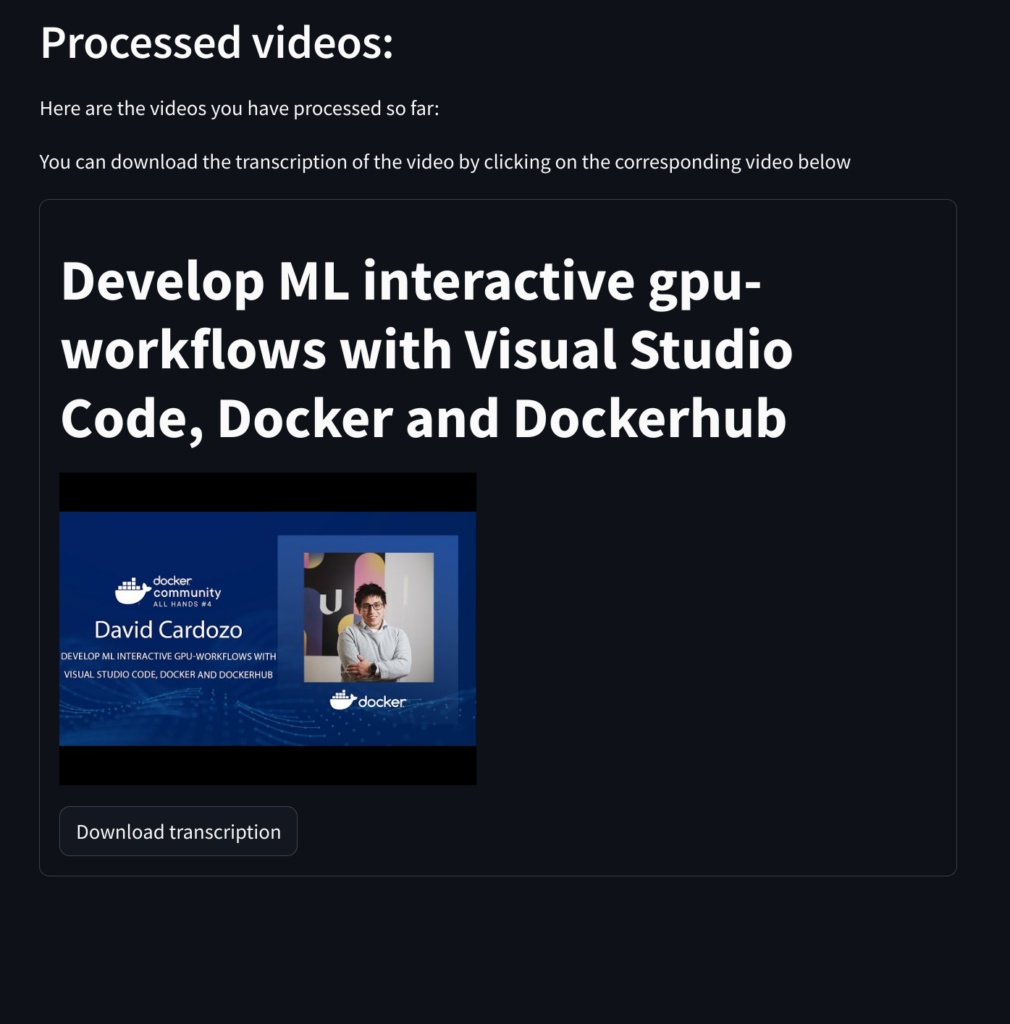
Open a browser and access the yt-whisper service at http://localhost:8503. Once the application appears, specify a YouTube video URL in the URL field and select Submit. The example shown in Figure 2 uses a video from David Cardozo.

Submitting a video
The yt-whisper service downloads the audio of the video, then uses Whisper to transcribe it into a WebVTT (*.vtt) format (which you can download). Next, it uses the “text-embedding-3-small” model to create embeddings and finally uploads those embeddings into the Pinecone database.
After the video is processed, a video list appears in the web app that informs you which videos have been indexed in Pinecone. It also provides a button to download the transcript.
Accessing Dockerbot chat service
You can now access the Dockerbot chat service on port 8504 and ask questions about the videos as shown in Figure 3.


Conclusion
In this article, we explored the exciting potential of GenAI technologies combined with Docker for unlocking valuable insights from video content. It shows how the integration of cutting-edge AI models like Whisper, coupled with efficient database solutions like Pinecone, empowers organizations to transform raw video data into actionable knowledge.
Whether you’re an experienced developer or just starting to explore the world of AI, the provided resources and code make it simple to embark on your own video-understanding projects.
Learn more
About the Authors
Developer Advocate, Docker
Ajeet Singh Raina, Developer Advocate at Docker, writes and speaks on containers, Docker Compose & AI, helping devs build confidently.
Chief Analyst ML Scientist, Updata
Related Posts
-
May 12, 2026
Docker AI Governance: Unlock Agent Autonomy, Safely
Introducing Docker AI Governance: centralized control over how agents execute, what they can reach on the network, which credentials they can use, and which MCP tools they can call, so every developer in your company can run AI agents safely, wherever they work. Your laptop is the new prod Agents are the biggest productivity unlock…
Srini SekaranRead now
-
Jun 15, 2026
Docker joins the Athena coalition: a cross-industry collaboration for supply chain security
AI is lowering the bar for supply chain attacks. Docker is joining the Athena alliance, a cross-industry effort to coordinate the defense of open source, building on our work to give every developer secure-by-default tools and our track record of sharing signals across the ecosystem.
Tushar JainRead now
-
Jun 11, 2026
Docker Hardened Images enhanced vulnerability scanning with Docker and Aikido
Aikido now scans Docker Hardened Images (DHI) with built-in VEX support. Vulnerabilities that Docker has verified as non-exploitable drop out of the queue automatically, so developers spend their time on findings that actually matter. This post walks through what changed, why it matters, and how users can benefit from the new integration. Why teams are…
Dan StelzerandBjorn HovdRead now
-
Jun 8, 2026
5 Software Supply Chain Security Best Practices for Development Teams
Learn the key software supply chain security best practices for container-based delivery, from trusted base images and dependency management to build provenance and runtime monitoring.
Aditya TripathiRead now