
Compose Editing Evolved: Schema-Driven and Context-Aware
Every day, thousands of developers are creating and editing Compose files. At Docker, we are regularly adding more features to Docker Compose such as the new provider services capability that lets you run AI models as part of your multi-container applications with Docker Model Runner. We know that providing a first-class editing experience for Compose files is key to empowering our users to ship amazing products that will delight their customers. We are pleased to announce today some new additions to the Docker Language Server that will make authoring Compose files easier than ever before.
Schema-Driven Features
To help you stay on the right track as you edit your Compose file, the Docker Language Server brings the Compose specification into the editor to help minimize window switching and keeps you in your editor where you are most productive.
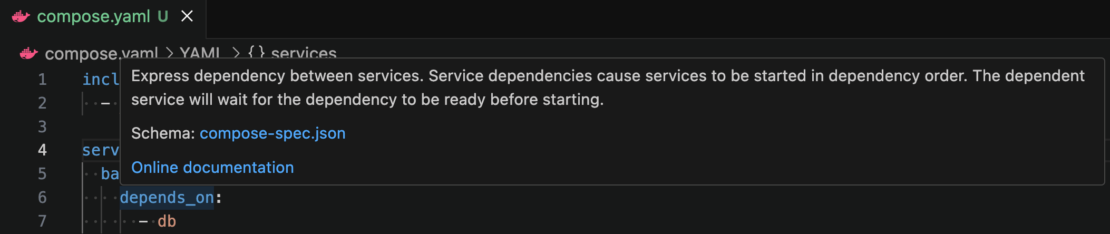
Figure 1: Leverage hover tooltips to quickly understand what a specific Compose attribute is for.
Context-Aware Intelligence
Although attribute names and types can be inferred from the Compose specification, certain attributes have a contextual meaning on them and reference values of different attributes or content from another file. The Docker Language Server understands these relationships and will suggest the available values so that there is no guesswork on your part.
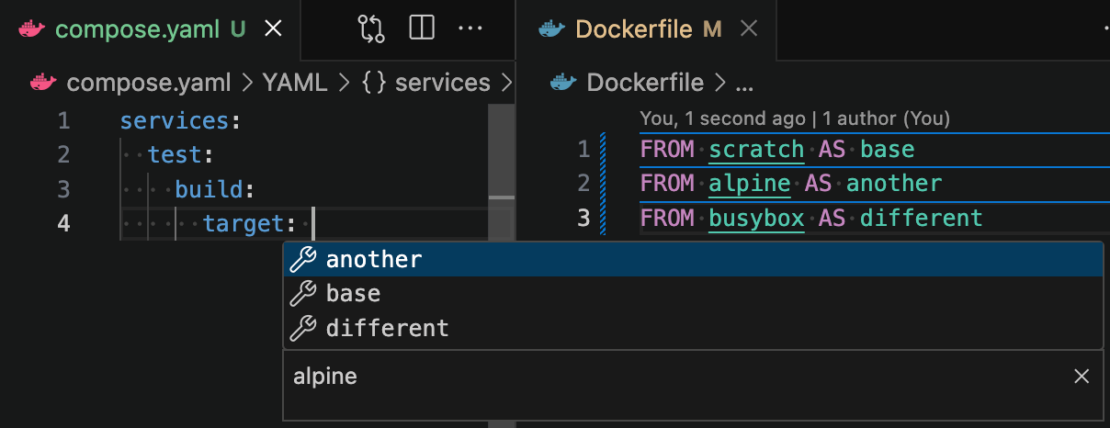
Figure 2: Code completion understands how your files are connected and will only give you suggestions that are relevant in your current context.
Freedom of Choice
The Docker Language Server is built on the Language Server Protocol (LSP) which means you can connect it with any LSP-compatible editor of your choosing. Whatever editor you like using, we will be right there with you to guide you along your software development journey.
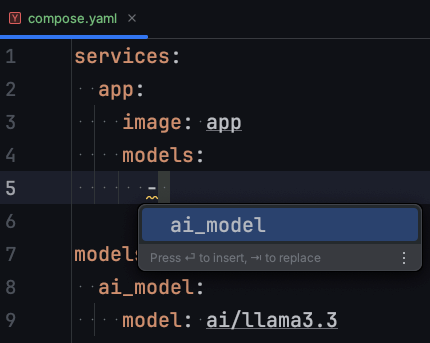
Figure 3: The Docker Language Server can run in any LSP-compliant editor such as the JetBrains IDE with the LSP4IJ plugin.
Conclusion
Docker Compose is a core part of hundreds of companies’ development cycles. By offering a feature-rich editing experience with the Docker Language Server, developers everywhere can test and ship their products faster than ever before. Install the Docker DX extension for Visual Studio Code today or download the Docker Language Server to integrate it with your favourite editor.
What’s Next
Your feedback is critical in helping us improve and shape the Docker DX extension and the Docker Language Server.
If you encounter any issues or have ideas for enhancements that you would like to see, please let us know:
- Open an issue on the Docker DX VS Code extension GitHub repository or the Docker Language Server GitHub repository
- Or submit feedback through the Docker feedback page
We’re listening and excited to keep making things better for you!
Learn More
- Setup the Docker Language Server after installing LSP4IJ in your favorite JetBrains IDE.
Related Posts
-
May 12, 2026
Docker AI Governance: Unlock Agent Autonomy, Safely
Introducing Docker AI Governance: centralized control over how agents execute, what they can reach on the network, which credentials they can use, and which MCP tools they can call, so every developer in your company can run AI agents safely, wherever they work. Your laptop is the new prod Agents are the biggest productivity unlock…
Srini SekaranRead now
-
Jun 25, 2026
How to Generate an SBOM for Container Workflows
Learn when, where, and how to generate SBOMs for container images. Covers build-time vs. post-build approaches, quality criteria, and CI/CD integration.
Aditya TripathiRead now
-
Jun 25, 2026
EU Cyber Resilience Act: Overview, Requirements, and Timelines
Learn what the EU Cyber Resilience Act requires, including SBOM mandates, vulnerability reporting, and compliance deadlines for container teams.
Dan StelzerandMonique AltmanRead now
-
Jun 23, 2026
What is an SBOM (and Why Can’t You Ship Without One)?
Learn what a software bill of materials (SBOM) is, why it matters for supply chain security, how to generate one, and what formats and standards to use.
Aditya TripathiRead now



