Connect to Remote MCP Servers with OAuth in Docker


In just a year, the Model Context Protocol (MCP) has become the standard for connecting AI agents to tools and external systems. The Docker MCP Catalog now hosts hundreds of containerized local MCP servers, enabling developers to quickly experiment and prototype locally.
We have now added support for remote MCP servers to the Docker MCP Catalog. These servers function like local MCP servers but run over the internet, making them easier to access from any environment without the need for local configuration.
With the latest update, the Docker MCP Toolkit now supports remote MCP servers with OAuth, making it easier than ever to securely connect to external apps like Notion and Linear, right from your Docker environment. Plus, the Docker MCP Catalog just grew by 60+ new remote MCP servers, giving you an even wider range of integrations to power your workflows and accelerate how you build, collaborate, and automate.
As remote MCP servers gain popularity, we’re excited to make this capability available to millions of developers building with Docker.
In this post, we’ll explore what this means for developers, why OAuth support is a game-changer, and how you can get started with remote MCP servers with just two simple commands.
Connect to Remote MCP Servers- Securely, Easily, Seamlessly
Goodbye Manual Setup, Hello OAuth Magic
Figuring out how to find and generate API tokens for a service is often tedious, especially for beginners. Tokens also tend to expire unpredictably, breaking existing MCP connections and require reconfiguration.
With OAuth built directly into Docker MCP, you’ll no longer need to juggle tokens or manually configure connections. You can securely connect to remote MCP servers in seconds – all while keeping your credentials safe.
60+ New Remote MCP Servers, Instantly Available
From project management to documentation and issue tracking, the expanded MCP Catalog now includes integrations for Notion, Linear, and dozens more. Whatever tools your team depends on, they’re now just a command away. We will continue to expand the catalog as new remote servers become available.
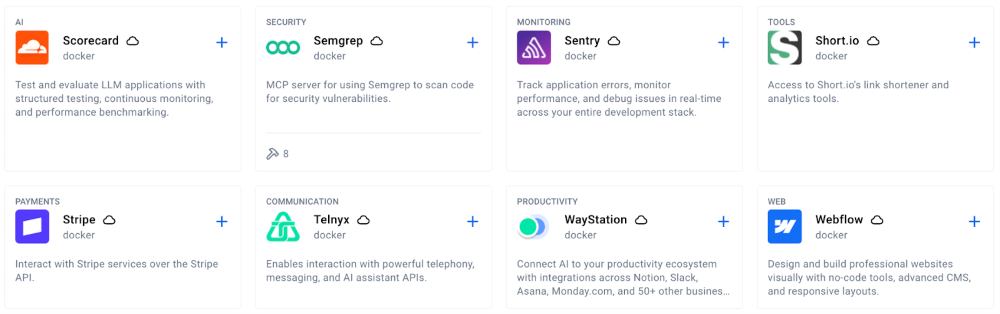
Figure 1: Some examples of remote MCP servers that are now part of the Docker MCP Catalog
Easy to use via the CLI or Docker Desktop
No new setup. No steep learning curve. Just use your existing Docker CLI and get going. Enabling and authorizing remote MCP servers is fully integrated into the familiar command-line experience you already love. You can also install servers via one-click with Docker Desktop.
Two Commands to Connect and Authorize Remote MCP Servers- It’s That Simple
Using Docker CLI
Step 1: Enable Your Remote MCP Server
Pick your server, and enable it with one line:
docker mcp server enable notion-remote
This registers the remote server and prepares it for OAuth authorization.
Step 2: Authorize Securely with OAuth
Next, authorize your connection with:
docker mcp oauth authorize notion-remote
This launches your browser with an OAuth authorization page.
Using Docker Desktop
Step 1: Enable Your Remote MCP Server
If you prefer to use Docker Desktop instead of the command line, open the Catalog tab and search for the server you want to use. The cloud icon indicates that it’s a remote server. Click the “+” button to enable the server.
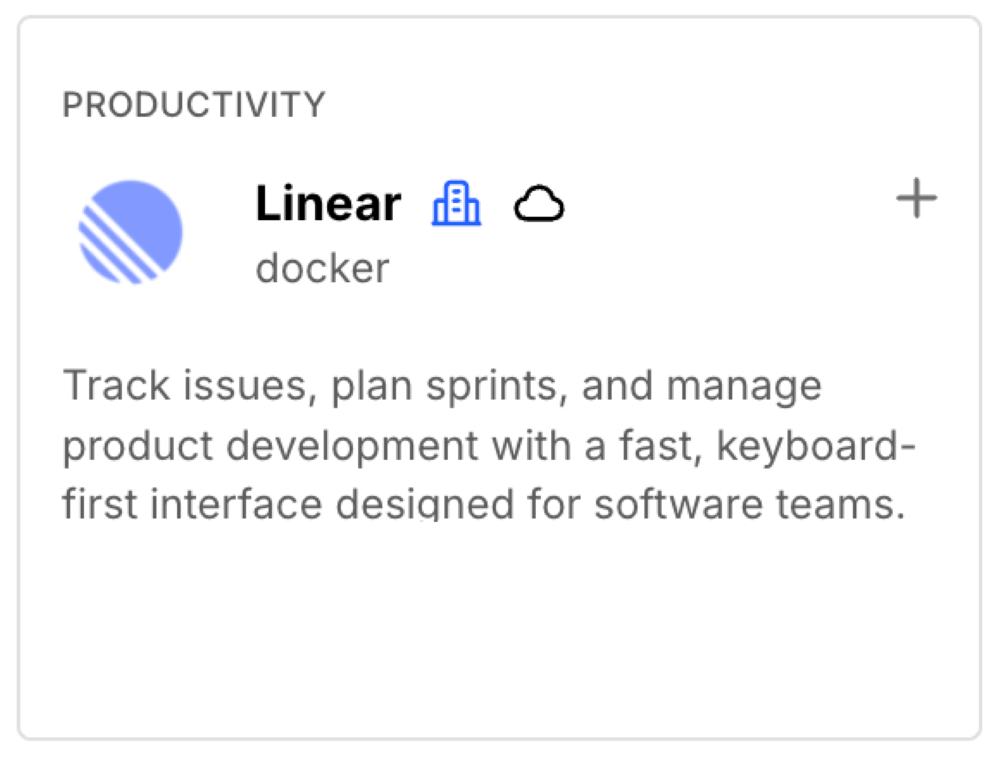
Figure 2: Enabling the Linear remote MCP server is just one click.
Step 2: Authorize Securely with OAuth
Open the OAuth tab and click the “Authorize” button next to the MCP Server you want to authenticate with.

Figure 3: Built-in OAuth flow for Linear remote MCP servers.
Once authorized, your connection is live. You can now interact with Notion, Linear, or any other supported MCP server directly through your Docker MCP environment.
Why This Update Matters for Developers
Unified Access Across Your Ecosystem
Developers rely on dozens of tools every day across different MCP clients. The Docker MCP Toolkit brings them together under one secure, unified interface – helping you move faster without manually configuring each MCP client. This means you don’t need to log in to the same service multiple times across Cursor, Claude Code, and other clients you may use.
Unlock AI-Powered Workflows
Remote MCP servers make it really easy to bridge data, tools, and AI. They are always up to date with the latest tools and are faster to use as they don’t run any code on your computer. With OAuth support, your connected apps can now securely provide context to AI models unlocking powerful new automation possibilities.
Building the Future of Developer Productivity
This update is more than just an integration boost – it’s the foundation for a more connected, intelligent, and automated developer experience. And this is only the beginning.
Conclusion
The addition of OAuth for remote MCP servers makes Docker MCP Toolkit the most powerful way to securely connect your tools, workflows, and AI-powered automations.
With 60+ new remote servers now available and growing, developers can bring their favorite services – like Notion and Linear, directly into Docker MCP Toolkit.
Learn more
- Head over to our docs to learn more
- Explore the MCP Catalog: Discover containerized, security-hardened MCP servers
- Open Docker Desktop and get started with the MCP Toolkit (Requires version 4.48 or newer to launch the MCP Toolkit automatically)
Related Posts
-
May 12, 2026
Docker AI Governance: Unlock Agent Autonomy, Safely
Introducing Docker AI Governance: centralized control over how agents execute, what they can reach on the network, which credentials they can use, and which MCP tools they can call, so every developer in your company can run AI agents safely, wherever they work. Your laptop is the new prod Agents are the biggest productivity unlock…
Srini SekaranRead now
-
Jun 16, 2026
Docker Content Trust: Retirement and Migration Guidance
Docker Content Trust (DCT) and the Notary v1 service at notary.docker.io are being fully retired (first announced in July of 2025). This blog explains what is changing, who is affected, and how to move to modern alternatives.
Julia WilsonandAditya TripathiRead now
-
Jun 15, 2026
Docker joins the Athena coalition: a cross-industry collaboration for supply chain security
AI is lowering the bar for supply chain attacks. Docker is joining the Athena alliance, a cross-industry effort to coordinate the defense of open source, building on our work to give every developer secure-by-default tools and our track record of sharing signals across the ecosystem.
Tushar JainRead now
-
Jun 11, 2026
Docker Hardened Images enhanced vulnerability scanning with Docker and Aikido
Aikido now scans Docker Hardened Images (DHI) with built-in VEX support. Vulnerabilities that Docker has verified as non-exploitable drop out of the queue automatically, so developers spend their time on findings that actually matter. This post walks through what changed, why it matters, and how users can benefit from the new integration. Why teams are…
Dan StelzerandBjorn HovdRead now