Docker Compose Experiment: Sync Files and Automatically Rebuild Services with Watch Mode

We often hear how indispensable Docker Compose is as a development tool. Running docker compose up offers a streamlined experience and scales from quickly standing up a PostgreSQL database to building 50+ services across multiple platforms.
And, although “building a Docker image” was previously considered a last step in release pipelines, it’s safe to say that containers have since become an essential part of our daily workflow. Still, concerns around slow builds and developer experience have often been a barrier towards the adoption of containers for local development.
We’ve come a long way, though. For starters, Docker Compose v2 now has deep integration with BuildKit, so you can use features like RUN cache mounts, SSH Agent forwarding, and efficient COPY with –link to speed up and simplify your builds. We’re also constantly making quality-of-life tweaks like enhanced progress reporting and improving consistency across the Docker CLI ecosystem.
As a result, more developers are running docker compose build && docker compose up to keep their running development environment up-to-date as they make code changes. In some cases, you can even use bind mounts combined with a framework that supports hot reload to avoid the need for an image rebuild, but this approach often comes with its own set of caveats and limitations.
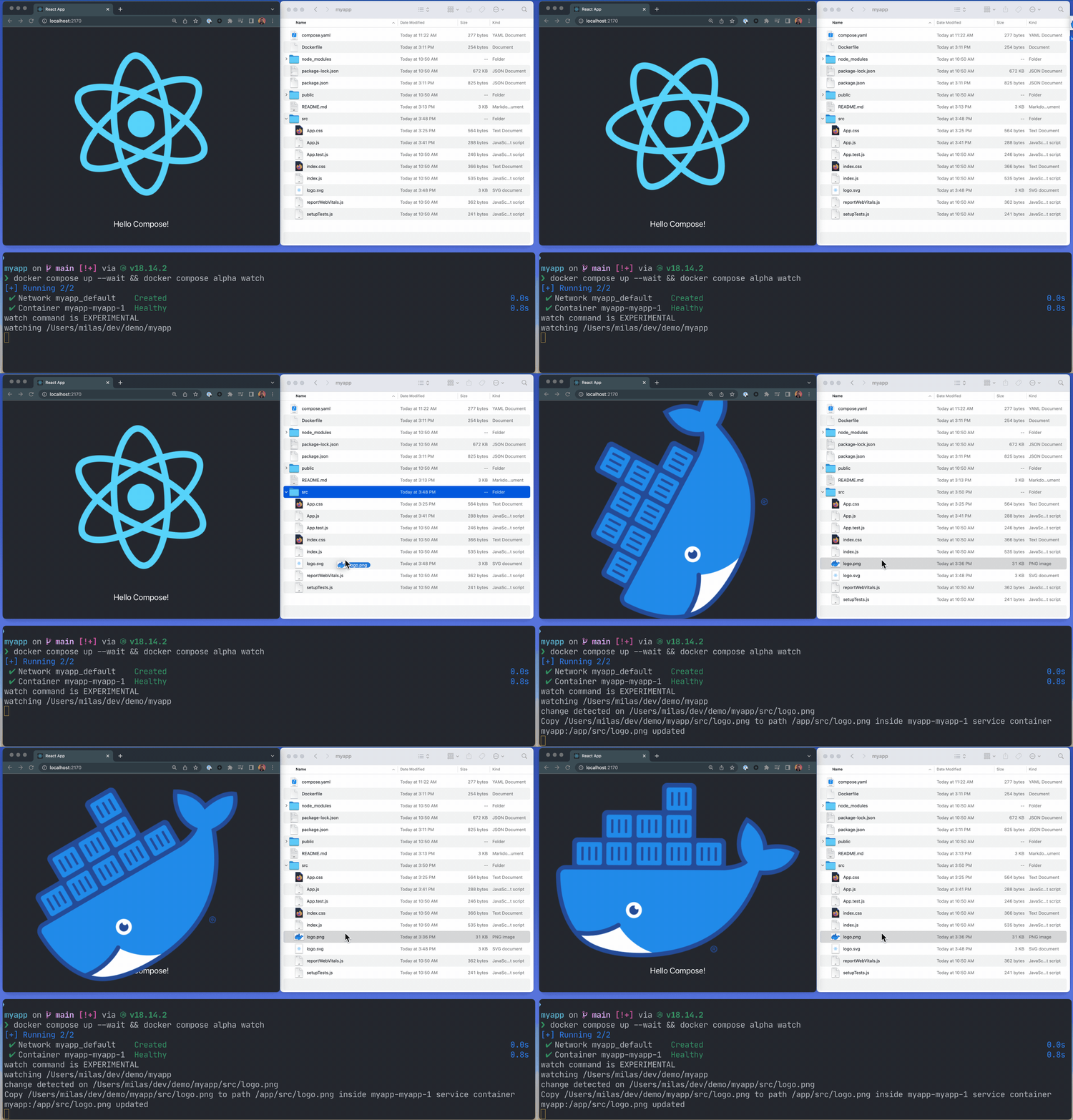
An early look at the watch command
Starting with Compose v2.17, we’re excited to share an early look at the new development-specific configuration in Compose YAML as well as an experimental file watch command (Figure 1) that will automatically update your running Compose services as you edit and save your code.
This preview is brought to you in no small part by Compose developer Nicolas De Loof (in addition to more than 10 bugfixes in this release alone).
An optional new section, x-develop, can be added to a Compose service to configure options specific to your project’s daily flow. In this release, the only available option is watch, which allows you to define file or directory paths to monitor on your computer and a corresponding action to take inside the service container.
Currently, there are two possible actions:
sync— Copy changed files matching the pattern into the running service container(s).rebuild— Trigger an image build and recreate the running service container(s).
services:
 web:
 build: .
 x-develop:
 watch:
 - action: sync
 path: ./web
 target: /src/web
 - action: rebuild
 path: package.json
In the preceding example, whenever a source file in the web/ directory is changed, Compose will copy the file to the corresponding location under /src/web inside the container. Because Webpack supports Hot Module Reload, the changes are automatically detected and applied.
Unlike source code files, adding a new dependency cannot be done on the fly, so whenever package.json is changed, Compose will rebuild the image and recreate the web service container.
Behind the scenes, the file watching code shares its core with Tilt. The intricacies and surprises of file watching have always been near and dear to the Tilt team’s hearts, and, as Dockhands, the geeking out has continued.
We are going to continue to build out the experience while gated behind the new docker compose alpha command and x-develop Compose YAML section. This approach will allow us to respond to community feedback early in the development process while still providing a clear path to stabilization as part of the Compose Spec.
Docker Compose powers countless workflows today, and its lightweight approach to containerized development is not going anywhere — it’s just learning a few new tricks.
Try it out
Follow the instructions at dockersamples/avatars to quickly run a small demo app, as follows:
git clone https://github.com/dockersamples/avatars.git
cd avatars
docker compose up -d
docker compose alpha watch
# open http://localhost:5735 in your browser
If you try it out on your own project, you can comment on the proposed specification on GitHub issue #253 in the compose-spec repository.
Related Posts
-
May 12, 2026
Docker AI Governance: Unlock Agent Autonomy, Safely
Introducing Docker AI Governance: centralized control over how agents execute, what they can reach on the network, which credentials they can use, and which MCP tools they can call, so every developer in your company can run AI agents safely, wherever they work. Your laptop is the new prod Agents are the biggest productivity unlock…
Srini SekaranRead now
-
Jun 16, 2026
Docker Content Trust: Retirement and Migration Guidance
Docker Content Trust (DCT) and the Notary v1 service at notary.docker.io are being fully retired (first announced in July of 2025). This blog explains what is changing, who is affected, and how to move to modern alternatives.
Julia WilsonandAditya TripathiRead now
-
Jun 15, 2026
Docker joins the Athena coalition: a cross-industry collaboration for supply chain security
AI is lowering the bar for supply chain attacks. Docker is joining the Athena alliance, a cross-industry effort to coordinate the defense of open source, building on our work to give every developer secure-by-default tools and our track record of sharing signals across the ecosystem.
Tushar JainRead now
-
Jun 11, 2026
Docker Hardened Images enhanced vulnerability scanning with Docker and Aikido
Aikido now scans Docker Hardened Images (DHI) with built-in VEX support. Vulnerabilities that Docker has verified as non-exploitable drop out of the queue automatically, so developers spend their time on findings that actually matter. This post walks through what changed, why it matters, and how users can benefit from the new integration. Why teams are…
Dan StelzerandBjorn HovdRead now