
New Docker Extension for Visual Studio Code

Today, we are excited to announce the release of a new, open-source Docker Language Server and Docker DX VS Code extension. In a joint collaboration between Docker and the Microsoft Container Tools team, this new integration enhances the existing Docker extension with improved Dockerfile linting, inline image vulnerability checks, Docker Bake file support, and outlines for Docker Compose files. By working directly with Microsoft, we’re ensuring a native, high-performance experience that complements the existing developer workflow. It’s the next evolution of Docker tooling in VS Code — built to help you move faster, catch issues earlier, and focus on what matters most: building great software.
What’s the Docker DX extension?
The Docker DX extension is focused on providing developers with faster feedback as they edit. Whether you’re authoring a complex Compose file or fine-tuning a Dockerfile, the extension surfaces relevant suggestions, validations, and warnings in real time.
Key features include:
- Dockerfile linting: Get build warnings and best-practice suggestions directly from BuildKit and Buildx.
- Image vulnerability remediation (experimental): Flags references to container images with known vulnerabilities directly in Dockerfiles.
- Bake file support: Includes code completion, variable navigation, and inline suggestions for generating targets based on your Dockerfile stages.
- Compose file outline: Easily navigate complex Compose files with an outline view in the editor.
If you’re already using the Docker VS Code extension, the new features are included — just update the extension and start using them!
Dockerfile linting and vulnerability remediation
The inline Dockerfile linting provides warnings and best-practice guidance for writing Dockerfiles from the experts at Docker, powered by Build Checks. Potential vulnerabilities are highlighted directly in the editor with context about their severity and impact, powered by Docker Scout.
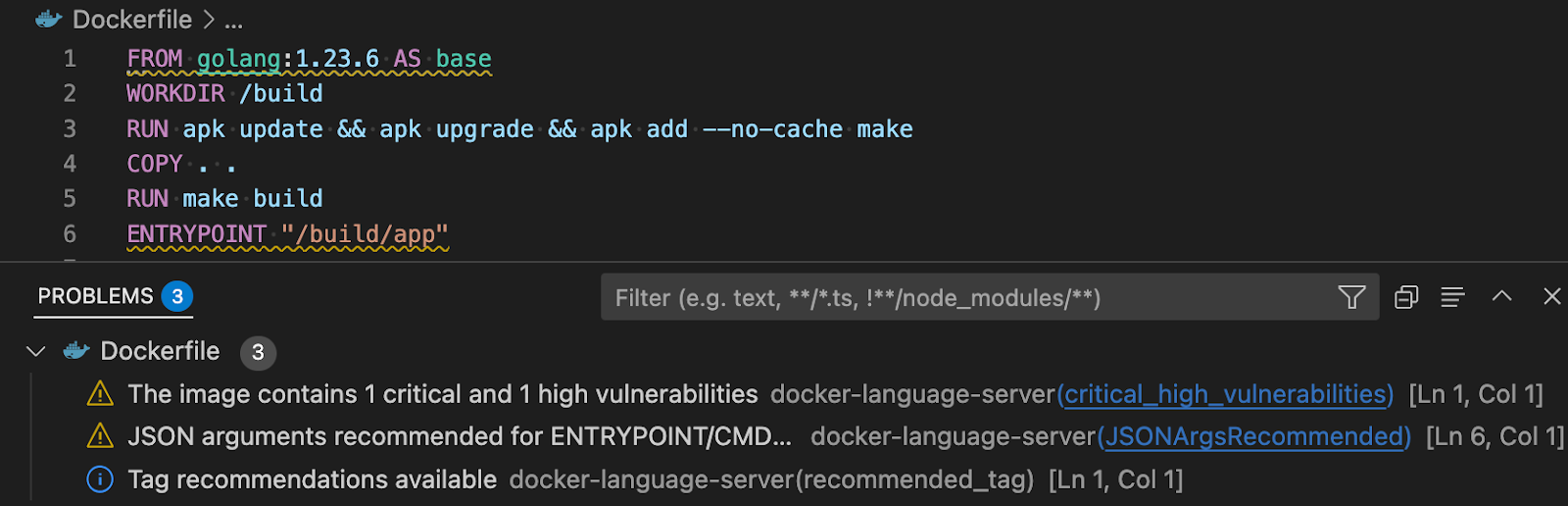
Figure 1: Providing actionable recommendations for fixing vulnerabilities and optimizing Dockerfiles
Early feedback directly in Dockerfiles keeps you focused and saves you and your team time debugging and remediating later.
Docker Bake files
The Docker DX extension makes authoring and editing Docker Bake files quick and easy. It provides code completion, code navigation, and error reporting to make editing Bake files a breeze. The extension will also look at your Dockerfile and suggest Bake targets based on the build stages you have defined in your Dockerfile.
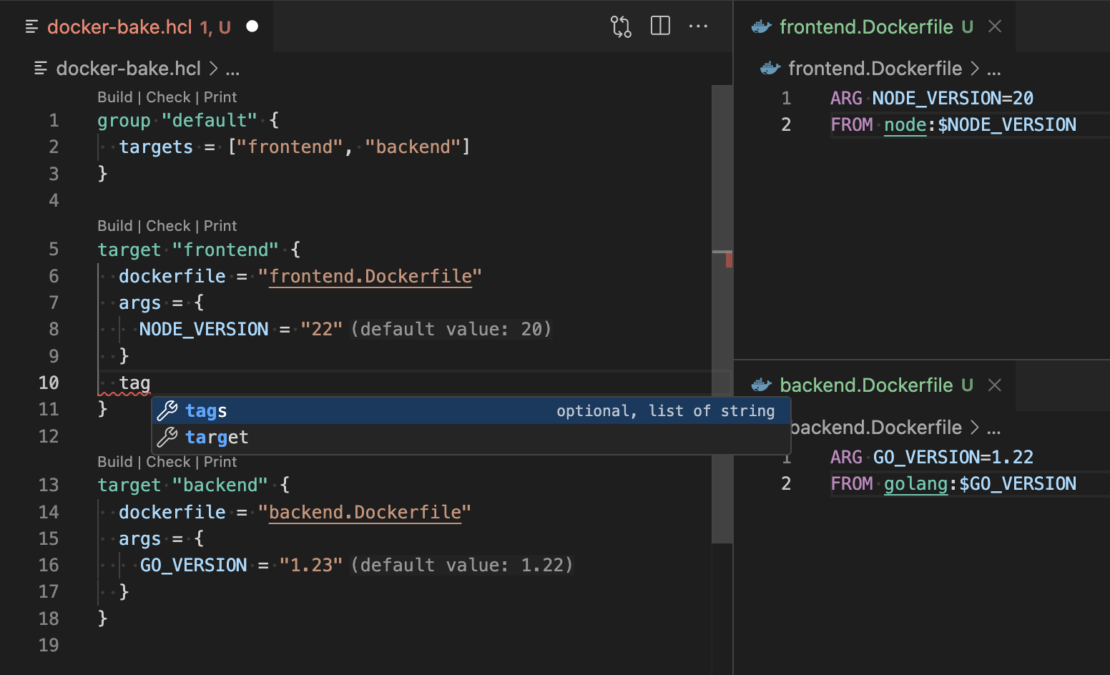
Figure 2: Editing Bake files is simple and intuitive with the rich language features that the Docker DX extension provides.
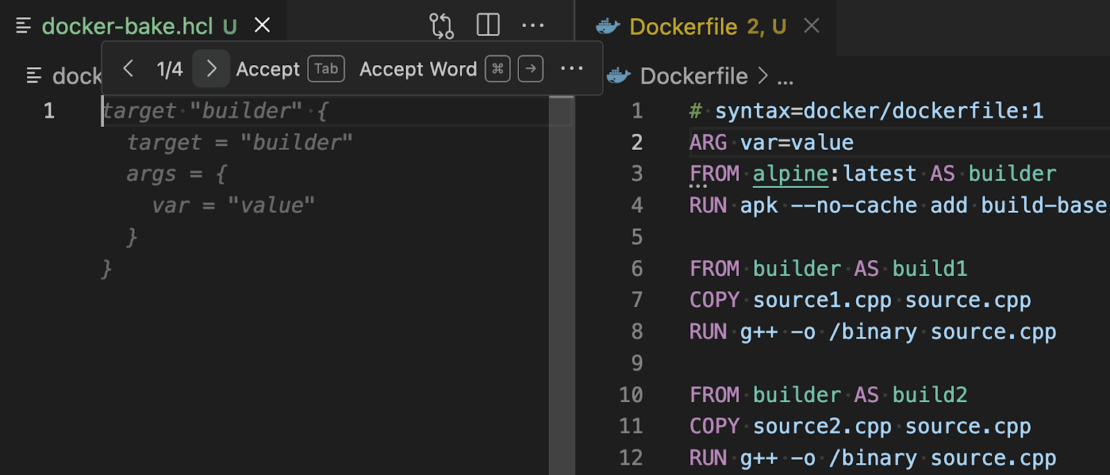
Figure 3: Creating new Bake files is straightforward as your Dockerfile’s build stages are analyzed and suggested as Bake targets.
Compose outlines
Quickly navigate complex Compose files with the extension’s support for outlines available directly through VS Code’s command palette.
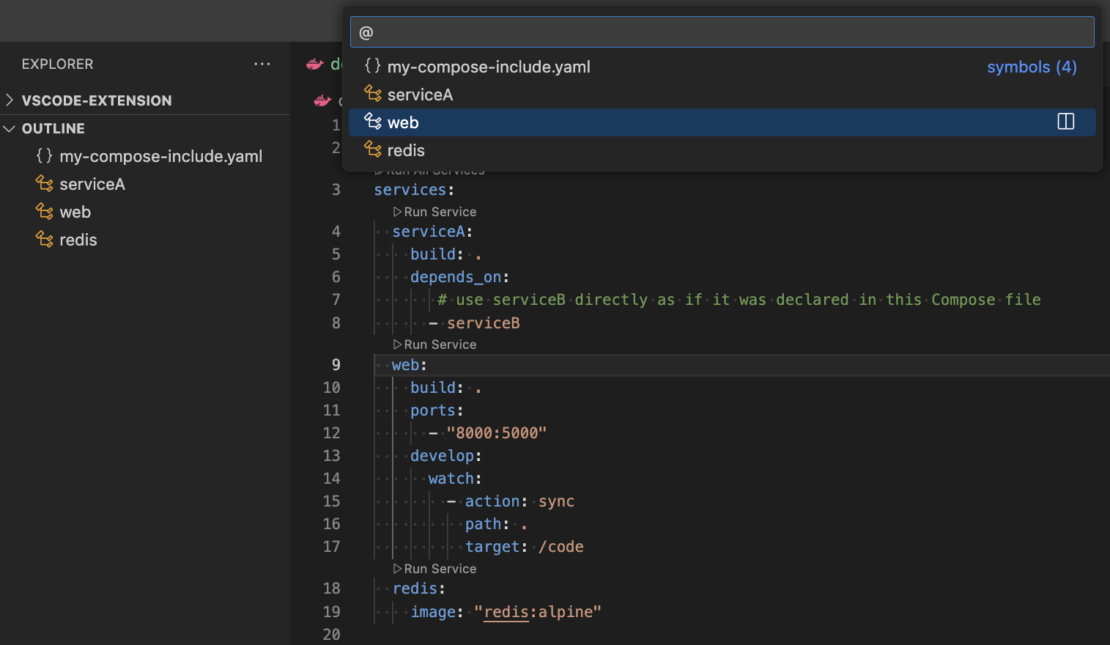
Figure 4: Navigate complex Compose files with the outline panel.
Don’t use VS Code? Try the Language Server!
The features offered by the Docker DX extension are powered by the brand-new Docker Language Server, built on the Language Server Protocol (LSP). This means the same smart editing experience — like real-time feedback, validation, and suggestions for Dockerfiles, Compose, and Bake files — is available in your favorite editor.
Wrapping up
Install the extension from Docker DX – Visual Studio Marketplace today! The functionality is also automatically installed with the existing Docker VS Code extension from Microsoft.
Share your feedback on how it’s working for you, and share what features you’d like to see next. If you’d like to learn more or contribute to the project, check out our GitHub repo.
Learn more
Related Posts
-
May 12, 2026
Docker AI Governance: Unlock Agent Autonomy, Safely
Introducing Docker AI Governance: centralized control over how agents execute, what they can reach on the network, which credentials they can use, and which MCP tools they can call, so every developer in your company can run AI agents safely, wherever they work. Your laptop is the new prod Agents are the biggest productivity unlock…
Srini SekaranRead now
-
Jun 25, 2026
How to Generate an SBOM for Container Workflows
Learn when, where, and how to generate SBOMs for container images. Covers build-time vs. post-build approaches, quality criteria, and CI/CD integration.
Aditya TripathiRead now
-
Jun 25, 2026
EU Cyber Resilience Act: Overview, Requirements, and Timelines
Learn what the EU Cyber Resilience Act requires, including SBOM mandates, vulnerability reporting, and compliance deadlines for container teams.
Dan StelzerandMonique AltmanRead now
-
Jun 23, 2026
What is an SBOM (and Why Can’t You Ship Without One)?
Learn what a software bill of materials (SBOM) is, why it matters for supply chain security, how to generate one, and what formats and standards to use.
Aditya TripathiRead now



