Docker Init: Initialize Dockerfiles and Compose files with a single CLI command


Docker has revolutionized the way developers build, package, and deploy their applications. Docker containers provide a lightweight, portable, and consistent runtime environment that can run on any infrastructure. And now, the Docker team has developed docker init, a new command-line interface (CLI) command introduced as a beta feature that simplifies the process of adding Docker to a project (Figure 1).
Note: Docker Init should not be confused with the internally -used docker-init executable, which is invoked by Docker when utilizing the –init flag with the docker run command.
Create assets automatically
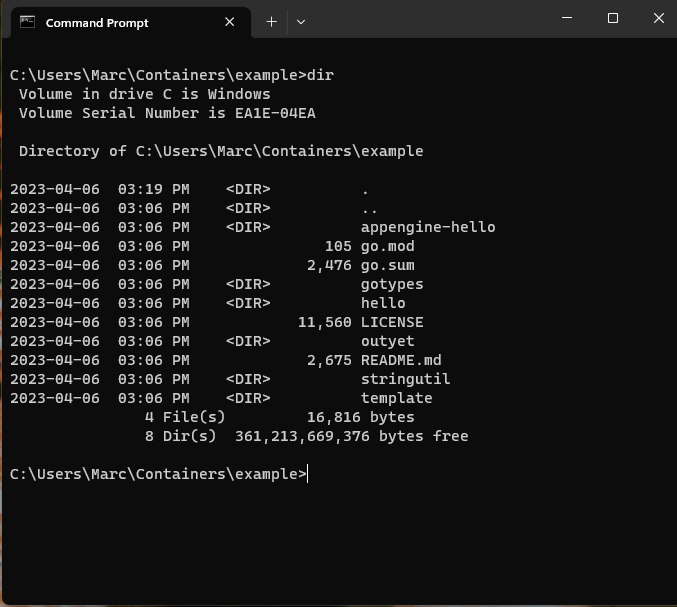
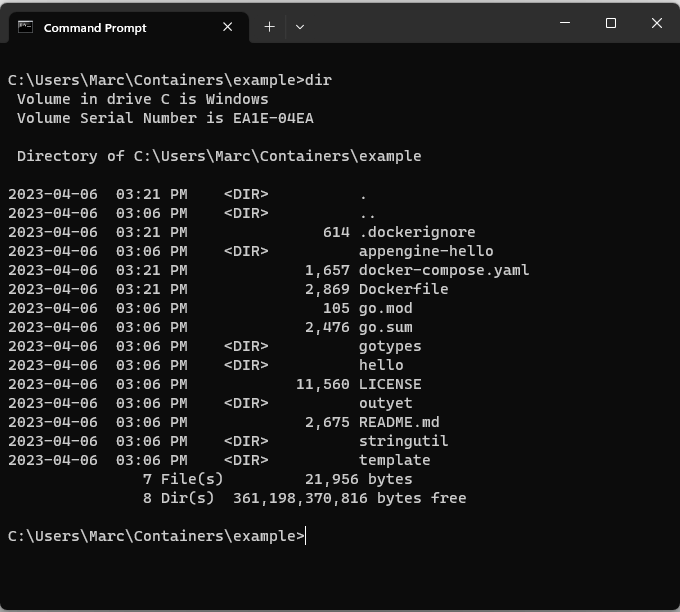
The new docker init command automates the creation of necessary Docker assets, such as Dockerfiles, Compose files, and .dockerignore files, based on the characteristics of the project. By executing the docker init command, developers can quickly containerize their projects. Docker init is a valuable tool for developers who want to experiment with Docker, learn about containerization, or integrate Docker into their existing projects.
To use docker init, developers need to upgrade to the version 4.19.0 or later of Docker Desktop and execute the command in the target project folder. Docker init will detect the project definitions, and it will automatically generate the necessary files to run the project in Docker.
The current Beta release of docker init supports Go, Node, and Python, and our development team is actively working to extend support for additional languages and frameworks, including Java, Rust, and .NET. If there is a language or stack that you would like to see added or if you have other feedback about docker init, let us know through our Google form.
In conclusion, docker init is a valuable tool for developers who want to simplify the process of adding Docker support to their projects. It automates the creation of necessary Docker assets and can help standardize the creation of Docker assets across different projects. By enabling developers to focus on developing their applications and reducing the risk of errors and inconsistencies, Docker init can help accelerate the adoption of Docker and containerization.
See Docker Init in action
To see docker init in action, check out the following overview video by Francesco Ciulla, which demonstrates building the required Docker assets to your project.
Check out the documentation to learn more.
About the Authors
Technical Product Marketing, Docker
Principal Product Manager, Docker
Principal PM at Docker, Nuno leads the AI agents teams – Gordon, Docker agent, and MCP – shipping the open foundations that bring agentic AI into developers’ daily workflows.
Related Posts
-
May 12, 2026
Docker AI Governance: Unlock Agent Autonomy, Safely
Introducing Docker AI Governance: centralized control over how agents execute, what they can reach on the network, which credentials they can use, and which MCP tools they can call, so every developer in your company can run AI agents safely, wherever they work. Your laptop is the new prod Agents are the biggest productivity unlock…
Srini SekaranRead now
-
Jun 16, 2026
Docker Content Trust: Retirement and Migration Guidance
Docker Content Trust (DCT) and the Notary v1 service at notary.docker.io are being fully retired (first announced in July of 2025). This blog explains what is changing, who is affected, and how to move to modern alternatives.
Julia WilsonandAditya TripathiRead now
-
Jun 15, 2026
Docker joins the Athena coalition: a cross-industry collaboration for supply chain security
AI is lowering the bar for supply chain attacks. Docker is joining the Athena alliance, a cross-industry effort to coordinate the defense of open source, building on our work to give every developer secure-by-default tools and our track record of sharing signals across the ecosystem.
Tushar JainRead now
-
Jun 11, 2026
Docker Hardened Images enhanced vulnerability scanning with Docker and Aikido
Aikido now scans Docker Hardened Images (DHI) with built-in VEX support. Vulnerabilities that Docker has verified as non-exploitable drop out of the queue automatically, so developers spend their time on findings that actually matter. This post walks through what changed, why it matters, and how users can benefit from the new integration. Why teams are…
Dan StelzerandBjorn HovdRead now