The Docker MCP Catalog: the Secure Way to Discover and Run MCP Servers


The Model Context Protocol (MCP) ecosystem is exploding. In just weeks, our Docker MCP Catalog has surpassed 1 million pulls, validating that developers are hungry for a secure way to run MCP servers. Today, we’re excited to share major updates to the Docker MCP Catalog, including enhanced discovery features and our new open submission process. With hundreds of developers already requesting to publish their MCP servers through Docker, we’re accelerating our mission to make containerized MCP servers the standard for secure AI tool distribution.
The rapid adoption of MCP servers also highlights a critical problem — the current practice of running them via npx or uvx commands exposes systems to unverified code with full host access, not to mention dependency management friction. In this post, we’ll explain why Docker is investing in the MCP ecosystem, showcase the new catalog capabilities, and share how you can contribute to building a more secure foundation for AI applications.
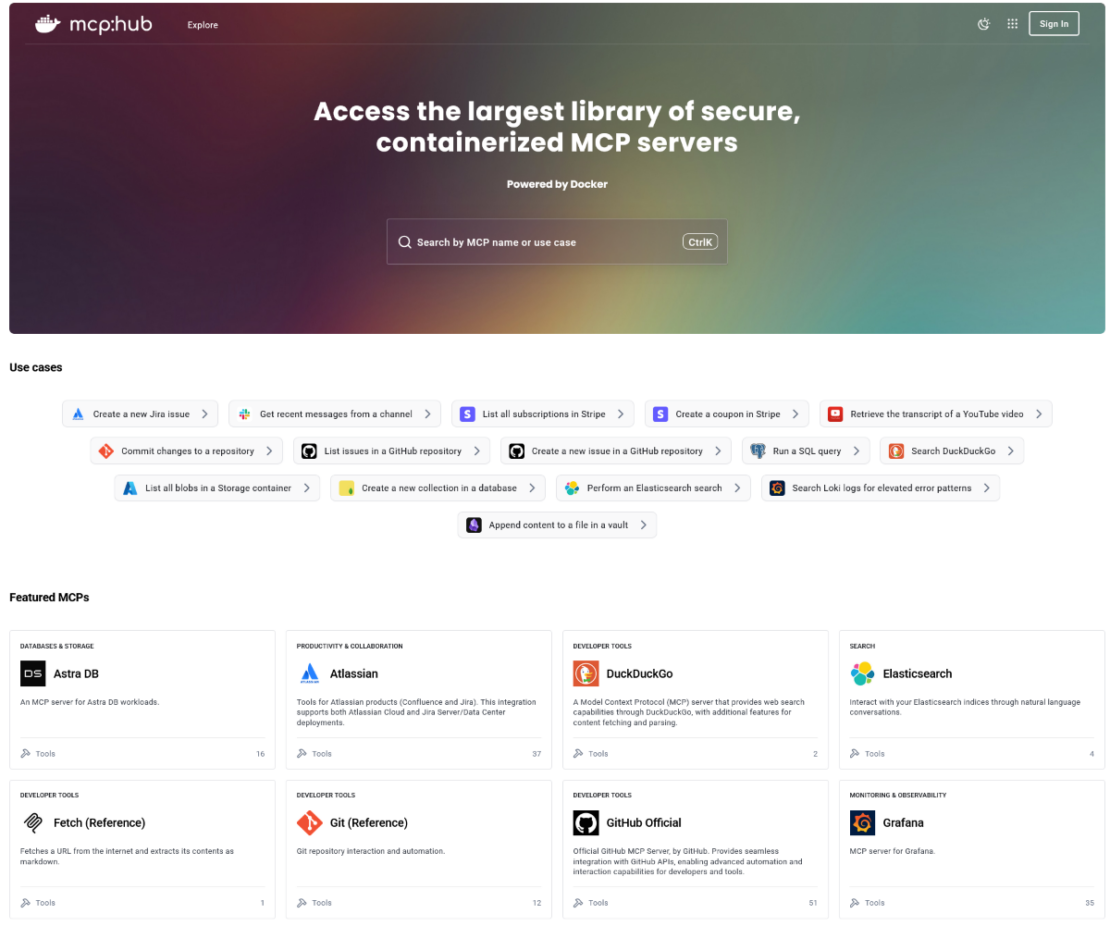
Figure 1: The new Docker MCP Catalog, built for easier discovery.
Why Docker is building the MCP Catalog
The security issues in MCP distribution
Every time a developer runs npx -y @untrusted/mcp-server or uvx some-mcp-tool, they’re making a dangerous trade-off: convenience over security. These commands execute arbitrary code directly on the host system with full access to:
- The entire file system
- Network connections
- Environment variables and secrets
- System resources
Some MCP clients limit environment variable access, but even that is not a universal practice. This isn’t sustainable. As MCP moves from experimentation to production, we need a fundamentally different approach.
Docker’s unique position
Docker has spent over a decade solving exactly these problems for cloud-native applications. We’ve built the infrastructure, tools, and trust that developers rely on to run billions of containers in production. Now, we’re applying these same principles to the MCP ecosystem.
When you run an MCP server from our Catalog, you get:
- Cryptographic signatures verifying the image hasn’t been tampered with
- Software Bill of Materials (SBOMs) documenting every component
- Complete isolation from your host system
- Controlled access to only what the server actually needs
This isn’t about making life harder for developers—it’s about making security the path of least resistance.
Introducing the enhanced MCP Catalog
Built for MCP discovery
We’ve reimagined the MCP Catalog to make it more accessible and easier to navigate. You can still access the MCP Catalog from Docker Hub and the MCP Toolkit in Docker Desktop just like before, or go straight to the MCP catalog. We’ve gone beyond generic container image listings by building features that help you quickly find the right MCP servers for your AI applications.
Browse by Use Case: MCP servers are organized by what they actually do:
- Data Integration (databases, APIs, file systems)
- Development Tools (IDEs, code analysis, testing)
- Communication (email, Slack, messaging platforms)
- Productivity (task management, calendars, note-taking)
- Analytics (data processing, visualization, reporting)
Enhanced Search: Find servers by capability, tools, GitHub tags, and categories — not just by name.
Security Transparency: Every catalog entry clearly shows whether it’s Docker-built (with transparent build signing and verification) or community-built (containerized and maintained by the publisher).

Figure 2: Discover MCP servers by use cases.
How we classify MCP Servers: Built by Docker vs. community-built
Docker-Built Servers: When you see “Built by Docker,” you’re getting our complete security treatment. We control the entire build pipeline, providing cryptographic signatures, SBOMs, provenance attestations, and continuous vulnerability scanning.
Community-Built Servers: These servers are packaged as Docker images by their developers. While we don’t control their build process, they still benefit from container isolation, which is a massive security improvement over direct execution.
Tiers serve important roles: Docker-built servers demonstrate the gold standard for security, while community-built servers ensure we can scale rapidly to meet developer demand. Developers can change their mind after submitting a community-built server and opt to resubmit it as a Docker-built server.
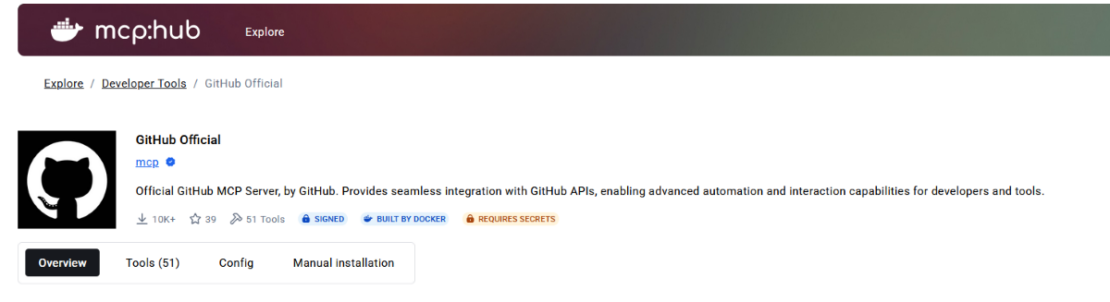
Figure 3: An example of Built by Docker MCP Server.
Open for MCP server submission: Join the secure MCP movement
Starting today, we’re opening our submission process to the community. Whether you’re an individual developer or an enterprise team, you can feature your MCP servers on the Docker MCP Catalog. By publishing through our catalog, you’re not just distributing your MCP server — you’re helping establish a new security standard for the entire ecosystem while getting your MCP tools available to millions of developers already using Docker via Docker Hub and Docker Desktop. Your containerized server becomes part of the solution, demonstrating that production-ready AI tools don’t require compromising on security.
👁 - mcp registry
How to submit your MCP server
- Containerize your server – Package your MCP server as a Docker image
- Submit via GitHub – Create a pull request at github.com/docker/mcp-registry
- Choose your tier – Opt for Docker-built (we handle the build) or community-built (you build and maintain it)
We’re committed to a fast, transparent review process. Quality MCP servers that follow our security guidelines will be published quickly, helping you reach Docker’s 20+ million developer community.
ClickHouse is one of the first companies to take advantage of Docker’s MCP Catalog, and they opted for the Docker-built tier to ensure maximum security. Here’s why they chose to partner with Docker:
“At ClickHouse, we deliver the fastest analytics database – open-source, and designed for real-time data processing and analytics at scale. As agentic AI becomes more embedded in modern applications, developers are using the ClickHouse MCP server to support intelligent, data-driven workflows that demand low latency, high concurrency, and cost efficiency.
To make it easier for developers to deploy these workloads, we’re featuring ClickHouse MCP Server on Docker’s MCP Catalog, which provides a powerful way to reach 20M+ developers and makes it easier for Docker users to discover and use our solution. We opted for “Built by Docker” with the highest security standard, including cryptographic signatures, SBOMs, provenance attestations, and continuous vulnerability scanning. Together with Docker, developers can run ClickHouse MCP Server with confidence, knowing it’s secured, verified, and ready for their agentic applications.” – Tanya Bragin, VP of Product and Marketing Clickhouse.
What’s coming next
Remote MCP servers
We’re preparing for the future of cloud-native AI applications. Remote MCP servers will enable:
- Managed MCP services that scale automatically
- Shared capabilities across teams without distributing code
- Stricter security boundaries for sensitive operations
Integration with the official MCP registry
We’re actively collaborating with the MCP community on the upcoming official registry. Our vision is complementary:
- The official registry provides centralized discovery – the “yellow pages” of available MCP servers
- Docker provides the secure runtime and distribution for those listings
- Together, we create a complete ecosystem where discovery and security work hand-in-hand
The path forward
The explosive growth of our MCP Catalog, 1 million pulls and hundreds of publisher requests, tells us developers are ready for change. They want the power of MCP, but they need it delivered securely.
By establishing containers as the standard for MCP server distribution, we’re not trying to own the ecosystem — we’re trying to secure it. Every MCP server that moves from npx execution to containerized deployment is a win for the entire community.
Start today
- Explore the enhanced MCP Catalog: Visit the MCP Catalogto discover MCP servers that solve your specific needs securely.
- Use and test hundreds of MCP Servers: Download Docker Desktopto download and use any MCP server in our catalog with your favorite clients: Gordon, Claude, Cursor, VSCode, etc
- Submit your server: Join the movement toward secure AI tool distribution. Check our submission guidelines for more.
- Follow our progress: Star our repository and watch for updates on the MCP Gateway release and remote server capabilities.
Together, we’re building more than a catalog — we’re establishing the secure foundation that the MCP ecosystem needs to grow from experimental tool to production-ready platform. Because when it comes to AI applications, security isn’t optional. It’s fundamental.
Learn more
- Check out our announcement blog
- Find documentation forDocker MCP Catalog and Toolkit.
- Subscribe to the Docker Navigator Newsletter.
- New to Docker? Create an account.
- Have questions? The Docker community is here to help.
About the Authors
Staff Software Engineer, Docker
Principal Product Manager, Docker
Principal PM at Docker, Nuno leads the AI agents teams – Gordon, Docker agent, and MCP – shipping the open foundations that bring agentic AI into developers’ daily workflows.
Related Posts
-
May 12, 2026
Docker AI Governance: Unlock Agent Autonomy, Safely
Introducing Docker AI Governance: centralized control over how agents execute, what they can reach on the network, which credentials they can use, and which MCP tools they can call, so every developer in your company can run AI agents safely, wherever they work. Your laptop is the new prod Agents are the biggest productivity unlock…
Srini SekaranRead now
-
Jun 16, 2026
Docker Content Trust: Retirement and Migration Guidance
Docker Content Trust (DCT) and the Notary v1 service at notary.docker.io are being fully retired (first announced in July of 2025). This blog explains what is changing, who is affected, and how to move to modern alternatives.
Julia WilsonandAditya TripathiRead now
-
Jun 15, 2026
Docker joins the Athena coalition: a cross-industry collaboration for supply chain security
AI is lowering the bar for supply chain attacks. Docker is joining the Athena alliance, a cross-industry effort to coordinate the defense of open source, building on our work to give every developer secure-by-default tools and our track record of sharing signals across the ecosystem.
Tushar JainRead now
-
Jun 11, 2026
Docker Hardened Images enhanced vulnerability scanning with Docker and Aikido
Aikido now scans Docker Hardened Images (DHI) with built-in VEX support. Vulnerabilities that Docker has verified as non-exploitable drop out of the queue automatically, so developers spend their time on findings that actually matter. This post walks through what changed, why it matters, and how users can benefit from the new integration. Why teams are…
Dan StelzerandBjorn HovdRead now