Docker MCP Gateway: Open Source, Secure Infrastructure for Agentic AI

Since releasing the Docker MCP Toolkit, we’ve seen strong community adoption, including steady growth in MCP server usage and over 1 million pulls from the Docker MCP Catalog. With the community, we’re laying the groundwork by standardizing how developers define, run, and share agent-based workloads with Docker Compose.
Now, we’re expanding on that foundation with the MCP Gateway, a new open-source project designed to help you move beyond local development and into production environments. The MCP Gateway acts as a secure enforcement point between agents and external tools. It integrates seamlessly with Docker Compose while enhancing the security posture of the broader MCP ecosystem.
We believe that infrastructure of this kind should be transparent, secure, and community-driven, which is why we’re open-sourcing all of this work. We’re excited to announce that the MCP Gateway project is available now in this public GitHub repository!
When we started building the MCP Gateway project, our vision was to enable a wide range of agents to access trusted catalogs of MCP servers. The goal was simple: make it easy and safe to run MCP servers.
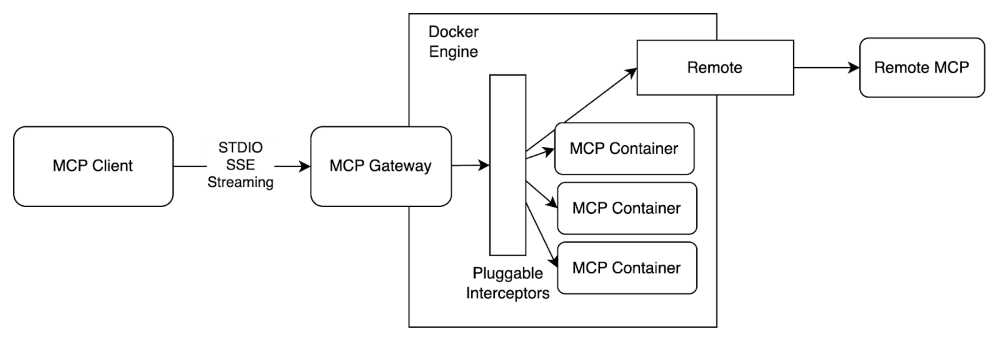
Figure 1: Architecture diagram of the MCP Gateway, securely orchestrating and managing MCP servers
This project’s tools are designed to help users discover, configure, and run MCP workloads. In the sections below, we’ll walk through these tools.
Discovery
To view entries in the current default catalog, use the following CLI command.
docker mcp catalog show
This is the set of servers that are available on your host.
As the Official MCP Registry continues to progress, the details for how MCP server authors publish will change.
For now, we’ve created a PR-based process for contributing content to the Docker MCP Catalog.
Configure
To safely store secrets on an MCP host or to configure an MCP host to support OAuth-enabled MCP servers, we need to prepare the host. For example, servers like the Brave MCP server require an API key. To prepare your MCP host to inject this secret into the Brave MCP server runtime, we provide a CLI interface.
docker mcp secret set 'brave.api_key=XXXXX'
Some servers will also have host-specific configuration that needs to be made available to the server runtimes, usually in the form of environment variables. For example, both the filesystem, and resend server support host specific configurations.
cat << 'EOF' | docker mcp config write
filesystem:
 paths:
 - /Users/slim
resend:
 reply_to: slim@gmail.com
 sender: slim@slimslenderslacks.com
EOF
MCP servers have different requirements for host configuration and secret management, so we will need tools to manage this.
Run
An MCP Gateway exposes a set of MCP server runtimes. For example, if clients should be able to connect to Google-maps and Brave, then those two servers can be enabled by default.
docker mcp server enable google-maps brave
docker mcp gateway run
However, each gateway can also expose custom views. For example, here is a gateway configuration that exposes only the Brave and Wikipedia servers, over SSE, and then only a subset of the tools from each.
docker mcp gateway run \
 --transport=sse \
 --servers=brave,wikipedia-mcp \
 --tools=brave_web_search,get_article,get_summary,get_related_topics
Secure
One of the advantages of a gateway process is that users can plug in generic interceptors to help secure any MCP server. By securing the MCP host, we can ease the adoption burden for any MCP client.
Expect this list to grow quickly, but we have an initial set of features available in the repository to begin demonstrating what’ll be possible.
- Verify signatures – ensure that the gateway can verify provenance of the MCP container image before using it.
- Block-secrets – scan inbound and outbound payloads for content that looks like secrets of some kind.
- Log-calls
These can be enabled when starting the gateway.
docker mcp gateway run \
 --verify-signatures \
 --log-calls \
 --block-secrets
Summary
The MCP Gateway is Docker’s answer to the growing complexity and security risks of connecting AI agents to MCP servers. By aggregating multiple MCP servers behind a single, secure interface, it gives developers and teams a consistent way to build, scale, and govern agent-based workloads from local development to production environments.
The Gateway is available out of the box in the latest release of Docker Desktop. Now open source, it’s also ready for you to use with any community edition of Docker. Whether you’re building AI agents or supporting others who do, the MCP Gateway is a great foundational tool for developing secure, scalable agentic applications with MCP. Visit the Gateway GitHub repository to get started!
Related Posts
-
May 12, 2026
Docker AI Governance: Unlock Agent Autonomy, Safely
Introducing Docker AI Governance: centralized control over how agents execute, what they can reach on the network, which credentials they can use, and which MCP tools they can call, so every developer in your company can run AI agents safely, wherever they work. Your laptop is the new prod Agents are the biggest productivity unlock…
Srini SekaranRead now
-
Jun 16, 2026
Docker Content Trust: Retirement and Migration Guidance
Docker Content Trust (DCT) and the Notary v1 service at notary.docker.io are being fully retired (first announced in July of 2025). This blog explains what is changing, who is affected, and how to move to modern alternatives.
Julia WilsonandAditya TripathiRead now
-
Jun 15, 2026
Docker joins the Athena coalition: a cross-industry collaboration for supply chain security
AI is lowering the bar for supply chain attacks. Docker is joining the Athena alliance, a cross-industry effort to coordinate the defense of open source, building on our work to give every developer secure-by-default tools and our track record of sharing signals across the ecosystem.
Tushar JainRead now
-
Jun 11, 2026
Docker Hardened Images enhanced vulnerability scanning with Docker and Aikido
Aikido now scans Docker Hardened Images (DHI) with built-in VEX support. Vulnerabilities that Docker has verified as non-exploitable drop out of the queue automatically, so developers spend their time on findings that actually matter. This post walks through what changed, why it matters, and how users can benefit from the new integration. Why teams are…
Dan StelzerandBjorn HovdRead now