
Guest Post: Calling the Docker CLI from Python with Python-on-whales

At Docker, we are incredibly proud of our vibrant, diverse and creative community. From time to time, we feature cool contributions from the community on our blog to highlight some of the great work our community does. The following is a guest post by Docker community member Gabriel de Marmiesse. Are you working on something awesome with Docker? Send your contributions to William Quiviger (@william) on the Docker Community Slack and we might feature your work!
The most common way to call and control Docker is by using the command line.
With the increased usage of Docker, users want to call Docker from programming languages other than shell. One popular way to use Docker from Python has been to use docker-py. This library has had so much success that even docker-compose is written in Python, and leverages docker-py.
The goal of docker-py though is not to replicate the Docker client (written in Golang), but to talk to the Docker Engine HTTP API. The Docker client is extremely complex and is hard to duplicate in another language. Because of this, a lot of features that were in the Docker client could not be available in docker-py. Sometimes users would sometimes get frustrated because docker-py did not behave exactly like the CLI.
Today, we’re presenting a new project built by Gabriel de Marmiesse from the Docker community: Python-on-whales. The goal of this project is to have a 1-to-1 mapping between the Docker CLI and the Python library. We do this by communicating with the Docker CLI instead of calling directly the Docker Engine HTTP API.
👁 - Docker clients 1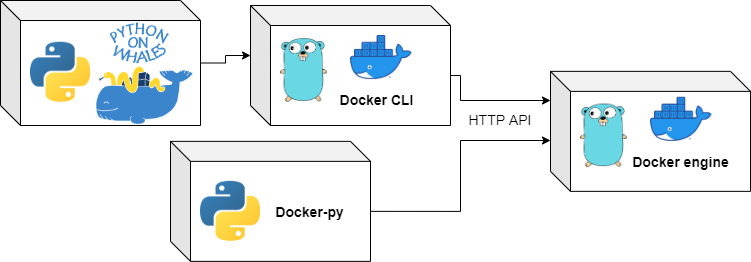
If you need to call the Docker command line, use Python-on-whales. And if you need to call the Docker engine directly, use docker-py.
In this post, we’ll take a look at some of the features that are not available in docker-py but are available in Python-on-whales:
- Building with Docker buildx
- Deploying to Swarm with docker stack
- Deploying to the local Engine with Compose
Start by downloading Python-on-whales with
pip install python-on-whales
and you’re ready to rock!
Docker Buildx0
Here we build a Docker image. Python-on-whales uses buildx by default and gives you the output in real time.
>>> from python_on_whales import docker
>>> my_image = docker.build(".", tags="some_name")
[+] Building 1.6s (17/17) FINISHED
 => [internal] load build definition from Dockerfile 0.0s
 => => transferring dockerfile: 32B 0.0s
 => [internal] load .dockerignore 0.0s
 => => transferring context: 2B 0.0s
 => [internal] load metadata for docker.io/library/python:3.6 1.4s
 => [python_dependencies 1/5] FROM docker.io/library/python:3.6@sha256:293 0.0s
 => [internal] load build context 0.1s
 => => transferring context: 72.86kB 0.0s
 => CACHED [python_dependencies 2/5] RUN pip install typeguard pydantic re 0.0s
 => CACHED [python_dependencies 3/5] COPY tests/test-requirements.txt /tmp 0.0s
 => CACHED [python_dependencies 4/5] COPY requirements.txt /tmp/ 0.0s
 => CACHED [python_dependencies 5/5] RUN pip install -r /tmp/test-requirem 0.0s
 => CACHED [tests_ubuntu_install_without_buildx 1/7] RUN apt-get update && 0.0s
 => CACHED [tests_ubuntu_install_without_buildx 2/7] RUN curl -fsSL https: 0.0s
 => CACHED [tests_ubuntu_install_without_buildx 3/7] RUN add-apt-repositor 0.0s
 => CACHED [tests_ubuntu_install_without_buildx 4/7] RUN apt-get update & 0.0s
 => CACHED [tests_ubuntu_install_without_buildx 5/7] WORKDIR /python-on-wh 0.0s
 => CACHED [tests_ubuntu_install_without_buildx 6/7] COPY . . 0.0s
 => CACHED [tests_ubuntu_install_without_buildx 7/7] RUN pip install -e . 0.0s
 => exporting to image 0.1s
 => => exporting layers 0.0s
 => => writing image sha256:e1c2382d515b097ebdac4ed189012ca3b34ab6be65ba0c 0.0s
 => => naming to docker.io/library/some_image_name
Docker Stacks
Here we deploy a simple Swarmpit stack on a local Swarm. You get a Stack object that has several methods: remove(), services(), ps().
>>> from python_on_whales import docker
>>> docker.swarm.init()
>>> swarmpit_stack = docker.stack.deploy("swarmpit", compose_files=["./docker-compose.yml"])
Creating network swarmpit_net
Creating service swarmpit_influxdb
Creating service swarmpit_agent
Creating service swarmpit_app
Creating service swarmpit_db
>>> swarmpit_stack.services()
[<python_on_whales.components.service.Service object at 0x7f9be5058d60>,
<python_on_whales.components.service.Service object at 0x7f9be506d0d0>,
<python_on_whales.components.service.Service object at 0x7f9be506d400>,
<python_on_whales.components.service.Service object at 0x7f9be506d730>]
>>> swarmpit_stack.remove()
Docker Compose
Here we show how we can run a Docker Compose application with Python-on-whales. Note that, behind the scenes, it uses the new version of Compose written in Golang. This version of Compose is still experimental. Take appropriate precautions.
$ git clone https://github.com/dockersamples/example-voting-app.git
$ cd example-voting-app
$ python
>>> from python_on_whales import docker
>>> docker.compose.up(detach=True)
Network "example-voting-app_back-tier" Creating
Network "example-voting-app_back-tier" Created
Network "example-voting-app_front-tier" Creating
Network "example-voting-app_front-tier" Created
example-voting-app_redis_1 Creating
example-voting-app_db_1 Creating
example-voting-app_db_1 Created
example-voting-app_result_1 Creating
example-voting-app_redis_1 Created
example-voting-app_worker_1 Creating
example-voting-app_vote_1 Creating
example-voting-app_worker_1 Created
example-voting-app_result_1 Created
example-voting-app_vote_1 Created
>>> for container in docker.compose.ps():
... print(container.name, container.state.status)
example-voting-app_vote_1 running
example-voting-app_worker_1 running
example-voting-app_result_1 running
example-voting-app_redis_1 running
example-voting-app_db_1 running
>>> docker.compose.down()
>>> print(docker.compose.ps())
[]
Bonus section: Docker objects attributes as Python attributes
All information that you can access with docker inspect is available as Python attributes:
>>> from python_on_whales import docker
>>> my_container = docker.run("ubuntu", ["sleep", "infinity"], detach=True)
>>> my_container.state.started_at
datetime.datetime(2021, 2, 18, 13, 55, 44, 358235, tzinfo=datetime.timezone.utc)
>>> my_container.state.running
True
>>> my_container.kill()
>>> my_container.remove()

>>> my_image = docker.image.inspect("ubuntu")
>>> print(my_image.config.cmd)
['/bin/bash']
What’s next for Python-on-whales ?
We’re currently improving the integration of Python-on-whales with the new Compose in the Docker CLI (currently beta).
You can consider that Python-on-whales is in beta. Some small API changes are still possible.
We encourage the community to try it out and give feedback in the issues!
To learn more about Python-on-whales:
Related Posts
-
May 12, 2026
Docker AI Governance: Unlock Agent Autonomy, Safely
Introducing Docker AI Governance: centralized control over how agents execute, what they can reach on the network, which credentials they can use, and which MCP tools they can call, so every developer in your company can run AI agents safely, wherever they work. Your laptop is the new prod Agents are the biggest productivity unlock…
Srini SekaranRead now
-
Jun 26, 2026
What Does EU AI Act Compliance Require?
Learn what EU AI Act compliance requires at each risk tier, key deadlines through 2027, and how engineering teams can operationalize AI governance.
Dan StelzerandMonique AltmanRead now
-
Jun 25, 2026
How to Generate an SBOM for Container Workflows
Learn when, where, and how to generate SBOMs for container images. Covers build-time vs. post-build approaches, quality criteria, and CI/CD integration.
Aditya TripathiRead now
-
Jun 25, 2026
EU Cyber Resilience Act: Overview, Requirements, and Timelines
Learn what the EU Cyber Resilience Act requires, including SBOM mandates, vulnerability reporting, and compliance deadlines for container teams.
Dan StelzerandMonique AltmanRead now



