Navigating Proxy Servers with Ease: New Advancements in Docker Desktop 4.30

Within the ecosystem of corporate networks, proxy servers stand as guardians, orchestrating the flow of information with a watchful eye toward security. These sentinels, while adding layers to navigate, play a crucial role in safeguarding an organization’s digital boundaries and keeping its network denizens — developers and admins alike — secure from external threats.
Recognizing proxy servers’ critical position, Docker Desktop 4.30 offers new enhancements, especially on the Windows front, to ensure seamless integration and interaction within these secured environments.

Traditional approach
The realm of proxy servers is intricate, a testament to their importance in modern corporate infrastructure. They’re not just barriers but sophisticated filters and conduits that enhance security, optimize network performance, and ensure efficient internet traffic management. In this light, the dance of authentication — while complex — is necessary to maintain this secure environment, ensuring that only verified users and applications gain access.
Traditionally, Docker Desktop approached corporate networks with a single option: basic authentication. Although functional, this approach often felt like navigating with an outdated map. It was a method that, while simple, sometimes led to moments of vulnerability and the occasional hiccup in access for those venturing into more secure or differently configured spaces within the network.
This approach could also create roadblocks for users and admins, such as:
- Repeated login prompts: A constant buzzkill.
- Security faux pas: Your credentials, base64 encoded, might as well be on a billboard.
- Access denied: Use a different authentication method? Docker Desktop is out of the loop.
- Workflow whiplash: Nothing like a login prompt to break your coding stride.
- Performance hiccups: Waiting on auth can slow down your Docker development endeavors.
Seamless interaction
Enter Docker Desktop 4.30, where the roadblocks are removed. Embracing the advanced authentication protocols of Kerberos and NTLM, Docker Desktop now ensures a more secure, seamless interaction with corporate proxies while creating a streamlined and frictionless experience.
This upgrade is designed to help you easily navigate the complexities of proxy authentication, providing a more intuitive and unobtrusive experience that both developers and admins can appreciate:
- Invisible authentication: Docker Desktop handles the proxy handshake behind the scenes.
- No more interruptions: Focus on your code, not on login prompts.
- Simplicity: No extra steps compared to basic auth.
- Performance perks: Less time waiting, more time doing.
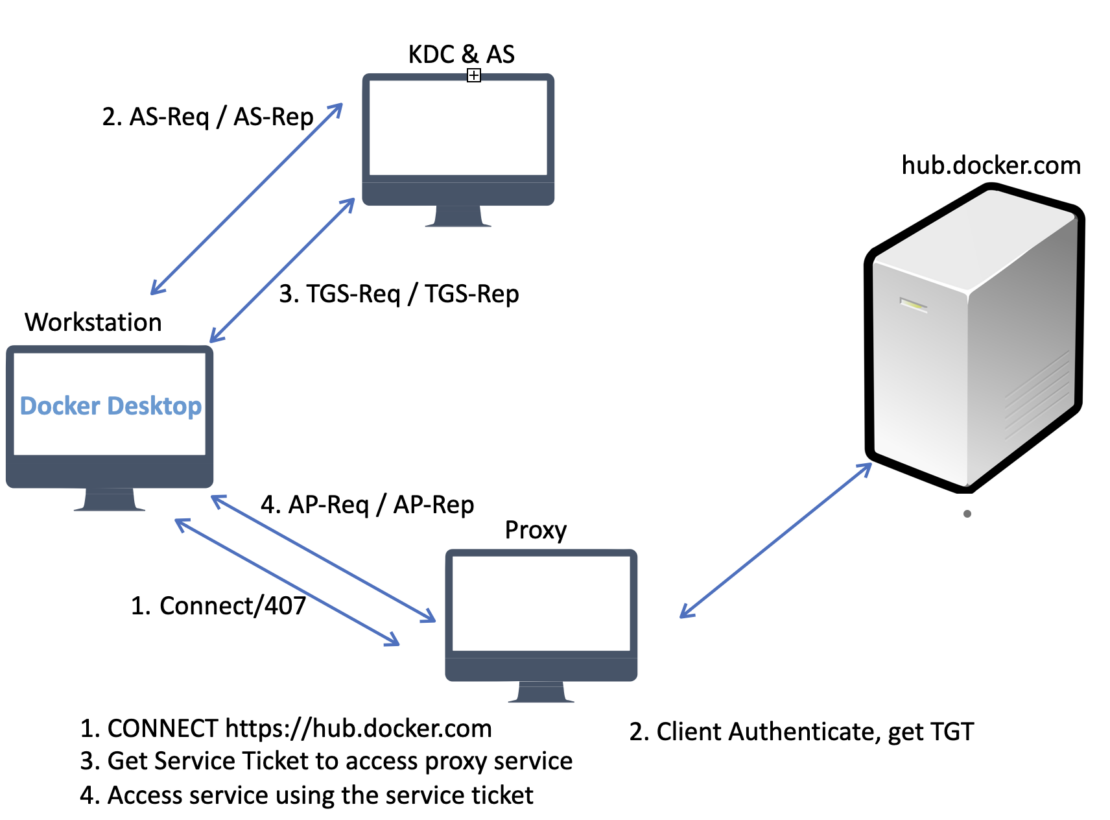
A new workflow with Kerberos authentication scheme is shown in Figure 1:

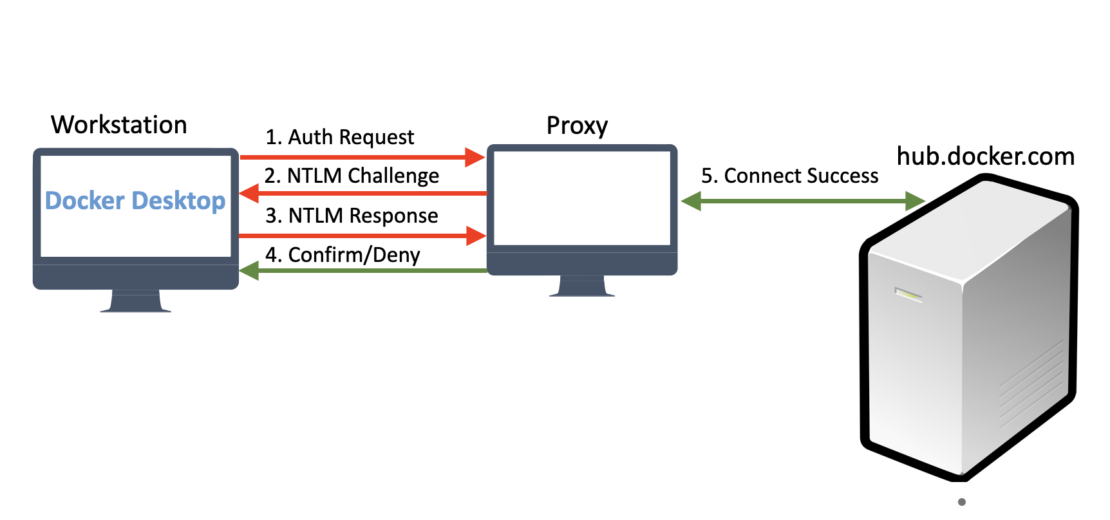
A new workflow with NTLM auth scheme is shown in Figure 2:

Integrating Docker Desktop into environments guarded by NTLM or Kerberos proxies no longer feels like a challenge but an opportunity.
With Docker Desktop 4.30, we’re committed to facilitating this transition, prioritizing secure, efficient workflows catering to developers and admins who orchestrate these digital environments. Our focus is on bridging gaps and ensuring Docker Desktop aligns with today’s corporate networks’ security and operational standards.
FAQ
- Who benefits? Both Windows-based developers and admins.
- Continued basic auth support? Yes, providing flexibility while encouraging a shift to more secure protocols.
- How to get started? Upgrade to Docker Desktop 4.30 for Windows.
- Impact on internal networking? Absolutely none. It’s smooth sailing for container networking.
- Validity of authentication? Enjoy 10 hours of secure access with Kerberos, automatically renewed with system logins.
Docker Desktop is more than just a tool — it’s a bridge to a more streamlined, secure, and productive coding environment, respecting the intricate dance with proxy servers and ensuring that everyone involved, from developers to admins, moves in harmony with the secure protocols of their networks. Welcome to a smoother and more secure journey with Docker Desktop.
Learn more
- Update to Docker Desktop 4.30.
- Read Docker Desktop 4.30: Proxy Support with SOCKS5, NTLM and Kerberos, ECI for Build Commands, Build View Features, and Docker Desktop on RHEL Beta.
- Create a Docker Account and choose Business subscription.
- Authenticate using your corporate credentials.
- Subscribe to the Docker Newsletter.
- New to Docker? Get started.
Related Posts
-
May 12, 2026
Docker AI Governance: Unlock Agent Autonomy, Safely
Introducing Docker AI Governance: centralized control over how agents execute, what they can reach on the network, which credentials they can use, and which MCP tools they can call, so every developer in your company can run AI agents safely, wherever they work. Your laptop is the new prod Agents are the biggest productivity unlock…
Srini SekaranRead now
-
Jun 16, 2026
Docker Content Trust: Retirement and Migration Guidance
Docker Content Trust (DCT) and the Notary v1 service at notary.docker.io are being fully retired (first announced in July of 2025). This blog explains what is changing, who is affected, and how to move to modern alternatives.
Julia WilsonandAditya TripathiRead now
-
Jun 15, 2026
Docker joins the Athena coalition: a cross-industry collaboration for supply chain security
AI is lowering the bar for supply chain attacks. Docker is joining the Athena alliance, a cross-industry effort to coordinate the defense of open source, building on our work to give every developer secure-by-default tools and our track record of sharing signals across the ecosystem.
Tushar JainRead now
-
Jun 11, 2026
Docker Hardened Images enhanced vulnerability scanning with Docker and Aikido
Aikido now scans Docker Hardened Images (DHI) with built-in VEX support. Vulnerabilities that Docker has verified as non-exploitable drop out of the queue automatically, so developers spend their time on findings that actually matter. This post walks through what changed, why it matters, and how users can benefit from the new integration. Why teams are…
Dan StelzerandBjorn HovdRead now