New Beta Feature: Deep Dive into GitHub Actions Docker Builds with Docker Desktop

We’re excited to announce the beta release of a new feature for inspecting GitHub Actions builds directly in Docker Desktop 4.31.
Centralized CI/CD environments, such as GitHub Actions, are popular and useful, giving teams a single location to build, test, and verify their deployments. However, remote processes, such as builds in GitHub Actions, often lack visibility into what’s happening in your Docker builds. This means developers often need additional builds and steps to locate the root cause of issues, making diagnosing and resolving build issues challenging.
To help, we’re introducing enhancements in GitHub Actions Summary and Docker Desktop to provide a deeper understanding of your Docker builds in GitHub Actions.
Get a high-level view with Docker Build Summary in GitHub Actions
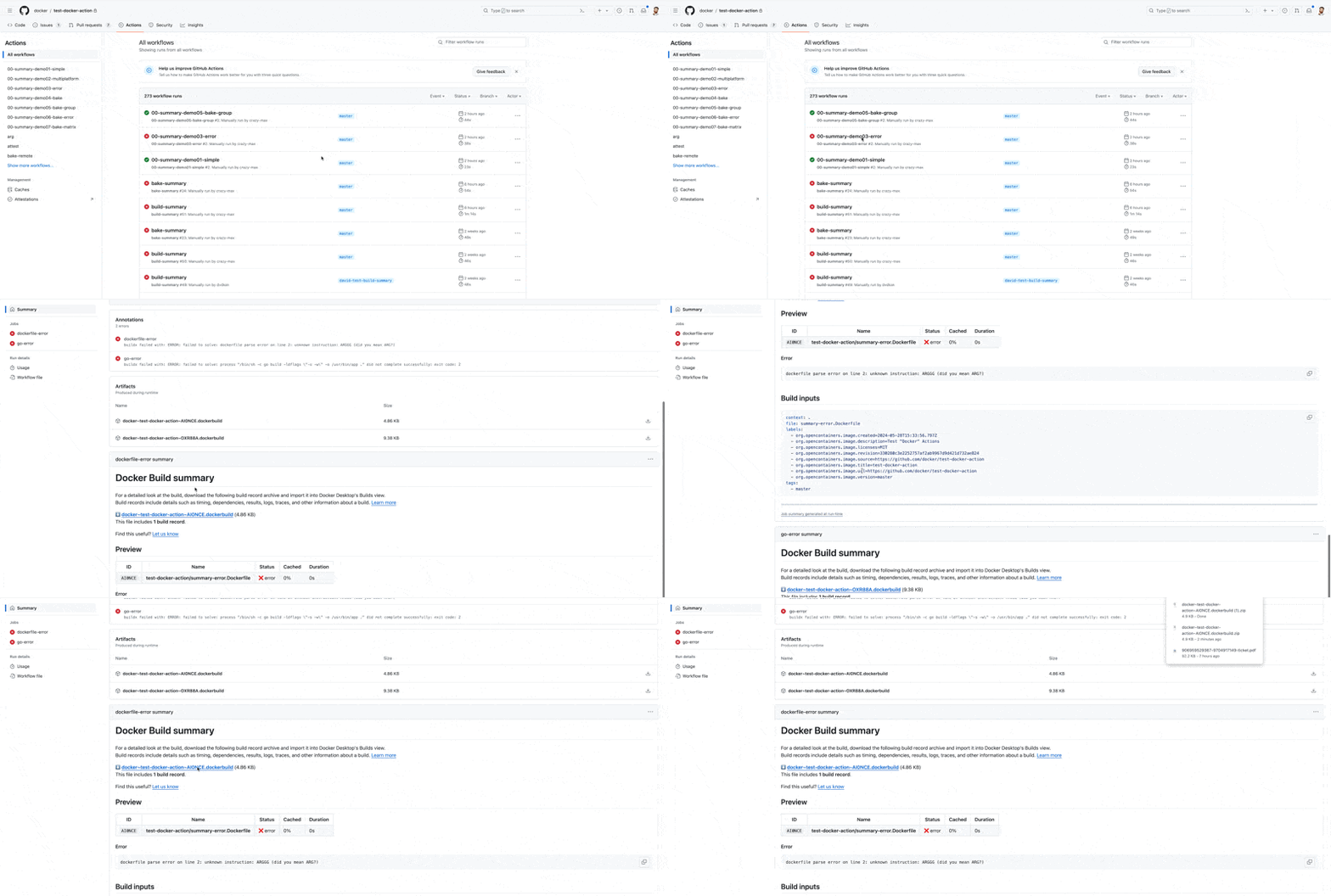
We now provide Docker Build Summary, a GitHub Actions Summary that displays reports and aggregates build information. The Docker Build Summary offers additional details about your builds in GitHub Actions, including a high-level summary of performance metrics, such as build duration, and cache utilization (Figure 1). Users of docker/build-push-action and docker/bake-action will automatically receive Docker Build Summaries.
Key benefits
- Identify build failures: Immediate access to error details eliminates the need to sift through logs.
- Performance metrics: See exactly how long the Docker Build stage took and assess if it met expectations.
- Cache utilization: View the percentage of the build that used the cache to identify performance impacts.
- Configuration details: Access information on build inputs to understand what ran during build time.

If further investigation is needed, we package your build results in a .dockerbuild archive file. This file can be imported to the Build View in Docker Desktop, providing comprehensive build details, including timings, dependencies, logs, and traces.
Import and inspect GitHub Actions Builds in Docker Desktop
Initially announced last year, the Build View in Docker Desktop now supports importing the dockerbuild archive from GitHub Actions, providing greater insight into your Docker builds.
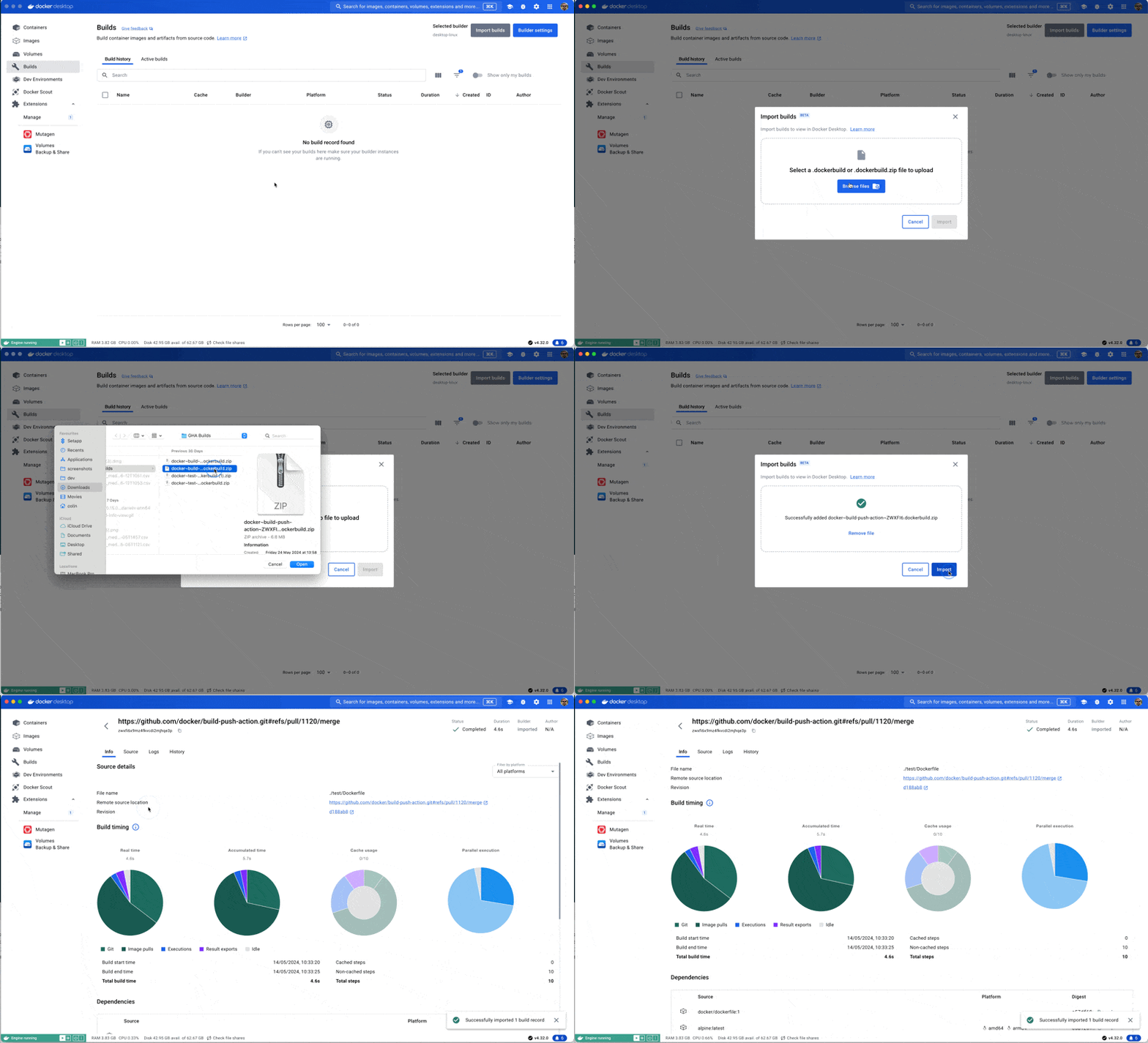
In Docker Desktop, navigate to the Builds View tab and use the new Import Builds button. Select the .dockerbuild file you downloaded to access all the details about your remote build as if you ran it locally (Figure 2).

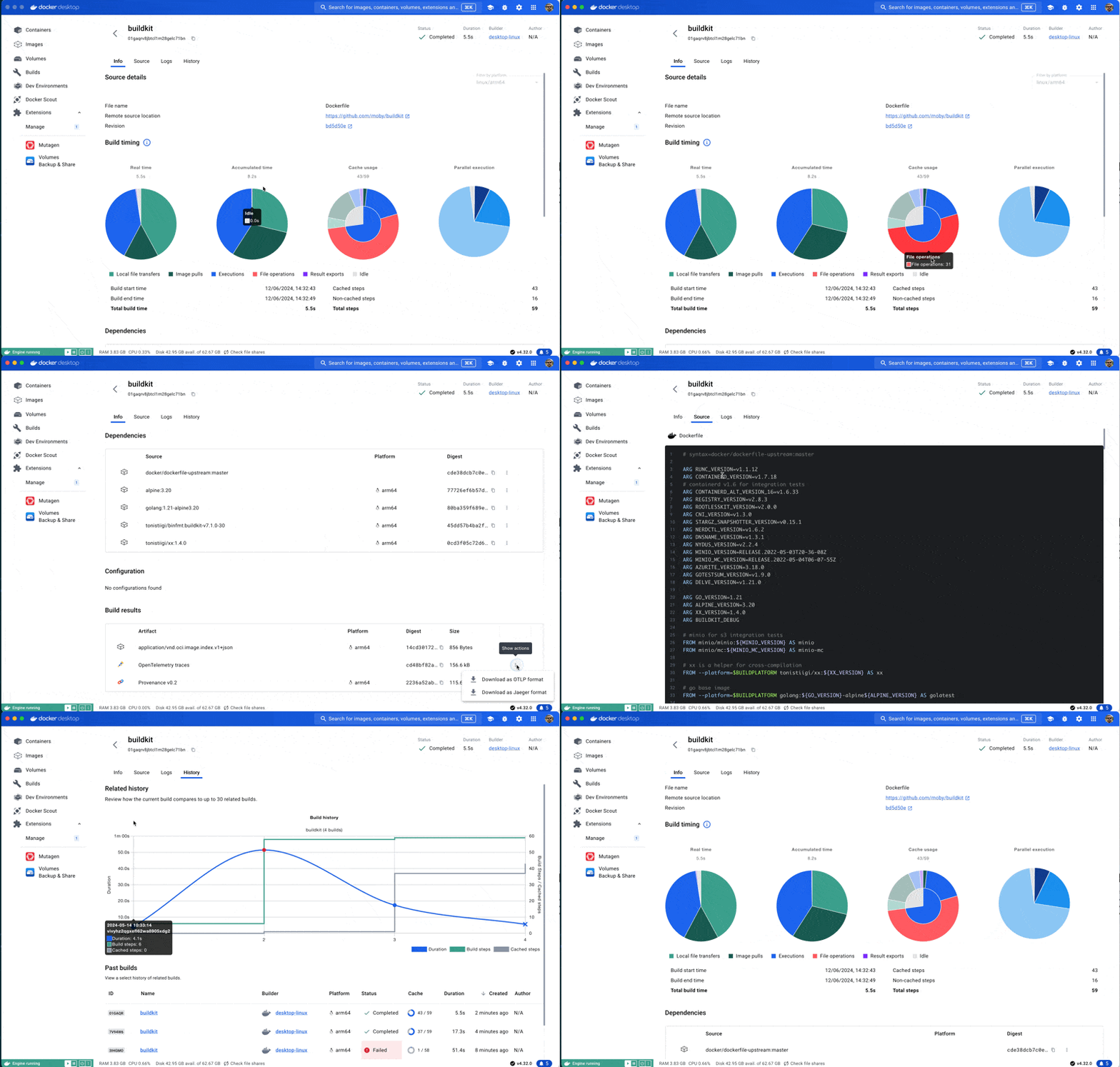
You can view in-depth information about your build execution, including error lines in your Dockerfile, build timings, cache utilization, and OpenTelemetry traces. This comprehensive view helps diagnose complex builds efficiently.
For example, you can see the stack trace right next to the Dockerfile command that is causing the issues, which is useful for understanding the exact step and attributes that caused the error (Figure 3).


You can even see the commit and source information for the build and easily locate who made the change for more help in resolving the issue, along with other useful info you need for diagnosing even the most complicated builds (Figure 4).

Enhance team collaboration
We aim to enhance team collaboration, allowing you to share and work together on Docker builds and optimizing the build experience for your team. These .dockerbuild archives are self-contained and don’t expire, making them perfect for team collaboration. Share the .dockerbuild file via Slack or email or attach it to GitHub issues or Jira tickets to preserve context for when your team investigates.
Get started
To start using Docker Build Summary and the .dockerbuild archive in Docker Desktop, update your Docker Build GitHub Actions configuration to:
uses: docker/build-push-action@v6uses: docker/bake-action@v5
Then, update to Docker Desktop 4.31 to inspect build archives from GitHub Actions. Learn more in the documentation.
We are incredibly excited about these new features, which will help you and your team diagnose and resolve build issues quickly. Please try them out and let us know what you think!
Learn more
- Subscribe to the Docker Newsletter.
- Get the latest release of Docker Desktop.
- Vote on what’s next! Check out our public roadmap.
- Have questions? The Docker community is here to help.
- New to Docker? Get started.
Related Posts
-
May 12, 2026
Docker AI Governance: Unlock Agent Autonomy, Safely
Introducing Docker AI Governance: centralized control over how agents execute, what they can reach on the network, which credentials they can use, and which MCP tools they can call, so every developer in your company can run AI agents safely, wherever they work. Your laptop is the new prod Agents are the biggest productivity unlock…
Srini SekaranRead now
-
Jun 16, 2026
Docker Content Trust: Retirement and Migration Guidance
Docker Content Trust (DCT) and the Notary v1 service at notary.docker.io are being fully retired (first announced in July of 2025). This blog explains what is changing, who is affected, and how to move to modern alternatives.
Julia WilsonandAditya TripathiRead now
-
Jun 15, 2026
Docker joins the Athena coalition: a cross-industry collaboration for supply chain security
AI is lowering the bar for supply chain attacks. Docker is joining the Athena alliance, a cross-industry effort to coordinate the defense of open source, building on our work to give every developer secure-by-default tools and our track record of sharing signals across the ecosystem.
Tushar JainRead now
-
Jun 11, 2026
Docker Hardened Images enhanced vulnerability scanning with Docker and Aikido
Aikido now scans Docker Hardened Images (DHI) with built-in VEX support. Vulnerabilities that Docker has verified as non-exploitable drop out of the queue automatically, so developers spend their time on findings that actually matter. This post walks through what changed, why it matters, and how users can benefit from the new integration. Why teams are…
Dan StelzerandBjorn HovdRead now