
Docker Compose: What’s New, What’s Changing, What’s Next

We’ll walk through new Docker Compose features the team has built, share what we plan to work on next, and remind you to switch to Compose V2 as soon as possible.
Compose V1 support will no longer be provided after June 2023 and will be removed from all future Docker Desktop versions. If you’re still on Compose V1, we recommend you switch as soon as possible to leave time to address any issues with running your Compose applications. (Until the end of June 2023, we’ll monitor Compose issues to address challenges related to V1 migration to V2.)
In this post
Compose V1: So long and farewell, old friend!
In the Compose V2 GA announcement we proposed the following timeline:
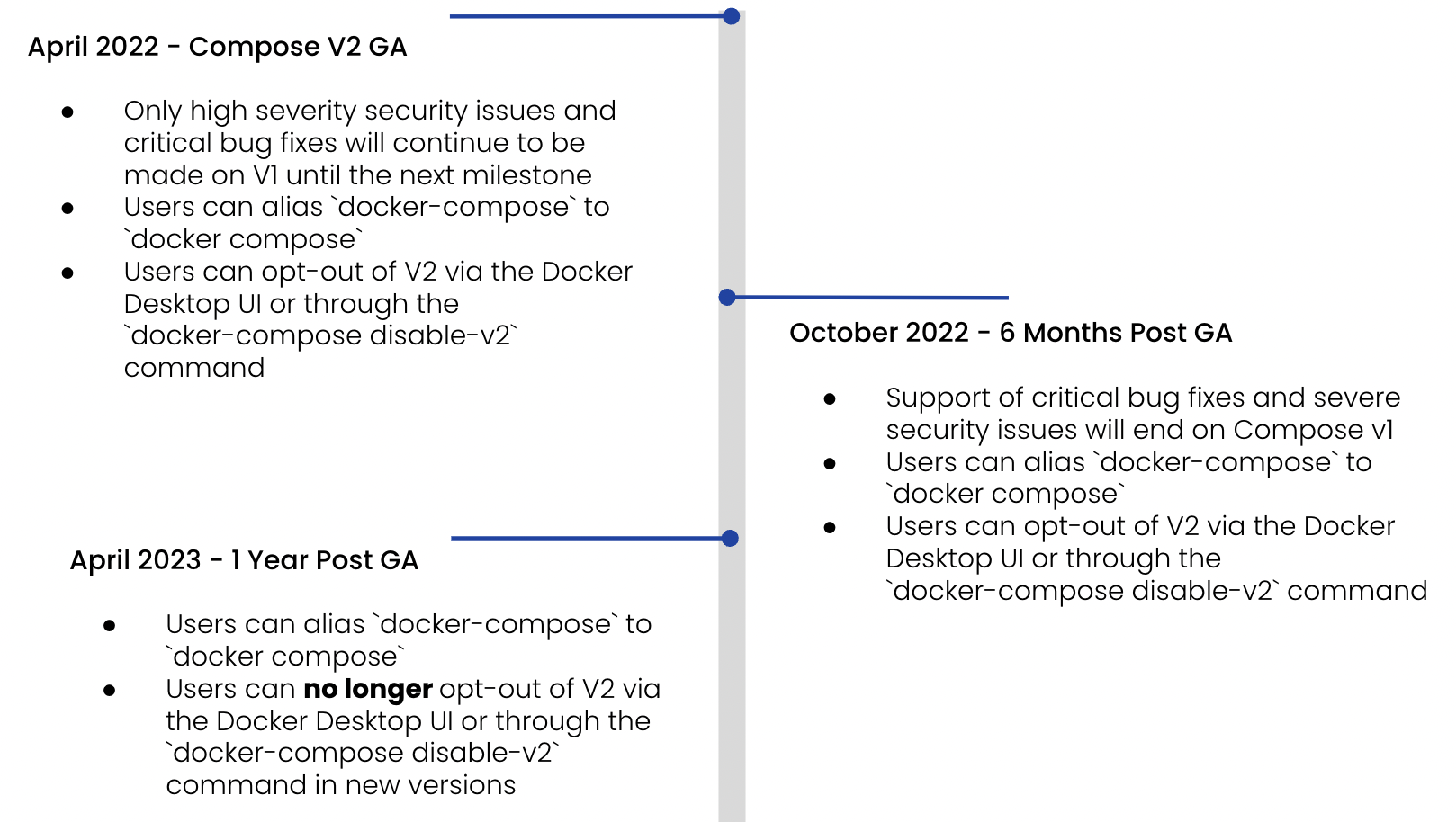
We’ve extended the timeline, so support now ends after June 2023.
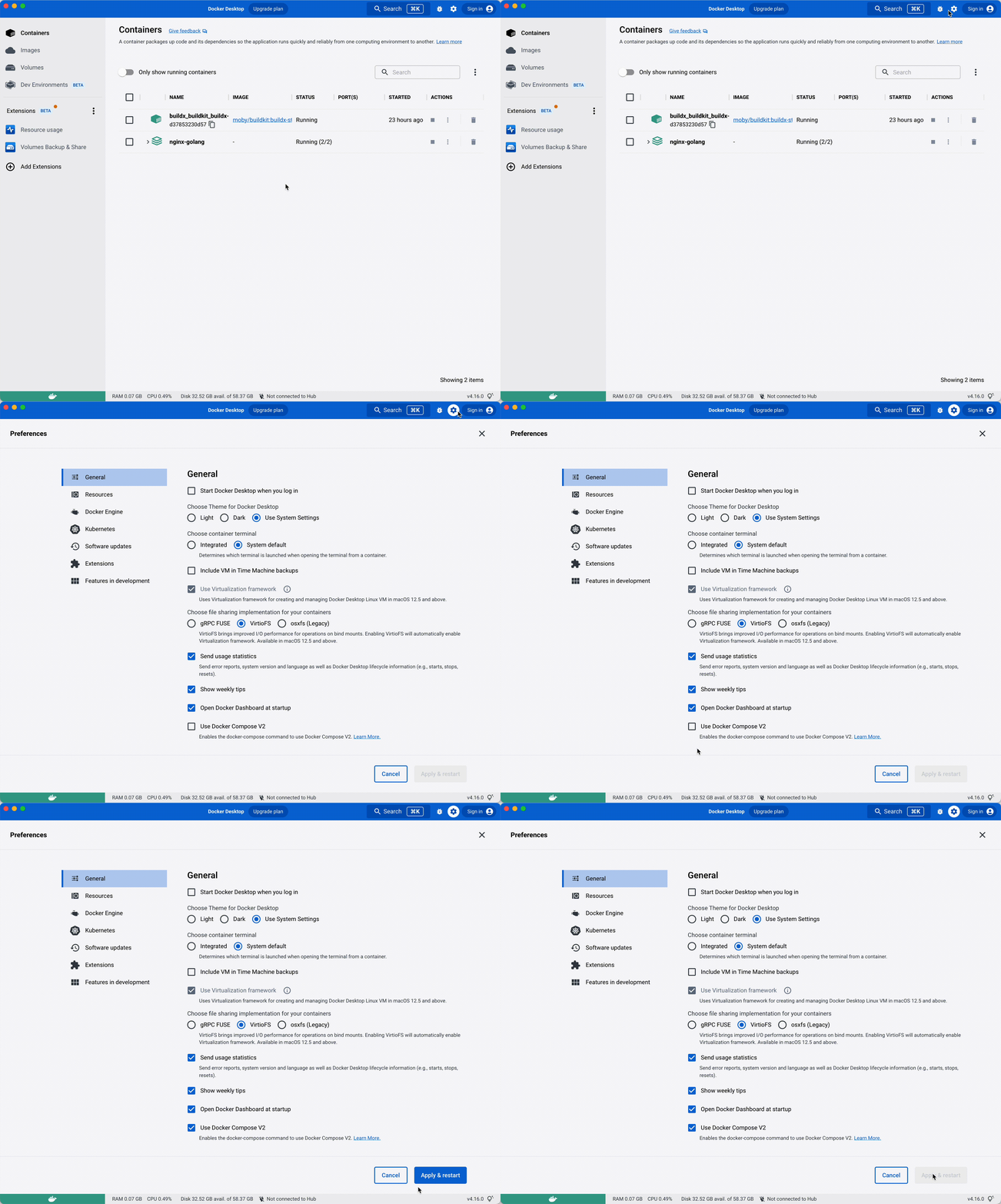
Switching is easy. Type instead of in your favorite terminal.
An even easier way is to choose Compose V2 by default inside Docker Desktop settings. Activating this option creates a symlink for you so you can continue using to preserve your potential existing scripts, but start using the newest version of Compose.
For more on the differences between V1 and V2, see the Evolution of Compose in docs.
What’s new?
Build improvements
During the past few months, the main effort of the team was to focus on improving the build experience within Compose. After collecting all the proposals opened in the Compose specification, we started to ship the following new features incrementally:
- support to allow sharing layers from intermediary images in a multi-stage build. One of the best ways to use this option is sharing cache in your CI between your workflow steps.
- to force a full rebuild of your service.
- to trigger a registry sync for force-pulling your base images.
- to use at build time.
- to define a list associated with your final build image.
- to use your local ssh configuration or pass keys to your build process. This allows you to clone a private repo or interact with protected resources; the ssh info won’t be stored in the final image.
- to define multiple platforms and let Compose produce multi-arch images of your services.
Let’s dive deeper into those last two improvements.
Using ssh resources
was introduced in Compose V2.4.0 GA and lets you use ssh resources at build time. Now you’re able to use your local ssh configuration or public/private keys when you build your service image. For example, you can clone a private Git repository inside your container or connect to a remote server to use critical resources during the build process of your services.
The ssh resources are only used during the build process and won’t be available in your final image.
There are different possibilities for using ssh with Compose. The first one is the new attribute of the build section in your Compose file:
services:
 myservice:
 image: build-test-ssh
 build:
 context: .
 ssh:
 - fake-ssh=./fixtures/build-test/ssh/fake_rsa
And you need to reference the ID of your ssh resource inside your Dockerfile:
FROM alpine
RUN apk add --no-cache openssh-client

WORKDIR /compose
COPY fake_rsa.pub /compose/

RUN --mount=type=ssh,id=fake-ssh,required=true diff <(ssh-add -L) <(cat /compose/fake_rsa.pub)
This example is a simple demonstration of using keys at build time. It copies a public ssh key, mounts the private key inside the container, and checks if it matches the public key previously added.
It’s also possible to directly use the CLI with the new flag. Let’s try to use it to copy a private Git repository.
The following Dockerfile adds GitHub as a known host in the ssh configuration of the image and then mounts the ssh local agent to clone the private repository:
# syntax=docker/dockerfile:1
FROM alpine:3.15

RUN apk add --no-cache openssh-client git
RUN mkdir -p -m 0700 ~/.ssh && ssh-keyscan github.com >> ~/.ssh/known_hosts
RUN --mount=type=ssh git clone git@github.com:glours/secret-repo.git

CMD ls -lah secret-repo
And using the docker compose build command will pass your local ssh agent to Compose.
Build multi-arch images with Compose
In Compose version V2.11.0, we introduced the ability to add platforms in the build section and let Compose do a cross-platform build for you.
The following Dockerfile logs the name of the service, the targeted platform to build, and the platform used for doing this build:
FROM --platform=$BUILDPLATFORM golang:alpine AS build

ARG TARGETPLATFORM
ARG BUILDPLATFORM
ARG SERVICENAME
RUN echo "I am $SERVICENAME building for $TARGETPLATFORM, running on $BUILDPLATFORM" > /log

FROM alpine
COPY --from=build /log /log
This Compose file defines an application stack with two services (A and B) which are targeting different build platforms:
services:
 serviceA:
 image: build-test-platform-a:test
 build:
 context: .
 args:
 - SERVICENAME=serviceA
 platforms:
 - linux/amd64
 - linux/arm64
 serviceB:
 image: build-test-platform-b:test
 build:
 context: .
 args:
 - SERVICENAME=serviceB
 platforms:
 - linux/386
 - linux/arm64
Be sure to create and use a build driver that allows you to build multi-arch images:
docker buildx create --driver docker-container --use
To use the multi-arch build feature:
> docker compose build --no-cache
Additional updates
We also fixed issues, managed corner cases, and added features. For example, you can define a secret from the environment variable value:
services:
 myservice:
 image: build-test-secret
 build:
 context: .
 secrets:
 - envsecret

secrets:
 envsecret:
 environment: SOME_SECRET
We’re now providing Compose binaries for windows/arm64 and linux/riscv64.
We overhauled the way Compose manages .env files, environment variables, and precedence interpolation. Read the environment variables precedence documentation to learn more.
To see all the changes we’ve made since April 2022, check out the Compose release page or the comparing changes page.
What’s next?
The Compose team is focused on improving the developer inner loop using Compose. Ideas we’re working on include:
- A section in the Compose specification, including a watch mode so you will be able to use the one defined by your programming tooling or let Compose manage it for you
- Capabilities to add specific debugging ports, or use profiling tooling inside your service containers
- Lifecycle hooks to interact with services at different moments of the container lifecycle (for example, letting you execute a command when a container is created but not started, or when it’s up and healthy)
- A flag to test a Compose command before executing it
If you’d like to see something in Compose to improve your development workflow, we invite your feedback in our Public Roadmap.
To take advantage of ongoing improvements to Compose and surface any issues before support ends June 2023, make sure you’re on Compose V2. Use the CLI or activate the option in Docker Desktop settings.
To learn more about the differences between V1 and V2, check out the Evolution of Compose in our documentation.
Related Posts
-
May 12, 2026
Docker AI Governance: Unlock Agent Autonomy, Safely
Introducing Docker AI Governance: centralized control over how agents execute, what they can reach on the network, which credentials they can use, and which MCP tools they can call, so every developer in your company can run AI agents safely, wherever they work. Your laptop is the new prod Agents are the biggest productivity unlock…
Srini SekaranRead now
-
Jun 25, 2026
How to Generate an SBOM for Container Workflows
Learn when, where, and how to generate SBOMs for container images. Covers build-time vs. post-build approaches, quality criteria, and CI/CD integration.
Aditya TripathiRead now
-
Jun 25, 2026
EU Cyber Resilience Act: Overview, Requirements, and Timelines
Learn what the EU Cyber Resilience Act requires, including SBOM mandates, vulnerability reporting, and compliance deadlines for container teams.
Dan StelzerandMonique AltmanRead now
-
Jun 23, 2026
What is an SBOM (and Why Can’t You Ship Without One)?
Learn what a software bill of materials (SBOM) is, why it matters for supply chain security, how to generate one, and what formats and standards to use.
Aditya TripathiRead now



