Reduce Vulnerability Noise with VEX: Wiz + Docker Hardened Images


Open source components power most modern applications. A new generation of hardened container images can establish a more secure foundation, but even with hardened images, vulnerability scanners often return dozens or hundreds of CVEs with little prioritization. This noise slows teams down and complicates security triage. The VEX (Vulnerability Exploitability eXchange) standard addresses the problem by providing information on whether a specific vulnerability actually impacts an organization’s application stack and infrastructure.
A new integration between Docker Hardened Images (DHI) and Wiz CLI now gives security and platform teams accurate reachability insights by analyzing VEX data. Wiz worked with Docker to tune its scanners to properly ingest and parse the VEX statements included with every one of the more than 1,000 DHI images in the catalog. The integration helps users cut through vulnerability noise with scan results that deliver clear, actionable insights.
When the Wiz scanner detects a Docker Hardened Image, it pulls from the image’s VEX documents and OSV advisories to filter out false positives. For organizations already using Wiz, this means a simpler path to adopting hardened images across their container fleet. Finally, for organizations pursuing FedRAMP or other compliance certifications that specify VEX coverage, the ability of Wiz to read DHI VEX statements can accelerate compliance, reducing time to deployment and consequently time to revenue.
TL;DR
Integrate Docker with Wiz to:
- Minimize false positives using VEX and OSV data
- Identify base images and software components more accurately
- Provide security teams with clear visibility into software bills of materials (SBOMs)
- Reduce manual validation efforts by integrating detailed issue summaries into your remediation workflows
- Better image quality assurance with up-to-date package metadata and SPDX snippets
- Migrate to Docker Hardened Images with greater confidence
Why VEX?
VEX (Vulnerability Exploitability eXchange) is a machine-readable way for software suppliers to state whether a known vulnerability actually affects a specific product. Instead of inferring risk from dependency lists alone, VEX explicitly declares whether a vulnerability is not affected, affected, fixed, or under investigation. This matters because many scanner findings are not exploitable in real products, leading to false positives, wasted effort, and obscured real risk.
VEX enables transparent, auditable vulnerability status that security tools and customers can independently verify, unlike proprietary advisory feeds that obscure context and historical risk.
Before you begin
- Ensure you have access to both your Docker and Wiz organizations;
- Confirm your are using a Docker Hardened Image
- Ensure you have SBOM export and scan visibility enabled in Wiz.
- Identifying Docker Hardened Images via the Integration on Wiz
- With the integration, Wiz automatically detects Docker Hardened Images. The integration consists of two main functionalities on the Wiz dashboard. First, we will verify how many resources and organizations are using Docker Hardened Images by following these steps:
- Navigate to the Wiz Docker integration page and click connect
- You’ll be prompted to log in to your Wiz dashboard
- Once logged in, navigate to the “Inventory” section on the left side bar of your dashboard
- You’ll be redirected to the “Technology” dashboard, where Wiz detects all technologies running on customer environments. Now, look for “Docker Hardened Images” on the search bar
- Wiz automatically detects the specific operating systems running on each container mounts and flags them as hardened images
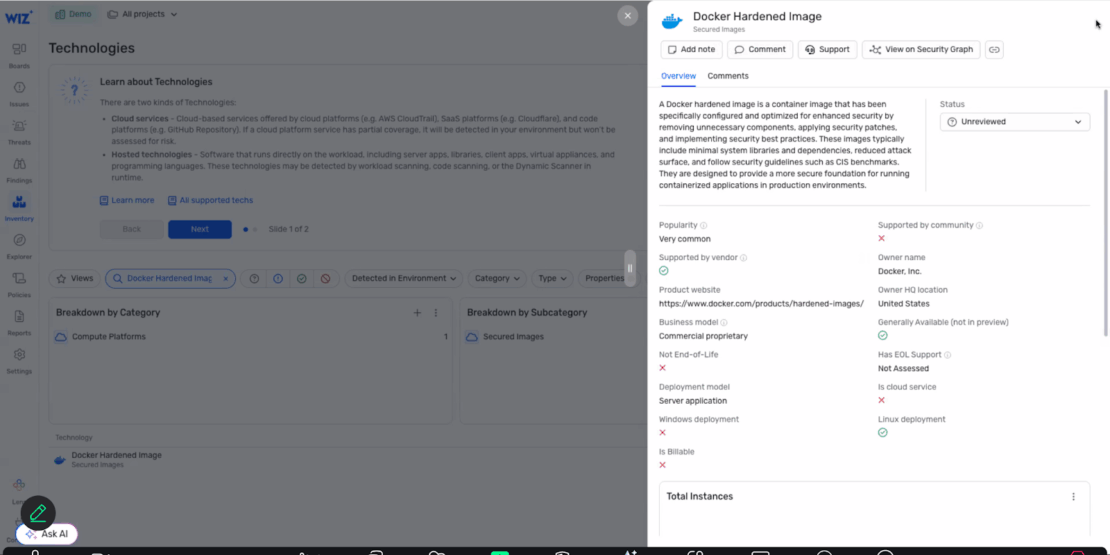
Checking for vulnerabilities on the Wiz dashboard:
Once you’ve validated that Wiz can identify Docker Hardened Images, you will be able to check for vulnerabilities using Wiz’s security graph and Docker’s container metadata. In order to do that, follow these steps from the technologies tab:
- Go to inventory/technologies page and filter by operating systems or search for specific technology
- Click on the OS/technology to view metadata and resource count
- Click to access the security graph view showing all resources running that technology
- Add a condition to filter for CVEs detected on those resources.
- View all resources with their associated vulnerabilities in table or graph format
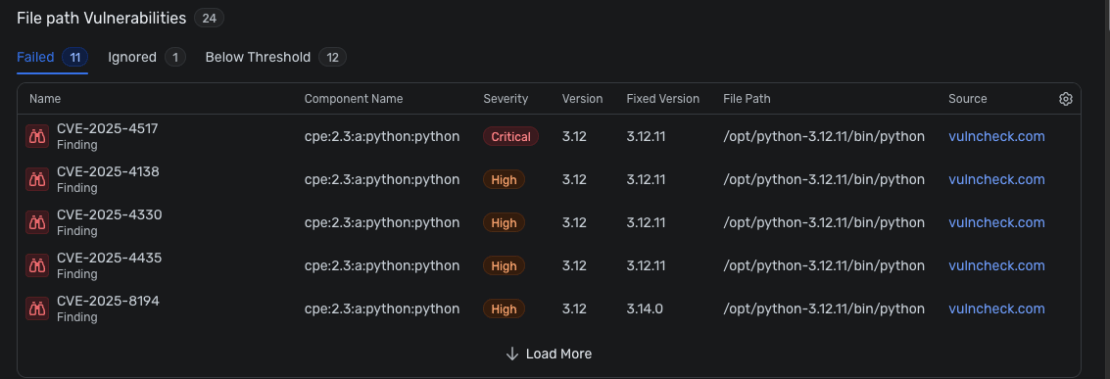
Final Check
After setup, the vulnerabilities will appear according to your pre-set policies. You’ll be able to get a detailed overview on each CVE listed, including graph visualizations for dependency relationships, severity distribution, and potential exploit paths. These insights will help you prioritize remediation efforts, track resolution progress, and ensure compliance with your organization’s security standards.
Integrating Docker Hardened Images for better software supply chain visibility
The Docker-Wiz integration is more than just a checkbox in your security checklist. It provides:
- Clarity: VEX documents and accurate base image identification eliminate guesswork, providing clear, contextual vulnerability data.
- Confidence: Minimized false positives through OSV advisories and Docker-provided metadata ensures security teams can trust what they see.
- Control: Enhanced visibility into SBOMs and technology usage empowers teams to prioritize and manage remediation effectively.
- Coverage: Full-stack integration with Wiz surfaces vulnerabilities across all Docker environments, including hardened images and source-built components.
This partnership helps DevSecOps teams move fast and remain proactive against container vulnerabilities, an essential capability for modern, lean teams managing fast-paced releases, open source risk, and complex cloud-native environments.
Ready to Get Started?
If you’re already using Docker Hardened Images and Wiz, you’re just a few clicks away from reducing false positives, improving SBOM visibility, and making vulnerability data more actionable.
- Check the Docker + Wiz solutions brief
- Visit the Docker + Wiz integration page
- Read more about VEX in our documentation
Related Posts
-
May 12, 2026
Docker AI Governance: Unlock Agent Autonomy, Safely
Introducing Docker AI Governance: centralized control over how agents execute, what they can reach on the network, which credentials they can use, and which MCP tools they can call, so every developer in your company can run AI agents safely, wherever they work. Your laptop is the new prod Agents are the biggest productivity unlock…
Srini SekaranRead now
-
Jun 16, 2026
Docker Content Trust: Retirement and Migration Guidance
Docker Content Trust (DCT) and the Notary v1 service at notary.docker.io are being fully retired (first announced in July of 2025). This blog explains what is changing, who is affected, and how to move to modern alternatives.
Julia WilsonandAditya TripathiRead now
-
Jun 15, 2026
Docker joins the Athena coalition: a cross-industry collaboration for supply chain security
AI is lowering the bar for supply chain attacks. Docker is joining the Athena alliance, a cross-industry effort to coordinate the defense of open source, building on our work to give every developer secure-by-default tools and our track record of sharing signals across the ecosystem.
Tushar JainRead now
-
Jun 11, 2026
Docker Hardened Images enhanced vulnerability scanning with Docker and Aikido
Aikido now scans Docker Hardened Images (DHI) with built-in VEX support. Vulnerabilities that Docker has verified as non-exploitable drop out of the queue automatically, so developers spend their time on findings that actually matter. This post walks through what changed, why it matters, and how users can benefit from the new integration. Why teams are…
Dan StelzerandBjorn HovdRead now