AI canned responses for support: how to move past static saved replies


Last edited June 21, 2026
Why static canned responses quietly let you down
I spend my days on a support queue, so I have a soft spot for the humble macro. When the same shipping question lands for the fortieth time, a saved reply is the difference between a sane afternoon and a miserable one. Macro templates earn their keep, and they're a staple of AI in customer service; I'm not here to talk anyone out of them.
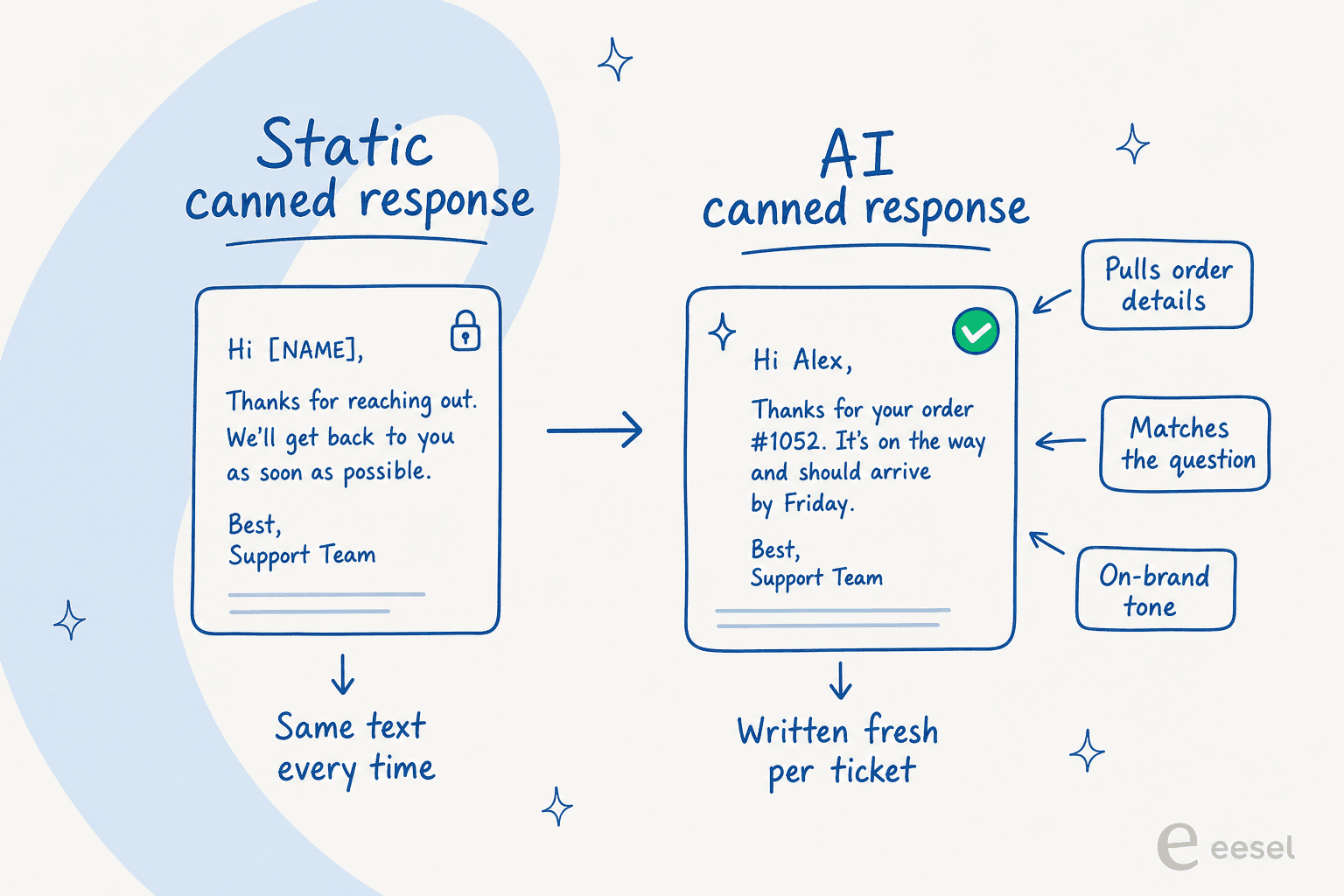
But here's the thing nobody likes to admit: the customer can tell. A static reply is the same paragraph every time, so it answers the category of question rather than the actual one. The customer asked about their specific order; the macro talks about "orders" in general. They asked one precise thing; the macro answers three things, two of which they didn't ask. You end up either pasting a template that's 80% relevant, or you stop, edit it down, and lose the speed that made the macro worth having.
It gets worse as your library grows. Teams I talk to end up with hundreds of macros and saved replies, and nobody remembers which one is current. Half are slightly out of date, the shipping cutoff changed but three macros still quote the old one, and new agents paste whichever one they find first. The library that was supposed to create consistency becomes the thing that quietly erodes it.
That's the gap AI canned responses are built to close.
What an AI canned response actually is
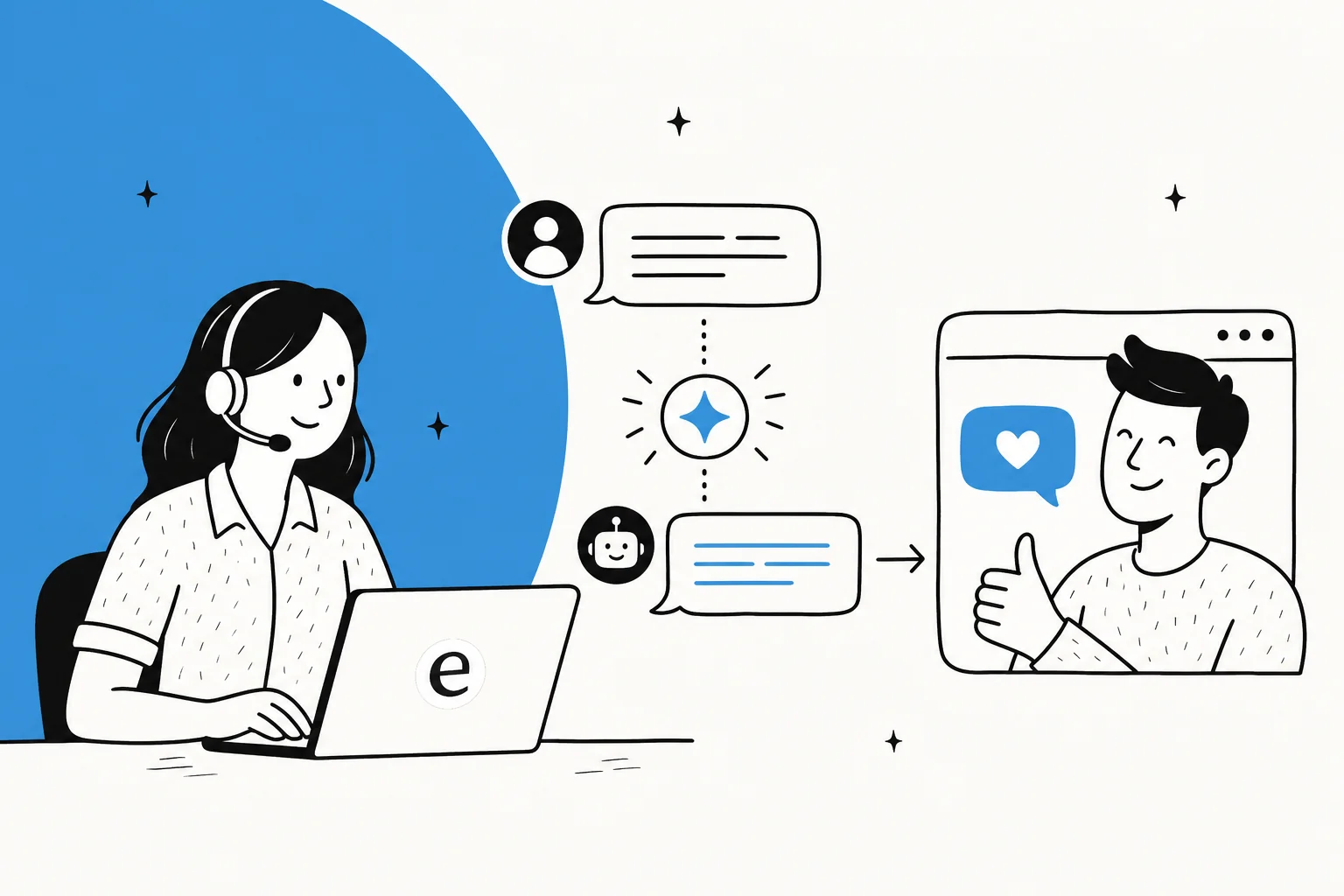
An AI canned response is a reply the AI writes per ticket instead of pulling from a fixed list. It reads the incoming message, looks up the relevant answer in your knowledge base and your history of solved tickets, and drafts a reply that fits this exact conversation, in your brand voice.
So the speed feels like a macro (the agent isn't writing from scratch), but the output reads like a person who actually read the ticket. Same keystroke, none of the form-letter stiffness.
A service desk lead at a logistics SaaS running this on Salesforce and Slack put the difference well:
"It is getting us to the right articles really quickly and easily, as well as curating well-formed responses with consistent, on-brand tone, still keeping our own style and still keeping that human touch."
Eddie Stephens, Service Desk Lead, CartonCloud (case study)
"Keeping the human touch" is the part static macros can't do. The whole point of a template is that it's not personalized. The whole point of an AI canned response is that it is.
How an AI canned response gets built
It helps to see the pipeline, because the quality of the reply is entirely downstream of what the AI is allowed to read.
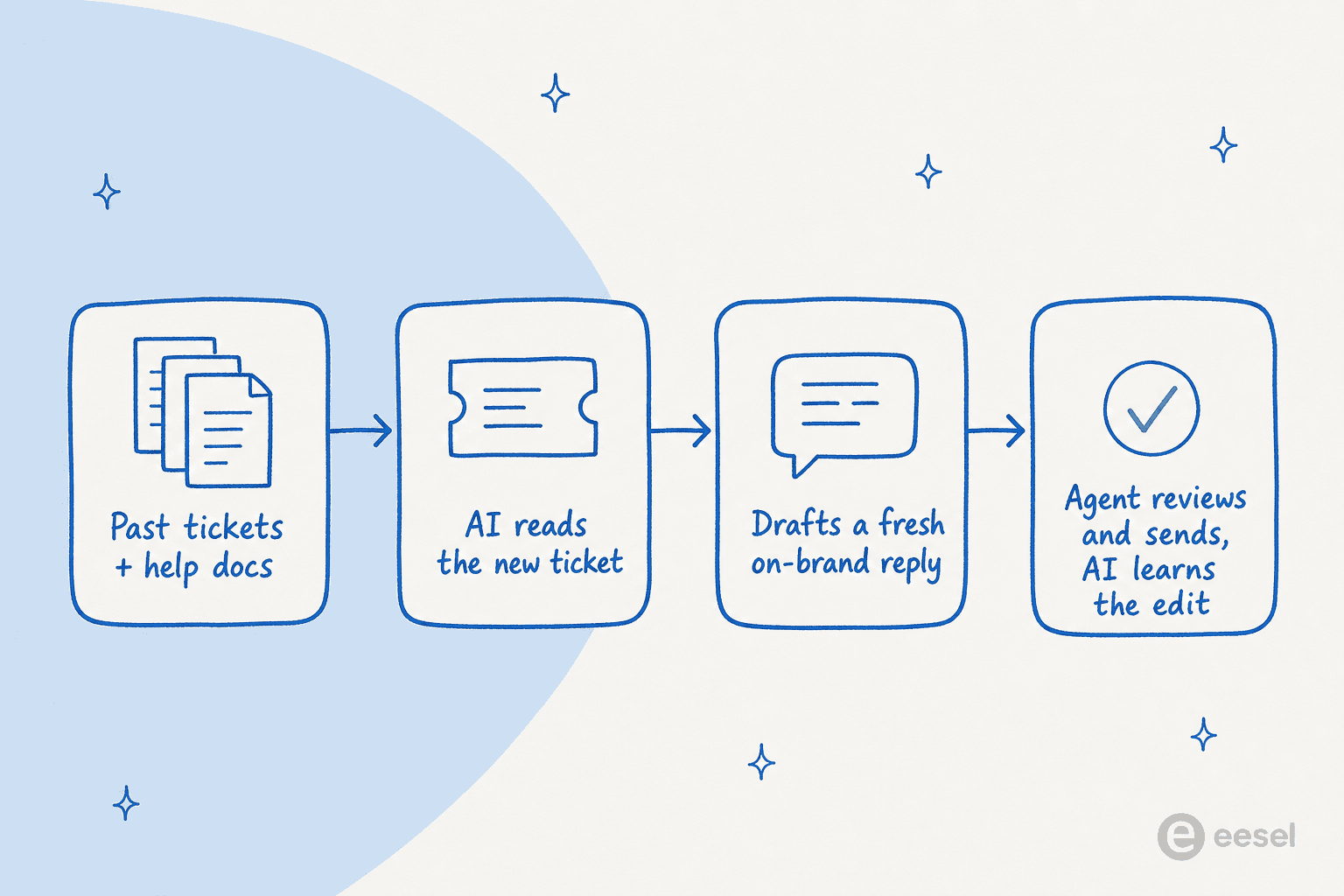
- It learns your sources. Help center articles, internal docs in Notion or Google Docs, and crucially your past solved tickets. This is what powers an AI-driven support workflow rather than a static script. Past tickets matter most, because they hold the answers your agents actually give, not the sanitized version in the help center.
- It reads the new ticket. The customer's question, the order or account context attached to it, the conversation so far.
- It drafts a reply. Specific to that ticket, citing where the answer came from, in your tone.
- A human reviews, sends, and the AI learns the edit. Every correction nudges the next draft closer.
That last step is why this beats a static library over time. A macro you edited stays edited only until the next person pastes the original. A correction to an AI draft becomes part of how it answers tomorrow. As one team building on scattered docs described it:
"Our agents can instantly draft replies to customers. We don't have to look through all our documentation on Notion, Google Docs or our help center anymore because eesel AI does it for us."
Tactiq (case study)
Training on real history is what separates a useful AI copilot from a chatbot that just rephrases your help center. It's also the most-requested capability I hear about, because it's the difference between "sounds plausible" and "is what we'd actually say."
Copilot first, automation later
Here's the advice I'd give before any tool talk: don't start by letting the AI send replies on its own. Start with it drafting, and your agents sending. This is the pattern almost every team that succeeds with this lands on, and the ones who skip it tend to get burned.
We've spent years putting AI on live support queues, and the scar that shaped how we build is watching a confident-sounding bot quietly hand a customer the wrong answer. A wrong reply sent automatically is far more expensive than a hundred drafts a human glanced at. So the rollout that works looks like a dial, not a switch:
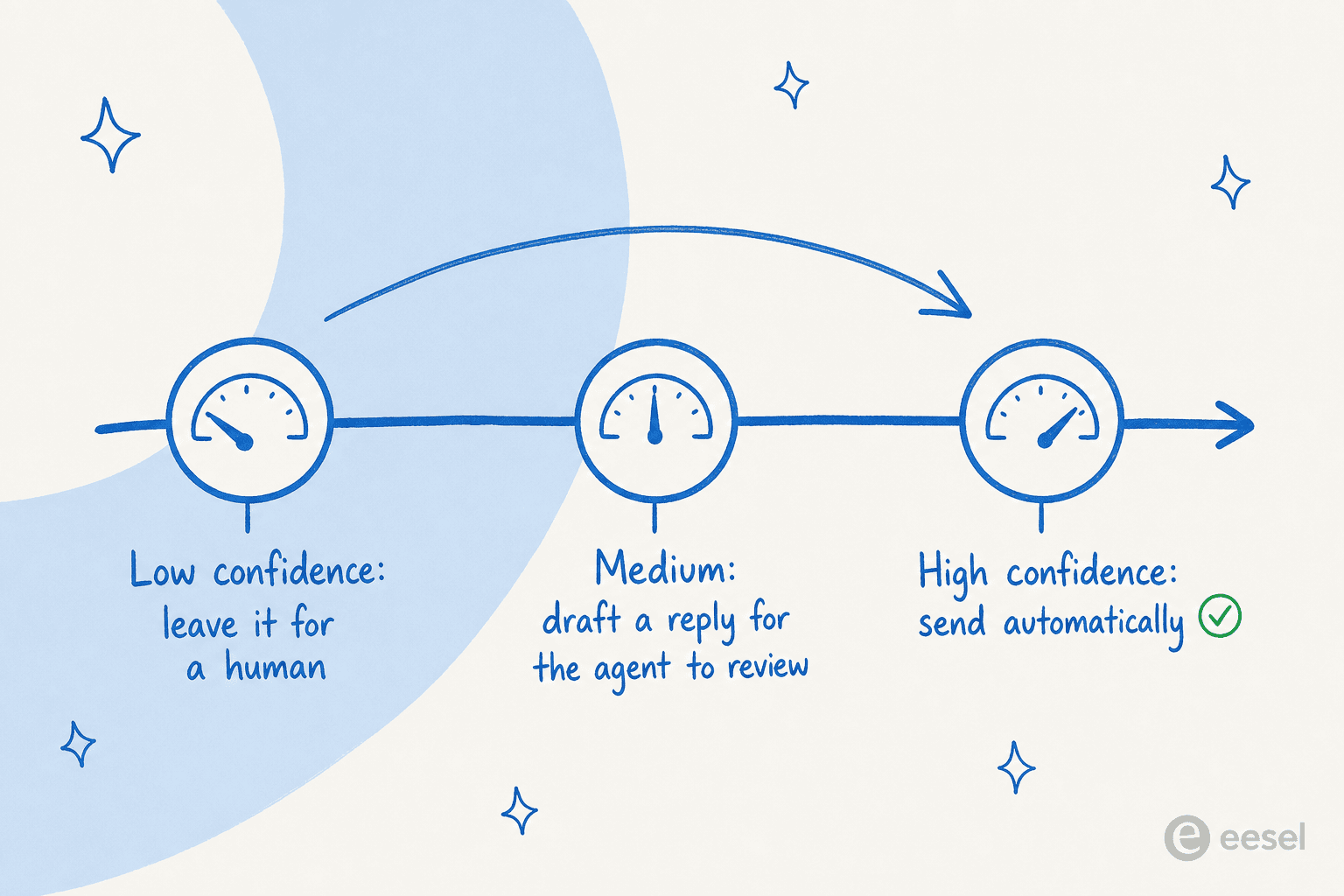
- Low confidence (the AI isn't sure it can source a correct answer): leave it untouched for a human.
- Medium: draft a reply and drop it in for the agent to review and send.
- High confidence on a repetitive, well-documented question: send it automatically, the way good ticket automation should.
The trick is that you, not the vendor, decide where those thresholds sit and which ticket types are even eligible. The strongest version of this thinking came from a customer who summed up the whole philosophy: they wanted an AI that "is only handling the tickets that it's confident to handle and all the other ones, leave them alone." That's the right mental model. You're not trying to automate everything; you're trying to automate the boring, certain stuff and protect the rest.
This graduated approach is also how trust gets built internally. A reviewer at an SMS platform described the feeling once the confidence routing was dialed in:
"It answers confidently but not too confidently, and training it has been super easy."
Kellen Brown, Textla (G2 review)

How to set up AI canned responses without breaking anything
Here's the practical sequence I'd follow, whether you use eesel or something else.
1. Point it at your best sources. Connect your help center and, more importantly, your archive of resolved tickets. If your docs are scattered across Notion, Google Docs, and a help center, that's fine, connect them all rather than reorganizing first.

2. Set the tone and the rules in plain language. You shouldn't need a prompt engineer. Tell it when to jump in, when to stay quiet, and how to sound, the same way you'd brief a new hire. I've watched admins teach durable policies this way, like "troubleshoot before you process a cancellation" or "skip tickets from this test address entirely," just by typing the rule.

3. Simulate before you go live. This is the step most tools skip and the one that matters most. Replay the AI against your last few thousand real tickets and read what it would have said, broken down by topic. You find the gaps (the categories where it's guessing) and fix them before a customer is ever involved. Going live without this is how you end up with the confident-wrong-answer problem.
4. Start in draft mode, then graduate. Let it draft for a couple of weeks, running as an AI copilot beside your agents. Watch the edits they make. When a ticket category is consistently coming back clean, promote that category to auto-send and keep the rest in draft.
5. Measure the right thing. Not "how many replies did the AI send," but resolution quality and the support metrics you already track, plus how much time your team got back. The point isn't volume; it's taking the cost and the toil out of tier-1.
Common mistakes to avoid
- Treating it like a smarter macro library. It's not a list you maintain; it's a system you teach, closer to an AI support agent than a snippet folder. Spend your effort on sources and feedback, not on writing templates.
- Flipping straight to full auto. Skipping the copilot phase is the fastest way to lose your team's trust after one bad public reply.
- Pointing it only at your help center. Help docs are written for a general audience; your solved tickets hold the real answers. Skip them and the AI sounds like marketing copy.
- Ignoring the billing unit. "$X per resolution" sounds fair until a busy month, when you're charged more precisely when you can least afford it. I'd take predictable, usage-based pricing over per-resolution any day.
Try eesel for AI canned responses
If you want AI canned responses inside the helpdesk your team already lives in, that's exactly what eesel does. It plugs into Zendesk, Freshdesk, Gorgias, Front, and HubSpot, trains on your past tickets and docs on day one, and drafts context-aware replies your agents can review or send automatically once you trust them.
The two things I'd flag as genuinely different: you can simulate against your real ticket history before going live (so you're not guessing at accuracy), and pricing is $0.40 per ticket with no per-seat fees, so the bill tracks your volume instead of punishing you for it. There's a free trial with no credit card if you want to point it at your own tickets and see what the drafts look like.

One support team running this in their first month put a number on it that's hard to argue with:
"In the first month, eesel is resolving 73% of our tier 1 requests... Our team implemented and achieved results quickly during our 7-day trial. Responses are simple to fix and adjust."
Kim Simpson, Gridwise (G2 review)
That's the promise of AI canned responses done right: the speed of a macro, the quality of a real reply, and a human still in the loop wherever it counts.
Frequently Asked Questions

Share this article

Article by
Riellvriany Indriawan
Riell is a designer and writer at eesel AI with about two years of experience researching CX platforms, AI chatbots, and helpdesk software. She combines her design background with a sharp eye for how these tools actually look and feel in practice — making her comparisons unusually visual and user-focused.