AI change management tools: The definitive 2025 guide


Last edited October 8, 2025
Table of Contents
Let's be real for a second: organizational change is tough. You’ve probably heard that stat claiming up to 70% of change initiatives don't hit their targets. It gets thrown around a lot because, honestly, it just feels true. Most of us have been through a clunky software rollout or a confusing restructure that felt doomed from the start, usually thanks to a mix of employee pushback and fuzzy communication.
These days, AI is often the thing kicking off these big shifts. But here’s the interesting twist: AI is also becoming one of the best ways to actually manage that change successfully. It’s both the catalyst and the solution.
This guide is a straightforward look at the different kinds of AI change management tools available. We'll skip the buzzwords and get into how you can pick the right tools to make communication, training, and support better whenever your organization is going through a big transition.
What are AI change management tools?
When we talk about AI change management tools, we’re not talking about one single piece of software. It’s more like a whole category of tech designed to help with different parts of the change process. Think of it as a toolkit, not just one magic wrench.
The old way of managing change involved a lot of manual work: blasting out company-wide emails, holding town halls, printing out thick training binders, and then just hoping it all stuck. It was slow, impersonal, and you never really knew if people were getting the message. AI tools flip that on its head by using data and automation to make the whole thing smoother and more focused on the people involved.
To get a handle on it, we can sort these tools into three main jobs:
-
Communication and readiness assessment: These tools help you figure out how your team is actually feeling and make sure the right info gets to the right people.
-
Training and digital adoption: This group guides employees through new software and workflows, helping them learn as they go.
-
Frontline support and transition management: These provide instant answers and automate support so your team isn't left hanging.
The smartest change strategies don't just pick one. They mix and match tools from each category to create a support system that helps employees from every angle.
Enhancing communication and assessing team readiness
Here, we’ll look at tools that help companies talk about change and get a read on employee sentiment, but we’ll also talk about where they come up short.
The challenge of top-down communication
The classic way of communicating change was a one-way street. A leader sends an email or makes an announcement, and that’s pretty much it. We all know how well that works. The message is generic, there’s no easy way to ask questions, and it’s almost impossible to gauge how people are really feeling. Are they excited? Anxious? Just plain confused? Rumors quickly fill the silence, and morale can tank before the project even gets going.
How AI provides a clearer picture
A new batch of AI-powered tools is built to fix this by giving leaders a much better sense of what’s happening on the ground.
-
Sentiment analysis tools: Platforms like Microsoft Viva Glint or Culture Amp use AI to scan thousands of survey responses, chat messages, and emails. They pull out common themes and give you a dashboard showing employee morale. You might find out the engineering team is worried about their jobs while the sales team is baffled by the new commission plan.
-
AI-powered internal search: Tools like Glean work like a private Google for your company. They index all your internal documents, giving employees one place to find official info about the change. This cuts down on misinformation and helps make sure everyone is on the same page.
The limitation: Turning insights into answers
But here's the catch: these tools are great at telling you there's a problem, but they don't actually solve it. A sentiment report might show that 40% of your team is nervous about a software migration, but it doesn’t give those employees a way to get their questions answered right away. The work still falls on managers and HR to schedule more meetings and write more FAQs.
This is where an internal Q&A assistant can be a more direct fix. Instead of just analyzing how people feel, you can give them an AI they can talk to. For example, eesel AI's Internal Chat can be trained on all your official change documents from places like Confluence or Google Docs. You can then put it right inside Slack, where your team already works. When someone has a question, they get an instant, correct answer from a source they can trust. It’s a way to lower anxiety and stop rumors before they start, without scaling up your HR team.
Streamlining training and digital adoption
This section covers Digital Adoption Platforms (DAPs) and their role in change management, while also being honest about their weak spots.
The role of digital adoption platforms (DAPs)
When a change involves new software, just getting everyone trained is a huge task. This is where Digital Adoption Platforms (DAPs) come into play. You’ve probably heard of big players like Whatfix and WalkMe. These tools add an interactive layer on top of your software, creating pop-up tooltips, guided walkthroughs, and checklists that help people learn by doing.
They’re fantastic for teaching step-by-step tasks. For a new CRM launch, a DAP can show a salesperson exactly where to click to log a call or create a deal. This can definitely shorten the initial training curve and help people get comfortable with a new system.
Limitations of guided tours for complex change
But DAPs have their limits. They’re masters of the "what" and "where" (click this, fill that out), but they struggle with the "why" and "what if." A guided tour can’t answer specific questions like, "Why can't I access this report?" or "What's the right expense code for this new project?" These are the real questions people have long after the initial tour is over.
On top of that, setting up a DAP is no small feat. It can be a complicated and pricey project, needing a lot of configuration for every single app you want to support. Their pricing is usually aimed at large companies, hidden behind a "contact us" form with zero transparency.
This is an area where an AI support agent works perfectly alongside a DAP. While a DAP shows users how to click through a workflow, an AI agent from eesel AI can answer the thousands of other questions that come up during a change. By learning from your company's past support tickets and knowledge base articles, eesel AI understands the actual problems your team runs into. It gives instant, useful answers that are much more helpful than a simple UI tour, which is a huge help in taming the flood of support tickets that usually hits the help desk after a launch.
Automating support to manage the transition smoothly
This section frames AI support automation as the crucial, often-overlooked part of the change management puzzle, and it’s where eesel AI really shines.
Why your support team is critical during change
During any major change, your support team members are the unsung heroes. They're on the front lines, dealing with a tidal wave of confusion, frustration, and the same questions over and over from both customers and fellow employees. This spike in tickets is unavoidable and leads to burnt-out agents, long wait times, and a bad experience for everyone. A smooth change depends on giving this team the right tools to handle the chaos.
The old way vs. the new way with AI
The traditional response to this surge is to just throw more people at the problem. Companies hire temps or pull staff from other departments, but that's an expensive and inefficient fix. The other go-to is creating massive FAQ documents that, let's face it, nobody ever reads.
A modern, AI-first approach is much smarter. But many AI tools on the market come with their own set of problems. They often want you to completely replace your existing helpdesk, whether it's Zendesk or Freshdesk, forcing a difficult migration. The setup can be a months-long project that requires developers, and many use unpredictable pricing that charges you per resolution, making it impossible to budget.
This is how eesel AI does things differently:
-
Go live in minutes: Forget about sales calls and drawn-out onboarding. With eesel AI, you can connect your helpdesk with a click and get everything set up yourself. It fits right into your current workflow without causing any disruption.
-
Total control: You get to decide exactly what the AI handles. You can start small by automating answers to common questions about the change and let your human agents take care of the rest. You can set up specific rules to ensure a safe, gradual rollout.
-
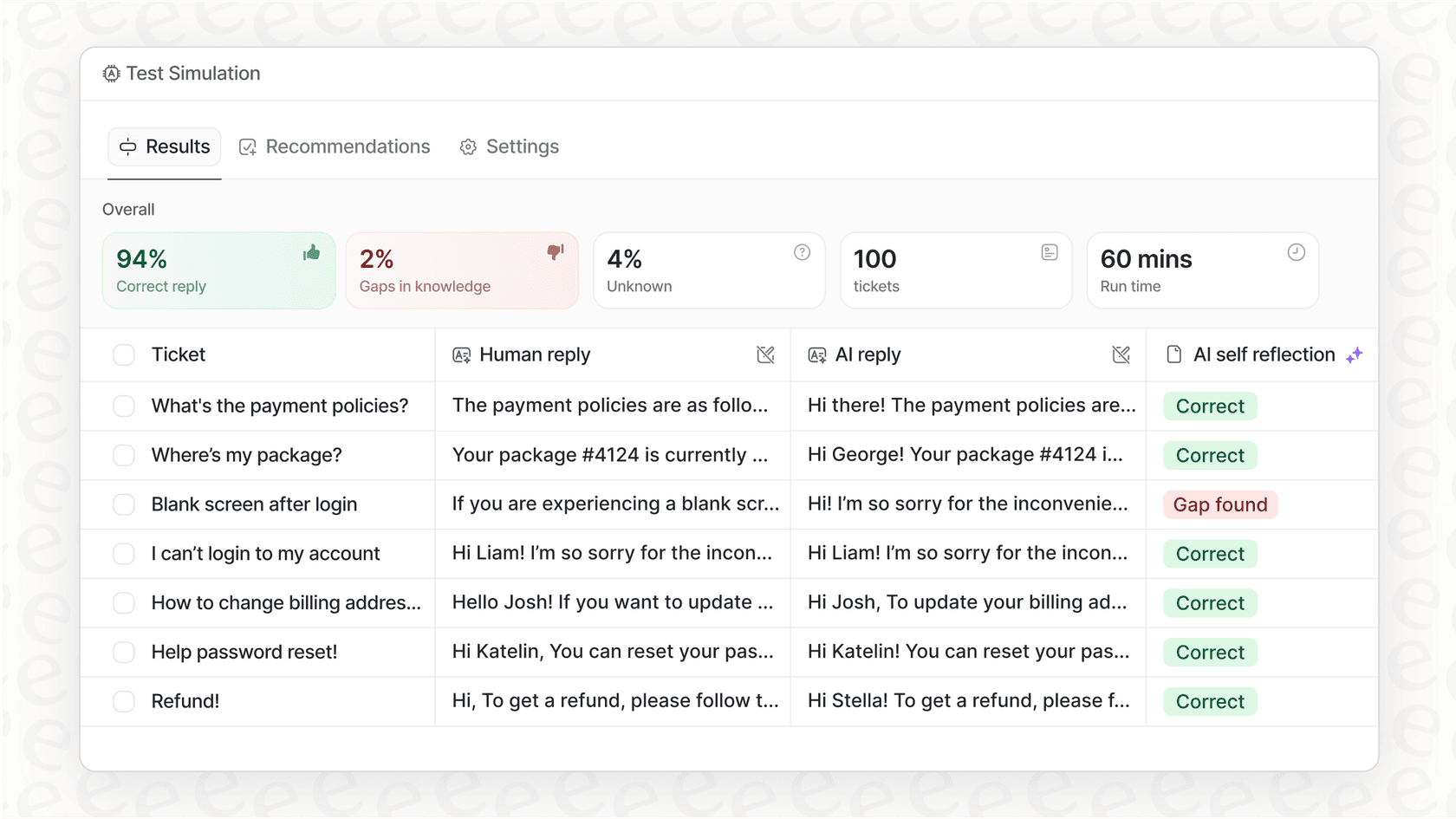
Test with confidence: This is a big one. eesel AI's powerful simulation mode lets you test your AI agent on thousands of your past support tickets in a safe environment. You can see exactly how it would have answered, get accurate predictions on how many tickets it will resolve, and tweak its performance before it ever talks to a real person. Most competitors don't offer anything close to this level of risk-free testing.
Comparing pricing for top AI change management tools
When you're trying to budget for a new tool, there's nothing more annoying than a pricing page that just says "Contact Sales." This lack of transparency is common in enterprise software and can really slow things down.
Tools like WalkMe, Whatfix, and Glean all make you schedule a demo to get a custom quote. This usually kicks off a long sales process and a price that feels based on how much they think you can afford. You can’t just sign up and try it, which makes it tough to compare your options or run a quick test.
In contrast, eesel AI is all about clear, predictable pricing. You know exactly what you’re paying for, with no hidden fees or surprise bills.
| Tool | Starting Price | Pricing Model | Key Takeaway |
|---|---|---|---|
| eesel AI | $299/month (Team Plan) | Tiered, based on interactions. No per-resolution fees. | Transparent and predictable. Offers a flexible month-to-month option. |
| WalkMe | Contact Sales | Custom (Typically enterprise contracts) | Opaque pricing. You have to go through a sales process. Not self-serve. |
| Whatfix | Contact Sales | Custom (Varies by use case) | Geared toward enterprise deals, requires a demo and custom quote. |
| Microsoft Viva | Starts at ~$2/user/month | Per user, per month (Requires specific Microsoft 365 licenses) | Looks cheap at first, but costs scale with user count and has licensing rules. |
Choosing the right AI change management tools for your people
At the end of the day, successful change isn’t about forcing new processes onto people. It's about supporting them through the messy, uncertain parts of a transition. The best AI change management tools are the ones that give your employees instant answers, clear communication, and training that actually works.
While sentiment analysis and guided software tours have their place, the biggest impact comes from automating the frontline support that bogs your team down. By providing instant resolutions to the most common questions, you free up your human experts to focus on the complex, high-touch problems that really need their attention. This not only makes the change go smoother but also shows your team you're invested in helping them succeed.
CTA:
Managing change is hard, but supporting your team through it doesn't have to be. See how eesel AI can automate your change-related support questions and give your team instant answers in minutes, not months. Start your free trial today and simulate your AI agent with confidence.
Frequently asked questions

Share this article

Article by
Stevia Putri
Stevia Putri is a marketing generalist at eesel AI, where she helps turn powerful AI tools into stories that resonate. She’s driven by curiosity, clarity, and the human side of technology.