The 5 best AI plugins for Jira to boost productivity in 2026


Last edited January 16, 2026

If you're a Jira admin or a team lead, you know the daily grind. Your day is a constant balancing act between moving big projects forward and staying on top of the various reactive tasks that keep a team running. Strategic work is the priority, and having a reliable platform like Jira makes managing these moving parts much easier.
As AI technology has evolved, its integration within Jira has become incredibly sophisticated. While early tools in the ecosystem were just starting out, today's solutions offer impressive precision that fits naturally into your existing workflows.
Thankfully, things are better than ever. A new wave of AI tools has shown up, and they’re much more focused. They’re built to solve specific problems and enhance knowledge management. In this guide, we'll walk through the five best AI plugins for Jira that can actually give you some time back.
What is an AI plugin for Jira?
Let's clear something up first. An AI plugin for Jira isn't one single thing. It’s a term for apps that plug into your Jira setup to automate or speed up certain jobs. It’s a good idea to set some expectations here: most of these plugins work alongside your existing expertise to optimize your setup.
Instead, these tools are really good at handling the repetitive tasks that can occupy a team's day. Jira is a mature, reliable platform, and these plugins help you get the most out of it by:
-
Handling frontline support: Answering the same simple questions by digging up answers from past tickets or your Confluence pages.
-
Sorting and routing tickets: Automatically tagging, prioritizing, and assigning incoming requests in Jira Service Management so they get to the right person faster.
-
Drafting content: Creating a first pass of a user story, acceptance criteria, or a knowledge base article from a brief description.
-
Finding answers, fast: Helping your support agents find the right information without having to leave the ticket they're working on.
So, think of these plugins as efficient assistants that take care of routine work, freeing you up for more complex problem-solving.
How we picked the best AI plugin for Jira in 2026
The Atlassian Marketplace is an impressive ecosystem. To find the tools that are actually worth your time, we looked at each AI plugin for Jira through a practical lens, focusing on what really matters when you have a job to do.
Here’s what we cared about:
-
Could we set it up ourselves? We wanted tools you could get running in an afternoon, taking advantage of Jira's flexible architecture.
-
Does it actually fix a real problem? We leaned towards plugins that do one thing really well (like automating support) to provide immediate value.
-
Does it play nice with other tools? How well does it connect to Jira, obviously, but also to other places your team works, like Confluence, Slack, or Google Docs?
-
Can you trust it? Does the tool let you test it out before rolling it out? We looked for ways to control what gets automated so you can deploy with confidence.
-
Is the pricing straightforward? We looked for clear, predictable pricing models to match different team sizes.
Quick comparison: The best AI plugin for Jira
Here's a bird's-eye view of how our top picks compare.
| Feature | eesel AI | Atlassian Intelligence | AI Jeannie | AI Assistant for Jira | Testomat.io AI |
|---|---|---|---|---|---|
| Primary Use Case | Support & ITSM Automation | General Platform AI | Requirements Generation | Basic Task Creation | Test Case Management |
| Self-Serve Setup | ✅ Yes | ✅ Yes (native integration) | ✅ Yes | ✅ Yes | ✅ Yes |
| Trains on Past Tickets | ✅ Yes | ✅ Yes | ❌ No | ❌ No | ❌ No |
| Simulation Mode | ✅ Yes | ❌ No | ❌ No | ❌ No | ❌ No |
| Custom Actions/APIs | ✅ Yes | ✅ Yes (via Rovo Studio) | ❌ No | ❌ No | ❌ No |
| Pricing Model | Flat, predictable tiers | Included in Premium plans | Open Source | Free | Per-user subscription |
The 5 best AI plugins for Jira in 2026
Alright, let's get into the details. Here’s our breakdown of the top AI tools for Jira, each built for a different kind of team and a different kind of problem.
1. eesel AI
eesel AI is built to do one thing exceptionally well: automate the frontline support and ITSM work happening in your existing tools. It sits on top of Jira Service Management, Confluence, and other knowledge sources, acting as an agent that handles repetitive tickets for you.
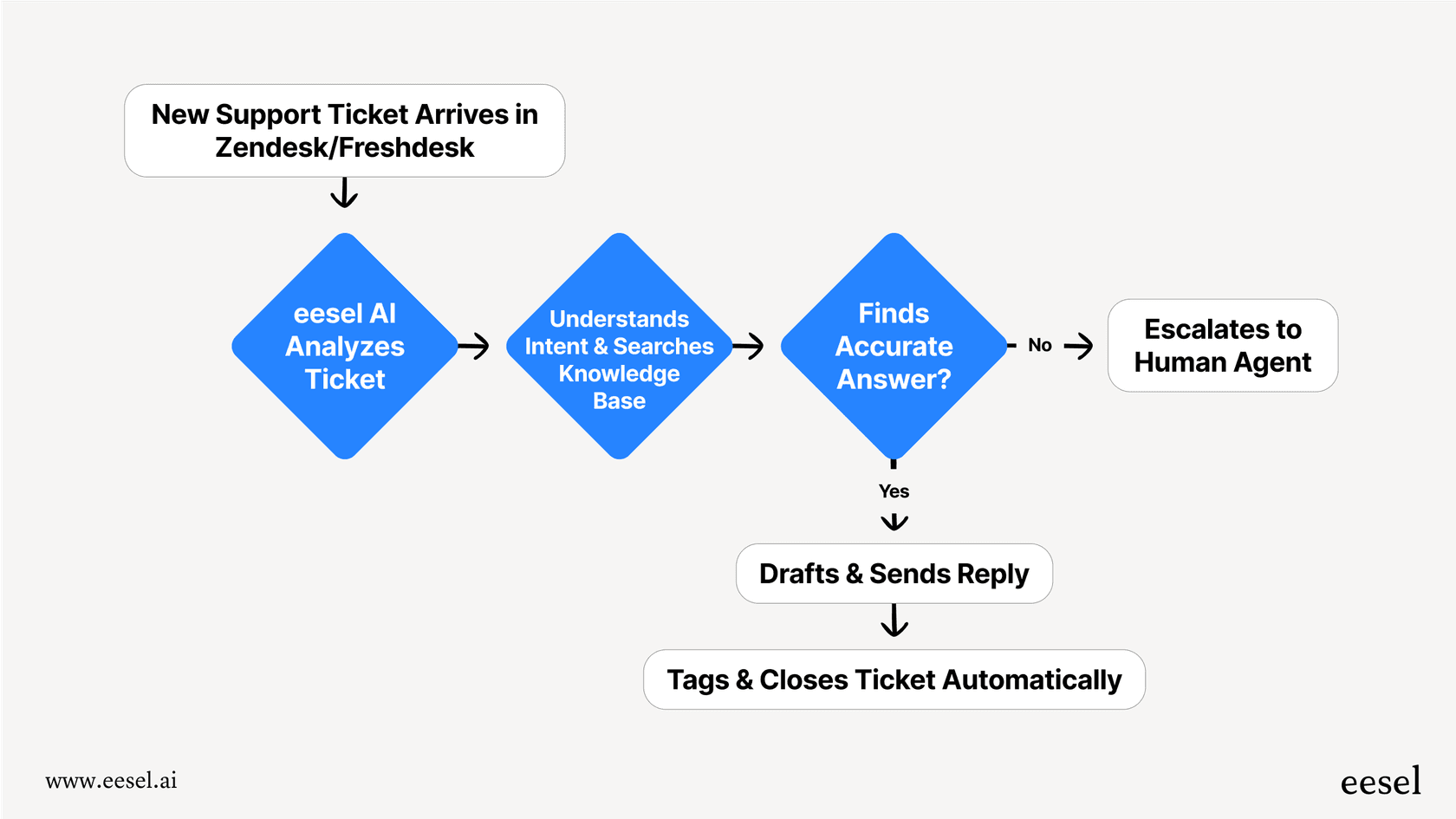
What makes it a great choice is how easily it integrates and its simulation feature. You can connect your Jira account, let the AI learn from your past tickets and Confluence articles, and then see exactly how it would have handled thousands of your old support requests. You get a clear picture of its performance before you even turn it on for a single user. This lets you start small and expand with confidence.

Why we picked it: eesel AI addresses the common Tier 1 questions that many service desks receive. It acts as a focused automation tool that works within the Jira ecosystem. You can set up custom actions, tweak its personality, and pull knowledge from dozens of sources outside of Jira, like Google Docs and Notion.
-
Pros:
- Live in minutes: You can set it up yourself quickly.
- Risk-free testing: The simulation mode lets you test it on your historical data to see how it will perform.
- You're in control: You decide which tickets get automated and exactly what the AI is allowed to do.
- Connects all your knowledge: It can learn from over 100 sources, not just Jira, to give accurate answers.
-
Cons:
- It is specialized for support and knowledge automation rather than development tasks like writing code.
-
- Team Plan: $299/month ($239/month annually) for up to 1,000 AI interactions, 3 bots, and key integrations.
- Business Plan: $799/month ($639/month annually) for up to 3,000 interactions, unlimited bots, and adds the ability to train on past tickets and run bulk simulations.
- The pricing is clear and based on usage. All plans come with a 7-day free trial.
2. Atlassian Intelligence (Rovo)
Atlassian Intelligence is the company’s own AI, with features delivered through an agent named Rovo. It's woven deeply into the whole Atlassian ecosystem, including Jira, Confluence, and Jira Service Management. It acts like a helpful teammate that can summarize tasks, generate JQL queries, or answer questions by looking through your internal docs.
If your team lives and breathes Atlassian products, this is a fantastic option. It can pull answers from Confluence right into a JSM ticket and help automate some basic actions. The biggest perk is that it's built-in, so it’s easy to manage alongside your other Atlassian tools.
Why we picked it: As the official, native tool, it’s a powerful place to start. It’s excellent for summarizing long comment threads on a ticket, drafting quick responses, and searching for things across all your Atlassian tools at once. It’s a very capable general-purpose assistant.
-
Pros:
- It’s baked right into the reliable Atlassian platform you already use.
- Excellent for summarizing content and searching across Jira and Confluence.
- Included with Premium and Enterprise plans, offering great value for established teams.
-
Cons:
- It does not include a simulation mode for testing support automation on historical data.
- While standard setup is seamless, deeply specialized custom logic can take time to fine-tune.
- It is most effective when knowledge is primarily stored within the Atlassian ecosystem.
-
Pricing:
- Atlassian Intelligence is included with higher-tier Jira plans.
- Premium Plan: Starts around $13.53 per user/month and includes Rovo.
- Enterprise Plan: Custom pricing, including more Rovo credits.
- The Standard plan includes a version with core benefits, but Premium or Enterprise offers the full experience.
3. AI Jeannie
AI Jeannie is a specialized AI plugin for Jira built for product managers and business analysts. It focuses on helping you write clear and consistent project requirements.
You give it a project definition, and it uses AI to write descriptions for epics, user stories, and acceptance criteria. This can be a significant help in the early stages of a project, ensuring all documentation is consistent and saving your team time on writing tasks.
Why we picked it: This is a great example of an AI tool that addresses a specific need. By focusing on requirements, it delivers value to teams looking to streamline their project documentation.
-
Pros:
- Helps standardize how you write requirements.
- It's an open-source tool, allowing for flexibility.
- Keeps developers and BAs aligned with consistent documentation.
-
Cons:
- It is a niche tool focused specifically on requirements and user stories.
- Requires you to connect your own AI provider API key.
-
Pricing:
- AI Jeannie itself is open source and free. You only pay for the usage costs from your chosen AI provider (like OpenAI).
4. AI Assistant for Jira
Available on the Atlassian Marketplace, AI Assistant for Jira by Cappsule is a straightforward plugin that makes task creation easier. Its primary function is to look at a Jira issue and suggest sub-tasks to help break down the work.
This tool is a great choice for teams that want a simple entry point into AI. It focuses on a core set of features that make it easy to install and use for basic task management.
Why we picked it: It’s an accessible and no-risk way to see how AI can help with daily task management. It's free and simple, which makes it perfect for teams with straightforward needs who are just beginning to explore automation.
-
Pros:
- It’s free and very easy to set up.
- Useful for generating quick ideas for sub-tasks.
-
Cons:
- The functionality is focused on basic task breakdown.
- It does not connect to external knowledge bases or automate complex support workflows.
-
Pricing:
- This app is listed as Free on the Atlassian Marketplace.
5. Testomat.io AI
Testomat.io offers a smart AI plugin for Jira that’s made just for QA teams. It connects your Jira issues with test management by reading user stories and automatically suggesting test cases.
It provides a great integration where you can see test data right inside a Jira ticket, and if a bug is found, it can be sent back to Jira with the details filled in. This keeps developers and QA engineers in sync efficiently.
Why we picked it: This plugin highlights how AI in Jira can benefit specialized teams like QA. It ensures test plans match the work being done, leading to better software and more efficient collaboration.
-
Pros:
- Streamlines creating and linking test cases to Jira issues.
- Helps developers and QA teams work together seamlessly.
- Supports both manual and automated testing workflows.
-
Cons:
- Specialized only for testing and QA use cases.
- The AI capabilities are focused within their Enterprise-level offering.
-
- The AI features are part of the Enterprise plan, which uses custom quotes.
- They offer Free and Professional plans for standard test management without the AI suite.
How to choose the right AI plugin for Jira
So, with all these different tools, how do you pick one? It comes down to the specific goals you're trying to achieve.
-
Identify your primary needs. Are you looking to optimize support tickets? Is project documentation your focus? Or are you looking to enhance your QA process? Choose the tool that addresses your biggest opportunity for growth.
-
Consider where your knowledge is stored. If your information is neatly stored in Confluence, native tools are excellent. If it's spread across Google Docs, Slack, and other sources, a tool like eesel AI is a great complementary choice.
-
Look for reliable testing features. Confidence is key when adopting new technology. Look for plugins that offer simulation or testing modes so you can see how the AI behaves within your Jira environment before going live.
-
Start with a clear use case. You don’t need to change everything at once. Pick a tool that allows you to start with one clear task, prove the value, and then build from there.
Boost your Jira workflows with the right AI plugin for Jira
Jira is a powerful, enterprise-grade platform, and today's AI plugins are practical tools built to enhance that experience. Whether it's freeing up your support team or making project requirements clearer, these tools help you get even more value from your Jira setup.
The focus should always be on the job you need to get done. For teams handling a volume of support requests and ITSM tickets, specialized and user-friendly tools can make a great difference.
Curious to see how much time you could save? eesel AI lets you connect your Jira instance and run a free simulation to see what your potential automation rate could be in just a few minutes.
Frequently asked questions

Share this article

Article by
Kenneth Pangan
Writer and marketer for over ten years, Kenneth Pangan splits his time between history, politics, and art with plenty of interruptions from his dogs demanding attention.