Airtable AI review (2026): Features, limits & verdict

Last edited August 7, 2025

Table of Contents
- What is Airtable AI?
- How Airtable AI summarizes and analyzes data
- Streamlining workflow categorization and automation
- Scaling your business with Airtable AI: Features and limitations
- Airtable AI pricing: Making sense of the credit system
- Is Airtable AI the right tool for your business?
- Give your support and IT a real boost with eesel AI
Let's be honest, most businesses feel like they're drowning in data. It’s scattered across endless spreadsheets, buried in long documents, and stuck in dozens of different apps. Trying to turn that ocean of information into something you can actually use is a huge headache. This is where AI tools are popping up, promising to connect the dots and pull useful insights from the chaos.
One of the most talked-about tools in this space comes from Airtable, the popular no-code platform many teams already use to organize their work. They’ve recently rolled out Airtable AI, an assistant built to automate data management right inside your existing bases.
So, what’s the real story? In this review, we’ll take a practical look at Airtable AI's main features for summarizing, categorizing, and scaling your data. We’ll cover where it works well, where it might not be the best fit for specialized teams, and what its pricing model actually means for your budget. By the end, you should have a much clearer picture of whether it's the right tool for your business in 2025.
What is Airtable AI?
Before we get into the AI part, let's do a quick recap of what Airtable is. At its core, Airtable is a flexible, cloud-based platform that looks and feels like a spreadsheet but has the power of a database behind it. It’s a go-to for teams managing everything from project timelines to marketing campaigns, all without needing to write code.
Airtable AI isn't a separate product you have to buy and install. Instead, it’s a set of features woven directly into the Airtable experience you already know. Think of it as an intelligent assistant living inside your bases and workflows. Its main purpose is to bring generative AI to your data, letting you summarize long text threads, generate new content, automatically sort information, and even build new apps using plain English.
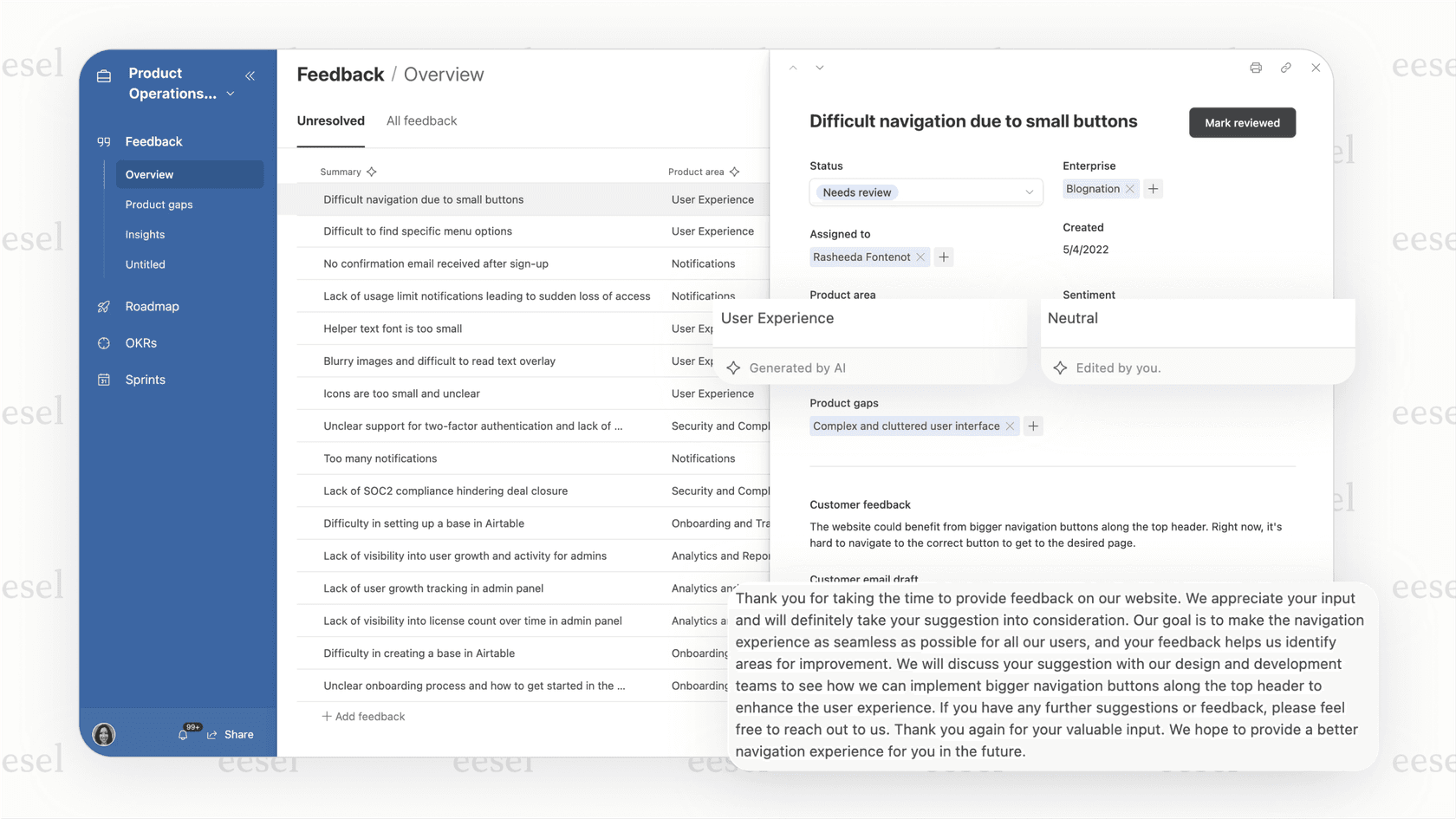
Its biggest strength is that it works with the data that's already inside Airtable. You feed it information by creating records and filling out fields, and the AI helps you make sense of it all. This is a key point to remember, as it explains some of its limitations when compared to other AI solutions that can work on top of your existing tools without you having to move all your data first.
How Airtable AI summarizes and analyzes data
One of the biggest promises of Airtable AI is its ability to find meaning in massive amounts of unstructured data. Whether it's pages of text or thousands of records, the goal is to find the important stuff. Let's look at how it actually does this.
Uncovering insights with natural language
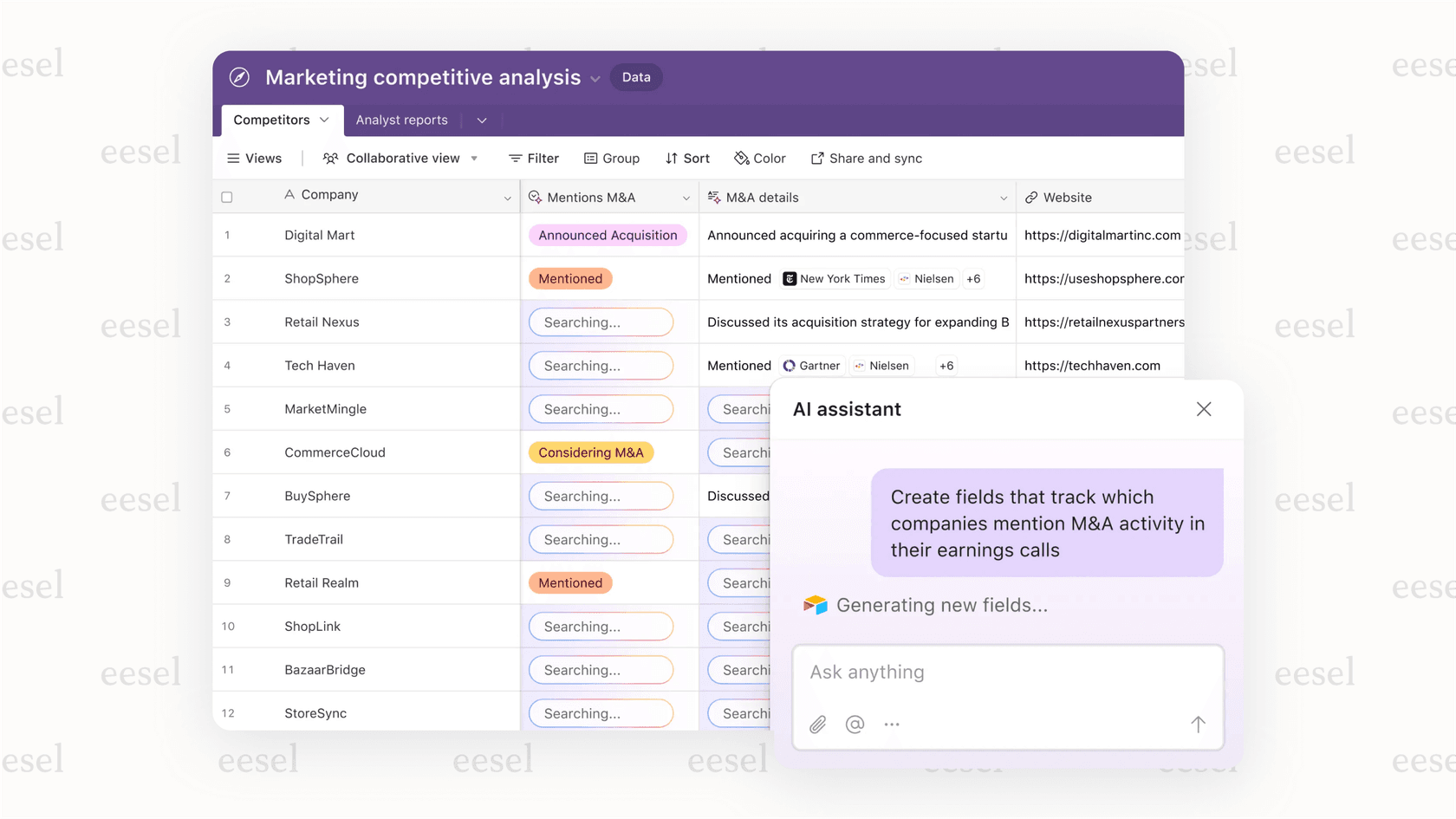
The most impressive feature here is being able to "chat" with your data. Instead of fiddling with complex filters or formulas, you can just ask questions in plain natural language. For example, you could ask, "What were the main themes from our last customer feedback survey?" or "Which product line had the best margin in Q3?". The AI scans your records, pulls information from different tables if needed, and gives you a straight answer. It’s like having a data analyst on call.
AI-powered document analysis
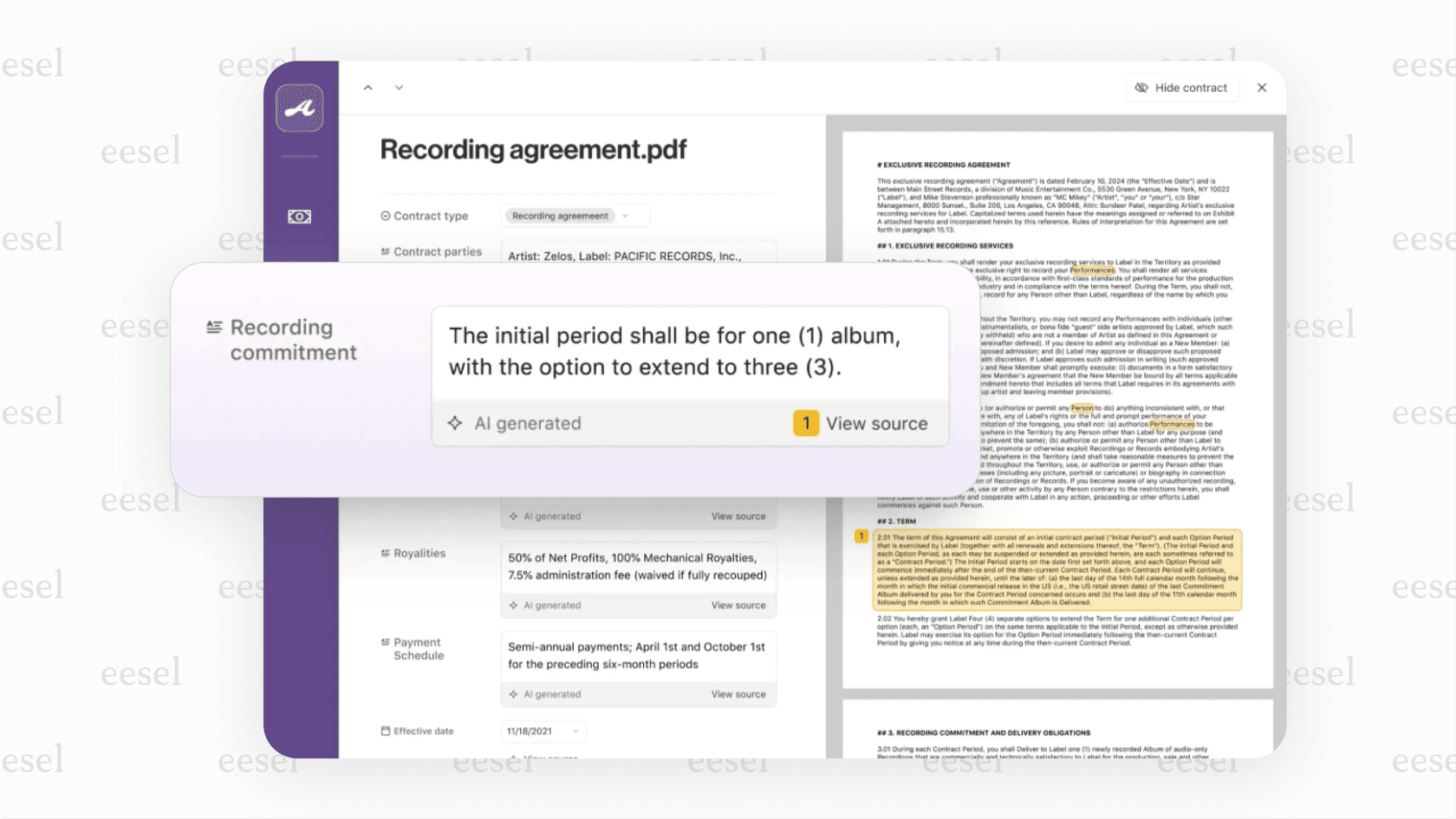
Another handy tool is its document analysis feature. You can upload files like PDFs or Word documents into an Airtable record and tell the AI to scan them for specific details. Picture a legal team uploading dozens of contracts. They could ask Airtable AI to read through all of them and automatically pull out the counterparty names, effective dates, and renewal clauses into a clean, organized table. This could save a ton of time on manual data entry.
The catch with Airtable AI for customer support and IT teams
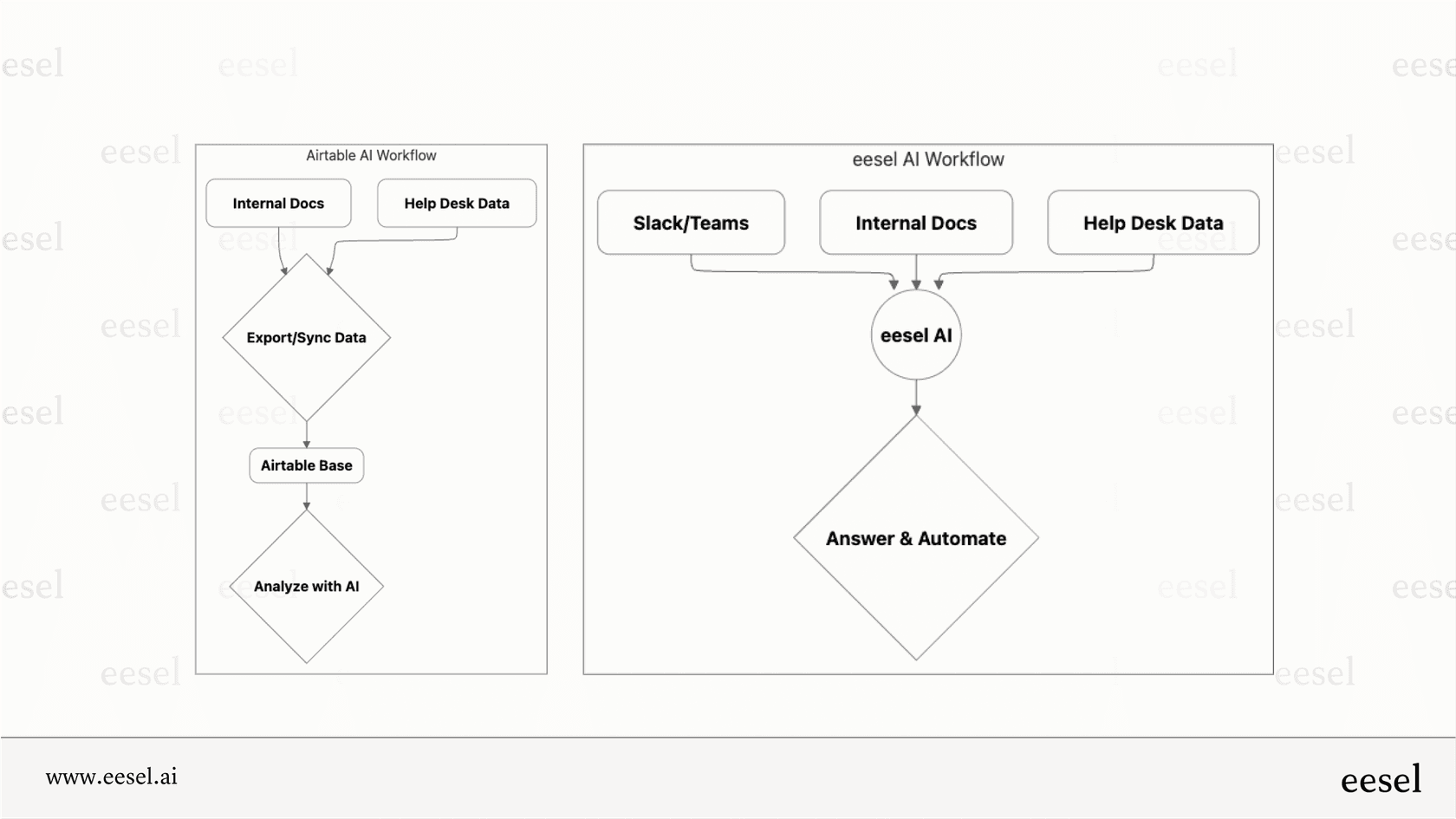
This is where we hit the first real snag. These features are fantastic, but they work best when all your data is already sitting neatly in Airtable. For teams in customer support or IT, their most important information lives in specialized tools like Zendesk or Jira Service Management. Getting that information into Airtable means setting up a data sync or doing manual exports, which just adds another layer of complexity and another system to keep an eye on.
A different way to go is using a tool that acts as an intelligence layer over your existing systems. For instance, eesel AI connects directly to your help desk, internal docs in Confluence, and chat tools like Slack without making you move anything. It analyzes the data right where it is, giving you insights and automation without the extra hassle.
Streamlining workflow categorization and automation
Once you’ve analyzed your data, the next logical step is to do something with it. Airtable AI has some smart ways to help you move from analysis to action using its automation and "AI Field" features.
Using AI fields for smart categorization
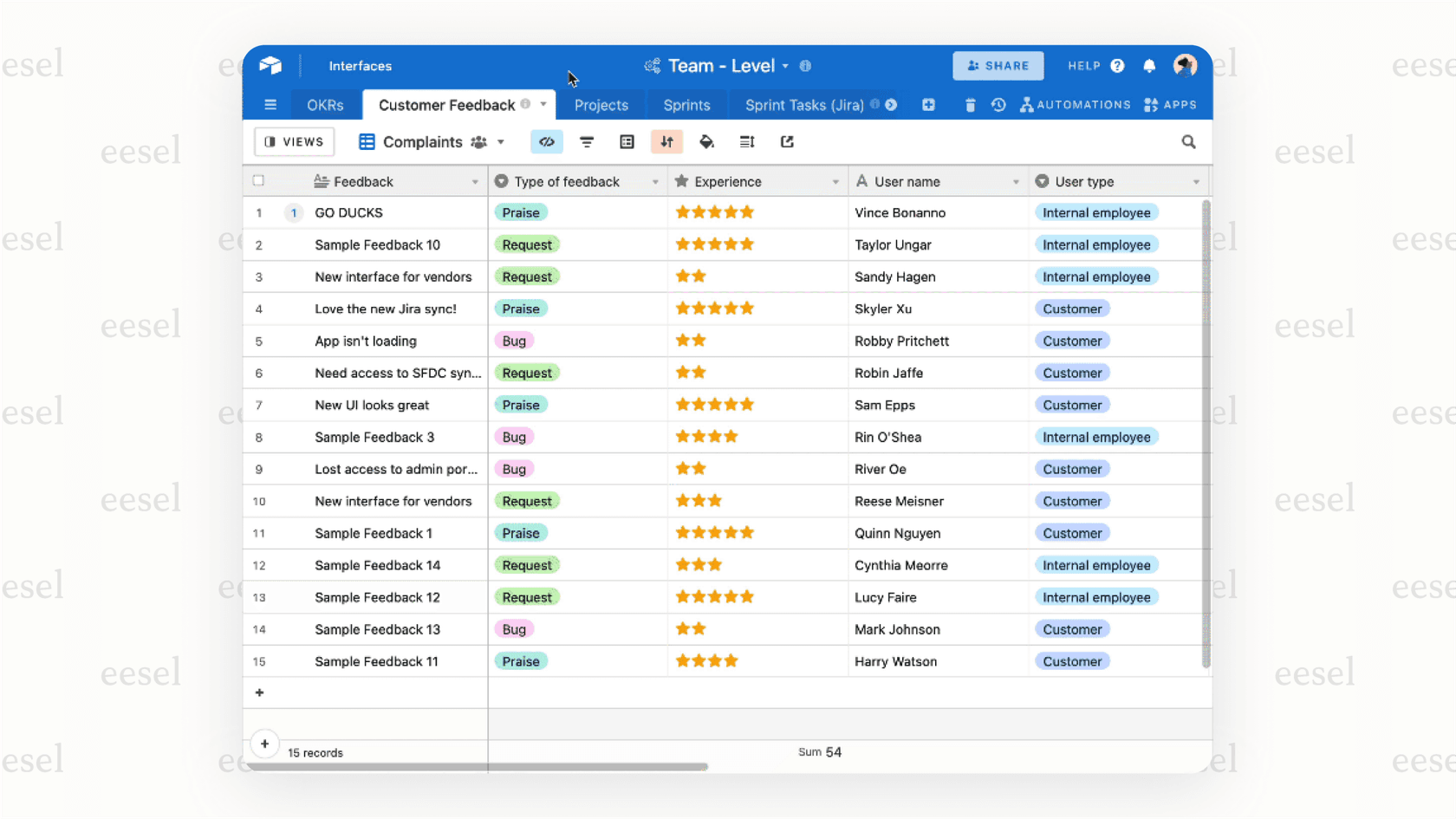
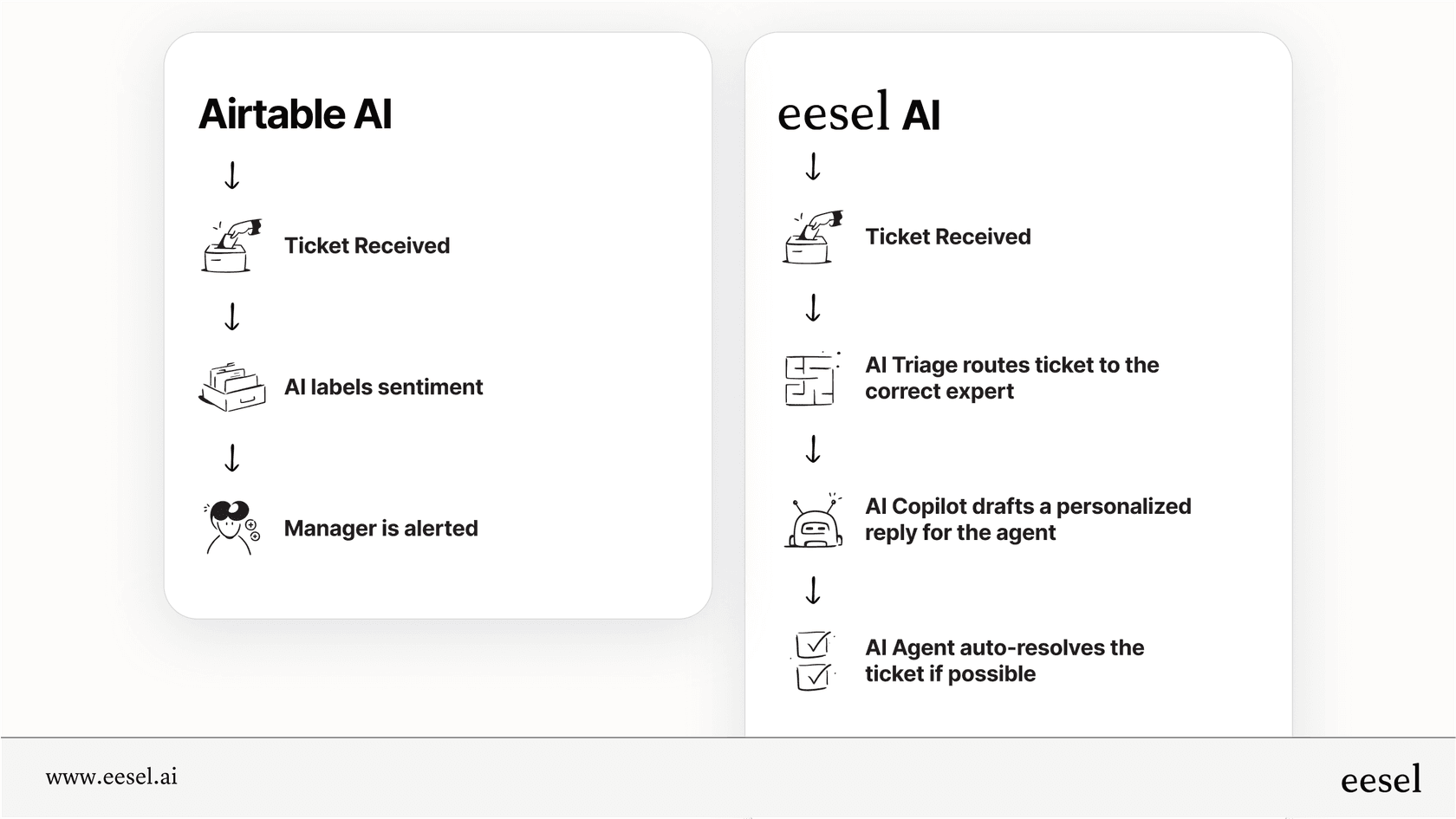
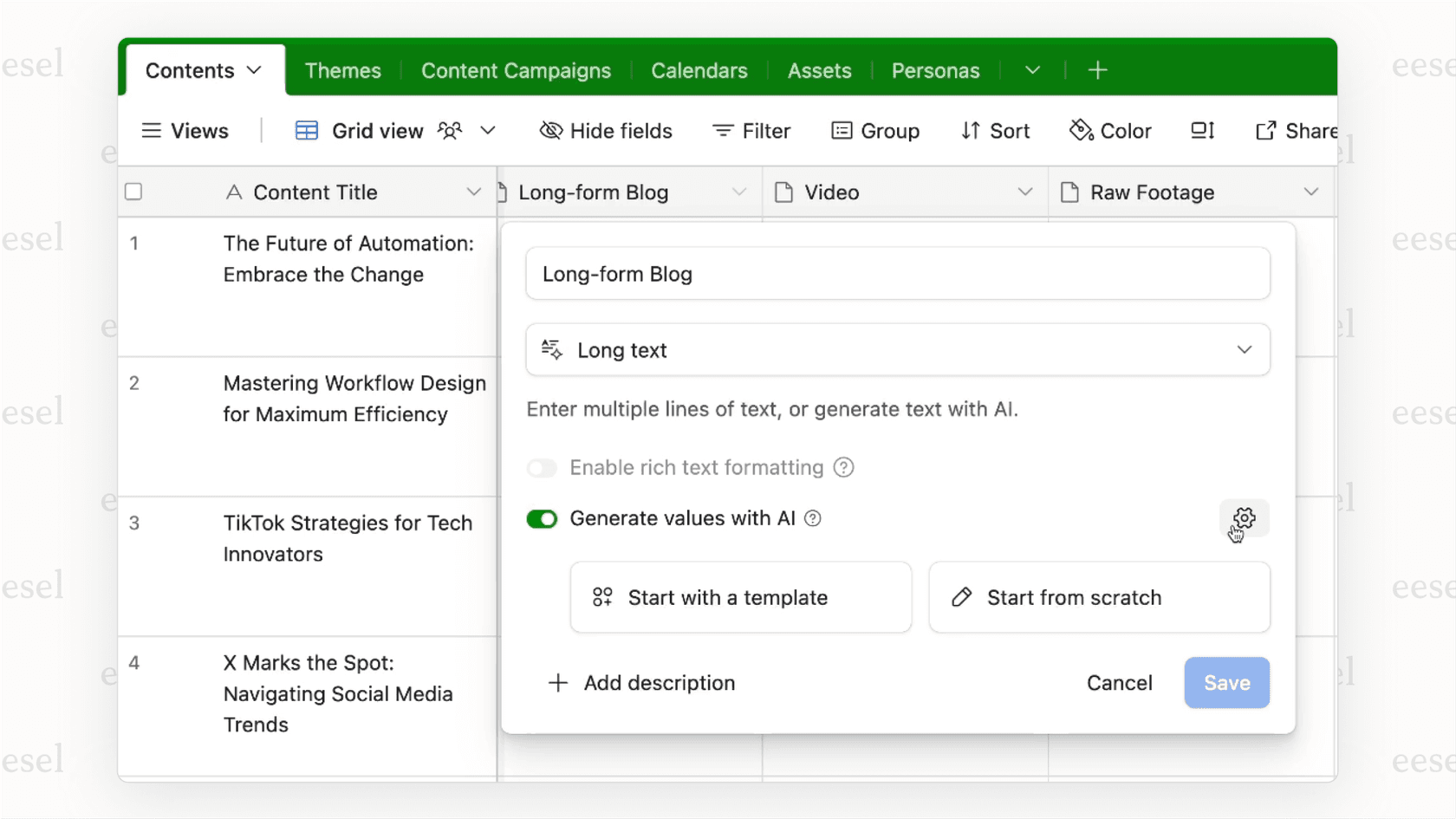
The "AI Field" is a key part of how Airtable AI works. It's a special field type that you can ask the AI to fill in for you based on what's in other fields. For example, let's say you have a base for tracking customer reviews. In one field, you have the full text of the review. You can then create an AI Field called "Sentiment" and tell the AI to read the review and label it "Positive," "Negative," or "Neutral." Just like that, you've turned a block of text into structured data you can run reports on.
Triggering automations from Airtable AI outputs
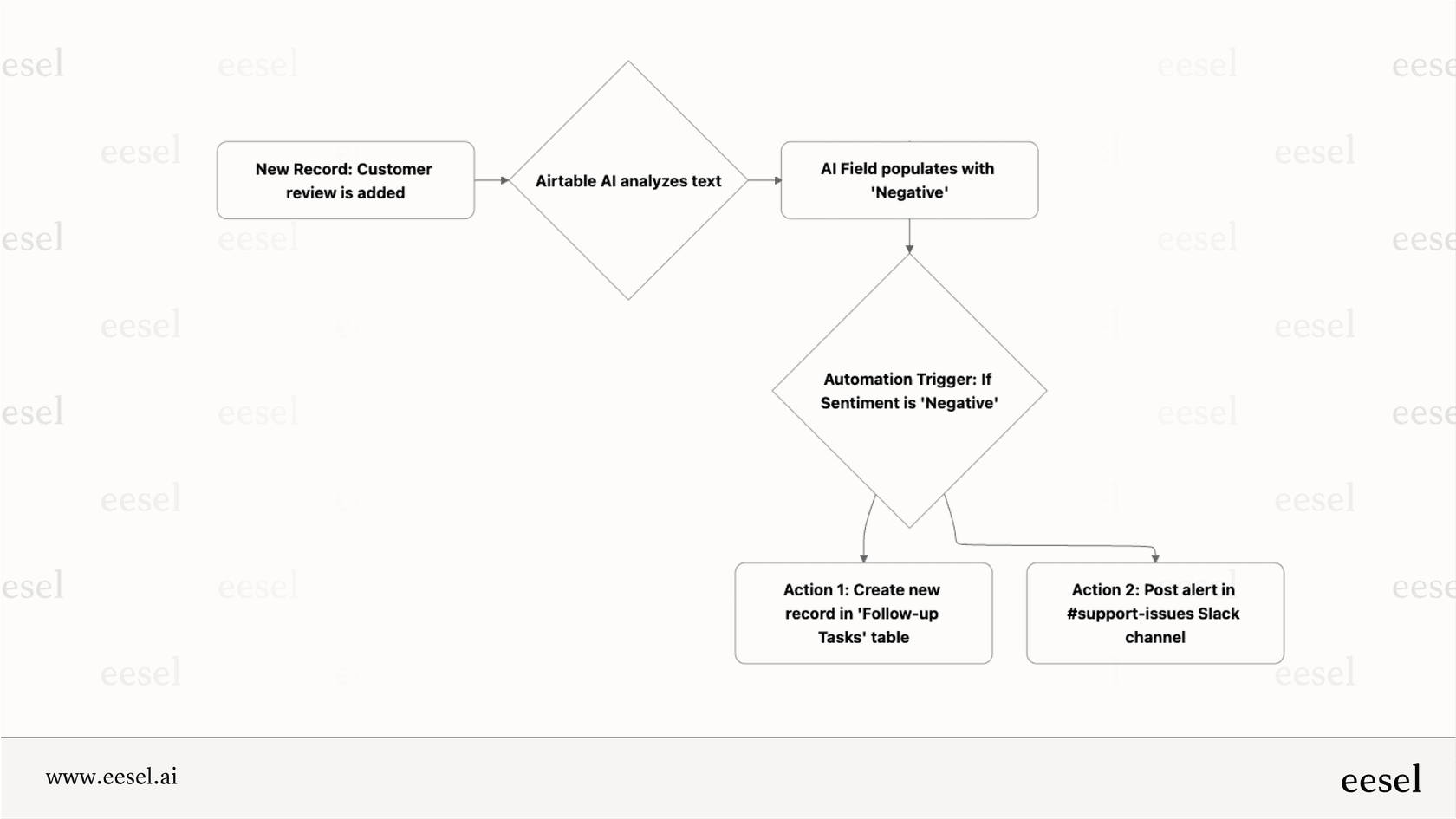
This smart labeling gets even better when you connect it to Airtable's built-in automation engine. The output of an AI Field can kick off a workflow. For instance, if the AI marks a review's sentiment as "Negative," you can set up an automation that automatically creates a task for a support manager to follow up or posts an alert in a Slack channel. This helps close the loop between finding an insight and acting on it.
Where the general automation in Airtable AI just isn't enough
While these automations are great for general tasks, they don't always cut it for more specialized teams. Customer support, for example, needs workflows that do a lot more than just simple labeling. Tagging a support ticket with a sentiment is only the first step. What needs to happen next?
This is where a tool built specifically for support teams really shows its worth. A solution like eesel AI provides a complete toolset for the entire ticket lifecycle. Its AI Triage can automatically send that "Negative" ticket to the right product expert. The AI Copilot can then draft a personalized, empathetic reply for the agent by learning from thousands of past tickets. And for common questions, the AI Agent can resolve the ticket on its own, freeing up your team to focus on trickier problems. That’s a level of specialized automation a general-purpose tool just can’t replicate.
Scaling your business with Airtable AI: Features and limitations
Airtable AI also has features meant to help growing businesses. But as companies get bigger, the "generalist vs. specialist" problem often becomes more obvious.
AI web research for enriching data
Airtable AI can search the web to add publicly available information to your records. For example, if you have a list of company names in a base, you can create AI Fields for "Industry," "Company Size," and "Headquarters Location." The AI will then go out, find that info online, and fill in the fields for you, saving your team from a lot of manual research.
No-code app generation with Cobuilder
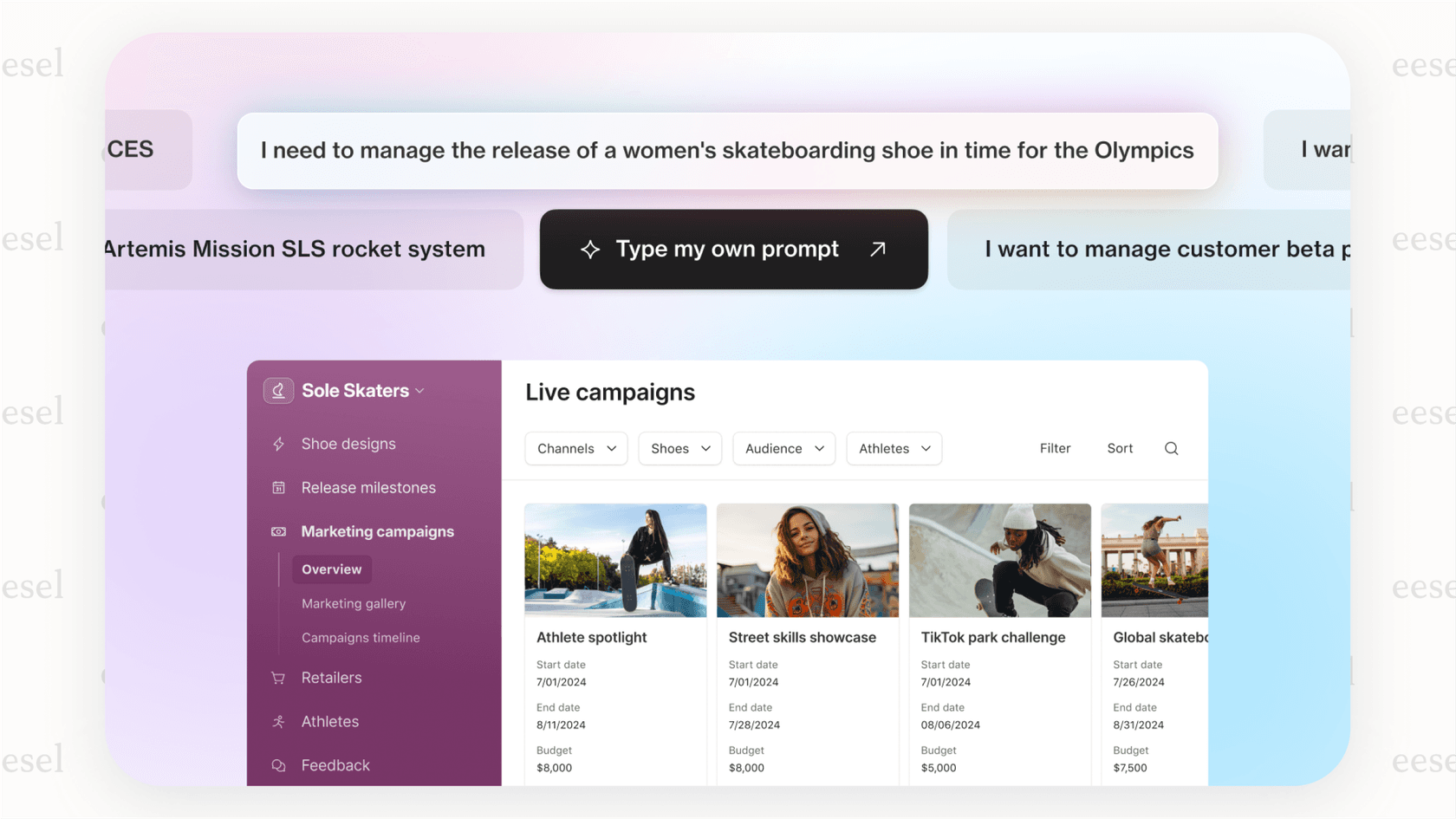
One of the newest and most interesting features is the Cobuilder. It lets you describe an application you want in plain English, and Airtable AI will generate the entire structure for you, including all the tables, fields, and connections. You could type, "Create an app to track our marketing campaign assets and their performance," and it will build a solid starting point for you to work from.
The scalability challenge: A jack of all trades
While these features are great for getting things off the ground, they highlight the main challenge of using a general tool for critical business functions. As a company grows, its needs get more specific. A marketing team might start with a simple app built by Cobuilder, but they'll soon need integrations with their analytics platforms and ad networks.
A growing support team can't run on a quickly built app. They need enterprise-level security, detailed permissions, human oversight for the AI, and most importantly, a way to simulate AI performance before it ever talks to a customer. This is where a dedicated platform is a better bet. eesel AI, for example, is designed just for customer-facing teams and offers features like sandboxed simulations on your past tickets. This lets you test the AI's accuracy and prove it's worth it before you automate a single customer interaction, giving you the confidence to scale.
Airtable AI pricing: Making sense of the credit system
Airtable AI's pricing isn't a simple flat fee, which can be a little confusing. It's based on a "credit" system, where different AI actions use up a certain number of credits. More complicated tasks, like summarizing a long document, use more credits than simple ones, like categorizing sentiment.
| Plan | Price (Billed Annually) | AI Credits / Month | Notes |
|---|---|---|---|
| Free | $0 | 0 | No access to AI features |
| Team | $20 per user/month | 15,000 credits per user | Best for small teams exploring AI features |
| Business | $45 per user/month | 50,000 credits per user | Designed for growing businesses with heavier AI usage |
| Enterprise | Custom pricing | Custom allocation | Tailored credits and limits; ideal for large-scale AI deployments |
According to Airtable's pricing page, paid plans come with a monthly allowance of AI credits. For example, the Team plan ($20 per user/month, billed annually) gives you 15,000 credits per month for each paid user. While this sounds like a lot, a common complaint from users is that the variable nature of credit use makes it hard to predict and budget for costs, especially as your usage grows. One month you might be fine, and the next you could burn through all your credits on a single big project.
This is different from a more predictable model. For example, platforms like eesel AI use a simple, interaction-based pricing system. One AI-powered reply or one automated action (like tagging a ticket) equals one interaction. This makes it easy to forecast your costs and scale your support automation without getting hit with unexpected bills.
| Feature | Airtable AI | eesel AI |
|---|---|---|
| Pricing Metric | AI Credits | AI Interactions |
| Predictability | Low (Varies by task complexity & data size) | High (1 reply/action = 1 interaction) |
| Best For | Teams with variable, project-based AI needs | Teams needing predictable, scalable costs (e.g., support) |
| Official Link | Airtable Pricing | eesel AI Pricing |
Is Airtable AI the right tool for your business?
So, what's the bottom line? Airtable AI is a fantastic and powerful tool for any team that is already deep in the Airtable ecosystem. It’s excellent for organizing internal projects, managing marketing operations, and automating lighter business processes where all the data is already in one place.
But its greatest strength, its tight integration with the Airtable platform, is also its biggest limitation. It’s a powerful generalist AI. For specialized, high-volume jobs like customer service, ITSM, or internal HR support, a dedicated AI platform that works with your existing tools is almost always going to be a more scalable, secure, and cost-effective choice in the long run.
Give your support and IT a real boost with eesel AI
If you’re looking to bring AI into your support and IT workflows, you need a tool that was built for that specific job. eesel AI is an intelligence layer that plugs directly into your existing help desk, chat tools, and knowledge sources. It doesn't make you move your data or get rid of the tools your team already knows and likes; it just makes them smarter.
With eesel AI, you can automate frontline support, give agents an AI copilot that drafts perfect replies in seconds, and keep your ticket queue tidy with smart, automated triage. It’s the specialized power you need to deliver great service as you grow.
Ready to see how a specialized AI can transform your support workflows without a painful migration? Book a demo of eesel AI today or give it a try for free.
Frequently asked questions

Share this article

Article by
Kenneth Pangan
Writer and marketer for over ten years, Kenneth Pangan splits his time between history, politics, and art with plenty of interruptions from his dogs demanding attention.