A practical guide to setting up automatic WhatsApp replies for Zendesk in 2026


Last edited January 12, 2026

Table of Contents
Does your team dread the Monday morning scramble to answer WhatsApp messages from the weekend? It’s a common challenge for growing brands. A great sales lead might come in late on Friday, and to maintain the best connection, you want to respond within Meta’s 24-hour reply window.
Replying promptly is key for keeping customers happy and closing sales that come through WhatsApp. To support your team and ensure no message goes unanswered, setting up a reliable automated system is a smart move.
This guide will walk you through the different ways to set up automatic WhatsApp replies for Zendesk. We'll cover everything from Zendesk's built-in features and professional custom builds to complementary AI tools, giving you a straightforward comparison so you can pick the right approach for your team in 2026.
What are automatic WhatsApp replies for Zendesk?
When we talk about automatic replies for WhatsApp in Zendesk, it’s about more than just a simple “we’re away” message. A good auto-reply is a helpful tool that sets expectations, gathers essential info, and keeps the conversation window open so a human agent can follow up effectively.
Think of it as your reliable first response for common situations, like:
- Letting a customer know you’ve received their message outside of business hours.
- Informing customers about current wait times during busy periods.
- Sending a quick acknowledgment to keep the 24-hour window active for more complex inquiries.
For any business using WhatsApp for support or sales, this is an essential part of maintaining high service quality and ensuring every revenue opportunity is captured.
Method 1: using Zendesk's built-in auto-responder
The most direct way to get started is with Zendesk’s own auto-responder for social messaging. This is a mature, out-of-the-box feature available right within your Zendesk account.
It's a simple toggle you can activate in the Admin Center. When a customer sends a WhatsApp message for the first time, it sends back a professional, pre-written response. Crucially, according to Zendesk's own documentation, this reply successfully resets the 24-hour clock. It’s an efficient fix and ensures customers receive an immediate acknowledgment.
This tool is designed for ease of use and immediate deployment. Because it is built directly into the platform, it is incredibly reliable.
While it is focused on providing a consistent first point of contact, Zendesk offers other advanced tools for those who need to differentiate between office hours or specific ticket types. For teams who want a straightforward, dependable solution that works "out-of-the-box," the native auto-responder is a great choice. It ensures that every customer gets a response at least once a day, which is a solid foundation for customer engagement.
Method 2: the professional way with triggers and webhooks
To extend the native tool's capabilities, many teams leverage the technical power of Zendesk's automation engine. This route offers high levels of flexibility and control for more specialized workflows.
Here's how this advanced setup usually works:
- Set up Zendesk triggers: You create a trigger that fires based on specific conditions, such as "Ticket is created" or "Channel is WhatsApp."
- Use webhooks: The trigger can then communicate with external services via webhooks, providing comprehensive ticket details.
- Utilize the Sunshine Conversations API: This robust API powers Zendesk's messaging features, allowing for highly customized responses.
- Integration layer: To bridge your logic with the Sunshine Conversations API, you can use a verified marketplace app or a custom script hosted on professional platforms like Cloudflare Workers or Zapier.
This approach is incredibly powerful for teams with specific technical requirements.
Ideal for technical teams This method allows developers to create bespoke experiences, utilizing Zendesk’s open and flexible architecture to meet unique business needs.
Professional-grade customization Custom integrations allow for deep logic. While they require periodic review to stay aligned with API updates from Zendesk or Meta, they provide a level of sophistication that enterprise teams often appreciate.
Investment in flexibility The cost reflects the power of the solution, potentially involving marketplace apps or developer resources. This investment ensures your Zendesk setup is perfectly tailored to your exact specifications.
Method 3: the modern way with a dedicated AI agent
There's a third option that provides the power of advanced customization while remaining accessible: using a specialized AI platform that acts as a complementary add-on to Zendesk. This approach allows support teams to enhance their Zendesk setup with additional intelligence.
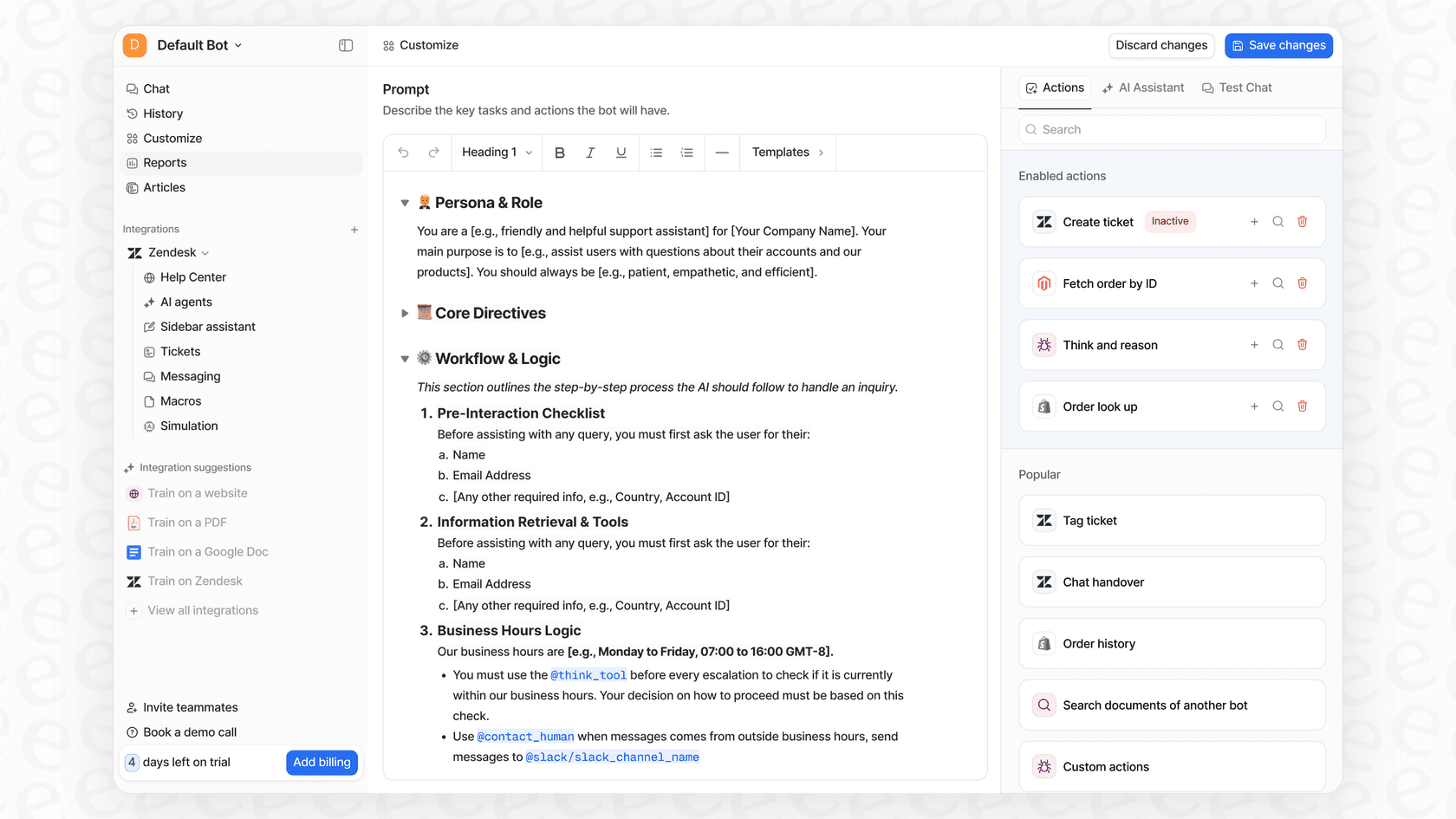
Platforms like eesel AI integrate seamlessly with your helpdesk, allowing you to build sophisticated automations that work alongside your existing processes.
Here’s how it complements your Zendesk experience:
- Fast deployment: You can connect your Zendesk account easily and begin refining your rules in a user-friendly editor. This allows teams to iterate quickly on their automation strategy.
- Enhanced control and customization: You can create specific, time-based rules to manage the weekend workload. For example:
- "If a WhatsApp ticket has been waiting for a reply for 22 hours, send a friendly status update and apply a specific tag."
- "If a WhatsApp message identifies a 'pricing' inquiry, provide a link to the pricing page and route the ticket to the appropriate team."
- Intelligent responses: Your automation can be further refined by training it on your Zendesk knowledge base articles, allowing it to provide helpful answers that support your human agents.
- Simulation tools: Before going live, you can test your logic against previous tickets, ensuring your new workflows align perfectly with your support standards.
Pricing comparison: Zendesk vs. AI solutions
Zendesk provides clear and structured pricing for its comprehensive suite of tools. The native auto-responder is a great value, as it is included in most Zendesk Suite plans.
| Plan | Price (Billed Annually) | Key AI/Messaging Features |
|---|---|---|
| Support Team | $19/agent/month | Core ticketing |
| Suite Team | $55/agent/month | Messaging, Help Center, Essential AI |
| Suite Professional | $115/agent/month | Advanced reporting, SLAs, 5 Help Centers |
| Suite Enterprise | $169/agent/month | Custom roles, Sandbox, 300 Help Centers |
For teams choosing Method 2 (Webhooks), the investment is based on the complexity of the custom build and any additional middle-layer services.
Complementary platforms like eesel AI offer predictable pricing that scales with your needs, designed to add value to your primary Zendesk investment.
| Plan | Price (Billed Annually) | AI Interactions/mo | Key Features |
|---|---|---|---|
| Team | $239/month | Up to 1,000 | Train on docs, Copilot, Slack integration |
| Business | $639/month | Up to 3,000 | Train on past tickets, Custom Actions, Simulation |
| Custom | Contact Sales | Unlimited | Advanced security, multi-agent orchestration |
Master your response times with automation
Managing WhatsApp’s 24-hour rule in Zendesk is a vital part of modern customer service. Zendesk's built-in tool provides a reliable and efficient foundation for every team. For those who need to push the boundaries of what's possible, custom API solutions and specialized AI extensions offer powerful ways to enhance the platform.
A dedicated AI agent like eesel AI acts as a great companion to Zendesk, offering customizable automation that’s easy to manage. The goal is to use Zendesk’s industry-leading capabilities to create a smarter, more helpful customer experience that builds long-term trust.
Ready to enhance your WhatsApp replies? Sign up for eesel AI and connect your Zendesk account to see how it works today.
Frequently asked questions


Share this article

Article by
Kenneth Pangan
Writer and marketer for over ten years, Kenneth Pangan splits his time between history, politics, and art with plenty of interruptions from his dogs demanding attention.