A strategic guide to ChatGPT chatbot integration for your business


Last edited October 21, 2025
It feels like everyone is talking about using ChatGPT for their business, and it makes sense. The idea of plugging its power straight into your website, help desk, or internal tools sounds amazing. But as more people try it, they're finding out that going from a neat idea to a reliable, secure, and genuinely helpful tool isn't quite so simple.
The whole process can get bogged down by technical headaches, costs that seem to pop out of nowhere, and the real fear of letting a half-finished AI talk to your customers. How are you supposed to build something that actually gets your business and helps your team without it turning into a massive, months-long project?
This guide will walk you through the different ways you can approach a ChatGPT chatbot integration. We'll look at what these bots can do beyond just answering simple questions and help you figure out the best path for your company.
What is a ChatGPT chatbot integration?
First off, let's clear something up. A "ChatGPT chatbot integration" doesn't mean slapping the public ChatGPT website onto your page. It’s about using the powerful language models that OpenAI builds, like GPT-4o, through their Application Programming Interface (API). Just think of the API as a secure line that lets your software talk to OpenAI's models.
You’ve really got two main ways to do this:
-
Direct API Integration: This is the build-it-yourself, developer-heavy route. Your team builds a custom solution from scratch, writing code for everything from the chat window to remembering conversation history.
-
Platform-Based Integration: This means using a tool that has already built the connection to OpenAI's API. These platforms give you a user-friendly setup and business-focused features so you can get started without needing to code.
No matter which way you go, the goal is the same: create a chatbot that’s trained on your company's knowledge and works within your specific systems, not just a generic bot that knows a lot about the internet.
How to set up your ChatGPT chatbot integration
The way you choose to build your chatbot is a big decision. It will shape the cost, the difficulty, and what your bot can ultimately do. Let's break down the options.
The DIY approach: Using the OpenAI API directly
Building a custom chatbot by calling the OpenAI API yourself gives you total control. You get to design every little detail and decide on all the logic. If you have a team of developers who are comfortable with AI and a really unique problem to solve, this might be for you.
For most businesses, though, the drawbacks start to pile up pretty fast. This approach takes a lot of developer time and a solid grasp of AI. You're responsible for building the user interface, managing conversations, connecting all your knowledge sources, and handling the deployment and hosting. It’s not a one-and-done job; it needs constant work to keep it running right.
The third-party platform approach
Using a pre-built software platform is a popular option that seems to make things simpler. These tools handle the technical connection to OpenAI, which can definitely make the initial setup faster than a full custom build.
But many of these platforms have their own frustrations. They can be really rigid, giving you very little say over the AI's personality, the actions it can perform, or which tickets it should even touch. Worse, many hide their product behind sales calls and mandatory demos, dragging out the whole process. You might even find yourself having to ditch the help desk you already know and use just to fit their system.
The hybrid powerhouse: Why a self-serve platform is the way to go
The best solution often combines the ease of a platform with the flexibility of a custom build. It's a hybrid approach that gives you control without all the complexity.
This is the whole reason we built eesel AI. While some competitors make you book a demo just to see what their product looks like, you can sign up and build a working bot with eesel AI in a few minutes, all on your own. No long sales calls needed.
It’s made to fit right into the tools you already use. With one-click integrations for help desks like Zendesk and Freshdesk, you don't have to change how you work or move your data. You get fine-grained control to decide exactly which tickets the AI handles and can easily tweak its persona and the actions it can take. It’s the best of both worlds, really.
What a good ChatGPT chatbot integration can do (it's more than just Q&A)
A basic chatbot can answer simple questions, but a smart AI agent can actually change how your support team works. It's about moving from just finding answers to actively solving customer problems.
Unify your company knowledge
The biggest weakness of a standard ChatGPT chatbot integration is that the model starts as a blank slate; it knows nothing about your business. The default fix is usually a clunky process of uploading documents one by one, which is slow and a pain to keep up-to-date.
A much better way is to instantly connect all of your existing knowledge. With a platform like eesel AI, you can:
-
Train on past tickets: Your AI can automatically learn your brand's voice, common customer issues, and what good solutions look like by analyzing your past support conversations.
-
Connect all your sources: You can link your entire knowledge ecosystem, pulling information from your Confluence wiki, shared Google Docs, Notion pages, and more.

Enable custom actions and workflows
A truly helpful chatbot doesn't just talk; it does things. Imagine a bot that can do more than just send a link to an article. It could:
-
Look up an order status in real-time from your Shopify store.
-
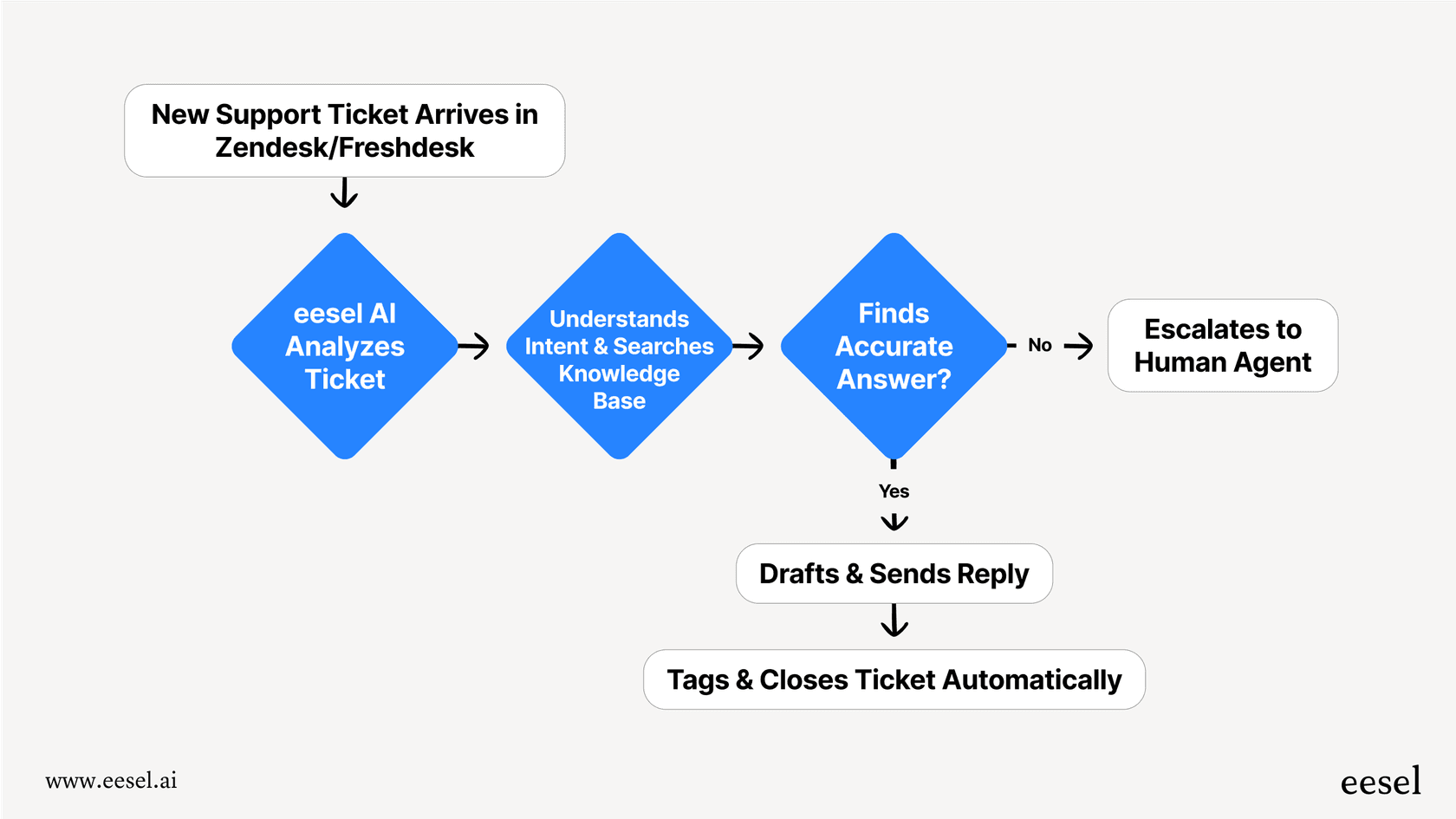
Triage a new support ticket by adding the right tags and assigning it to the right person.
-
Smoothly hand off a conversation to a human agent, passing along all the context so the customer doesn’t have to repeat everything.
Building this kind of functionality yourself is incredibly difficult, and it's often impossible with those rigid third-party tools. This is where a customizable workflow engine, which is a core part of eesel AI, really makes a difference.
Test and deploy with confidence
One of the biggest worries for any business is the AI saying the wrong thing to a customer. It's a fair concern, and it's why having a safe place to test is an absolute must.
This is another spot where eesel AI shines. Its simulation mode lets you safely test your entire AI setup on thousands of your own past tickets. You can see exactly how the bot would have replied without any risk. This gives you a good idea of its resolution rate and lets you tweak its behavior before it ever talks to a live customer.

The cost of a ChatGPT chatbot integration (and other gotchas)
Once you've settled on an approach, you need to think about the long-term, practical side of things, especially the price tag.
OpenAI API pricing: Powerful but unpredictable
OpenAI uses a pay-as-you-go model for its API based on "tokens." A token is basically a piece of a word, and you pay for both the tokens you send to the model (input) and the ones it sends back (output). For example, their latest GPT-4o model costs $5.00 per million input tokens and $15.00 per million output tokens.
While that sounds flexible, it makes budgeting a nightmare. Your support costs can swing wildly from month to month. During your busiest times, when your chatbot is successfully helping more customers, your bill will shoot up. You essentially get penalized for doing well.
A better way: Transparent and predictable pricing
The solution to this uncertainty is a pricing model that you can actually understand and predict. This is why eesel AI handles things differently.
We have no per-resolution fees. Our plans are based on a set monthly volume of AI interactions, so you’ll never get a surprise bill after a busy month. The price is the price.

| Plan | Monthly (bill monthly) | Effective /mo Annual | Bots | AI Interactions/mo | Key Unlocks |
|---|---|---|---|---|---|
| Team | $299 | $239 | Up to 3 | Up to 1,000 | Train on website/docs; Copilot for help desk; Slack; reports. |
| Business | $799 | $639 | Unlimited | Up to 3,000 | Everything in Team + train on past tickets; MS Teams; AI Actions (triage/API calls); bulk simulation; EU data residency. |
| Custom | Contact Sales | Custom | Unlimited | Unlimited | Advanced actions; multi‑agent orchestration; custom integrations; custom data retention; advanced security / controls. |
On top of that, you get the flexibility of a month-to-month plan you can cancel anytime. Many other platforms lock you into annual contracts from the get-go, but we think you should have the freedom to stick with what works for you.
Choosing the right ChatGPT chatbot integration partner
A successful ChatGPT chatbot integration is about more than just getting API access. It's about finding a platform that gives you total control over automation, connects deeply with your knowledge sources, provides a safe way to test, and has a pricing model that won't punish you for growing.
The DIY route is too slow and expensive for most companies, while many third-party tools are too rigid and honestly, just a pain to work with. The best solution lets you go live in minutes, not months, while giving you all the power you need to create an AI support agent that actually helps.
Ready to build a powerful AI chatbot without the usual headaches? Start your free eesel AI trial and see how quickly you can automate and improve your customer support.
Frequently asked questions

Share this article

Article by
Stevia Putri
Stevia Putri is a marketing generalist at eesel AI, where she helps turn powerful AI tools into stories that resonate. She’s driven by curiosity, clarity, and the human side of technology.