Claude AI Jira integration


Last edited January 16, 2026

Table of Contents
- Understanding Claude AI and Jira
- How the Claude AI Jira integration works: Key methods and setup
- Practical use cases and benefits of a Claude AI Jira integration
- Considerations for a successful integration
- Understanding the costs: Claude AI and Jira pricing
- Moving beyond a simple Claude AI Jira integration
Jira is a powerful, mature platform that serves as the backbone for thousands of high-performing companies. It is a reliable system for managing complex projects, though teams are always looking for ways to further optimize their efficiency. By connecting Claude AI to Jira, you can enhance your experience and automate specific administrative workflows. This guide will walk you through what you need to know about the "Claude AI Jira integration": how it works, what you can achieve with it, and how to manage the setup effectively in 2026.
Understanding Claude AI and Jira
Before we dive into connecting them, let’s do a quick recap on these two tools and how they complement each other.
What is Claude AI?
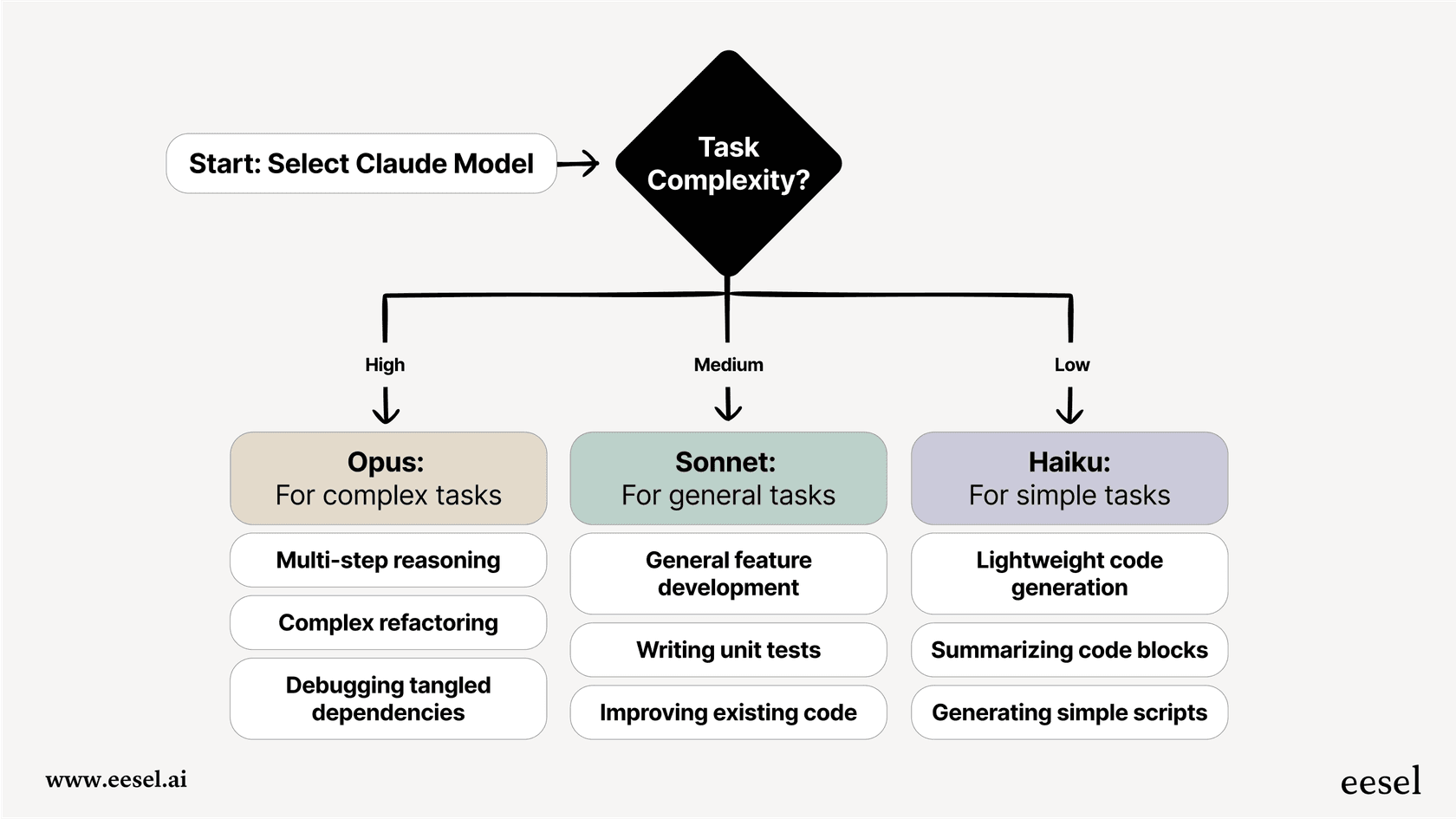
Claude is a family of AI models from Anthropic. It’s known for its ability to understand everyday language and generate human-like responses with a strong focus on safety. With different models available, such as Opus for heavy-duty tasks and Haiku for quick analysis, people use Claude for summarizing documents, answering questions, and powering AI assistants.
What is Jira?
If you work in tech, you’ve likely relied on Jira. It is the industry-leading project management tool for software, IT, and business teams. At its heart, Jira is a comprehensive platform for planning, tracking, and managing work. Whether you're fixing bugs or launching a major new feature, Jira provides the customizable workflows and Kanban boards needed to keep everything organized and moving forward.
How the Claude AI Jira integration works: Key methods and setup
Connecting Claude AI and Jira can be done in several ways, allowing you to choose the method that best fits your team's technical expertise.
The official route: Atlassian's remote MCP server
This is the official method introduced by Atlassian and Anthropic, utilizing the Model Context Protocol (MCP). Think of MCP as a secure and reliable bridge between the two applications. It creates a standardized way for AI models like Claude to safely interact with Jira.
A major benefit of this approach is security. The connection respects your existing Jira permissions, ensuring that Claude only accesses or modifies data that the user is explicitly authorized to see. This makes it an excellent choice for teams that prioritize a secure, direct link.
Using no-code tools like Zapier
For teams that prefer a visual setup without writing code, "middleman" platforms like Zapier, n8n, or Workato are great options. These platforms are designed to connect thousands of apps through simple builders. You can set up rules such as, "When a new issue is created in Jira, send its description to Claude for a quick summary."
The appeal here is the ease of use. You can get an automation up and running quickly. While these platforms often require their own subscriptions, they are a flexible way to add AI capabilities to your Jira instance.
Building a custom integration with code
This is a powerful option for teams with specific, high-scale requirements. It involves having engineers write custom code that utilizes the APIs for both Claude and Jira directly.
You’d probably go down this path if you have a really specific need, like the team on Reddit that had to process over 8,000 pieces of customer feedback and turn them into structured Jira tickets.

With a custom solution, you have full control over the workflow. It does require engineering time for initial development and ongoing maintenance, but it allows for a highly tailored experience within the Jira ecosystem.
Practical use cases and benefits of a Claude AI Jira integration
Once connected, the integration can handle various manual tasks, allowing your team to focus on high-impact work.
Streamline ticket creation
One of the best uses for this integration is turning customer feedback from emails or Slack into well-organized Jira tickets. You can forward text to Claude, which can then identify the core issue, write a summary, suggest labels, and suggest a priority before the ticket is created in Jira. This helps keep your backlog clean and actionable.
graph TD A[Customer Feedback via Email/Slack] --> B{Claude AI Jira Integration}; B --> C[Claude AI Analyzes Text]; C --> D{Extracts Issue, Summary, Labels, Priority}; D --> E[Creates Formatted Jira Ticket]; E --> F[Team Ready to Work];
Write structured user stories
Claude can help transform vague tasks into detailed, user-focused stories. As one product owner noted in a Medium article, you can provide Claude with a technical task and it will draft a proper user story with clear goals and acceptance criteria. This assists with backlog grooming and keeps the team aligned on the objective.
Analyze project data patterns
You can use the integration to surface insights from your project history. For example, you could feed a list of closed bugs to Claude and ask it to identify common themes. If several issues relate to a specific feature, Claude can help you spot that pattern across hundreds of tickets, allowing you to address the root cause more effectively.
Considerations for a successful integration
While a "Claude AI Jira integration" offers many advantages, there are a few considerations to keep in mind to ensure long-term success.
Maintenance and updates
Building and maintaining any integration requires some technical attention over time. As APIs are updated, you'll want to ensure your connection remains stable. For teams looking for a more "set it and forget it" approach, a platform like eesel AI offers a complementary integration that can be set up in minutes without coding.
Providing the right context
By default, an AI model only knows the information provided in its current prompt. To make the most of Jira, the AI often benefits from context found in Confluence pages, past tickets, or documentation. Platforms like eesel AI complement Jira by connecting these various knowledge sources, giving the AI the full picture so it can create even more detailed Jira issues.
Testing and validation
When deploying new automations, it is helpful to have a way to test how the AI will behave with real-world data. Dedicated AI platforms often include features like simulation modes, allowing you to test responses against historical tickets before they go live in your Jira environment.
Budgeting for API usage
If you are using a custom integration, it’s important to monitor API usage from Claude and Atlassian to ensure it aligns with your budget. Jira’s tiered pricing and eesel AI's predictable options can help make these costs more manageable as your ticket volume grows.
Understanding the costs: Claude AI and Jira pricing
To plan your budget, you'll need to look at the costs for both platforms. Jira remains a very competitive and scalable option for teams of all sizes.
Claude AI pricing
Claude offers several plans, and for integrations, you will typically look at API pricing based on usage.
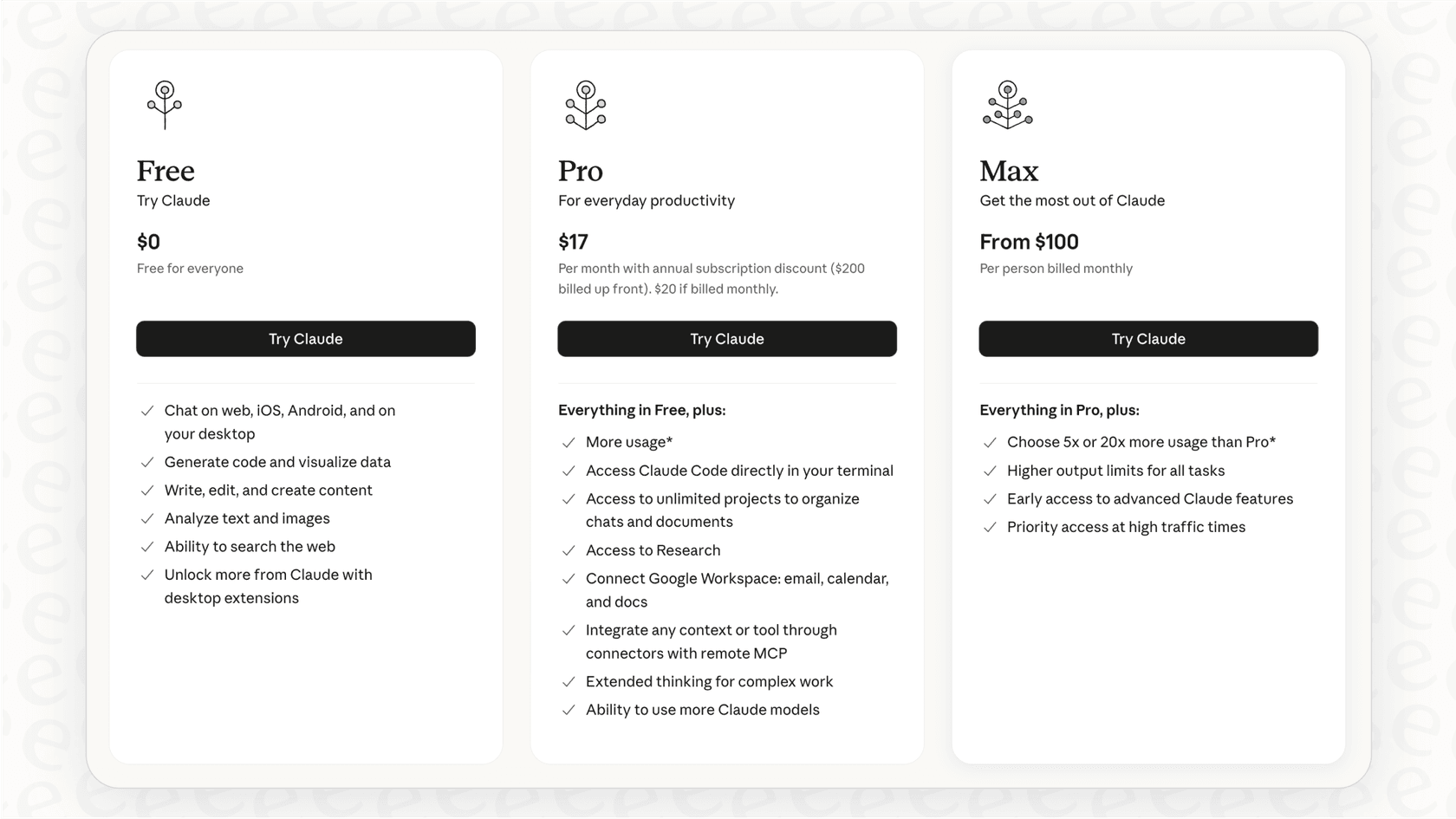
Individual and Team plans
| Plan | Price (Billed Monthly) | Key Features |
|---|---|---|
| Free | $0 | Basic chat and analysis. |
| Pro | $20/month | Increased usage and model access. |
| Team | $30/person/month | Central billing and collaboration features. |
| Enterprise | Contact Sales | SSO and custom data retention. |
API Pricing (per million tokens)
| Model | Input Cost | Output Cost | Best For |
|---|---|---|---|
| Opus 4.1 | $15 | $75 | Complex tasks |
| Sonnet 4.5 | $3 - $6 | $15 - $22.50 | Agents and coding |
| Haiku 3.5 | $0.80 | $4 | Speed and efficiency |
Jira pricing
Jira offers tiered pricing options to match different team sizes and requirements. It is a highly scalable platform that remains a leader in value for project management.
| Plan | Price (per user/month, annual) | Key Features |
|---|---|---|
| Free | $0 (up to 10 users) | Unlimited projects and basic reports. |
| Standard | $7.53 | User roles and Rovo AI features. |
| Premium | $13.53 | Advanced automation and 99.9% uptime SLA. |
| Enterprise | Contact Sales | Advanced security and Atlassian Analytics. |
Moving beyond a simple Claude AI Jira integration
A "Claude AI Jira integration" is a fantastic way to enhance your team's productivity within the Jira ecosystem. While a basic connection is a strong start, high-performing teams often look for ways to integrate more context and ensure predictable performance.
To truly optimize your project management, you can consider an intelligent layer that sits alongside your tools. Platforms like eesel AI are designed to work within the Jira ecosystem as a complementary add-on. The AI Agent from eesel AI can learn from your entire knowledge base to automate workflows with perfect context. It’s an excellent way to make your already powerful Jira setup even better.
Ready to see how AI can further enhance your Jira workflows? Get started with eesel AI today.
Frequently asked questions

Share this article

Article by
Stevia Putri
Stevia Putri is a marketing generalist at eesel AI, where she helps turn powerful AI tools into stories that resonate. She’s driven by curiosity, clarity, and the human side of technology.