A developer's Claude Code overview: The good, The bad, & The productive


Last edited October 15, 2025

You can't scroll through a dev forum these days without tripping over a post about agentic coding tools and CLI-based development assistants. Anthropic's Claude Code seems to be the one on everyone's lips. People are talking about it like it's some kind of magic, letting them offload the grunt work of coding to focus on the fun stuff. And honestly, some of the results look pretty amazing.
But then you hear the other side of the story. For every dev who’s shipping features at light speed, there’s another one quietly cleaning up a mess after someone "vibe coded" their way into a massive security hole. So, let's get real. This Claude Code overview is for the working developer. We’ll look at what it does well, and more importantly, where it can trip you up with hidden costs and risks you need to know about before you even think of using it on a real project.
What is Claude Code?
So, what exactly is Claude Code? It's an AI coding assistant from Anthropic that lives right in your terminal. You can also use it with VS Code integration for a more visual experience. The best way to think about it isn't as a chatbot that just spits out code snippets, but more like a junior dev you can collaborate with. You tell it what to do in plain English, and it actually goes and does it, changing your codebase directly.
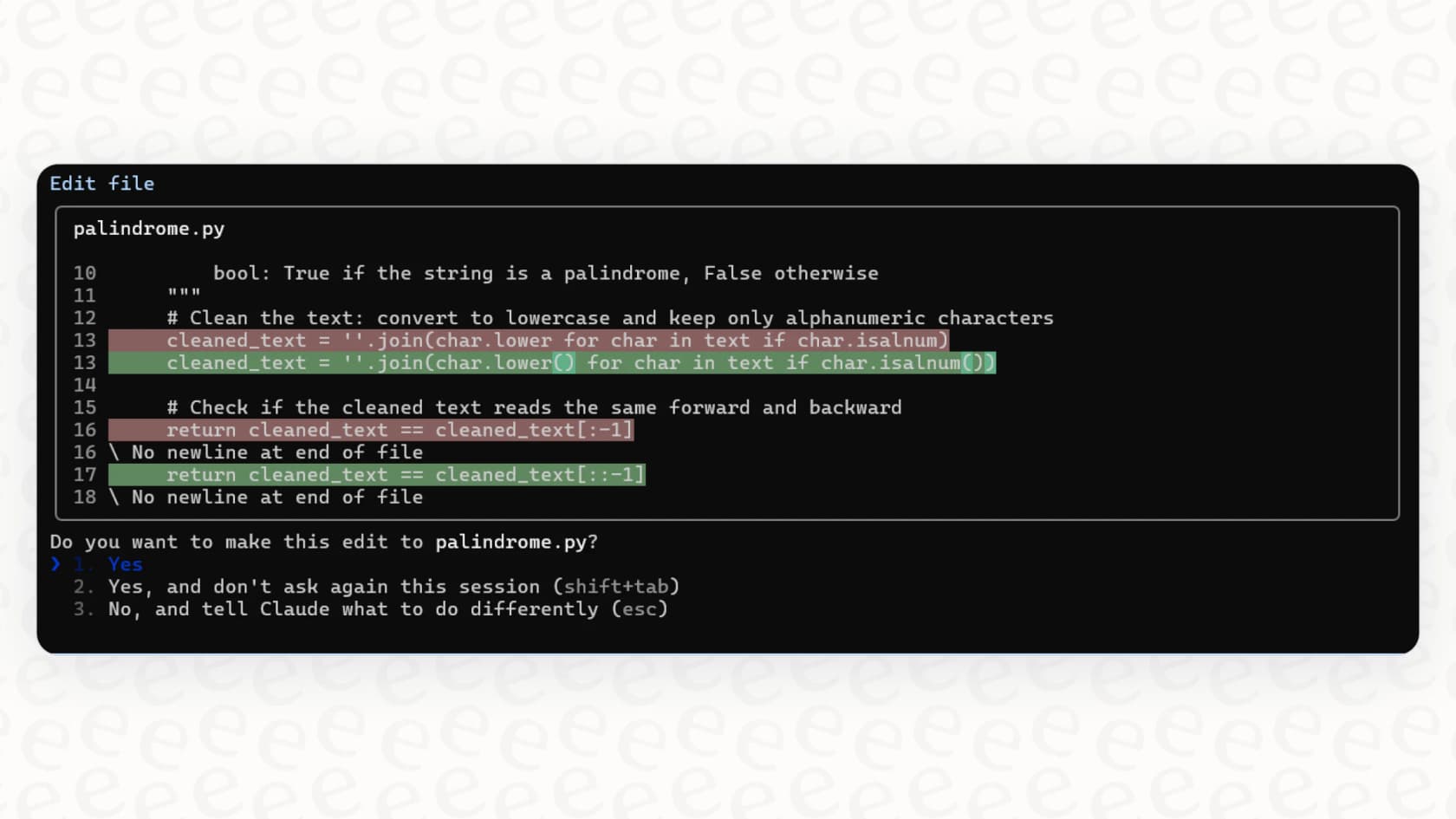
It’s built to get its hands dirty with real development work. This means it can:
-
Build out new features from a simple prompt.
-
Hunt down bugs and patch them up.
-
Figure out a complex codebase to answer your questions.
-
Handle boring tasks like fixing lint errors and writing up release notes.
-
Automate repetitive development tasks with minimal supervision.
It’s not just suggesting code; it's editing files, running commands, and making git commits. It's a genuinely active partner, but that level of access is exactly why you need to be careful.
Key features and common workflows in action
If you want to get anything useful out of Claude Code, you have to treat it like you're pair-programming with a junior dev. It's got potential, but it needs clear instructions. Here are a few ways experienced devs are actually using it to get work done faster.
Building and refactoring with a plan
One of the smartest ways to use Claude Code for anything complicated is the "explore, plan, code, commit" workflow. Instead of just barking "build this feature," you walk it through the process. First, you tell it to read the files it needs and get a feel for the existing patterns. Then, and this is the important part, you have it write out a detailed plan before it touches a single line of code.
This simple step stops the AI from jumping to a conclusion and building something that’s completely wrong. I’ve seen people use this method to rewrite an Objective-C screen into modern SwiftUI. They just gave it a screenshot of the new design and told it to make a plan first.
Test-driven development on steroids
Claude Code can be a huge help if you're a fan of test-driven development (TDD). Since TDD gives the AI a crystal-clear goal (make the tests pass), it has something concrete to work towards. The process is pretty simple but effective:
-
Ask Claude to write the unit or integration tests based on your specs.
-
Tell it to run the tests and check that they fail, just like they should.
-
Then, instruct it to write the code to make those tests pass, letting it try again and again until everything is green.
Following this pattern helps ensure the code it produces actually works and is less likely to have those sneaky bugs that AI can sometimes introduce.
Quick prototypes and visual feedback
Have an idea you want to try out without sinking a bunch of time into it? Claude Code is great for spinning up quick sample projects or UI components. It can turn tasks that felt too tedious to even start into something you can knock out in a few minutes.
It’s especially good when you can give it a visual target. You can literally drop a screenshot of a design mock-up into the terminal and tell Claude to build it. You can even ask it to take a screenshot of its own work so you can see how close it's getting, and then have it iterate until it matches your design. This visual back-and-forth helps it produce much cleaner results.
The hidden costs and limitations of Claude Code
While Claude Code looks impressive in demos, it brings some serious baggage that you don't notice at first. It’s more like a specialized, high-maintenance tool for experts, not something you can just hand out to your whole team.
The "vibe coding" dilemma and security risks
The horror stories are all over Reddit. People talk about "vibe coding," where junior devs or non-coders use Claude to generate something that looks and feels right but is a security nightmare or impossible to maintain. One developer told a story about finding an AI-generated API that casually returned all user data, including hashed passwords, from a single request. Sure, the code "worked," but it was a ticking time bomb.
Found an AI-generated API that casually returned all user data, including hashed passwords, from a single request. Sure, the code 'worked,' but it was a ticking time bomb.

It's way too easy to get yourself into a deep hole of technical debt if you don't know what you're doing. The time you save up front gets completely wiped out when a senior dev has to spend the next two weeks fixing the mess and rebuilding the feature from scratch.
The steep setup and learning curve
Getting good, consistent results from Claude Code isn't a walk in the park. You have to put in real time setting it up and learning its quirks. This means creating and constantly tweaking "CLAUDE.md" files for your projects. These files are like little cheat sheets that teach the AI about your coding standards, common commands, and overall architecture.
On top of that, you need to learn specific workflows to really make it sing, like using "git worktrees" to let it handle multiple tasks at once, knowing to use prompt keywords like "ultrathink" to give it more time to figure things out, or configuring your settings.json properly. This isn't a tool you just roll out to everyone and expect good things to happen. It requires a genuine investment in training and setup.
A bad fit for support teams who need control
This all sounds fine for a dev team with the time to babysit an AI, but it’s a non-starter for customer support or IT. Those teams need tools that are safe, predictable, and don't require a developer to be on call just to make sure the AI doesn't burn the house down. You can’t exactly have an AI that might accidentally write buggy code anywhere near your customer data.
This is where tools built specifically for support come into play. Something like eesel AI, for example, is built to be the exact opposite of that high-risk model. It's designed so anyone can set it up. You just connect it to your helpdesk, whether that’s Zendesk or Freshdesk, and it's ready to go in minutes. There are no complicated config files to wrestle with. You get a straightforward dashboard where you can define exactly what the AI knows and what it's allowed to do. This gives you complete control, so there’s no chance of it going rogue and causing a mess for your support agents.
Claude Code pricing explained
Claude Code isn't something you buy on its own. It's part of Anthropic's paid subscriptions, and the pricing isn't as straightforward as it looks.
Here’s the breakdown of the plans that include Claude Code, according to their official pricing page:
| Plan | Price (Billed Monthly) | Key Details |
|---|---|---|
| Pro | $20 / month | You get Claude Code, but the usage limits are pretty low. It's easy to hit them fast during a normal workday. |
| Max | Starts at $100 / month | Gives you 5 to 20 times more usage than the Pro plan, but devs still say they hit the cap on bigger tasks. |
But the real cost isn't the subscription fee. It's the developer time spent writing prompts, waiting for the AI to finish, and then reviewing and fixing what it spits out. If a 25-minute AI-assisted refactor is something you could have done yourself in five minutes, you're not actually saving time.
For a business, this kind of unpredictable cost can be a headache. In contrast, a tool like eesel AI has transparent pricing that’s based on a set number of AI interactions you can plan for. There are no per-resolution fees, so you won't get a surprise bill at the end of a busy month. It’s a much more predictable way to scale up your support automation.
A powerful tool for experts, a risky bet for everyone else
Look, there's no doubt Claude Code is powerful and shows us a piece of what software development might look like in the future. If you're an experienced developer who gets its weak spots and is ready to put in the time to learn it, it can be a massive help.
But for most teams, and especially for anyone outside of a core engineering role, it's a risky bet. The steep learning curve, unpredictable costs, and the very real possibility of it creating bad code are just too high. It's a specialized tool for building things, not for running a reliable customer support operation.
If you're looking for AI that can help your support or IT teams without all the risk and hassle, you need a different kind of tool. eesel AI is built for exactly that. You can get it live in minutes, not months. You can even test it safely on thousands of your past tickets using its simulation mode to see how it will perform. That way, you can roll it out feeling confident that you're in complete control.
Explore more Claude Code resources: Claude AI coding software, Claude Code for desktop, Claude Code plugin, MCP integration with Claude Code, and Amazon Bedrock with Claude Code.
Frequently asked questions

Share this article

Article by
Kenneth Pangan
Writer and marketer for over ten years, Kenneth Pangan splits his time between history, politics, and art with plenty of interruptions from his dogs demanding attention.