An in-depth look at Combinely pricing and features for 2025


Last edited November 14, 2025

It feels like specialized AI tools are popping up for just about every industry these days, and accounting is definitely one of them. The whole idea is pretty tempting: an AI that takes care of the tedious, repetitive stuff so experts can focus on the work that actually matters. One of the newer names in this space is Combinely, a Y Combinator-backed startup building what they call an "AI co-worker" for accountants.
But when a new tool promises to automate key parts of your business, you need to look past the hype. What can it really do, how does it work, and maybe most importantly, what's it going to cost? We're going to break down Combinely's features and everything we know about its pricing to help you figure out if it makes sense for your firm.
What is Combinely?
Combinely is an AI platform that acts like a digital assistant or "co-worker" for accounting firms. It was founded in 2025 by folks who've worked at places like Deloitte and Google, so they've built it with a good understanding of what accountants are up against.
The main goal is to take over the time-consuming tasks that can really bog down an accounting team. Think about all the time spent answering the same client questions over and over, chasing people for missing documents, or drafting the first version of a standard report. The whole idea is simple: let the AI handle that administrative work so accountants can spend their time on higher-value stuff like giving strategic advice, building client relationships, and tackling complex problems.
By taking on these tasks, Combinely hopes to help accounting firms of all sizes grow and bring on more clients without having to hire more people at the same rate. It’s a glimpse into a future where technology helps experts do more, not replace them.
Breaking down what Combinely actually does
Combinely’s features are all about automating the communication and production workflows that are central to an accounting practice. Let’s get into the specifics of what it offers.
Automated client communication
Apparently, accountants can spend up to 40% of their day just wrangling their inbox, according to Y Combinator's profile on Combinely. That’s a massive time sink. Combinely tries to fix this by connecting with tools like Outlook to manage the constant stream of client questions. It reviews your firm’s past emails to learn how to draft accurate replies to common questions. It can also send out reminders for missing documents, which cuts down on all that manual follow-up.
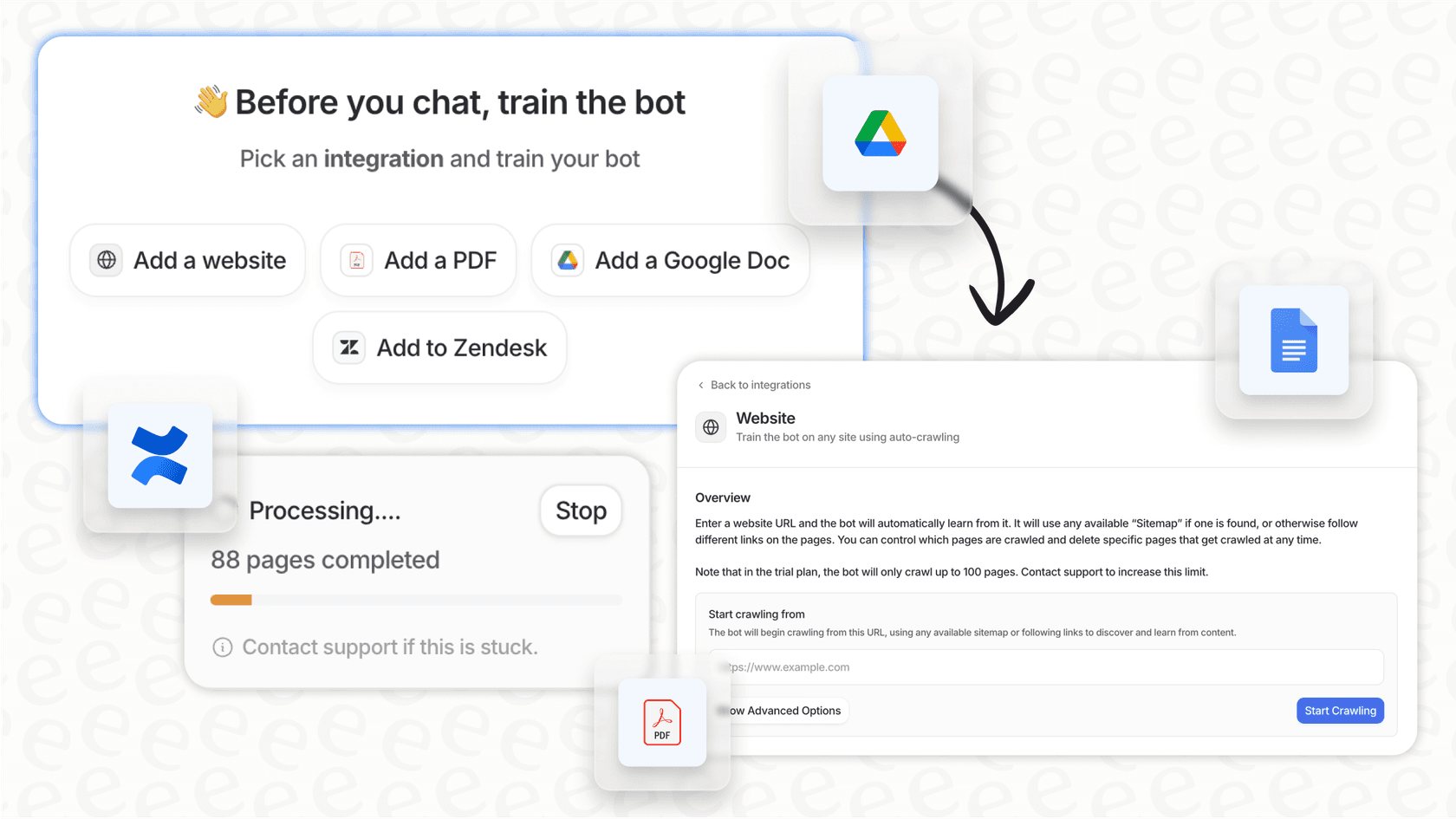
Automating email is a great start, but let's be honest, business communication is scattered all over the place now. You've got help desks, Slack, Microsoft Teams, and more. That’s where a tool that connects to everything can really make a difference. For instance, platforms like eesel AI don't just plug into your email; they connect to your help desk and chat tools, too. This lets you bring all your company knowledge together in one place, not just what's sitting in one department's inbox.
Deliverable and workflow automation
Combinely isn't just about answering emails; it’s also built to help with the actual work. It can help create and review "first-pass deliverables," which basically means it drafts a report or document for an accountant to look over. This is part of the "AI co-worker" idea, it’s supposed to handle tasks on its own, not just sit around waiting for a command.
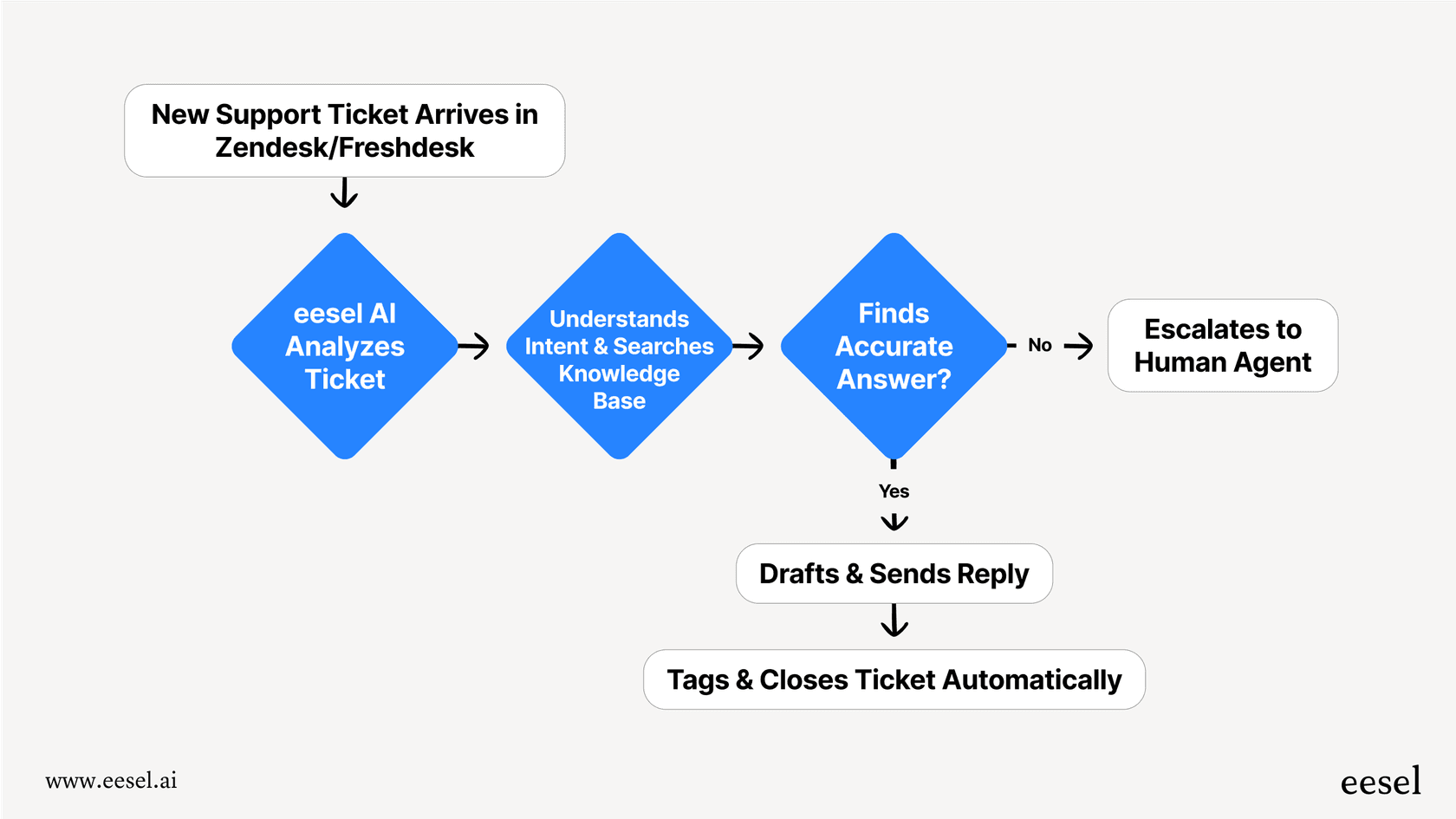
But drafting a document is one thing; automating an entire workflow is another. To do that, you need to be able to set up custom actions that match how your team actually works. This is where more flexible tools have an edge. For example, eesel AI's AI Agent has a visual editor that lets you build out a complete workflow. You could tell your AI to do things like look up order information using an API, send a ticket to a specific person, or add tags for better organization. That level of control lets you automate a whole process from start to finish, which goes way beyond just generating a document.
Contextual learning and client profiles
One of Combinely's more interesting features is how it builds a live profile for each client. It analyzes past work and conversations to learn a client's history, specific needs, and maybe even their little quirks. The goal is for the AI to give more personalized and relevant answers over time, making it feel more like a human assistant.
That sounds pretty smart, but its usefulness really depends on the data it can see. If it's only learning from your email threads, it's missing a huge chunk of the story. You get much better context when an AI can learn from all of your company's information. eesel AI, for example, connects to a much wider range of sources. It can pull information from your internal wikis in Confluence or Notion, shared files in Google Docs, and your entire ticket history from platforms like Zendesk or Freshdesk. This gives the AI a single, complete source of truth to work from, so it always has the full picture.
Understanding Combinely pricing
Now for the big question: what does all this cost? As of late 2025, Combinely doesn't list its pricing publicly on its website. Your only options are to "Get access" or "Book a call," which means you're heading into a sales process to get any numbers.
This "book a call" approach usually means a few things for you as a potential customer:
-
No trying it on your own: You can't just sign up for a free trial and play around with the product to see if you like it. This can really slow down your evaluation since you have to wait for a demo and talk to a salesperson.
-
No price transparency: Without any pricing info upfront, it's hard to compare Combinely to other tools or figure out if it fits your budget. You’re basically in the dark until you've spent time on a sales call.
-
Costs might vary: Pricing is probably customized based on things like the size of your firm or how much you use the tool. This can be good sometimes, but it can also make your expenses unpredictable and hard to plan for.
It's a completely different experience with platforms that put their pricing right on the website. A clear pricing page lets you make decisions quickly and confidently. For example, eesel AI's pricing is upfront and easy to understand. The plans are based on different feature levels and a set number of AI interactions per month, with no surprise fees. This way, your costs are predictable and won't suddenly jump up as you use the tool more.
Here’s what a transparent pricing model looks like:
| Plan | Effective /mo (Annual) | AI Interactions/mo | Key Features |
|---|---|---|---|
| Team | $239 | Up to 1,000 | Train on docs, AI Copilot for help desk, Slack integration |
| Business | $639 | Up to 3,000 | Train on past tickets, MS Teams, AI Actions, Simulation |
| Custom | Contact Sales | Unlimited | Advanced actions, custom integrations, multi-agent setup |
With this kind of clarity, you know exactly what you're getting and how much you'll pay, which makes budgeting a whole lot easier.
Important considerations about Combinely
While a specialized tool like Combinely can be really useful, it’s worth thinking about the potential downsides before you jump in. A tool that solves one specific problem perfectly might cause other issues later on.
A narrow focus
Combinely is built for accountants. That's great if you're an accountant, but it won't do much for your customer support, IT, or HR departments. The potential problem is that as your company grows, other departments will want their own AI tools. Before you know it, you're paying for and trying to manage a bunch of separate, single-purpose tools that don’t talk to each other. It can get messy and expensive fast.
This is where a more general, "horizontal" platform can be a better long-term bet. eesel AI, for instance, is designed to be a single AI solution for your whole business. You can use it to automate customer service, run your IT service desk, or answer internal questions for employees in Slack or Teams. Instead of buying and managing multiple tools, you get one platform that learns from all your company knowledge and helps out every team.
The sales-led onboarding process
The "book a call" model isn't just a pain for figuring out pricing; it can be a real barrier to just getting started. These days, teams need to be able to move fast, try things out, and see what works. Getting stuck in a long sales cycle just to test a product can really slow things down.
Being able to sign up, connect your tools, and see value in minutes is a huge plus. That self-serve approach makes all the difference. eesel AI is built to help you "go live in minutes, not months." You can create an account, connect your knowledge sources with a few clicks, and start building your AI agent all on your own.
Even better, you can do it without any risk. eesel AI has a simulation mode that lets you test your AI on thousands of your past tickets or conversations in a safe environment. You can see exactly how it would have replied, get real forecasts on how many issues it can solve, and tweak its behavior before you ever turn it on for your customers or employees. That ability to test confidently and roll out at your own pace is something a sales-led model just can't offer.

Is Combinely the right AI for your firm?
So, what's the bottom line? Combinely looks like a solid tool that gets what accountants need. The ability to automate client emails and help draft documents could definitely free up a lot of time.
But the hidden pricing, "book a call" setup, and its focus only on accounting might be dealbreakers for firms that want something more flexible and straightforward. The best tech today is usually transparent, fast, and plays well with others, and a closed-off model can feel out of step.
For teams that want to get started right away, test things out without risk, and use a platform that can grow with the entire company, a more versatile solution is probably the smarter investment.
If you're looking for an AI platform you can set up yourself in minutes, test risk-free, and use across your entire company, give eesel AI a try for free.
Frequently asked questions

Share this article

Article by
Kenneth Pangan
Writer and marketer for over ten years, Kenneth Pangan splits his time between history, politics, and art with plenty of interruptions from his dogs demanding attention.