How to create a macro: A practical guide for 2025


Last edited November 3, 2025
We’ve all been there. Staring at a task you have to do ten, twenty, or maybe even a hundred times a day. It could be copying customer details from one app to another, reformatting the same weekly report, or typing out a nearly identical reply to a common question. These jobs are a total time-sink and, let's be honest, it’s where mistakes happen.
For a long time, the standard fix has been the humble macro, a simple way to record and replay a sequence of your actions. It’s a classic productivity hack for a reason.
This guide will walk you through the old-school ways to create a macro. But we'll also look at how modern AI automation is shaking things up, offering a much smarter and more flexible way to get work off your plate without the usual headaches.
What you’ll need to create a macro
Before you jump in, what you need really depends on the route you take. The world of macros isn't one-size-fits-all, and the tools change based on what you’re trying to get done.
-
For a Recorded Macro: All you need is an application with a built-in macro recorder. Think of programs like Microsoft Word or Excel, which have had this feature forever.
-
For a Scripted Macro: You’ll need an app that supports scripting, like the Microsoft Office Suite with its Visual Basic for Applications (VBA) editor. You'll also need a basic grasp of the scripting language, or a whole lot of patience for trial and error.
-
For Business App Macros: You'll probably need admin permissions in a platform like Salesforce, Zendesk, or Sprinklr. These platforms have their own tools for building simple automations.
How to create a macro: The traditional methods
Let’s start with the basics. These methods are the foundation of task automation and can still be handy for simple, self-contained jobs. But as you’ll see, they each have their own quirks and limitations.
Method 1: Using a macro recorder
Think of a macro recorder as a VCR for your computer screen. You hit ‘record,’ do your task step-by-step (clicking buttons, typing text, navigating menus), and then hit ‘stop.’ The app saves that exact sequence, which you can then replay with a single click or a keyboard shortcut.
For example, imagine you prepare a monthly sales report in Excel. Every month, you have to bold column A, change the header row’s background to blue, and add a “Total” row that sums up sales. Instead of doing that manually every single time, you could record those steps once. Next month, when the raw data lands on your desk, you just run the macro, and it’s done in a second.
Here’s the general process:
-
Find the recorder. In many apps like Microsoft Word or Excel, you might need to enable the "Developer" tab in the options menu first.
-
Start recording. Click "Record Macro," give it a name you’ll remember, and maybe assign it a keyboard shortcut.
-
Do the task. Carefully perform the sequence of actions you want to automate, just as you normally would.
-
Stop recording. Once you're finished, click "Stop Recording." Your macro is now saved and ready to go.
The biggest problem here? Recorded macros are incredibly fragile. They just copy your clicks and keyboard strokes. If the app gets an update and a button moves, or even if you resize a window, your macro will throw its hands up and quit. It’s just following a blind script, not actually understanding your goal.
Method 2: Creating a macro from scratch with code
For more complicated tasks that need a bit of logic, recording just won't cut it. This is where you have to roll up your sleeves and write the macro yourself using a scripting language like Visual Basic for Applications (VBA).
This is the kind of thing you’d need for a request seen on Reddit, where a user wanted a script to automatically open their music website at 6 a.m. every day.

A simple recording can't handle scheduled events or conditional logic (like "if this happens, then do that").
Writing a macro from scratch is powerful, no doubt. You can make it do almost anything. The catch? It has a steep learning curve. You need to understand the syntax, the app’s object model, and how to debug your code when things go wrong. It turns a simple goal of saving time into a mini software development project, which is just not practical for most of us.
Method 3: Using built-in business platforms
Most modern business platforms, from helpdesks like Zendesk to CRMs like Salesforce, have their own version of macros. These are usually simpler, no-code tools that let you chain together a few predefined actions.
For example, a support agent could use a macro that, in one click, does the following:
-
Adds a "billing-issue" tag to a ticket.
-
Inserts a canned response explaining common billing questions.
-
Changes the ticket's status to "Pending."
This is a huge timesaver for support teams. But these macros have one giant blind spot: they are stuck in one place. A Zendesk macro lives only in Zendesk. It can't look up an order status in your Shopify store, pull a guide from your internal Confluence wiki, or check a policy document in a Google Doc. Work today spans dozens of apps, so why should your automation be trapped in just one?
Beyond traditional macros: A smarter way to automate your work
So, let's quickly recap the issues with traditional macros. They’re either fragile and break if you so much as look at them wrong, too technical for the average person to build, or stuck inside a single application. They follow rigid rules but lack any real intelligence or context.
This is where AI-powered automation offers a better way. Instead of giving the computer a strict, step-by-step script, you describe the outcome you want. The AI can then use context, pull information from all your different knowledge sources, and figure out how to complete the task.
Tools like eesel AI are designed to be this intelligent layer that works across all your existing tools. It takes the goal behind a macro and executes it with the flexibility and knowledge of your best team member, connecting the dots between different apps to get the job done right.
How to create intelligent automations with AI
Building an AI-powered workflow with eesel AI completely flips the old macro process around. It’s less about recording clicks and more about teaching an AI what it needs to know to solve problems for you.
Step 1: Connect your knowledge sources in minutes
Your first step isn't recording anything, it's connecting the AI to your company's brain. With eesel AI, this is as simple as using one-click integrations to link your various knowledge sources.
You can instantly train your AI on your past support tickets, your public help center, and all your internal documentation, whether it lives in Confluence, Google Docs, or Notion.
This is a world away from writing a script. The AI automatically learns your brand's voice, figures out common problems, and understands the solutions you've provided in the past. It immediately breaks down the walls between apps that limit platform macros, creating a single source of truth from day one. You can be up and running in minutes, not months.

Step 2: Define workflows with plain English and custom actions
Once the AI is trained on your knowledge, you can build your "macro" using a simple prompt editor and a workflow builder. You don't need code, just plain English.
You can define the AI's personality, tone, and what it should do in certain situations. From there, you can add "AI Actions" that allow it to talk to your other tools.
For instance, for a "Refund Request" ticket, you could tell the AI to:
-
Look up the order details in Shopify.
-
Check the return policy in your "Company Policies" Google Doc.
-
Draft a personalized reply based on what it found.
-
Tag the ticket as "Refund-Processed" in Zendesk.
This kind of cross-platform workflow is impossible for a traditional macro, but it’s straightforward to build with eesel AI. You get full control without the technical headache.

Step 3: Simulate and deploy with confidence
One of the biggest fears with automation is unleashing something that doesn't quite work right. Traditional macros often feel like a "deploy and pray" situation.
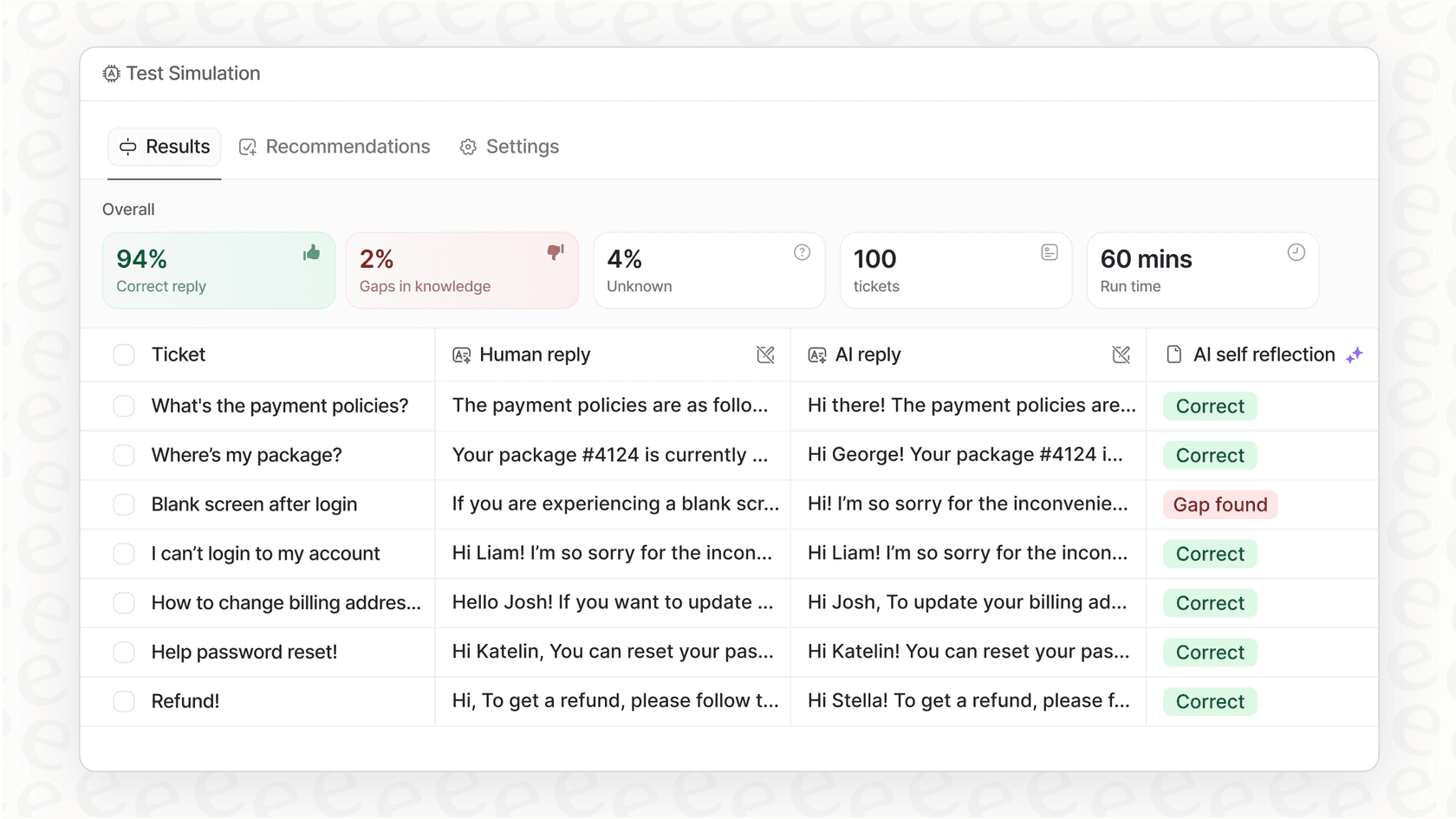
With eesel AI, you can get rid of that risk. Its simulation mode lets you test your new automation on thousands of your actual past support tickets in a safe environment. You can see exactly how the AI would have responded, review every draft, and get a clear forecast of your automation rate and time savings before it ever interacts with a real customer.
This lets you build with peace of mind, rolling out your automation gradually and making sure it performs perfectly from the start.
Tips and common mistakes to avoid
Whether you’re building a classic macro or an AI workflow, these tips can help you get it right.
-
Start small. Don't try to automate a 20-step process on your first go. Pick a simple, high-frequency task that causes a lot of repetitive work. Get a quick win under your belt and build from there.
-
Automation isn't "set it and forget it." For traditional macros, this means fixing them every time an update breaks them. For an AI system, it means periodically checking its performance and filling knowledge gaps, a process eesel AI makes easier with clear reports and analytics.
-
Don't work in silos. The most valuable automation connects your tools. The biggest drawback of old-school macros is their inability to see the bigger picture. Think about workflows that bridge your helpdesk, your knowledge base, and your backend systems.
From rigid macros to intelligent automation
Creating a macro is a great first step toward working smarter, not harder. We’ve seen how you can do it with recorders, code, and the built-in tools in your business apps. Each method has its place, but they all share the same limitations of being rigid, rule-based systems.
The future of automation is intelligent and context-aware. It’s about building workflows that can learn, reason, and adapt to get the job done. If you're tired of fixing fragile scripts and want to build powerful automations that use all of your company's knowledge, it's time to see what AI can do.
Frequently asked questions

Share this article

Article by
Kenneth Pangan
Writer and marketer for over ten years, Kenneth Pangan splits his time between history, politics, and art with plenty of interruptions from his dogs demanding attention.