7 free AI APIs most developers miss (2026 guide)

Last edited June 15, 2026

Everyone wants to build AI into their apps these days, but let's be real, the cost can be a dealbreaker. Whether you're a developer working on a side project, a startup trying to get an MVP out the door, or even a bigger company wanting to experiment, those enterprise API fees can shut things down before they even start. Thankfully, you don't always have to open your wallet to get access to powerful AI.
This guide is your no-fluff look at the best free AI API providers out there in 2026. We'll cut through the marketing hype, compare what the top players actually offer in their free plans, and help you decide which one makes sense for you. We’ll cover options for everything from a weekend hobby to a scalable business tool, so you can get building without getting a bill.
What is a free AI API?
First, a quick refresher. An API (Application Programming Interface) is just a way for two different software programs to chat with each other. It’s how your weather app gets its forecast from a meteorological service, for example.
An AI API is the same idea, but it connects you to a massive, pre-trained artificial intelligence model. Instead of spending a fortune and several years building your own model from scratch, you can just make a quick API call to generate text, write code, or create images.
So, where's the catch with "free"? Usually, it means a provider offers a free tier with some limits, like a certain number of requests or "tokens" (which are like pieces of words) you can use per month. It’s perfect for testing ideas, learning how things work, and running smaller apps without needing to pull out a credit card.
How we picked the best free AI API providers
We didn't just google "free AI API" and call it a day. To put this list together, we looked at these platforms the way a developer would, focusing on what really matters when you're trying to get a project off the ground.
-
A generous free tier: How much can you actually do before you have to pay? We checked out the token limits, request caps, and whether the free access has an expiration date.
-
Model quality and variety: Do you get access to top-tier models like Gemini, or a huge library of specialized open-source options?
-
How easy it is to use: What’s the developer experience like? We looked for clear documentation, a simple way to get an API key, and a process that doesn't make you want to pull your hair out.
-
Room to grow: What happens when your project gets popular? We checked how easy it is to move from the free plan to a paid one that makes sense.
The top free AI API providers for 2026 at a glance
If you're short on time, here's a quick look at our top picks. We'll get into the details for each one right after.
| Provider | Key Models Available | Free Tier Highlights | Best For | Key Limitation |
|---|---|---|---|---|
| Google AI Studio | Gemini 2.5 Flash, Gemini 2.0 | Free access with generous rate limits (e.g., 60 RPM for Flash) | Prototyping and building with Google's latest models. | Rate limits can be restrictive for high-traffic apps. |
| Hugging Face | Thousands of open-source models | Free Inference API for community models. | Experimenting with a wide variety of specialized models. | Performance can be inconsistent; no SLA on the free tier. |
| OpenRouter | GPT-5.2, Claude Sonnet 4.6, Gemini, Llama 3 | Small amount of free credits upon signup. | Comparing outputs from many different models with one key. | Free credits are limited and run out quickly. |
| Puter.js | GPT models, DALL-E | Free for developers; users cover their own usage costs. | Embedding AI directly in front-end apps without a backend. | Relies on the end-user having a Puter account and covering costs. |
| eesel AI | N/A (Platform) | Free simulation & setup; then pay-as-you-go (~$0.40 per ticket, $50 trial credit). | Businesses wanting to automate customer support without coding. | Specialized for support/ITSM, not a general-purpose developer API. |
The 5 best free AI API providers in 2026
Alright, let's dive into what makes each of these a solid choice for anyone building on a budget.
1. Google AI Studio
If you want to work with Google's powerful Gemini models, Google AI Studio is the most direct way in. It’s a straightforward, web-based tool where you can mess around with prompts and get a free API key in a couple of minutes. It’s probably one of the simplest ways to start playing with some seriously advanced AI.
We picked it because it gives you free access to some of the best models out there, including the fast and very capable Gemini 2.5 Flash. The free plan is generous enough to let you do some real development and prototyping work before you ever have to think about a paywall.
-
Pros:
- You get to use Google's latest and greatest multimodal models directly from the source.
- The documentation is great, and there are SDKs for languages like Python and Node.js.
- The free tier's rate limits reset every minute, which is great for testing and tweaking your code.
-
Cons:
- You're in Google's world, so you can't easily swap in a model from another company.
- The free limits (like 60 requests per minute) probably won't cut it for a live app with lots of users.
-
Pricing: The free tier is available to everyone. If you outgrow it, you move to a pay-as-you-go plan based on your usage.
2. Hugging Face
Hugging Face is pretty much the go-to place for open-source AI. Think of it as a huge library of AI models built by developers all over the world. Their Inference API lets you tap into thousands of these community-hosted models for free, which is an amazing resource for trying things out.
This is the best option for pure variety. If you need a model that does something niche, like figuring out the sentiment of Portuguese text or summarizing legal documents, chances are you can find it on Hugging Face and test it instantly without paying a cent.
-
Pros:
- An unbelievable selection of open-source models for almost anything you can think of.
- It's completely free for running models hosted by the community.
- It's the perfect sandbox for experimenting and finding a specialized model that big commercial providers don't have.
-
Cons:
- The free service isn't guaranteed to be online 24/7 and can get sluggish during busy times. It's not meant for production apps.
- You have to do a bit more homework to make sure a community model is high-quality and safe to use.
-
Pricing: Free for basic use of community models. Paid "Pro" plans and dedicated "Spaces" are available if you need guaranteed performance.
3. OpenRouter
OpenRouter is like a universal remote for AI models. It brings together APIs from dozens of different providers (OpenAI, Google, Anthropic, you name it) into one place.
This is super helpful in the early days of a project because you can test out different models without having to rewrite your code for each one. With a single API key, you can fire the same prompt at GPT-5.2, Claude Sonnet 4.6, and Llama 3 to see which one gives you the best results for your specific task.
-
Pros:
- Access a massive variety of top models through one simple API.
- Makes it easy to compare how different models perform and what they cost.
- New users get some free credits to try everything out.
-
Cons:
- The free credits are a nice starting gift, but they can disappear fast if you're using the bigger models.
- It's a middleman, so once the free credits are gone, you're just paying for the underlying models. It's not a long-term free solution.
-
Pricing: A small amount of free credits for new users, then pay-as-you-go for what you use.
4. Puter.js
Puter.js has a really interesting take on this whole thing: a "user-pays" model. As the developer, you use their JavaScript library to build AI features into your app for free. Then, your users pay for their own AI usage through their personal Puter account.
This is a pretty wild idea because it shifts the cost away from you entirely. You can build AI features right into a simple website and never worry about an API bill.
-
Pros:
- Totally free for developers to use.
- You don't need any backend code or have to worry about managing secret API keys.
- Ideal for adding AI features to front-end-only applications.
-
Cons:
- It only works if your users are willing to sign up for a Puter account and pay for their usage.
- It’s not a great fit for business apps where the company is expected to cover the costs for its customers.
-
Pricing: Free for developers. Your users pay for what they use.
5. eesel AI
Okay, so the APIs we've covered are great if you're a developer building something from the ground up. But what if you're not trying to build a new AI app, but solve a specific business problem, like automating customer support? Using a general-purpose API to build a support bot from scratch can take months and a whole team of engineers.
That's where a tool like eesel AI comes in. We've included it here because it's a completely different, and often much faster, way to tackle a common business need. Instead of handing you a box of parts, it gives you a finished solution for AI support that you can get running in minutes.
- Pros:
- Get started in minutes. You can connect your help desk (like Zendesk or Freshdesk) and other knowledge sources with simple, one-click integrations. The whole platform is self-serve, so you don't have to talk to a salesperson just to try it.
- It learns from your existing docs. eesel AI instantly trains itself on your help center articles and past support tickets to understand your company's tone and common problems, so it gives accurate answers right away.
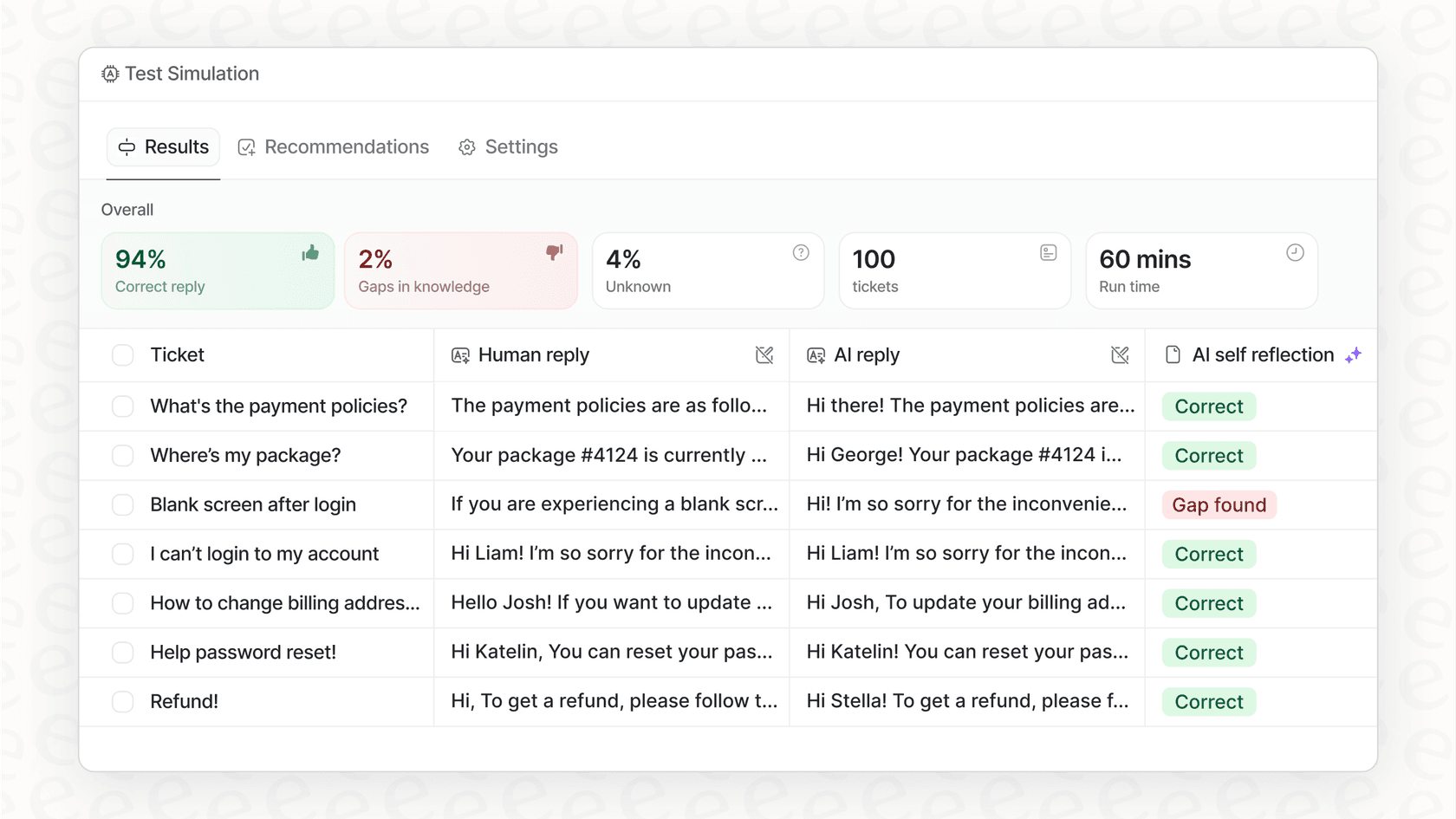
- Test it without any risk. A cool simulation mode lets you test the AI on thousands of your real, historical support tickets. You can see exactly how it would have performed and get a precise automation rate before a single customer ever interacts with it.
- Pricing is straightforward. It's pay-as-you-go per ticket (~$0.40 each) with a hard spend cap, so there are no per-seat fees and your costs are always predictable.
-
Cons:
- It's built specifically for support and ITSM, so it's not a developer API you can use to build just any app.
- The free part is for setup and unlimited simulations; you'll need a paid plan for the AI to interact with live customers.
-
Pricing: Pay-as-you-go per ticket (~$0.40 each, with a $50 trial credit and no per-seat fees). You can sign up, connect your data, and run simulations completely for free to see if it’s a good fit.
Tips for choosing the right free AI API for your project
Feeling a bit stuck trying to choose? Here are a few questions to ask yourself to figure out the best fit for your project.
-
What's your end goal? Are you just messing around on a hobby project, or are you building a commercial product? A hobby project can probably survive the occasional slowness of a free Hugging Face model, but a business app needs something reliable.
-
Build or buy? Using a developer API from Google is a "build" approach. It's flexible, but it takes a lot of your time to develop, test, and maintain. For a common business headache like customer support, a "buy" approach with a platform like eesel AI can get you results much, much faster.
-
What happens after "free"? Take a hard look at the pricing. A pay-as-you-go model like Google's is predictable and easy to scale with. Others might have a free tier that jumps to a very expensive plan once you cross a certain threshold.
-
Do you need a specialist? Does your project depend on top-notch reasoning, creative writing, or coding help? Use a tool like OpenRouter to test-drive a few different models with your actual prompts to see which one works best before you commit to a single provider.
Ready to start building with a free AI API?
It's a great time to be a developer. The world of the free AI API is more open than ever, and tools like Google AI Studio and Hugging Face give you everything you need to start building.
But if you're a business trying to solve a specific problem like customer support, building from scratch isn't always the smartest move. A ready-made platform can save you a ton of time and headaches. Instead of spending the next few months wrestling with an API, you could find out what's possible in the next 15 minutes.
Connect your knowledge base and simulate eesel AI on your past tickets for free to see your potential automation rate instantly.
Frequently asked questions

Share this article

Article by
Stevia Putri
Stevia Putri is a marketing generalist at eesel AI, where she helps turn powerful AI tools into stories that resonate. She’s driven by curiosity, clarity, and the human side of technology.