Freshdesk vs Zoho Desk: A complete guide for 2026

Last edited January 16, 2026

Picking a help desk is a pretty big commitment. The tool you choose will shape how your agents work and how your customers feel about you for a long time. When it’s the right fit, your support team runs smoothly. When it’s not, you’re left dealing with clunky workflows and unhappy agents.
In the world of support software, Freshdesk and Zoho Desk are two names you’ll hear over and over. They’re both popular, packed with features, and seem pretty similar on the surface, which can make choosing between them tough.
This guide is here to help you sort through it all. We’ll give you a straightforward comparison of their features, AI, and pricing to help you make a decision. We'll also take a look at how to get the most out of their built-in AI and explore a flexible option that can work with whichever tool you end up with.
What is Freshdesk?
Freshdesk is a cloud-based customer service tool from the Freshworks suite of products. It’s best known for its clean, modern interface that most teams can get the hang of pretty quickly. You can think of it as a central hub for all your support activities.
At its core, it gives you a solid ticketing system and omnichannel support, letting you manage conversations from email, phone, chat, and social media all in one spot. It also has automation tools to take care of repetitive tasks and an AI assistant called Freddy AI, which is meant to help agents get through their work faster. It’s a mature, reliable platform designed to work for businesses of all sizes, from small teams just getting organized to large companies that need a tool that can grow with them.
What is Zoho Desk?
Zoho Desk is the help desk offering from the huge Zoho ecosystem of business apps. Its main advantage is what they call a "context-aware" approach. Because it connects so well with other Zoho products, especially Zoho CRM, it can pull in a customer’s entire history to give agents the full picture during any conversation.
Like Freshdesk, it has all the key features you'd expect: ticket management across multiple channels, a knowledge base for self-service, community forums, and its own AI assistant named Zia. Zoho Desk is a great option for businesses already in the Zoho ecosystem, as it helps create a unified system across sales, marketing, and support. It's also a solid choice for teams that want a lot of customization options.
Freshdesk vs Zoho Desk: Feature comparison
Let's see how these two platforms stack up when it comes to the features your team will be using every day.
Ticket management and collaboration
-
Freshdesk: Has a really intuitive ticketing system. Little things like agent collision detection, which stops two people from accidentally working on the same ticket, make a big difference. You can also use custom statuses and private notes to track ticket progress and chat with teammates behind the scenes. It's a mature system designed to be simple and fast.
-
Zoho Desk: Is particularly good if you have set processes you need to follow. Its "Work Modes" help agents sort tickets by things like due date or status. For bigger problems, the parent-child ticketing feature lets you split a major issue into smaller, more manageable tasks. It also has a unique "Blueprint" feature that walks agents through a required workflow.
-
Verdict: You'll probably prefer Freshdesk if you want simplicity and a clean, fast interface. Zoho Desk is a great fit if your organization has structured, multi-step support processes that need to be followed every time.
Omnichannel support
-
Freshdesk: Gives agents a single workspace where conversations from email, chat, social media (including Instagram and WhatsApp), and phone all come together. This setup makes it easy for agents to jump between channels without losing the thread of the conversation.
-
Zoho Desk: Offers a similar set of built-in channels. Its live chat is powered by Zoho SalesIQ, which is a nice bonus if your sales team already uses it. The goal is the same for both platforms: give you one clear view of the customer, regardless of how they contact you.
-
Verdict: Both are really strong here. The deciding factor usually boils down to pricing, since some channels on both platforms are only available as add-ons or in the more expensive plans. Before you commit, double-check that the channels you rely on are included in the plan you’re looking at.
Reporting and analytics
-
Freshdesk: Comes with a good set of pre-built reports and dashboards you can customize. You can easily track standard metrics like first response time, resolution SLAs, and individual agent performance. It also includes customer satisfaction (CSAT) surveys to help you gauge the quality of your support.
-
Zoho Desk: Has an advantage for teams that love digging into data, thanks to its direct connection with Zoho Analytics. This lets you build custom reports that go beyond what most help desks offer out of the box. Zoho also has a mobile app for managers called "Radar" that provides a real-time overview of your team's performance.
-
Verdict: For great, easy-to-use reporting that works from day one, Freshdesk is a solid pick. For businesses that need to do deep analysis and build highly specific dashboards, Zoho Desk’s link to Zoho Analytics is tough to top.
Feature comparison table
Here’s a quick summary of the key differences.
| Feature | Freshdesk | Zoho Desk |
|---|---|---|
| User Interface | Modern, clean, and intuitive | Functional, highly customizable, integrated feel |
| AI Assistant | Freddy AI (available in higher tiers) | Zia (included in higher-tier plans) |
| Core Ticketing | Strong, with collision detection & canned responses | Robust, with parent-child ticketing & Blueprints |
| CRM Integration | Integrates with many CRMs (e.g., Salesforce) | Deep, native integration with Zoho CRM |
| Customization | Good, with custom fields and portal CSS | Excellent, with custom modules and layouts |
| App Marketplace | 1,200+ apps in the Freshworks Marketplace | 500+ apps, deep integration within Zoho ecosystem |
Native AI comparison: Freddy AI vs. Zia
Both Freshdesk and Zoho Desk talk a lot about their built-in AI assistants, Freddy AI and Zia, which can assist support teams in their daily work.
What can they do?
On paper, both Freddy AI and Zia promise to make your team more productive. They’re built to do things like automate ticket sorting, suggest replies for agents, summarize long email threads, and power self-service chatbots. They're positioned as helpful assistants that handle the repetitive stuff so your agents can focus on solving customer problems.
Considerations for built-in AI
While native AI provides a fantastic starting point, there are a few considerations to keep in mind to ensure your team gets the most value.
-
Setup and Training: Native AI is a great foundation, though it often requires time and manual setup to align with your specific workflows. Most native AIs are primarily trained on your knowledge base articles. As your team grows, you might find value in adding complementary tools that can also learn from your history of solved tickets.
-
Knowledge Sources: Native AI is designed to work seamlessly within its own platform. For some teams, this is perfect. Others might eventually need their AI to pull in information stored in external places like Confluence or Google Docs. In those cases, a specialized AI integration can help bridge the gap.
-
Customizing Workflows: Native systems offer excellent automation rules. For highly specialized or advanced custom actions - like pulling live data from third-party order management systems - you might look to integrate complementary AI platforms to extend your help desk's capabilities even further.
-
Testing Options: Freshdesk is a reliable ecosystem that continues to evolve. While native tools are solid, some advanced teams might prefer additional environments to test AI performance on historical data before deployment, which is where specialized add-ons can shine.
A better way to add AI to your help desk
Instead of choosing between platforms based only on their AI, you could add AI to your help desk right on top. This approach lets you stick with the tool your team already uses, whether that's Freshdesk or Zoho Desk, and enhance its existing capabilities.
This is where a dedicated AI platform can make a huge difference.
eesel AI was built to complement platforms like Freshdesk. It connects to the tools you already use and provides additional flexibility for teams with complex needs.
-
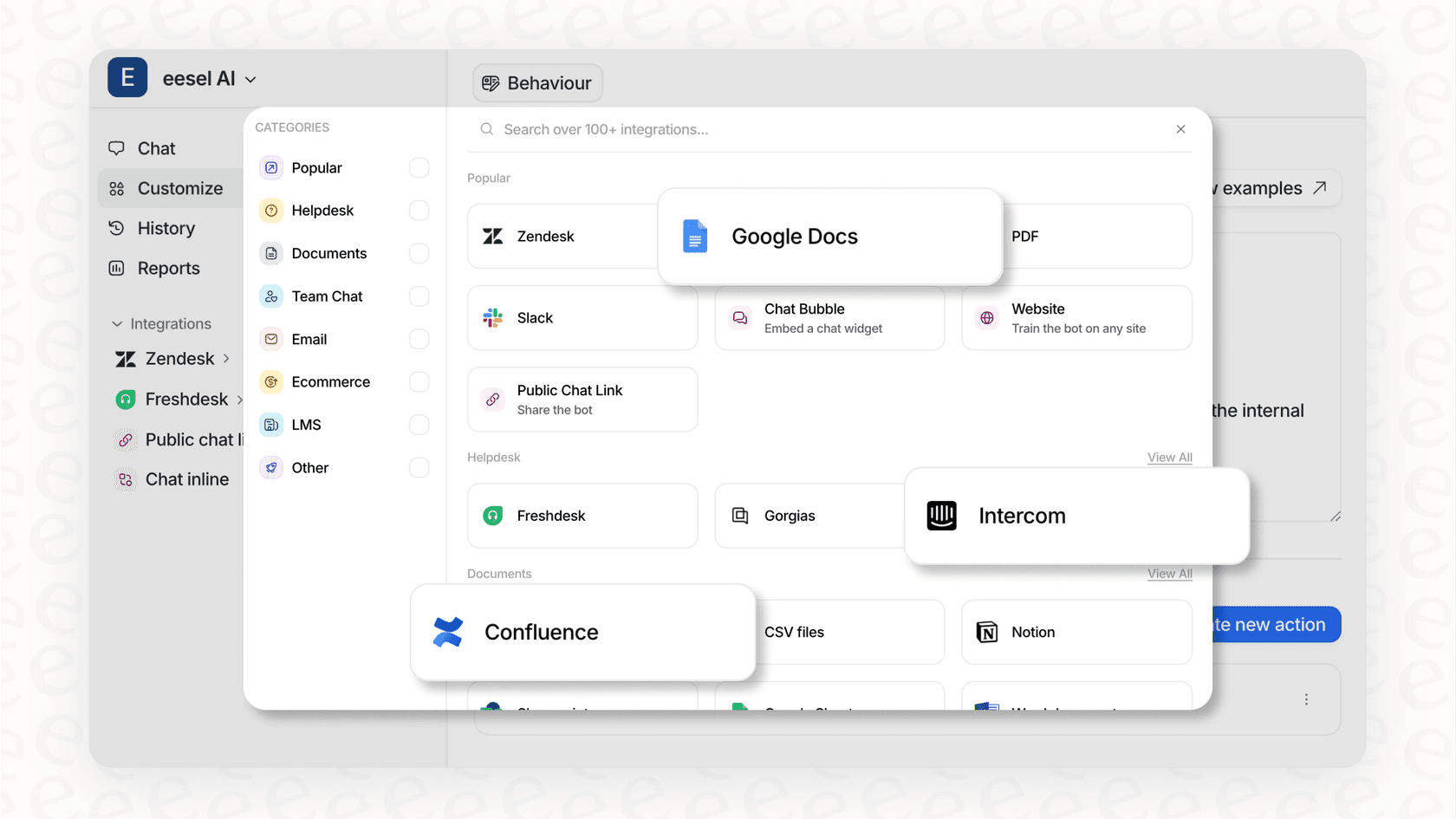
Get it running in minutes: With one-click integrations, you can connect your help desk and other tools almost instantly. It’s designed to be a smooth addition to your existing setup.
-
Bring all your knowledge together: eesel AI complements your help center by learning from everything: your past tickets, internal wikis, Google Docs, Confluence pages, and more. This helps ensure it always has the full story to give accurate answers.
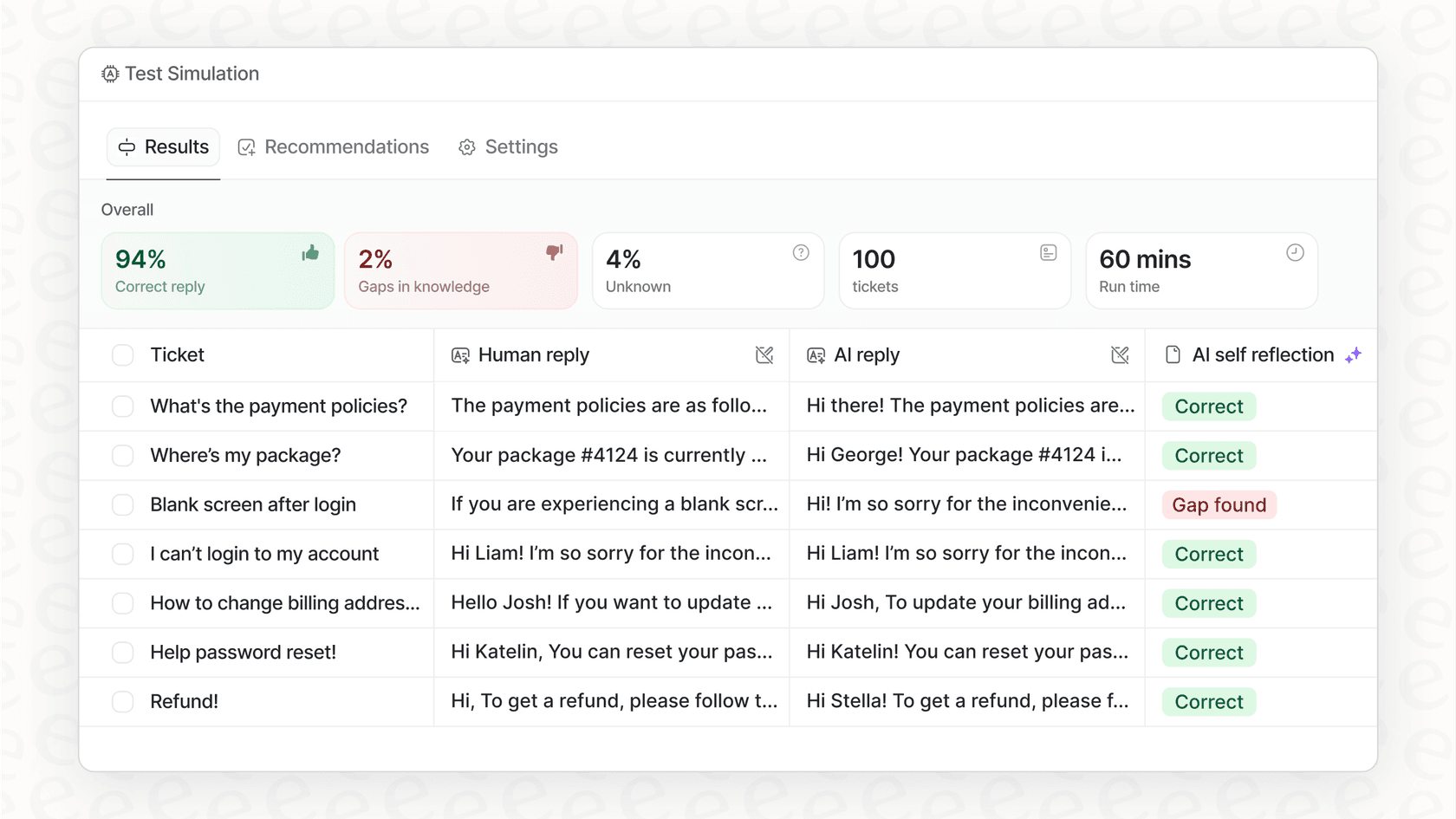
- Test with confidence: eesel AI has a simulation mode that lets you test your AI on thousands of your past tickets in a safe environment. This allows you to see how it will perform alongside Freshdesk before it ever interacts with a customer.
- You're in control: A customizable workflow engine lets you decide exactly which tickets the AI should touch. You can define its tone of voice to match your brand and create custom actions to pull information from other systems.
Pricing breakdown: Freshdesk vs Zoho Desk
Price is often the final puzzle piece, so let's break down what you can expect for each platform in 2026.
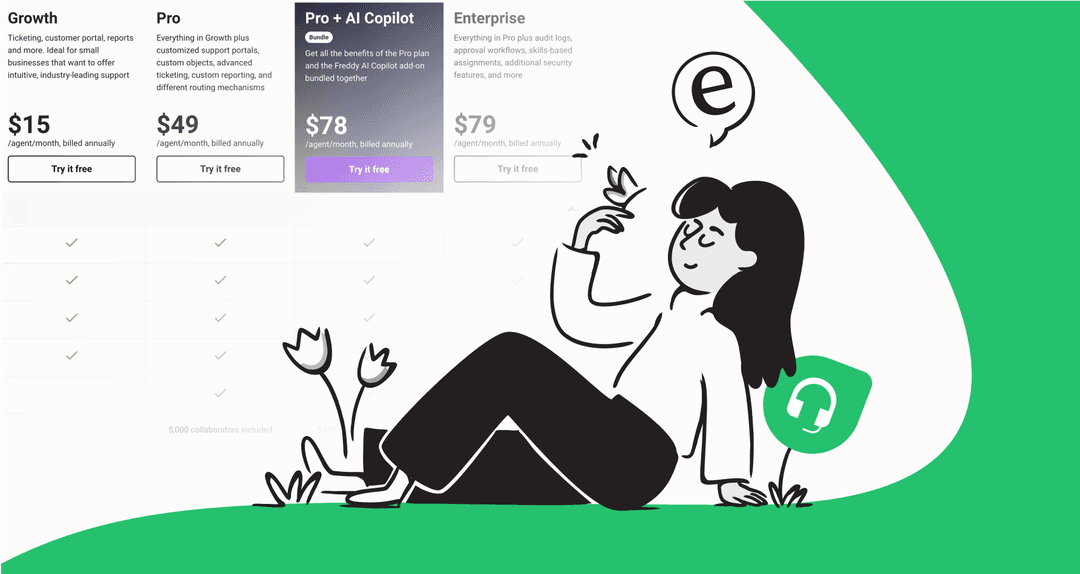
Freshdesk pricing
-
Free: For up to 10 agents. Includes basic email ticketing and a knowledge base.
-
Growth: $15 per agent/month (billed annually). Adds automation, collision detection, and marketplace apps.
-
Pro: $49 per agent/month (billed annually). Adds custom roles, CSAT surveys, and custom reports.
-
Enterprise: $79 per agent/month (billed annually). Adds skill-based routing and a sandbox environment.
Note: Freshdesk offers tiered plans to match different team sizes. The Freddy Copilot is an optional $29/agent/month add-on, allowing you to invest in advanced AI capabilities as you need them.
Zoho Desk pricing
-
Free: For up to 3 agents. Includes email ticketing, private knowledge base, and a customer portal.
-
Standard: $14 per agent/month (billed annually). Adds social media channels, SLAs, and customer happiness ratings.
-
Professional: $23 per agent/month (billed annually). Adds multi-department support, telephony integration, and round-robin ticket assignment.
-
Enterprise: $40 per agent/month (billed annually). Adds Zia (the AI assistant), live chat, multi-brand help centers, and advanced customization.
The bottom line on pricing
-
Zoho Desk is a functional option for teams looking for various features on a smaller budget.
-
Freshdesk is a premium, mature platform. While it has higher-tier pricing, you're investing in a slick user interface, a vast marketplace of over 1,200 apps, and a very reliable ecosystem used by thousands of global companies.
Pro Tip: This is where the pricing model for a separate AI tool can be beneficial. Tools like eesel AI often have transparent, usage-based pricing instead of a per-agent fee. This model can be a cost-effective way to add advanced AI to your help desk without increasing your per-agent costs.
Freshdesk vs Zoho Desk: Which tool is right for you?
So, after all that, which one should you go with? It really depends on what your team needs most.
-
Choose Zoho Desk if: You're already in the Zoho ecosystem, you need deep customization and powerful analytics, or you're looking for specific entry-level pricing.
-
Choose Freshdesk if: Your priority is a modern, intuitive, and industry-leading interface that your team can learn quickly, and you want access to a huge marketplace of third-party apps and a proven enterprise-grade ecosystem.
But here’s the key takeaway: no matter which help desk you choose, its built-in AI can be enhanced for even greater capability. For a more flexible and low-risk AI that can grow with you, a dedicated platform like eesel AI is a smart choice. It improves the tools you already have, giving you the best of both worlds.
Ready to give your support team AI that actually works?
Whether you use Freshdesk, Zoho Desk, or something else, eesel AI integrates in minutes to help automate support, draft replies, and bring all your knowledge together.
Try eesel AI for free or book a demo to see how it works.
Frequently asked questions


Automate your Freshdesk with AI agents
Share this article

Article by
Kenneth Pangan
Writer and marketer for over ten years, Kenneth Pangan splits his time between history, politics, and art with plenty of interruptions from his dogs demanding attention.