Gorgias automation to route tickets by storefront or brand: A complete overview


Last edited January 16, 2026

Let's be honest, managing customer support for one brand is a big task. When you add a second, third, or fourth brand into a single Gorgias helpdesk, it's important to have a solid plan. Without a system for organizing tickets, agents might spend time deciding who handles what, but with the right setup, you can ensure a smooth experience that keeps customer satisfaction high.
The solution is ticket routing, which is an automated way to send customer questions to the right person or team. Gorgias has built a very capable platform with strong native tools to get you started. As your business reaches new heights in 2026, you can further enhance these workflows to scale your multi-brand support efficiently.
In this guide, we'll walk through setting up Gorgias's own automation for ticket routing, discuss how to manage those rules at scale, and show how AI-powered tools can offer a flexible, complementary solution.
What is ticket routing by storefront or brand?
Ticket routing is the process of automatically assigning support tickets to the right agent or team based on logic you create. It acts like a digital coordinator that keeps your inbox focused and productive.
For any business juggling multiple brands, this is a fantastic way to streamline operations. Here's why it's so beneficial:
-
Connect customers with experts: It ensures the agents who know Brand A's products best are the ones responding to those customers.
-
Maintain brand consistency: Each of your storefronts has its own voice. Routing helps your team stay in character for every brand interaction.
-
Simplify reporting: When tickets are sorted by brand from the start, you can easily pull performance reports for each storefront to see how they're growing.
-
Improve response speed: By automating the assignment process, you can improve important metrics like first response time and resolution speed.
In Gorgias, this process is handled through their mature Rules system. These are powerful commands based on "if-then" logic. For example, IF a ticket comes from a specific brand email, THEN Gorgias can tag it or assign it to the correct team.
How to set up basic ticket routing in Gorgias
Getting started with rule-based routing in Gorgias is a smart first step for any multi-brand business. It provides a reliable foundation for your support team.
Using Gorgias rules for ticket routing
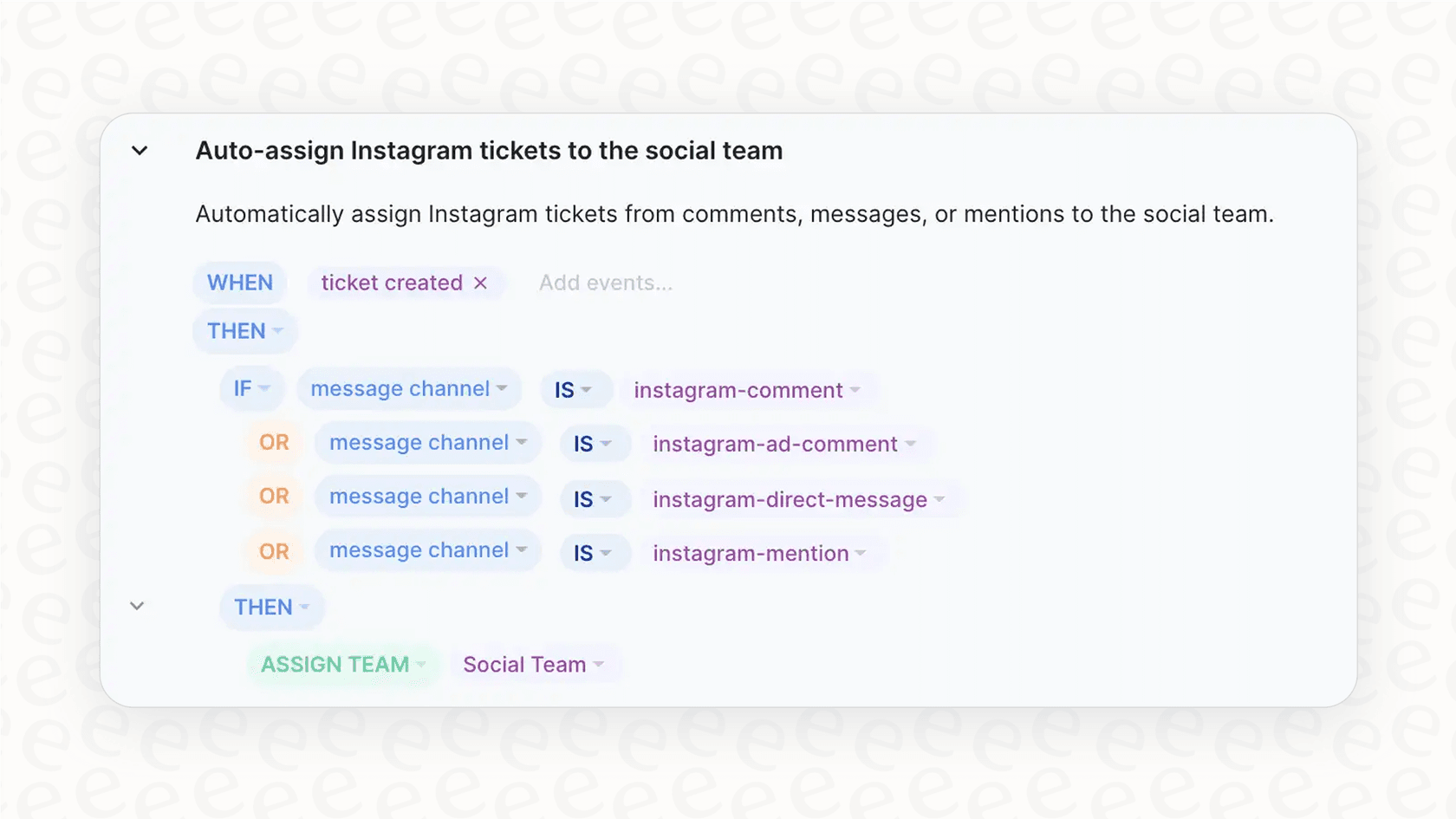
The Gorgias rule builder is designed to be user-friendly and accessible. It’s based on straightforward logic that makes it easy to automate your workflow. Here’s how you can set it up:
-
Identify your trigger: A common trigger for routing by brand is the channel. A ticket sent to "support@brand-a.com" clearly belongs to Brand A.
-
Create a new rule: In your Gorgias settings, visit the Rules section to start building your automation.
-
Define your conditions: This is the "IF" part. You can set a condition like:
IF ticket channel IS "support@brand-a.com". -
Set the actions: This is the "THEN" part. Common actions for routing include:
- Add a tag: Apply tags like "brand-a" so your team can identify the storefront at a glance.
- Assign to a team: Route the ticket directly to your "Brand A Support Team."
- Apply a Macro: Automatically send a brand-specific greeting to confirm the customer's request has been received.
Creating brand-specific views
Once your tickets are tagged, you can create Views. A View is a custom filtered inbox that lets agents focus on the tickets they are responsible for. For example, you can have a "Brand A" view that only displays tickets with the "brand-a" tag.
This creates a clean and organized environment for your team, ensuring they always have the right context for the brand they are supporting.
Considerations for scaling Gorgias automation
Gorgias Rules are excellent for organizing your support. As you continue to expand your brand portfolio and add more channels in 2026, you might look for ways to keep your rule list streamlined and manageable.
Managing rules as you grow
When you have a few brands, managing your rules is simple. As you add more brands, social media channels, and chat integrations, your rule list will naturally grow. Gorgias provides the tools to manage these, and many teams find that staying organized within the Rules engine is a key part of their success.
To keep things efficient at a very large scale, some teams choose to group rules or use AI to help handle more nuanced routing logic, which can save time on manual updates.
Adding context and urgency detection
Gorgias rules are highly reliable because they follow specific logic. They work best when there are clear triggers. To handle more subjective elements like "urgency" or "intent" without creating hundreds of keyword rules, you can incorporate AI into your workflow.
For instance, while a standard rule can identify a ticket for "Brand A," an AI integration can help determine if that ticket is a routine question or a high-priority concern based on the tone of the message. This adds another layer of sophistication to your already strong Gorgias setup.
Connecting to broader knowledge sources
Gorgias rules are highly effective at utilizing the data within each ticket. To take your routing even further, you can use complementary tools that allow your helpdesk to interact with external documents, like internal guides in Confluence or Google Docs. This allows for routing decisions based on your latest company policies and documentation.
A complementary option for Gorgias: Using an AI agent
You don't need to change your entire workflow to get more advanced features. You can add an AI agent that works directly within your Gorgias ecosystem. Tools like eesel AI act as an intelligent co-pilot, adding extra capabilities to your existing setup.
Intelligent ticket triage
Setting up eesel AI is quick thanks to its one-click integration for Gorgias. There’s no need for custom development work, making it a very accessible addition to your platform.
Once connected, eesel AI's AI Triage can analyze your Gorgias ticket history. It learns from past conversations to understand the context and topic of new tickets. This helps with accurate routing by identifying things like a "shipping inquiry" for "Brand B" even if those specific keywords aren't used, ensuring the ticket gets to the right place every time.
[YOUTUBE_VIDEO: https://website-cms.eesel.ai/wp-content/uploads/2025/10/eeselAI-Video-AI-Triage.mp4]
Maintaining control over your automation
Using AI is all about enhancing your team's capabilities while keeping you in the driver's seat. With eesel AI, you choose exactly which tickets the AI assists with.
The simulation feature is particularly helpful. It allows you to test how the AI would have handled thousands of past Gorgias tickets before you apply it to live support. This lets you verify the accuracy of the routing and tagging in a safe environment. You can start by using AI for one storefront and gradually expand as your confidence in the system grows.

Integrating your company knowledge
While Gorgias rules focus on ticket data, eesel AI can connect to your company's broader knowledge base. You can link it to your internal wikis, Google Docs, or public help centers.
This gives your routing logic more context. If a customer mentions a specific technical issue that is detailed in your internal Confluence docs for a specific brand, the AI can use that information to route the ticket to the specialized technical team immediately. It’s a great way to make your Gorgias setup even more informed.

Transparent pricing options for 2026
When planning for growth, having a clear understanding of costs is essential. Gorgias's pricing is designed to scale with your business, using a tiered model based on ticket volume that helps you only pay for what you use.
Complementary tools like eesel AI offer a different approach that can help with budget planning.
| Feature | Gorgias | eesel AI |
|---|---|---|
| Pricing Model | Tiered plans based on billable tickets | Flat monthly rate for AI interactions |
| Cost Structure | Scales naturally with your ticket volume | Predictable monthly costs regardless of volume spikes |
| Flexibility | Comprehensive plans for different team sizes | Flexible month-to-month options available |
Key aspects of eesel AI's model include:
-
Fixed interaction rates: Plans include a set number of AI interactions for a flat monthly fee, helping you maintain a consistent budget even during peak shopping seasons.
-
Flexible commitments: With month-to-month plans, you have the freedom to adjust your support tools as your business needs change in 2026.
Putting it all together
For any growing ecommerce business managing multiple brands, staying organized is the key to success. Gorgias Rules provide a mature, reliable foundation for ticket routing that helps thousands of companies deliver great support.
AI-powered automation is a natural next step for teams looking to further enhance their efficiency. By adding a tool like eesel AI to your existing Gorgias workflow, you're building on a strong platform to create a truly scalable support system for all your brands.
Ready to see how you can enhance your multi-brand support? Start a free trial with eesel AI or book a demo to see the simulation feature in action with your Gorgias tickets.
Frequently asked questions


Share this article

Article by
Kenneth Pangan
Writer and marketer for over ten years, Kenneth Pangan splits his time between history, politics, and art with plenty of interruptions from his dogs demanding attention.