How does Shopify magic work? A practical guide for ecommerce stores


Last edited October 6, 2025

If you run a Shopify store, you’re probably wearing a dozen different hats at once. One minute you're a copywriter, the next a marketer, and then suddenly you're knee-deep in customer support tickets. The to-do list is endless, and there’s just never enough time. Shopify gets this, which is why they built Shopify Magic, a suite of AI tools designed to help you automate some of the more repetitive parts of your day.
But what does that actually mean for your store? How does it all work in practice?
This guide will walk you through exactly that, step-by-step. We'll skip the buzzwords and show you how to use Shopify Magic’s features to get things done faster. You'll learn how to generate content, manage your store with a simple command, and, just as importantly, understand where it hits its limits, especially with customer support, and what to do when you need something more powerful.
What you'll need to get started
Getting started with Shopify Magic is probably the easiest thing you'll do all day. You likely have everything you need already:
-
An active Shopify store: Shopify Magic is built right in, so it’s ready to go on all paid plans (Basic, Shopify, and Advanced).
-
Your product and brand info: The AI isn't a mind reader. It needs some direction from you, so have your key features, keywords, and brand voice in mind.
A step-by-step walkthrough
Let's get into the practical side of things. Here’s how you can use Shopify Magic’s main features in your daily workflow.
Step 1: Generate compelling product descriptions in seconds
Let's be honest, writing unique, SEO-friendly product descriptions for every single item is a grind. With Shopify Magic, you can get a solid first draft knocked out in just a few seconds.
Here’s how to do it:
-
From your Shopify admin, go to Products and click on a product you want to edit.
-
In the Description field, look for the little purple icon with stars. That's your "Generate text" button. Go ahead and click it.
-
A prompt window will pop up, asking for a few details.
This is where you tell the AI what you want. Think of it like giving directions, the clearer you are, the better the result.
-
Features and Keywords: Be specific. "Nice shirt" won't get you very far. Try something like "100% organic cotton, relaxed fit, pre-shrunk, side-seamed." The more detail you feed it, the richer the output will be.
-
Tone of Voice: This is how you give the text some personality. 'Playful' is great for a fun, casual brand, while 'Sophisticated' works for luxury goods. 'Expert' is perfect if you're selling something technical. Pick the one that matches your brand.
-
Special Instructions: This field is your chance to give extra commands. You could ask it to "create a bulleted list of the top three features" or "make sure to mention our lifetime guarantee."
Once you've filled that in, click "Generate." Take a look at what it comes up with. If you like it, click "Keep." If not, you can hit "Generate again" for a new version or go back and tweak your prompts. I always recommend giving the final text a quick once-over to add your personal touch and make sure it sounds like it came from you, not a robot.
Step 2: Create marketing and blog content that converts
Shopify Magic can also be a huge help with your marketing, whether you're writing email campaigns or trying to publish more blog posts to boost your SEO.
For Shopify Email:
-
When you're creating a new campaign in the Shopify Email app, you'll see the "Generate text" icon for both the Subject line and the email body.
-
Give it a straightforward prompt, like "Announce a 20% off flash sale on all summer items this weekend only."
-
Shopify Magic will suggest a few subject lines and some email copy. You can pick your favorite or just use them as a jumping-off point.
For Blog Posts:
-
Head to Online Store > Blog Posts and start a new post.
-
Just like with product descriptions, the "Generate text" icon is there to help. You can ask it to whip up an outline, write an introduction, or even draft a whole post based on a topic and some keywords.
While the AI gives you a fantastic head start, remember that the best content connects on a human level. Always go back and weave in your brand's unique stories, customer testimonials, or personal insights. That’s what makes your marketing feel authentic.
Step 3: Enhance your store's visuals with AI image editing
You don't need to be a Photoshop whiz or have a big design budget to get professional-looking product photos. Shopify Magic has some surprisingly useful AI image editing tools built right in.
Here's how it works:
-
Go to a product's page in your admin and click on an image in the Media section to open the editor.
-
Look for the Enhance Background icon (it has the same purple stars).
-
From here, you can do some pretty neat things. You can remove the background entirely for a clean, minimalist look. You can also swap it out for a solid color or even generate a new background from a text prompt. For example, you could type "place the product on a marble countertop" or "put this on a beach at sunset."
This is a really handy feature for creating a consistent, polished look across your product catalog, which goes a long way in making your store feel more professional and trustworthy.
Step 4: Streamline store management with Sidekick
Think of Sidekick as your AI assistant for the Shopify admin. Instead of clicking through menus to find what you're looking for, you can just tell Sidekick what you need in plain English.
Here’s how you use it:
-
Find and click the Sidekick icon in your Shopify admin.
-
A chat window will pop up. Just type your request or question.
You can ask it to handle all sorts of tasks. For example:
-
"Create a 15% discount code called WELCOME15 for new customers."
-
"Show me my best-selling products from last month."
-
"How many orders are waiting to be fulfilled?"
Sidekick will either do the task for you (after you confirm) or take you straight to the right page in your admin. It’s a much faster way to get things done.
Step 5: Powering basic customer support with Instant Answers
Finally, you can use Shopify Magic to handle some of your basic customer questions by setting up automated answers in Shopify Inbox.
Here's how:
-
Open the Shopify Inbox sales channel from your admin.
-
Go to Chat Settings > Instant Answers.
-
Shopify Magic can suggest answers to common questions about things like your shipping and return policies. You can review its suggestions, edit them to match your voice, and then turn them on.
It's important to be realistic about this feature. It's fantastic for answering simple, repetitive questions where the answer never changes, like "What's your return policy?" or "Do you ship internationally?".
But this is also where you start to see the limitations. The AI can only answer questions based on the information it has inside Shopify. It can’t do things like look up a specific order status, and it gets confused by complex, multi-part questions. This is the difference between a simple text generator and a true AI support agent.
Common mistakes and how to go beyond the basics
Shopify Magic is a great tool, but it isn't perfect. Here are a few tips to get more out of it and what to do when your needs grow beyond its capabilities.
Quick tips for better results
-
Always be the final editor: Don't just copy and paste what the AI gives you. It's a great starting point, but it doesn't have your unique brand voice and can sometimes sound a bit generic or even make small mistakes.
-
Garbage in, garbage out: The quality of the AI's output is directly tied to the quality of your input. The more specific details you provide in your prompts, the more relevant the generated text will be.
-
Use AI as your SEO assistant: AI can help you weave keywords into your content naturally, but don't just stuff them in. Search engines can spot low-quality, AI-generated spam a mile away, so focus on creating genuinely helpful content for humans first.
Supercharging your Shopify support when it isn't enough
Shopify Magic is a solid first step for automating simple support questions, but growing stores often hit a wall with it pretty quickly. When your customers start asking about their specific orders or have issues that require information from different documents, you need a more specialized tool.
This is where an AI platform like eesel.ai comes in. It’s designed specifically to solve the problems that basic AI tools can't handle by connecting to all your existing tools and knowledge bases.
Here’s what makes a specialized tool different:
- Unify all your knowledge: Shopify Magic only knows what’s in Shopify. eesel AI connects to your entire knowledge ecosystem, your Zendesk or Gorgias helpdesk, past tickets, Google Docs, Confluence pages, and even internal Slack conversations. This gives it the context to answer much more complex questions accurately.

- Take real action: eesel AI’s workflow engine can do more than just provide information. It can be set up to look up an order status in your Shopify store, triage tickets with the right tags, or escalate an issue to a human agent, all automatically.
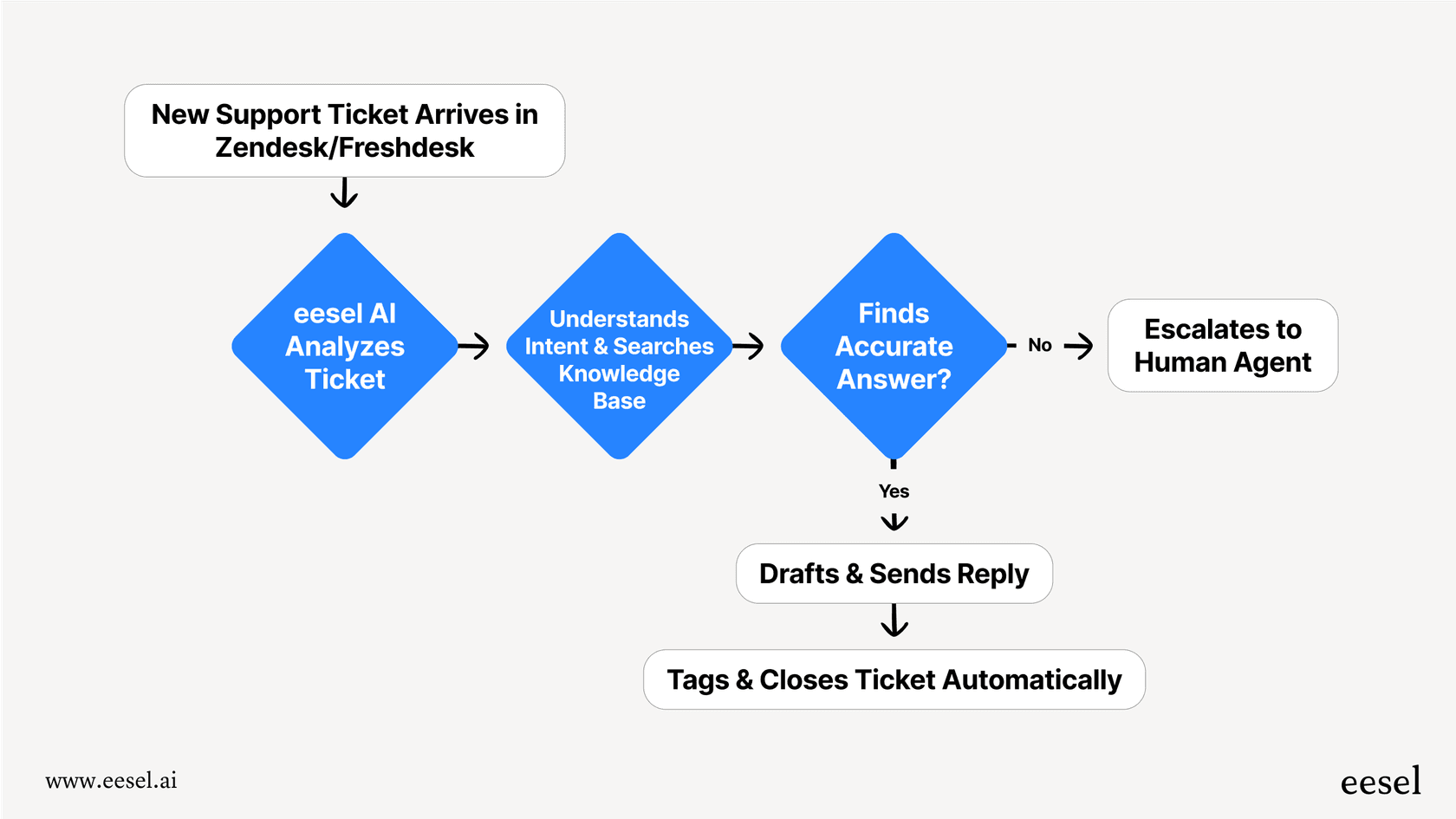
- Test with confidence: Worried about letting an AI talk directly to your customers? We get it. eesel AI’s simulation mode lets you test your setup on thousands of your past tickets. You can see exactly how it would have responded and get a clear forecast of your deflection rate before you ever go live.

- Set up in minutes: Unlike enterprise AI tools that often involve long sales calls and complicated setups, eesel AI is completely self-serve. You can connect your helpdesk, train the AI on your knowledge, and have it running in just a few minutes.
Start with Magic, grow with a specialist
Shopify Magic is a powerful, free tool that every merchant should be using. It’s a fantastic asset for automating routine content creation and speeding up store management. You now have a clear picture of how it works, what it’s good at, and how to start using it today.
For those foundational tasks, it’s incredibly helpful. But when it comes to customer support, a vital, revenue-driving part of your business, its limitations become clear pretty quickly.
When you're ready to automate your frontline support with an AI that can work across all your knowledge sources and take truly helpful actions for your customers, it's time to graduate.
See how eesel AI can transform your customer support by starting your free trial today.
Frequently asked questions


Share this article

Article by
Kenneth Pangan
Writer and marketer for over ten years, Kenneth Pangan splits his time between history, politics, and art with plenty of interruptions from his dogs demanding attention.