The smartest way to connect Notion and Zendesk in 2026


Last edited January 12, 2026
Let's be real, your team's best information probably lives in two different worlds. Your product and engineering folks are building beautiful, detailed guides in Notion. At the same time, your customer support team is on the front lines, managing a steady stream of questions in Zendesk.
This digital gap can sometimes slow things down. Agents may spend time switching between tabs or looking for documentation that's always evolving. The goal is to ensure fast response times and consistent answers for your customers by bringing these worlds together.
The real opportunity is finding a Notion Zendesk connection that genuinely supports your team's workflow. In this guide, we’ll look at what each platform does best, walk through the common ways to connect them, and show you how an AI-powered approach can further bridge the gap.
What's the Notion Zendesk stack?
For so many companies, Notion and Zendesk are more than just software; they’re the central hubs for knowledge and customer conversations. Figuring out what each one is designed for is the first step to understanding why a smart integration between them is so valuable.
What is Notion?
Think of Notion as your team's shared brain. It's a super flexible workspace that rolls a wiki, a project manager, and a document editor all into one. Its biggest strength is acting as a central knowledge base, a single source of truth where your team can create and organize everything from technical API guides to internal company policies.
What is Zendesk?
Zendesk is command central for customer service. It's a mature, reliable platform where you manage every customer interaction, from support tickets and live chats to phone calls. It pulls all those conversations into one place, giving agents the context they need to be helpful. For most support teams, Zendesk is the trusted, enterprise-grade environment where they spend their entire day.
Why create a Notion Zendesk connection?
When you think about it, the connection just makes sense. Notion holds all the deep, well-organized knowledge, while Zendesk is where that knowledge is needed to give customers quick, accurate answers. The goal of connecting them is to streamline the path between where information is stored and where it's used.
When you get it right, your agents have the right information at their fingertips, and every customer gets a consistent answer pulled straight from your official docs.
Common ways to create a Notion Zendesk connection
While everyone agrees these two tools should talk to each other, different methods serve different needs. Let's look at the usual approaches and how they help your team.
The official Notion Zendesk integration: A solid starting point
The first stop for most people is the official integration. Notion’s app for Zendesk lets you paste a link from a Zendesk ticket into a Notion page to create a tidy little preview.
This is a great feature for visibility. It allows teams to see ticket status and details directly within their Notion workspace, which is perfect for project managers or developers who want to stay informed about customer feedback. While it's primarily designed for referencing tickets within Notion, it's a useful foundational tool in the Zendesk Marketplace.
Automation tools for Notion Zendesk like Zapier: Reliable data movement
The next logical step is often turning to automation platforms like Zapier, Make, or Integrately. These tools let you build straightforward workflows, like "when a new ticket is made in Zendesk, create a new page in Notion."
This approach is excellent for simple data transfers:
-
Reliable workflows: These automations are great for keeping a record of specific tickets in a Notion database for long-term tracking.
-
Flexible triggers: You can customize exactly what data gets sent, allowing you to filter for only the most important tickets that need documentation.
-
Easy setup: These platforms make it easy for non-technical users to build basic connections between Notion and Zendesk.
Notion Zendesk syncing tools like Unito: Keeping data aligned
Finally, some teams use dedicated syncing tools like Unito, which offer two-way sync between platforms. This is a robust way to keep information consistent across both tools.
This is particularly helpful for cross-team collaboration. If a developer updates a task in Notion, the synced ticket in Zendesk can be updated as well, keeping the support agent in the loop. It’s a great way to ensure that information stays aligned across the organization.
A better Notion Zendesk approach: Use Notion as an AI knowledge source
Instead of just moving information from one place to another, you can enhance your workflow by using an intelligent layer that can access your knowledge directly in Notion and use it to assist within Zendesk.
How an AI support agent uses Notion for the Zendesk integration
Here’s how it works: an AI support agent connects to your Notion workspace as a knowledge source. It understands the content in your user guides and FAQs. Then, when a customer asks a question in Zendesk, the AI uses that knowledge to help draft or suggest an accurate, relevant answer in seconds.
This is where complementary tools like eesel's AI for Zendesk come in. With simple integrations, it works within the Zendesk ecosystem to create a seamless bridge with your knowledge sources like Notion. This approach offers several benefits:
-
Bring all your knowledge together: Along with Notion, AI can also learn from Google Docs, Confluence, and your existing Zendesk help center. This provides a comprehensive understanding of your business.
-
Get started quickly: These tools are designed for ease of use. You can connect your sources and begin assisting your agents in minutes, complementing your existing Zendesk setup.

From manual searches to assisted resolutions with Notion Zendesk
Using AI as a complementary tool can significantly streamline a support team's workflow.
The Traditional Way:
-
A ticket comes into Zendesk.
-
An agent reads it and identifies the need for information.
-
The agent looks through Notion to find the relevant guide.
-
They find the answer and translate it into a reply for the customer.
The AI-Enhanced Way:
-
A ticket comes into Zendesk.
-
The AI instantly identifies the relevant answer from your Notion knowledge base.
-
The AI drafts a reply, which the agent can then review and send.
This process helps the team work more efficiently, allowing them to focus on complex, high-priority issues while the AI assists with standard information retrieval.
How to use a Notion Zendesk integration with AI
Let's look at how this AI-powered approach supports teams in their daily tasks.
Support your tier 1 workflow with Notion guides
If your user guides live in Notion, an AI Agent can assist with common "how-to" questions by referencing those exact guides. It can provide agents with ready-made drafts or, with automated customer support, resolve simple queries directly.
Best of all, you can roll this out carefully. With selective automation, you can start small. You could have the AI handle only specific tags, like "how-to-question," while ensuring all other inquiries are handled by your experienced human agents.
Give Zendesk agents an AI copilot
For more complex or sensitive issues that need a human touch, the eesel AI Copilot works right alongside your agents inside Zendesk. It reads the customer's question and instantly drafts a response based on your Notion docs.
The agent can then give it a quick review and hit send. This supports new agents as they get up to speed and ensures that every response is backed by your official documentation.
Find and fill gaps in your Notion knowledge base
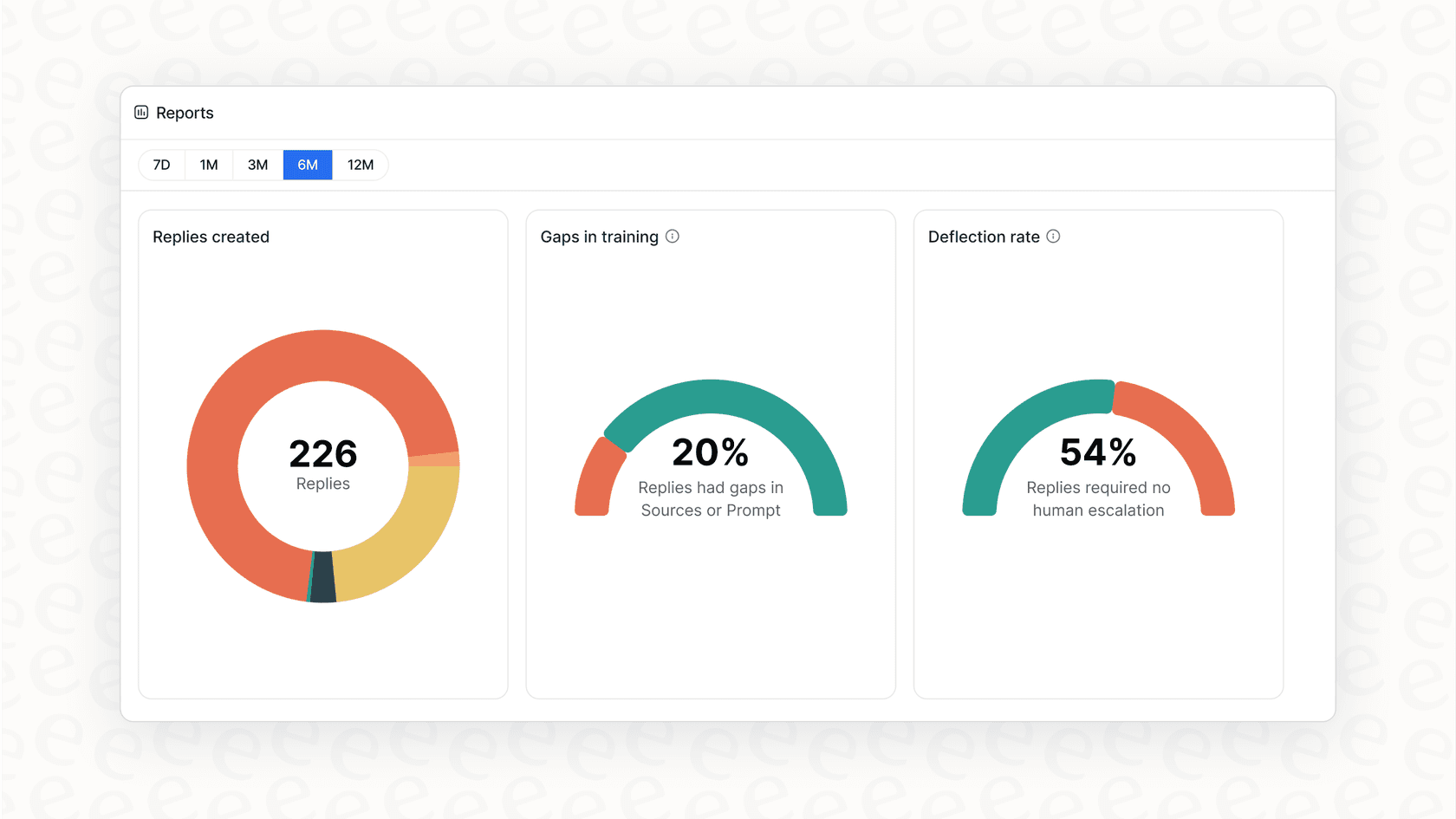
One of the best parts of this approach is that it helps you improve over time. When the AI identifies a question that isn't fully covered in your current documentation, it can flag it as a knowledge gap. Its reports help you track your deflection rates and give you a clear list of help articles that could be added to Notion. This helps your documentation stay as robust as your support.
Notion Zendesk: Enhancing your support ecosystem
Connecting your Notion Zendesk stack is a smart move for any modern support team. While traditional integrations and syncing tools provide a great foundation for visibility and data alignment, adding an AI layer can make your knowledge even more actionable.
By using an intelligent tool like eesel AI alongside Zendesk, you can turn your valuable Notion documentation into a powerful engine that helps solve customer issues efficiently. Experience how these tools can work together to support your team today.
Frequently asked questions


Share this article

Article by
Stevia Putri
Stevia Putri is a marketing generalist at eesel AI, where she helps turn powerful AI tools into stories that resonate. She’s driven by curiosity, clarity, and the human side of technology.