OpenAI AgentKit reviews: A practical guide for support teams


Last edited November 14, 2025

You've probably heard the buzz around OpenAI's AgentKit. It's been pitched as the toolkit that could finally let anyone build powerful AI agents. The idea is exciting: creating smart assistants that don't just answer questions, but actually get things done.
But once you get past the slick demos and developer-focused hype, a practical question emerges: Is AgentKit really the right tool for automating frontline customer support right now? Or is it more of a general-purpose toolkit for developers, leaving business teams to figure out all the tricky implementation details themselves? This guide is a hands-on review to help you figure that out.
What is OpenAI AgentKit?
First off, let's get on the same page about what AgentKit actually is. It isn't a single, off-the-shelf product. Think of it as a suite of tools that OpenAI released to help developers build, test, and launch their own AI agents. The main goal is to make the journey from a cool prototype to a reliable, live system a whole lot smoother.
It’s made up of three main parts:
-
Agent Builder: A visual, drag-and-drop workspace for designing how your agent thinks and what it can do.
-
ChatKit: A collection of pre-built UI components you can embed to create a polished chat interface for your customers.
-
Evals: A testing framework to make sure your agent is performing correctly and not just winging it.
Put together, these tools are meant to cover the entire process of creating an AI agent, from a rough idea to a live application that your customers interact with.
A closer look at features and capabilities
To put together fair OpenAI AgentKit reviews, we need to dig into what each part of the toolkit does and where it really stands out.
The visual workflow: The promise of Agent Builder
The core of AgentKit is the Agent Builder. It’s a visual canvas where you use nodes to map out your agent’s logic. You can drag in a node for an if/else condition, another to search a document, or one to reformat a piece of data.
This is easily its biggest selling point. It makes getting an idea up and running incredibly fast. If you saw the live demo at OpenAI’s DevDay, you know what I mean, an engineer built a working conference assistant in about eight minutes flat. For technical teams, it’s a great way to prototype and test an agent's flow without getting stuck writing a ton of code from scratch. It has a similar feel to tools like Zapier or n8n, but it's built specifically for AI workflows.
The user experience: The power of ChatKit
If Agent Builder is the brain, ChatKit is the face, and it's a pretty good one. ChatKit gives you production-ready, embeddable chat interfaces that you can drop directly into your website or app. And we're not just talking about a simple text box. It includes a library of 21 interactive widgets like cards, buttons, forms, and date pickers.
This saves developers from a ton of front-end headaches. Building a sleek, responsive, and fully functional chat UI from the ground up can take weeks, maybe even months. ChatKit takes care of the tricky stuff like real-time message streaming and managing conversations, so your team can focus on the agent's logic instead of its looks. If the customer-facing experience is a top priority, ChatKit is a huge plus.
The quality control: The necessity of Evals
An AI agent you can't trust is honestly worse than having no agent at all. That’s where the Evals framework comes into play. It’s OpenAI’s answer to quality control, designed to help you move beyond a simple demo to something you can actually depend on.
Evals lets you systematically test how well your agent is doing its job. You can use "trace grading" to review the step-by-step reasoning behind every action it takes, create specific datasets to test certain skills, and even use automated prompt optimization to help the agent improve over time. This is an absolutely critical piece for any team that's serious about using AI in a live environment. It’s what turns a fun experiment into a reliable business tool.
The practical limitations for support automation
While AgentKit looks impressive on paper, you start to see some significant gaps when you try to apply it to a real-world support environment. This is where a platform built specifically for support often ends up being a much better fit.
The rigid reality of "autonomous" agents
One of the biggest drawbacks in AgentKit's design is its rigid, sequential approach to logic. That might sound a bit technical, but it has a massive impact on how you build things. To get an agent to make a decision, you can't just tell it to pick the right tool for the job. You have to manually insert an "if/else" logic node for every single decision it needs to make.
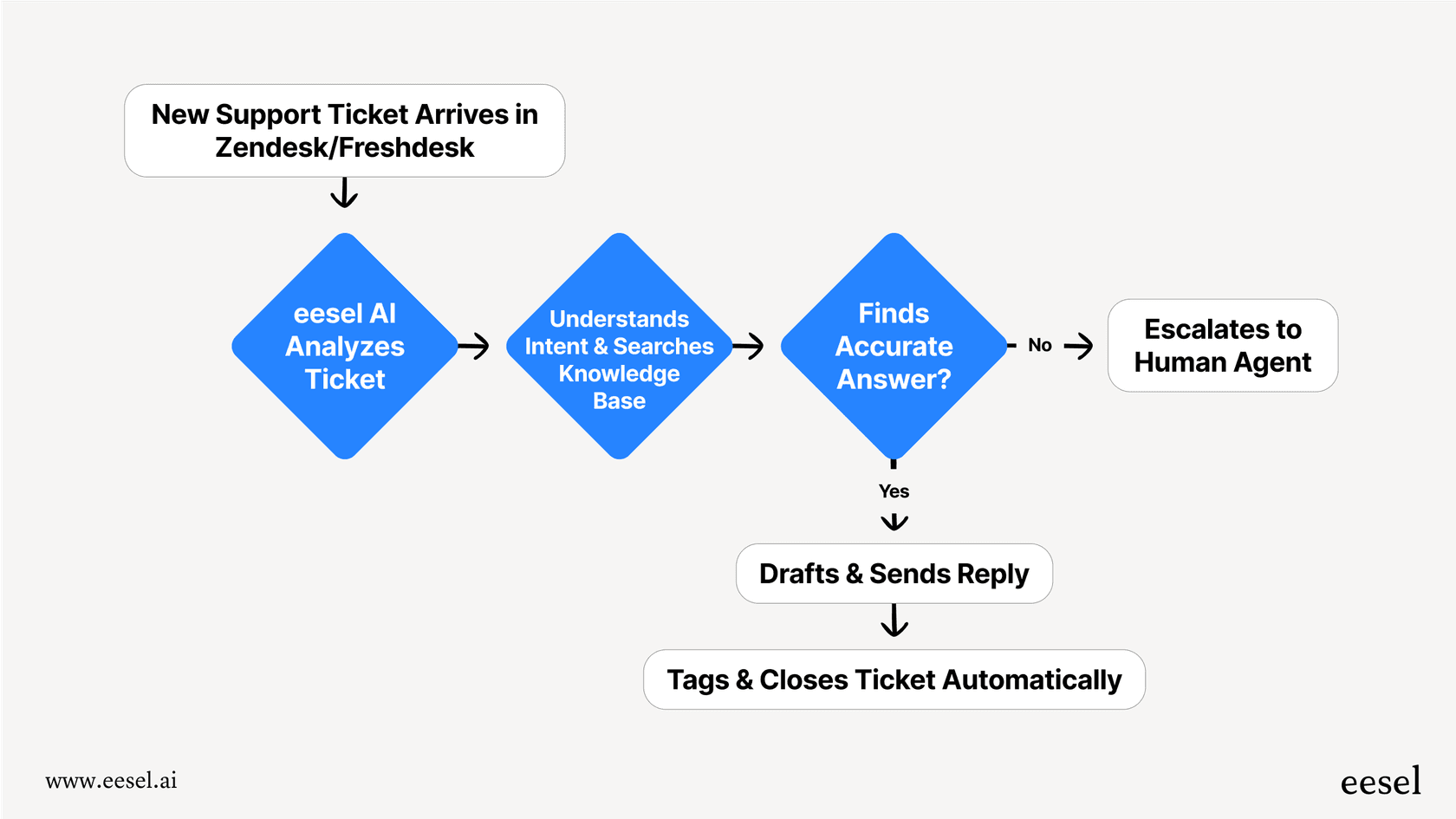
For instance, building a simple agent that can tell you the weather requires at least six different nodes: one to figure out the location, another to find the coordinates, a third to process them, a fourth to call the weather API, and so on. The workflow quickly becomes bloated and overly complicated for what should be a simple task. This is where a solution like eesel AI really shines. Instead of making you map out complicated flowcharts, eesel AI is designed for support workflows from the get-go. You can tell the AI what to do with a simple prompt editor and set up custom actions to handle tasks like looking up an order, checking a return policy, or escalating a ticket. You get all the same power without needing to become a workflow architect.
The challenge of knowledge management
An AI agent is only as good as the information it can access. AgentKit’s main way of doing this is its "File Search" tool, which means you have to manually upload and update all of your documents.
For any busy support team, this is just not practical. Your knowledge base is constantly changing, articles are updated, new product info comes out, and troubleshooting guides are tweaked daily. Trying to manually keep the agent’s knowledge in sync is an operational nightmare. And let’s be honest, knowledge doesn't just live in neat documents. It’s buried in past tickets, internal wikis, and team chats.
This is another spot where a specialized tool makes a world of difference. eesel AI is built to connect all your knowledge sources automatically. It integrates directly with your help desk (like Zendesk or Freshdesk), internal wikis (like Confluence or Google Docs), and even trains on your past support tickets to learn your brand voice and common solutions from day one. Everything is automatic, no manual uploads, no outdated information.

The enterprise readiness gap
Beyond the workflow and knowledge headaches, AgentKit has a few other missing pieces that make it a tough choice for many businesses:
-
You're locked into OpenAI's world: AgentKit is built to work only with OpenAI's models. This means you can't switch to other models (like Claude or Gemini) if you want to, and it ties your entire operation to a single company’s pricing, performance, and future plans.
-
Missing compliance checks: The platform doesn't currently have key enterprise certifications like SOC 2 or HIPAA. For companies in regulated fields like finance or healthcare, this can be an immediate no-go.
-
No source attribution: When an agent provides an answer, it doesn’t tell you where it got the information. This is a big problem for both customer trust and internal quality control. How can a customer feel confident in an answer if they can't see the source? And how can your own team double-check the AI's accuracy?
Platforms like eesel AI were designed with these needs in mind from the start, operating on SOC 2-certified infrastructure and giving you the flexibility you needed to run your operations securely.
An analysis of pricing
One of the first questions any business asks is, "So, what's this going to set me back?" With AgentKit, that answer is a little fuzzy. It doesn't have its own pricing plan. Instead, the costs are just part of OpenAI's standard usage-based API pricing.
You pay for the model tokens your agent uses, plus a small fee for file storage ($0.10 per GB-day after the first gigabyte). The big problem with this model is that it's unpredictable. For a support team, ticket volume can spike unexpectedly during an outage or a product launch. A usage-based bill means your costs can shoot through the roof right when you're at your busiest, which makes budgeting incredibly difficult.
A transparent alternative: eesel AI's pricing
This is where a platform with clear, predictable pricing can give you some peace of mind. eesel AI offers straightforward plans based on the features you need, not on how many tickets your AI resolves. You never have to brace yourself for a surprise bill after a busy month.
| Plan | Monthly Price (Billed Annually) | AI Interactions/mo | Key Features |
|---|---|---|---|
| Team | $239 | Up to 1,000 | Train on docs, Copilot, Slack integration |
| Business | $639 | Up to 3,000 | Train on past tickets, AI Actions, Simulation |
| Custom | Contact Sales | Unlimited | Advanced actions, multi-agent orchestration |
The bottom line: Is AgentKit right for your team?
After taking a close look, it's clear that OpenAI AgentKit is a seriously powerful toolkit for developers. If you have a technical team that wants to quickly build and test custom AI agents with a beautiful chat interface without getting bogged down in writing a ton of code, it’s one of the best choices available.
However, for business teams, especially in customer support and IT, it's a much harder sell for production use. Its rigid architecture, reliance on manual knowledge updates, and missing enterprise features present real challenges. Think of it as a fantastic box of building blocks, but it leaves you to build the entire house yourself. It’s best for tech-savvy companies with dedicated developers who are ready to dive into its complexities.
The rigid workflow and manual updates are a huge hurdle. It’s a great toolkit for developers, but our business team found it impractical for actual production use in our support department.

The self-serve alternative for support automation
If you're looking for an AI agent platform that’s built to fit your workflow, not the other way around, then a purpose-built solution is what you need. eesel AI was designed from the ground up for support and IT teams, solving the exact problems you find in general-purpose toolkits like AgentKit.
With eesel AI, you can:
-
Get up and running in minutes, not months, thanks to one-click integrations with the helpdesk you already use.
-
Have total control over your automation using a simple but powerful workflow engine made for support tasks.
-
Keep your AI's knowledge fresh automatically by connecting it to all your sources and training it on past tickets.
-
Test with confidence by running simulations on thousands of your real historical tickets before you go live.

Ready for an AI agent that’s built for your team, your tools, and your customers? Start your free eesel AI trial today.
Frequently asked questions

Share this article

Article by
Kenneth Pangan
Writer and marketer for over ten years, Kenneth Pangan splits his time between history, politics, and art with plenty of interruptions from his dogs demanding attention.