OpenAI API keys for support: Setup & practices (2026)


Last edited October 22, 2025

If you’re a support leader, the term “OpenAI API Keys” has probably come up in a meeting or two. The promise of using AI to automate tickets and boost efficiency is everywhere, but it’s easy to get lost in the technical jargon. What does it all actually mean for your team?
Think of an API key as a password that lets your software talk to OpenAI's powerful AI models. It’s the starting line for any company that wants to build custom AI tools from the ground up.
This guide will give you a straightforward look at what these keys are, how to get one, and help you answer the big question: should you build a custom AI solution yourself, or is it smarter to use a platform that’s already done the heavy lifting? Let’s get into it.
What are OpenAI API Keys and why should you care?
Simply put, an OpenAI API Key is a unique code that proves you're a registered user and grants you access to their AI models. It’s like the digital keycard to a library filled with some of the most advanced AI on the planet.
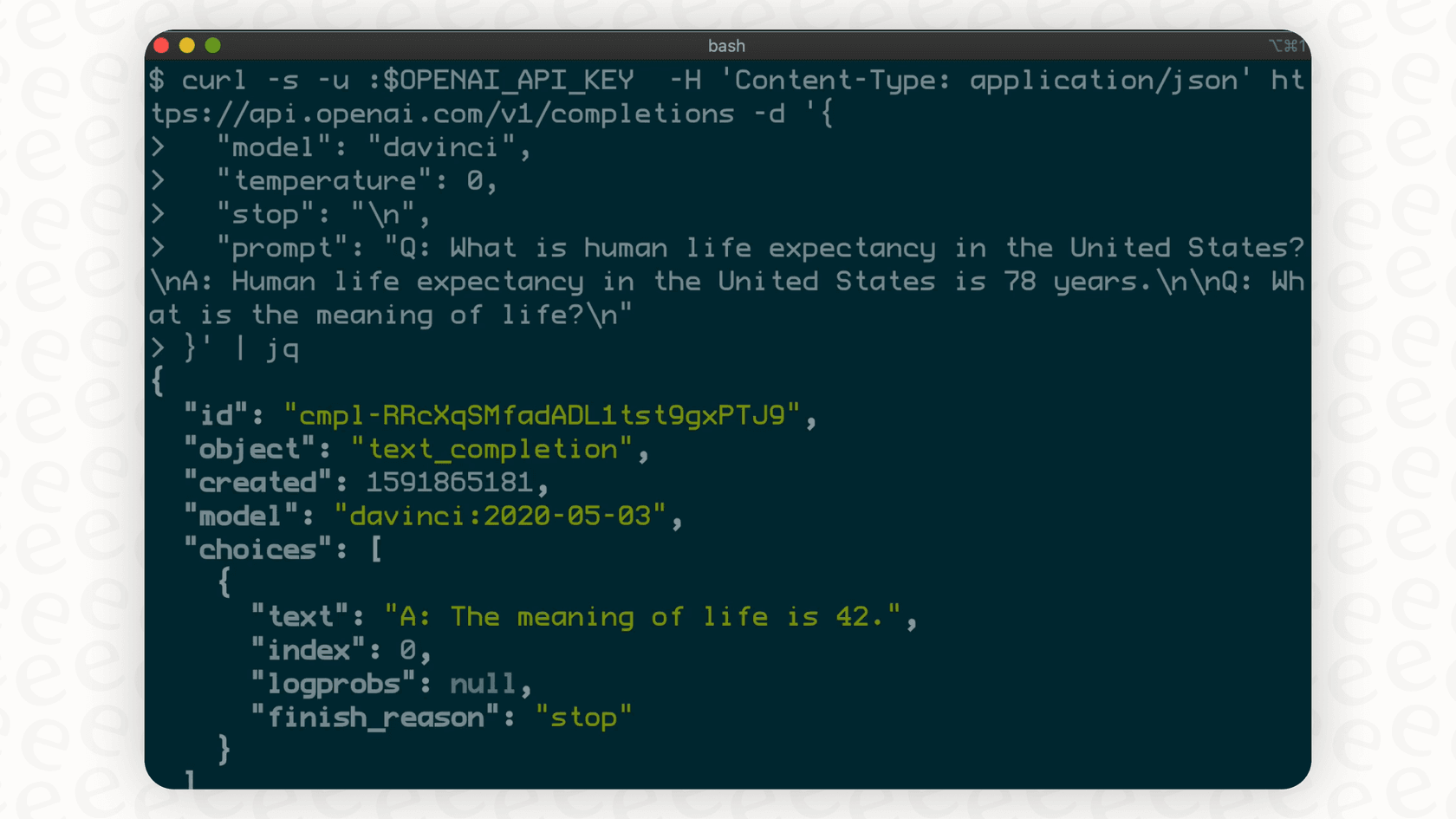
It does two main things:
-
Authentication: It confirms it’s really you every time your application makes a request to an OpenAI model. This makes sure only authorized folks can use the service.
-
Tracking & Billing: It lets OpenAI keep track of your usage and bill you for it. Every question you ask the AI is tied to your key, so they know exactly how much you've used.
With an API key, you can tap into models like GPT-4 to generate text or DALL-E to create images. For a support team, this could mean automatically drafting replies to common questions or summarizing long ticket threads. The API key is the first, essential piece of the puzzle if you decide to build your own AI-powered tools.
The DIY path: How to get and manage your OpenAI API Keys
Getting an API key is your first step on the do-it-yourself road. This part is pretty straightforward and is the standard process for developers looking to start building.
A step-by-step guide to generating your OpenAI API Keys
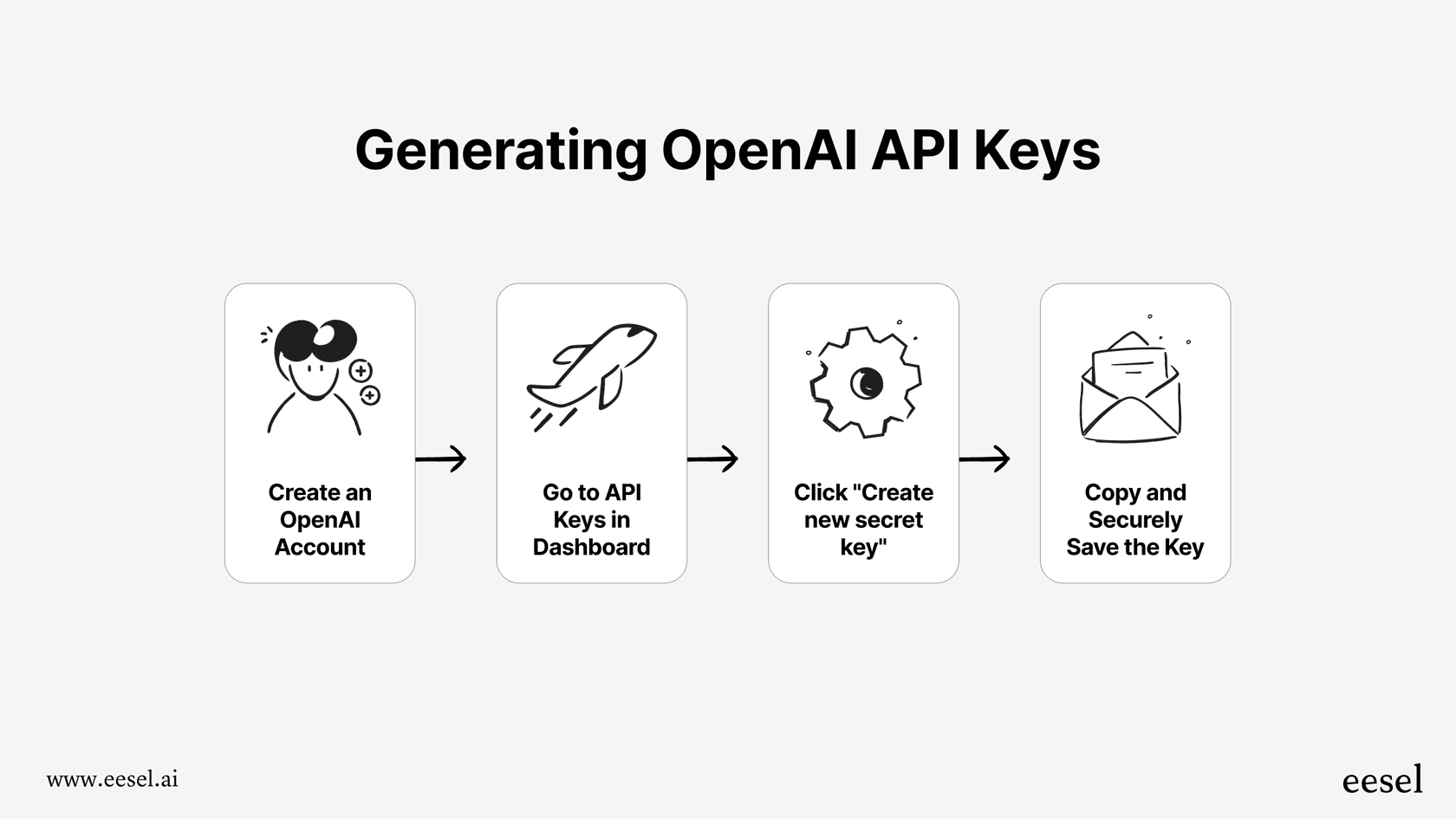
Here’s a quick rundown of how it works.
-
Create an OpenAI account: First, you’ll need to head over to the OpenAI Platform website and sign up. Just a heads-up, this is different from a regular ChatGPT account. The Platform is specifically for people and businesses building their own applications.
-
Find the API keys section: Once you’re logged in, you’ll see a dashboard. Look for "API keys" in the menu on the left. This is home base for all your keys.
-
Create a new secret key: Click the "Create new secret key" button. A little window will pop up asking for a name. It’s a good idea to give it a clear name, like "Support_Bot_Zendesk_Test," so you can remember what it’s for later.
-
Save your key somewhere safe: This is the most important step. OpenAI only shows you the full secret key once. The moment it’s generated, copy it and stash it somewhere secure, like a password manager. Seriously, never share this key publicly or leave it in your code, especially on a public repository like GitHub. If someone gets their hands on your key, they can start running up a bill on your account.
Setting up billing and figuring out the costs for OpenAI API Keys
Getting a key is free, but using it isn't. The days of generous free API credits are pretty much over, so to actually use the AI, you have to set up billing.
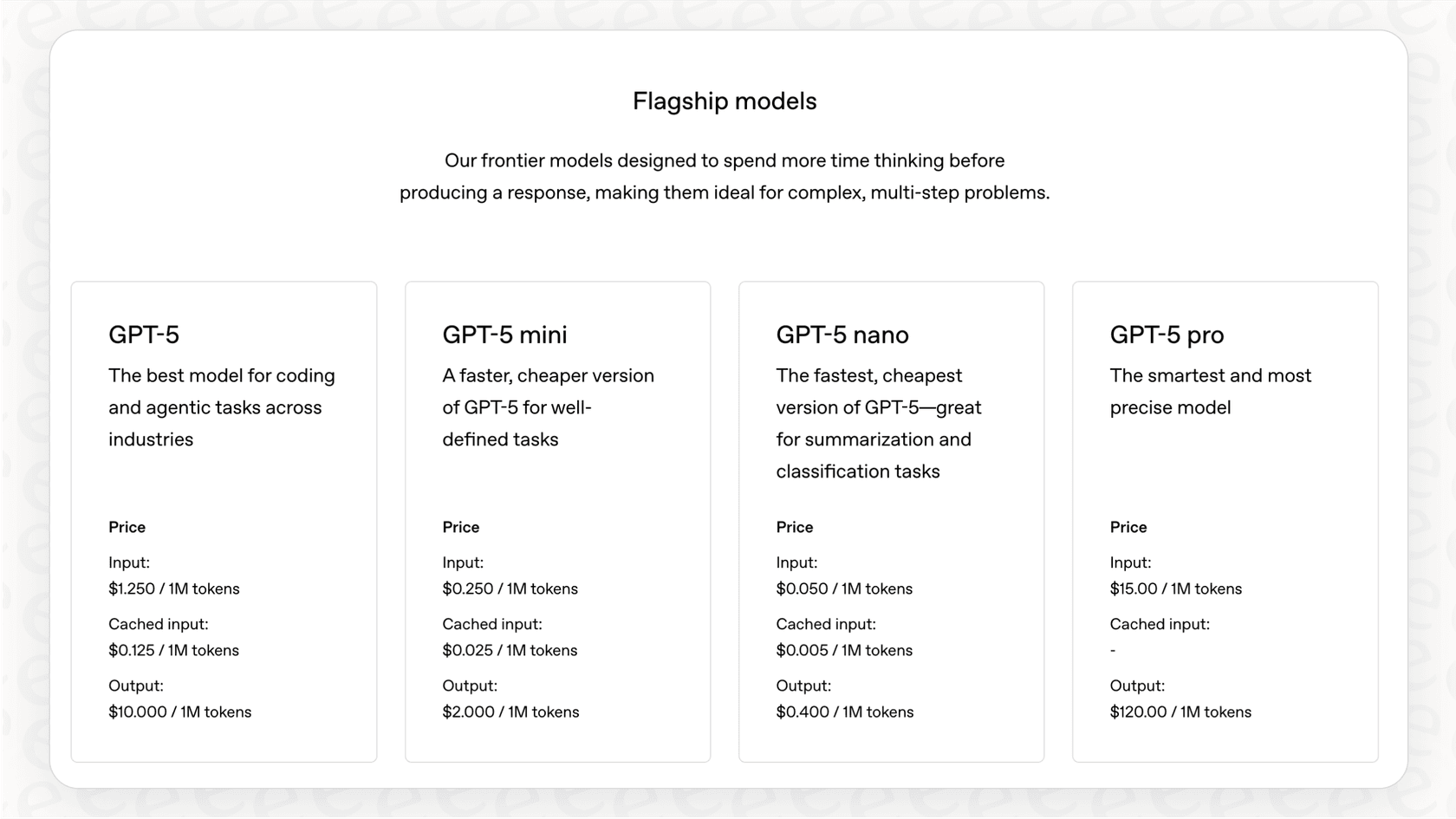
OpenAI’s pricing is pay-as-you-go, based on "tokens" (which are basically pieces of words). You’re charged for both the tokens you send in your request and the tokens the AI sends back. This model sounds flexible, but it makes costs incredibly difficult to predict. For a support team, an unexpected product outage or marketing campaign can cause ticket volume to spike, leading to a surprisingly hefty bill at the end of the month. You can see the full breakdown on OpenAI's pricing page.
Best practices for keeping your OpenAI API Keys secure
Since an API key is a direct line to your company’s wallet, you have to be careful with it. Leaving it unsecured is like leaving your company credit card on a table at a cafe.
-
Treat keys like passwords: Keep them private. Never paste them into your website's code or post them in public forums.
-
Use environment variables: This is a technical move where the key is stored separately from your application's code, making it much harder to expose by accident.
-
Rotate keys regularly: It’s a good habit to generate a new key and deactivate the old one every few months. This limits the potential damage if a key is ever compromised.
-
Keep an eye on your usage: Check your usage dashboard in the OpenAI platform regularly. If you see a sudden, weird spike, it could mean your key has been leaked.
The hidden work of using OpenAI API Keys for customer support
Getting an API key feels like a big step, but it’s really just the beginning. The key itself doesn't do anything on its own. It’s just an ingredient. Turning it into a reliable and genuinely helpful support tool is a huge project.

Here are the challenges most teams don't see coming.
-
You need a lot of engineering help An API key isn't a product. To make it do something useful, you need developers to write code that connects to the API, processes the AI's responses, and plugs it all into your existing tools. Just building a smooth integration with your helpdesk, whether it's Zendesk or Intercom, is a project that can easily eat up months of an engineering team’s time.
-
Connecting your company knowledge is really hard For an AI to give good answers, it needs context. It has to know your company policies, product features, and what your best agents did to solve similar problems. This means you have to build a system to feed it information from your help center, past tickets, Confluence pages, and internal Google Docs. This process, known as Retrieval-Augmented Generation (RAG), is a serious data engineering challenge that most support teams aren't equipped to handle.
-
There’s no good way to test it before launch When you build a solution yourself, you’re basically flying blind. There isn’t an easy way to see how your custom bot would have handled thousands of your past tickets. You can't predict its resolution rate, check its answers for accuracy at a large scale, or find its weak spots before it starts interacting with real customers. You just have to launch it and hope for the best, which is a big risk to take with your customer experience.
-
The costs are unpredictable and can get high That pay-per-token model we talked about? It can be a budget-killer. A single complicated ticket could rack up thousands of tokens. A month with a high ticket volume could completely blow through your budget. This unpredictability makes it almost impossible to forecast your spending, turning a promising tech project into a financial headache.
A better way than OpenAI API Keys: Use a platform to skip the complexity
Instead of building everything from scratch, there's a much smarter path. AI platforms act as a layer on top of models from companies like OpenAI, handling all the technical heavy lifting so you can focus on improving your support.
Platforms like eesel AI are built specifically for support teams. You don’t need to generate or manage a single API key. You just connect your helpdesk and knowledge sources, and the platform does the rest. It's designed to give you all the benefits of AI without any of the engineering nightmares.
The difference is night and day.
| Feature | DIY with OpenAI API Keys | The eesel AI Platform |
|---|---|---|
| Setup Time | Weeks or months | Minutes |
| Required Skills | Software engineering, API know-how | None (it’s a self-serve dashboard) |
| Knowledge Integration | Manual build for every source | 100+ one-click integrations |
| Pre-Launch Testing | None (build and hope) | Powerful simulation on past tickets |
| Pricing Model | Unpredictable (pay-per-token) | Predictable, flat-rate plans |
| Agent Tools | You have to build them yourself | AI Copilot, AI Triage, Reporting are all included |
When you use a platform, the whole game changes.
-
Go live in minutes: Instead of a months-long engineering project, you can connect your helpdesk and knowledge sources in just a few clicks. eesel AI handles all the tricky API calls, security, and context management behind the scenes. You can have a working AI agent in under an hour.
-
Test with confidence: The simulation mode is a huge advantage. eesel AI can analyze thousands of your past tickets and show you exactly how it would have responded. This gives you a clear forecast of your automation rate and ROI before you ever turn it on for live customers.
-
Predictable pricing: eesel AI has straightforward plans with no hidden fees. Your bill is the same every month, no matter how many tickets you get, so you can actually budget for it without worrying about surprise charges.
From raw OpenAI API Keys to a real solution
OpenAI API Keys are the engine that powers modern AI, but they're a raw material, not a finished product. They’re meant for developers building something brand new, not for support teams who need to solve problems today.
For a customer support team, the goal isn't to become a software company. It's to answer customer questions faster and make your agents' lives easier. A dedicated platform like eesel AI is the fastest, safest, and most cost-effective way to bring generative AI into your support workflow. It closes the gap between raw potential and actual results.
Ready to see what a fully-managed AI solution can do?
Instead of wrestling with code and API keys, let eesel AI handle the complexity. You can set up an AI agent trained on your own knowledge in minutes, not months.
Start your free trial or book a demo today to see how easy it can be.
Frequently asked questions

Share this article

Article by
Kenneth Pangan
Writer and marketer for over ten years, Kenneth Pangan splits his time between history, politics, and art with plenty of interruptions from his dogs demanding attention.